Research Shelf
 reallygood8348 downloads
Search public research reports by keyword and save them as Markdown notes, with PDF text and figures.
- Overview
- Scorecard
- Updates8
Search public research reports by keyword and save them as Markdown notes in your vault, with the PDF text and figures included.
English · 한국어
Formerly Labsidian. The GitHub repository keeps its old name.
What it does
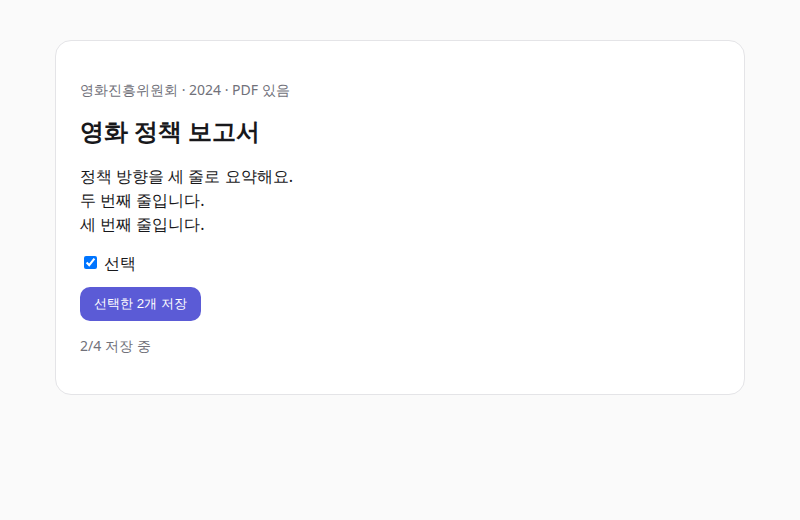
- Search several sources at once. Type a keyword and press Enter. Results show the abstract, source, year and whether a PDF is available.
- Save as notes. Pick results and press Save selected. Each note gets frontmatter (title, authors, source, date, links), the abstract, the full PDF text converted to Markdown, and the figures saved next to the note.
- Skip what you already have. Results that are already in your vault (same source id, DOI or URL) are marked and not saved again.
- Optional AI summary. Gemini, OpenAI or Anthropic with your own API key. Off by default.
- Optional shared library. Upload notes to your own Firebase project to keep a private cloud library or share with a team, with optional password locking. Off by default.
Desktop only. Requires Obsidian 1.11.4 or later.
Sources
| Source | Content | Key |
|---|---|---|
| Korean Film Council (KOFIC) | Film policy research reports | Not needed |
| Korea Creative Content Agency (KOCCA) | Content industry reports | Not needed |
| OpenAlex | Scholarly works worldwide | Free key recommended |
| KCI | Korean journal articles | Your own key |
| RISS | Korean theses and articles | Institution key |
Without an OpenAlex key, every user on the same network shares one small daily quota. A free key gives you your own quota and lets the plugin download OpenAlex's cached copy of open-access PDFs.
Getting started
- Install and enable Research Shelf from Settings → Community plugins.
- Run 자료 검색 (Search research) from the command palette, or select text in a note and choose 이 주제로 자료 찾기 (Find research on this) from the context menu.
- Type a keyword, press Enter, select results and press 선택한 n개 저장 (Save selected).
Notes are saved to the 연구자료 folder and figures to 연구자료/첨부/<note name>/. Both can be changed in settings. The interface is in Korean.
Privacy and network use
Research Shelf only makes network requests when you search, save, summarize or upload.
- Search and download: your search terms go to the sources you have turned on, and PDFs are downloaded from the source or from OpenAlex.
- AI summary (only when turned on): the note text goes to the provider you chose, using your own key.
- Cloud or team library (only when set up): notes you choose to upload go to your own Firebase project.
- Requests identify themselves as
ResearchShelf/0.2in the User-Agent header. - API keys are stored in Obsidian's keychain, not in the plugin's settings file.
- There is no telemetry or analytics.
Files on your computer. PDF conversion runs locally with kordoc (MIT) and pdfjs (Apache-2.0), bundled into main.js, so no Node.js, Python or kordoc install is needed. The plugin reads and writes only through the Obsidian vault API. The bundled library's file-system and process modules are replaced at build time with stubs that refuse to run, and dynamic code generation is disabled. Original PDFs are not stored in the vault; notes keep a link to the source.
Why it lists vault files and uses the clipboard. It reads note frontmatter to detect duplicates. The clipboard is used only when you press a Copy button in the settings (for example, to copy Firebase rules or an invite link).
Briefing site (optional)
The briefing/ folder is a separate Next.js website, not part of the plugin, that shows a team's shared notes. Deploy it to Vercel with the button below and set NEXT_PUBLIC_LABSIDIAN_CONFIG to the value from the plugin's team settings.
User guide (Korean)
Table of contents · Install · First steps · Search and save · AI summary · Note locking · Personal library · Team library · Briefing · FAQ
Development
npm ci
npm test
npm run test:rules
npm run build
npm run build also loads main.js the way Obsidian does and fails if it needs any module other than obsidian and Node built-ins. Release tags match the manifest version without a v (for example 0.2.5). Merging a new manifest version into main creates the release automatically.
License
MIT. Copyright (c) 2026 Moon Kim.