Remove Empty Assets
 xzhi40 downloads
中文: 删除附件目录中的空目录,支持桌面端与移动端。附件目录路径支持绝对路径、相对每个笔记目录(./)、相对仓库根三种写法;删除 md 笔记或附件时自动定点扫描,支持定时扫描,删除方式可选回收站或永久删除,中英文界面 | EN: Remove empty folders inside attachment directories, desktop & mobile. Configurable path (absolute, per-note, vault-root), auto-scan on note/attachment deletion, scheduled scan, trash/permanent delete, bilingual UI.
- Overview
- Scorecard
- Updates1
一个用于 Obsidian 的轻量插件:删除附件目录中的空目录,支持桌面端与移动端。如果你喜欢这个项目的话,欢迎给个 star!
A lightweight Obsidian plugin that removes empty folders inside your attachment directories. Works on both desktop and mobile. If you like this project, please give it a star!
📖 项目简介 / Overview
Obsidian 使用过程中,删除笔记或附件后,附件目录里常常残留大量空目录。Remove Empty Assets 会自动清理这些空目录:附件目录路径可配置(绝对路径 / 相对每个笔记目录 / 相对仓库根),支持启动自动清理、删除笔记/附件时定点扫描、定时扫描、命令面板手动触发,并可在系统回收站、.trash 回收文件夹与永久删除之间切换删除方式。
During normal Obsidian use, deleting notes or attachments often leaves a pile of empty folders behind in your attachment directories. Remove Empty Assets cleans them up for you: the attachment directory path is configurable (absolute / relative to each note / relative to the vault root), and cleanup can be triggered automatically on startup, on note or attachment deletion, on a schedule, or manually from the command palette. Deletion can go to the system trash, the .trash folder, or be permanent.
👀 预览 / Preview
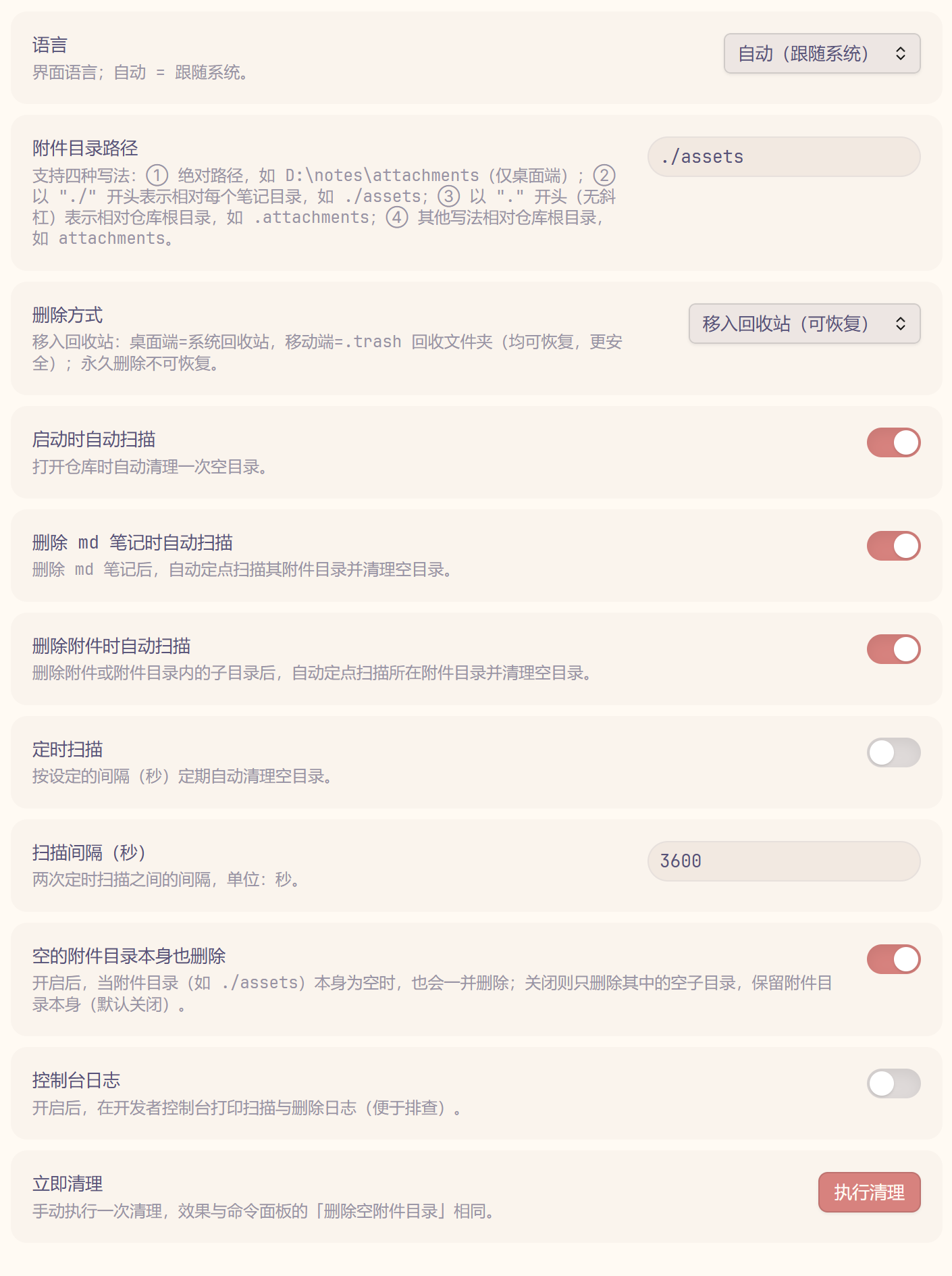
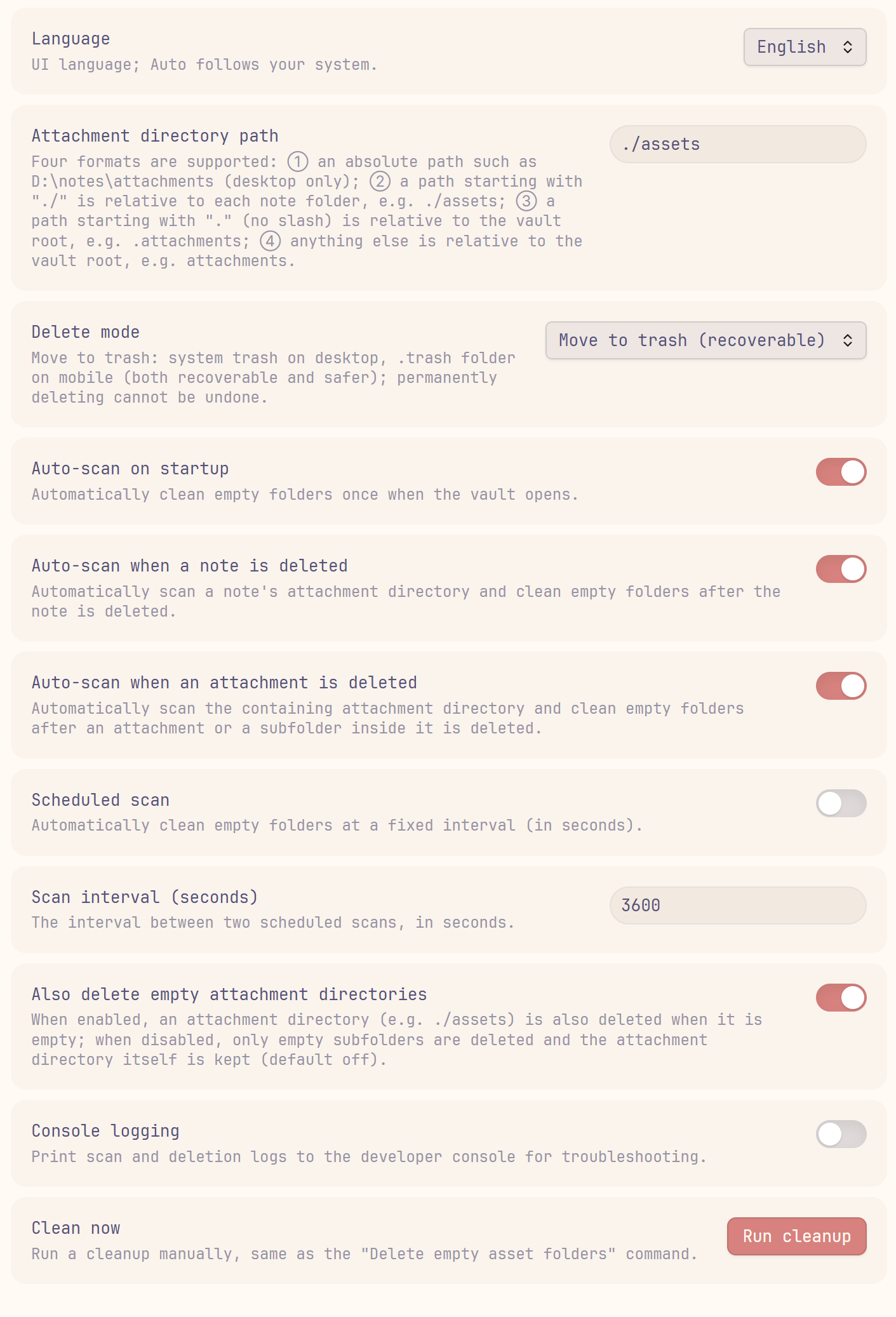
✨ 功能特性 / Features
| 功能 | 描述 | 默认值 |
|---|---|---|
| 跨平台 | 桌面端与移动端通用;移动端使用 .trash 回收文件夹 |
始终启用 |
| 路径可配置 | 支持绝对路径、相对每个笔记目录(./ 开头)、相对仓库根目录三种写法 |
.attachments |
| 递归清理 | 先删空子目录,上层因此变空时也一并删除 | 始终启用 |
| 启动自动清理 | 打开仓库时自动清理一次(可关闭) | 开启 |
| 删除笔记自动扫描 | 删除 md 笔记后定点扫描其附件目录 | 开启 |
| 删除附件自动扫描 | 删除附件或附件目录内子目录后定点扫描所在目录 | 开启 |
| 定时扫描 | 按设定间隔(秒)定期自动清理 | 关闭 |
| 删除方式 | 系统回收站 / .trash / 永久删除 |
移入回收站 |
| 中英文界面 | 设置页与提示支持 English / 中文切换 | 自动(跟随系统) |
| 控制台日志 | 打印扫描与删除日志,便于排查 | 关闭 |
| 保留空附件目录 | 是否连同空的附件目录本身一起删除 | 关闭(保留) |
| Feature | Description | Default |
|---|---|---|
| Cross-platform | Works on desktop and mobile; mobile uses the .trash folder |
Always on |
| Configurable path | Absolute path, relative to each note (./ prefix), or relative to the vault root |
.attachments |
| Recursive cleanup | Empty subfolders are removed first, then emptied parents are removed too | Always on |
| Cleanup on startup | Runs once when the vault opens (can be disabled) | On |
| Scan on note deletion | Scans a note's attachment directory when the note is deleted | On |
| Scan on attachment deletion | Scans the containing directory when an attachment or subfolder is deleted | On |
| Scheduled scan | Automatically cleans at a configurable interval (seconds) | Off |
| Delete mode | System trash / .trash / permanent delete |
Move to trash |
| Bilingual UI | Settings and notices in English / Chinese | Auto (follow system) |
| Console logging | Prints scan and deletion logs for troubleshooting | Off |
| Keep empty attachment dirs | Whether to also delete the empty attachment directory itself | Off (keep) |
📦 安装 / Installation
从 Obsidian 社区插件安装 / From Obsidian Community Plugins
- 打开 Obsidian → 设置 → 第三方插件。
- 点击 浏览,搜索 Remove Empty Assets。
- 点击 安装,然后 启用。
- Open Obsidian → Settings → Community plugins.
- Click Browse and search for Remove Empty Assets.
- Click Install, then Enable.
从 GitHub Releases 安装 / From GitHub Releases
- 从最新 release 下载
main.js、styles.css和manifest.json。 - 放入
<vault>/.obsidian/plugins/remove-empty-assets。 - 重启 Obsidian,在 设置 → 第三方插件 中启用 Remove Empty Assets。
- Download
main.js,styles.css, andmanifest.jsonfrom the latest release. - Place them in
<vault>/.obsidian/plugins/remove-empty-assets. - Restart Obsidian, then enable Remove Empty Assets from Settings → Community plugins.
🚀 使用 / Usage
- 在设置中填写附件目录路径(例如
./assets),选择删除方式,然后保存。 - 删除 md 笔记或附件时,插件会自动定点扫描并清理产生的空目录;也可使用命令面板的「删除空附件目录」手动触发。
- 在设置面板点击「执行清理」可立即清理一次。
- Fill in the attachment directory path (e.g.
./assets) and choose a delete mode in the settings, then save. - When you delete a note or an attachment, the plugin automatically scans and cleans up the resulting empty folders; you can also trigger it manually with the Delete empty asset folders command.
- Click Run cleanup in the settings tab to clean immediately.
⚙️ 设置说明 / Settings
| 设置 | 说明 |
|---|---|
| 附件目录路径 | ① 绝对路径(仅桌面端);② ./ 开头=相对每个笔记目录;③ .attachments 等=相对仓库根 |
| 删除方式 | 回收站:桌面端=系统回收站、移动端=.trash;或永久删除 |
| 启动时自动扫描 | 打开仓库时自动清理一次 |
| 删除 md 笔记时自动扫描 | 删除笔记后定点扫描其附件目录 |
| 删除附件时自动扫描 | 删除附件/子目录后定点扫描所在附件目录 |
| 定时扫描 | 按间隔(秒)定期自动清理 |
| 扫描间隔(秒) | 两次定时扫描的间隔 |
| 空的附件目录本身也删除 | 附件目录本身为空时是否一并删除 |
| 控制台日志 | 是否在控制台打印扫描与删除日志 |
| 语言 | 界面语言;自动=跟随系统 |
| 立即清理 | 手动执行一次清理 |
| Setting | Description |
|---|---|
| Attachment directory path | ① absolute path (desktop only); ② ./ prefix = relative to each note; ③ .attachments etc. = relative to the vault root |
| Delete mode | Trash: system trash on desktop / .trash on mobile; or permanent delete |
| Auto-scan on startup | Runs a cleanup once when the vault opens |
| Auto-scan when a note is deleted | Scans the note's attachment directory after deletion |
| Auto-scan when an attachment is deleted | Scans the containing directory after an attachment/subfolder is deleted |
| Scheduled scan | Periodically cleans at an interval (seconds) |
| Scan interval (seconds) | Interval between two scheduled scans |
| Also delete empty attachment directories | Whether to delete the attachment directory itself when empty |
| Console logging | Print scan and deletion logs to the console |
| Language | UI language; Auto follows your system |
| Clean now | Run a cleanup immediately |
🤝 参与贡献 / Contributing
欢迎提交 issue 与 PR。/ Issues and pull requests are welcome.
📄 许可证 / License
💖 支持 / Support
如果你喜欢这个插件,并对我表示感谢,你可以在这里请我喝一杯奶茶!
If you enjoy this plugin and want to say thanks, you can buy me a bubble tea!
微信 / WeChat Pay |
微信赞赏 / WeChat Tip |
支付宝 / Alipay |