Rememo
 Lynx3x200 downloads
Capture fleeting thoughts into your daily notes with a lively memo feed.
- Overview
- Scorecard
- Updates8
Capture fleeting thoughts straight into your daily notes. Every memo is a card block in your own note files — no private database.
English | 中文
Rememo is a memo plugin for Obsidian: a heavily rewritten fork of Obsidian-Memos. All memos live inside your daily notes — plain Markdown, readable and editable at any time, yours to keep.
Screenshots
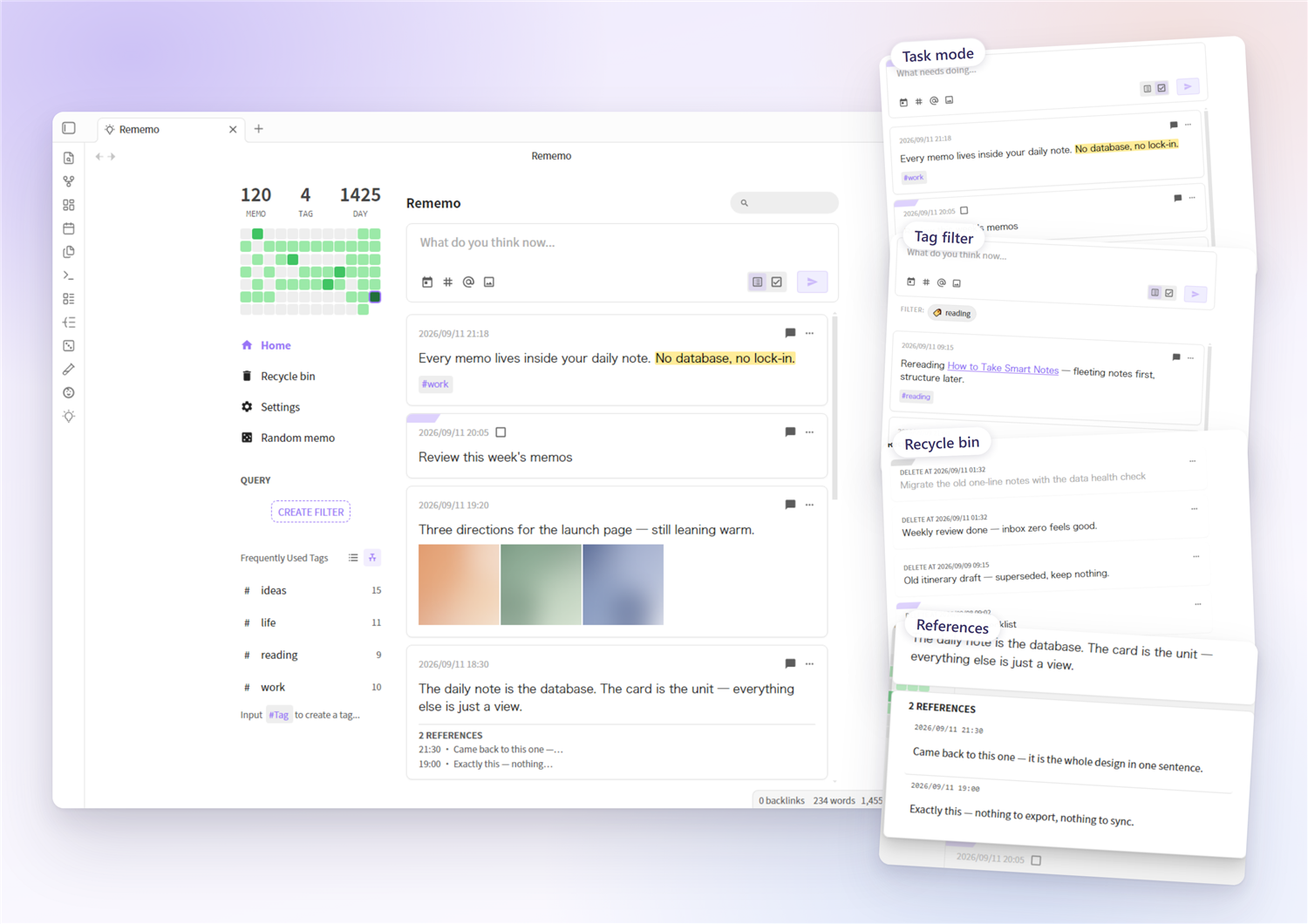
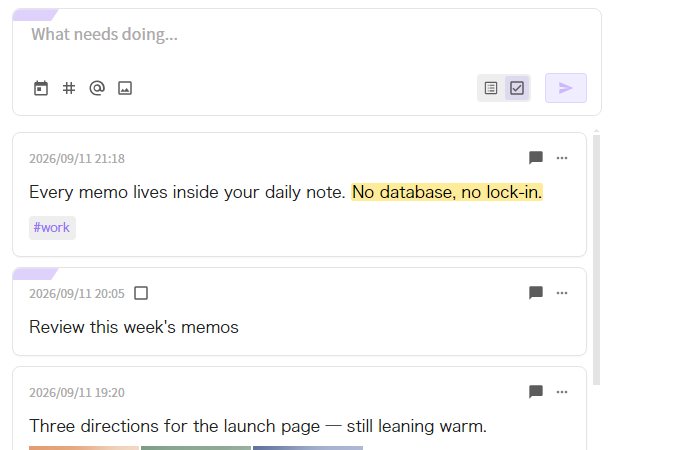 Task mode — the two-segment slider next to the send button turns what you type into a task card |
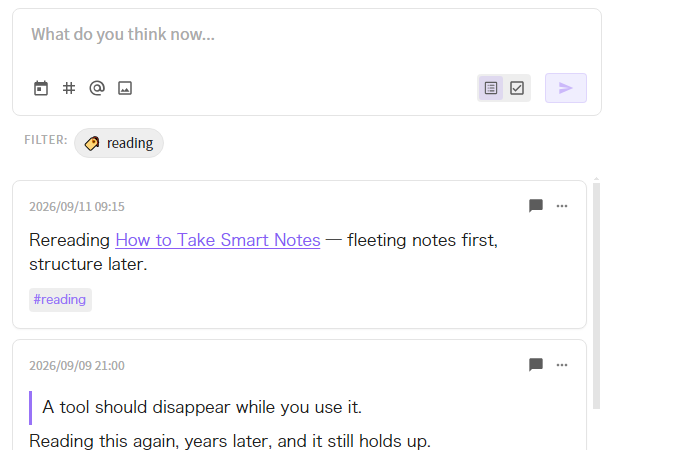 Tag filter — click any tag to filter the feed |
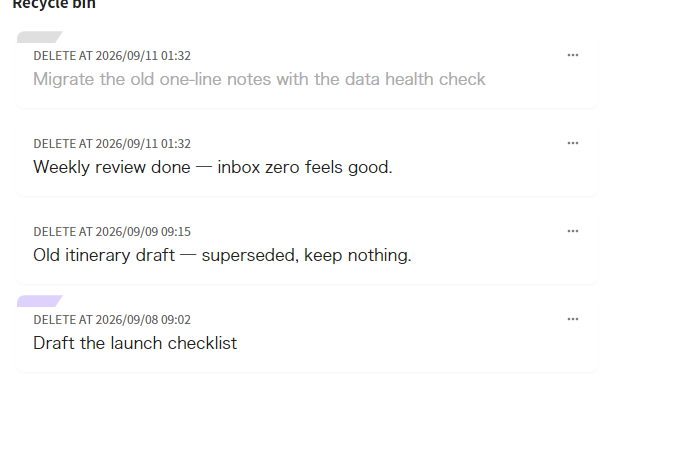 Recycle bin — deleted cards stay in your note and can be restored |
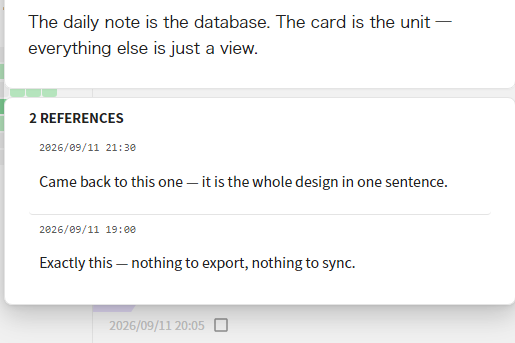 References — replies are reference cards, gathered under the memo they answer |
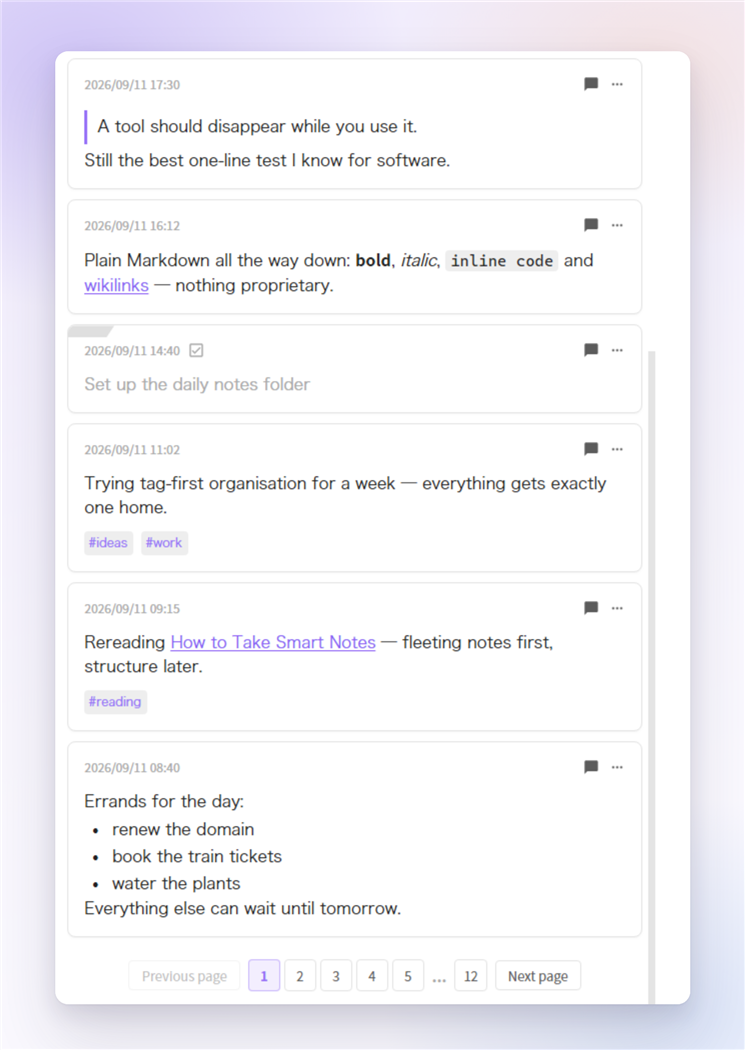 **The rest of the feed** — quote blocks, inline formatting (`**bold**`, `*italic*`, code), wikilinks, tag chips, finished tasks and plain lists all render from your own Markdown.
Features
- Native-feeling editor — built on Obsidian's own editor kernel: typing, IME, undo, live rendering of
==highlights==,#tagand[[wikilink]]autocomplete. PressEnterorCtrl/Cmd+Enterto send. - Card feed — memos from your daily notes rendered as a paginated card list; filter by text, tag, saved query or date; heat map and tag tree in the sidebar.
- Task cards — start a line with
- [ ]to create a task; tick the checkbox on the card to complete it. A two-segment slider next to the send button switches between plain memos and tasks — and follows the card's type when you edit it. - Tags — tag chips gathered at the bottom of the card, or kept inline where they appear (a setting); click any tag to filter.
- Recycle bin — deleting is a soft delete: the card stays in your note with a
deletedAtmarker, and can be restored or permanently removed from the recycle bin; optional auto-clean purges entries older than the retention period. - Send sound — an optional card-deal “whoosh” when a memo is sent: choose the built-in sound or your own audio file, with a volume slider.
- Share as image — export a single card or a whole day as an image (configurable footer and background).
- Data health check — a built-in audit that repairs anomalies and migrates the old single-line format into card blocks, with automatic backups.
- Mobile support — works on phones and tablets; accepts text and files via “Insert as memo”.
Installation
From the community plugin directory — search for “Rememo” in Settings → Community plugins → Browse.
Manually — copy main.js, styles.css and manifest.json into <your vault>/.obsidian/plugins/rememo/, then enable Rememo in Settings → Community plugins.
Requires Obsidian 1.7.2 or newer.
Coming from the Memos plugin? Read this first
Your memos are safe. Rememo reads the memos that are already inside your daily notes — it never moves, rewrites or deletes anything on its own.
One thing to know: memos written by the old Memos plugin use an older line format, and Rememo only renders the new card-block format. So right after you install, your existing memos won't appear in the feed yet — they are still sitting in your files, untouched.
To bring them back, run the built-in migration:
- When legacy memos are detected, a banner appears at the top of the feed — click Open data health check on it. (You can also open it from Rememo's settings → Data tools → Audit data.)
- The audit scans your daily notes and lists every file containing old-format lines.
- Use the migrate button next to a file — or the migrate-all button to convert them in one go.
- Before writing anything, a copy of each file is saved to
.rememo-backup/, so you can always restore by hand.
What the migration does — and only inside the section under your memo heading:
- Old single-line memos become card blocks (a heading line + an indented body).
- Old indented comment threads become reference cards, matching Rememo's comment ≡ reference model.
- The rest of the note is left alone.
Your existing settings keep working: the Memo heading defaults to ## Memo, the same heading the old plugin wrote to.
Quick start
- Enable the core Daily notes plugin — Rememo reads and writes your daily notes.
- Open Rememo's settings and confirm “Memo heading” matches your daily-note template (
## Memoby default). New memos are written under this heading; if the file doesn't have it yet, Rememo creates it. - Click the Rememo icon in the ribbon (or run the Open Memos command from the command palette).
- Type a thought and send it — open today's daily note and you'll find it as a card block.
What your notes look like
## Memo

- 14:32:15 ^a1b2c3
    Plain text with **bold**, `code`, #tag, [[wikilink]] or ![[image]] —
    blank lines start new paragraphs, full Markdown works

- [x] 14:40:00 ^d4e5f6
    A task card — ticking the box writes back to the heading line

- 14:45:00 deletedAt: 2026-09-05 14:45:00 ^g7h8i9
    A deleted card — still in place, restorable from the recycle bin
A card block is a heading line - [ ]? HH:mm:ss [deletedAt: …] ^id with the body indented by 4 spaces below it; the ^id is maintained by Obsidian itself. The old single-line format (body on the heading line) is no longer rendered — use Data health check → migrate whole file to convert it (backups are made automatically).
Settings highlights
- Memo heading — one setting for both reading and writing: Rememo only reads below this heading, and writes new memos at the end of that section (creating the heading if it's missing). Default:
## Memo. - Send memo by Enter key — off (default):
Enterinserts a newline,Ctrl/Cmd+Entersends. On: reversed. - Tag position — tags gathered at the card bottom (default) or kept inline in the text.
- Send sound — the built-in card-deal sound, your own audio file, or none; with a volume slider.
- Recycle bin — enable/disable soft delete; auto-clean retention (never / 7 / 30 / 90 / 180 days).
- Heat map — show or hide, week start day.
- Time display format — display only; files always store
HH:mm:ss.
Building
pnpm install
pnpm build   # produces main.js + styles.css
Copy the artifacts into your vault's plugin folder and reload the plugin in Obsidian (do a full restart if changes don't show up).
Credits
Built on top of Obsidian-Memos by Boninall (Quorafind), with design inspiration from memos and flomo.