Remember Settings Window
 xzhi98 downloads
Remember and restore the size and position of the settings popout window. 记住并恢复【在独立窗口中打开设置】窗口的尺寸和位置。
- Overview
- Scorecard
- Updates1
中文 | English
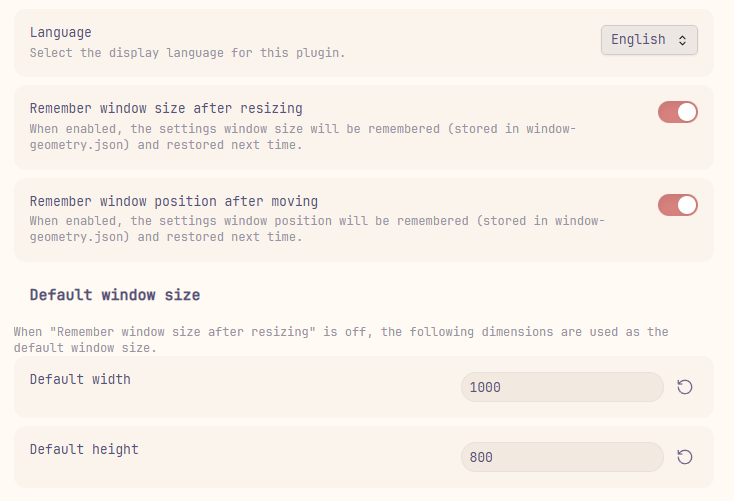
An Obsidian plugin that remembers the size and position of the settings popout window (introduced in Obsidian 1.13.0), and restores them automatically next time you open it.
👀 Preview
📖 Background
Starting from Obsidian 1.13.0, Settings can open in a separate window instead of a modal dialog (toggle via Settings → Interface → Open settings in new window). However, the window always opens with a default size and position, and any manual adjustments are lost after closing.
This plugin solves that problem.
✨ Features
| Feature | Description |
|---|---|
| Remember window size | Saves the settings window size after drag-resizing |
| Remember window position | Saves the settings window position after drag-moving |
| Default size | Configurable default width & height, used when "remember size" is off |
| Multi-language | Supports English and Chinese, extensible via JSON locale files |
📦 Installation
From Obsidian Community Plugins (Recommended)
- Open Obsidian → Settings → Community plugins
- Click Browse and search for Remember Settings Window
- Click Install, then Enable
From GitHub Releases
- Download
main.jsandmanifest.jsonfrom the latest release - Place them in
<vault>/.obsidian/plugins/obsidian-remember-settings-window/ - Restart Obsidian and enable the plugin in Settings → Community plugins
From source
- Clone this repository
- Install dependencies and build:
npm install npm run build - Copy the contents of the
dist/folder into your vault's plugin directory:<vault>/.obsidian/plugins/obsidian-remember-settings-window/ - Restart Obsidian and enable Remember Settings Window
🚀 Usage
After enabling the plugin, open its settings panel (Settings → Community plugins → Remember Settings Window):
| Setting | Description |
|---|---|
| Language | Choose display language (Auto follows your system locale) |
| Remember window size | Toggle on/off. When on, the settings window reopens with the last drag-resized dimensions |
| Remember window position | Toggle on/off. When on, the settings window reopens at the last drag-moved screen position |
| Default width / height | The size applied when "remember size" is off |
All settings take effect the next time the settings window opens.
🌐 Language / i18n
The plugin loads language files in real-time from the locale/ directory inside the plugin folder. New language files are detected automatically when you open the settings panel — no restart or reload needed.
Built-in languages
| File | _displayName |
Language |
|---|---|---|
en.json |
English |
English |
zh-cn.json |
简体中文 |
Simplified Chinese |
These files are bundled in locale/ when you install the plugin.
Adding a new language
- Navigate to your plugin's
locale/directory:<vault>/.obsidian/plugins/obsidian-remember-settings-window/locale/ - Create a new JSON file named
<code>.json(e.g.ja.jsonfor Japanese,fr.jsonfor French) - Add a
_displayNamefield with the language's native name, then translate all other keys (copy fromen.jsonas reference) - Open the plugin settings panel — your new language will appear in the dropdown automatically
Example ja.json:
{
    "_displayName": "日本語",
    "settingRememberSize": "リサイズ後のウィンドウサイズを記憶",
    "settingRememberSizeDesc": "有効にすると、設定ウィンドウのサイズが記憶され、次回開いた時に復元されます。",
    "settingRememberPosition": "移動後のウィンドウ位置を記憶",
    "settingRememberPositionDesc": "有効にすると、設定ウィンドウの位置が記憶され、次回開いた時に復元されます。",
    "defaultSizeHeader": "デフォルトのウィンドウサイズ",
    "defaultSizeDesc": "「リサイズ後のウィンドウサイズを記憶」が無効の場合、以下のサイズが使用されます。",
    "defaultWidth": "デフォルトの幅",
    "defaultHeight": "デフォルトの高さ",
    "language": "言語",
    "languageDesc": "プラグインの表示言語を選択します。",
    "languageAuto": "自動(システムに従う)",
    "enabled": "有効",
    "disabled": "無効"
}
Tip: If you create a translation, consider submitting a pull request so it can be bundled as a built-in language!
⚙️ Configuration files
| File | Purpose |
|---|---|
data.json |
Plugin settings: language, toggles, and default dimensions |
window-geometry.json |
Saved window bounds — auto-generated on first load |
locale/*.json |
Language files — auto-copied on first load, user-extensible |
🔧 How it works
- On plugin load, monkey-patch
app.setting.opento intercept settings window creation. - When the settings window opens, compare
BrowserWindow.getAllWindows()against known window IDs to identify the new window. - Attach Electron
resize/moveevent listeners to capture geometry changes in real-time. - On
resize-ended/move-ended(drag finished), persist the bounds towindow-geometry.jsonwith debouncing. - Next time the settings window opens, apply saved or default geometry via
setBounds().
📋 Requirements
- Obsidian 1.13.0+(设置独立窗口功能从此版本开始支持)
- Desktop only (the plugin relies on the Electron API)
🛠️ Development
npm install
npm run dev     # Watch mode, output to dist/
npm run build   # Production build, output to dist/
📄 License
💖 Support
If you enjoy this plugin and want to say thanks, you can buy me a bubble tea!
| WeChat Pay | WeChat Tip | Alipay |
|---|---|---|
 |
 |
 |