Tagged Sync for reMarkable
 Thomas Hochbichler2k downloads
Sync tagged reMarkable notebooks, PDFs and EPUBs into Obsidian as searchable Markdown. Send papers from Zotero, send highlights back and to Readwise. Unofficial; not affiliated with reMarkable AS.
- Overview
- Scorecard
- Updates44
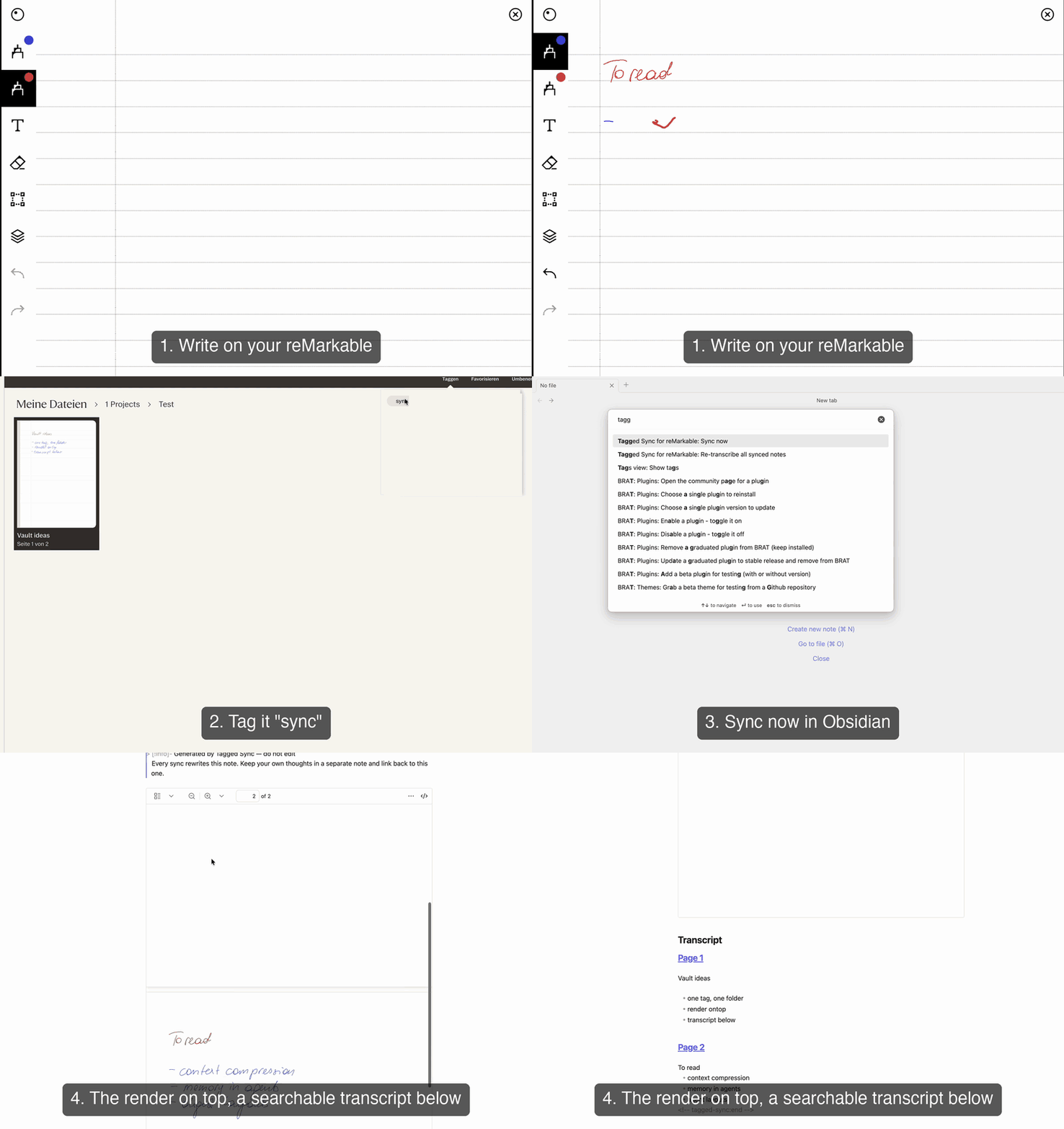
taggedsync.com — the short version, in pictures.
Disclaimer: Tagged Sync for reMarkable is an unofficial, community-built plugin. It is not affiliated with, endorsed by, or supported by reMarkable AS or Readwise, Inc. "reMarkable" is a trademark of reMarkable AS and "Readwise" a trademark of Readwise, Inc.; both are used only to describe compatibility.
Tag a notebook or a PDF on your reMarkable, and it lands in the vault folder you mapped — your handwriting transcribed, your highlights quoted.
Your handwriting never leaves your machine. Rendering and transcription run on your own computer — no upload, no account with us. The plugin is free; Pro is an optional add-on for €24 once, no subscription.
A notebook you wrote in
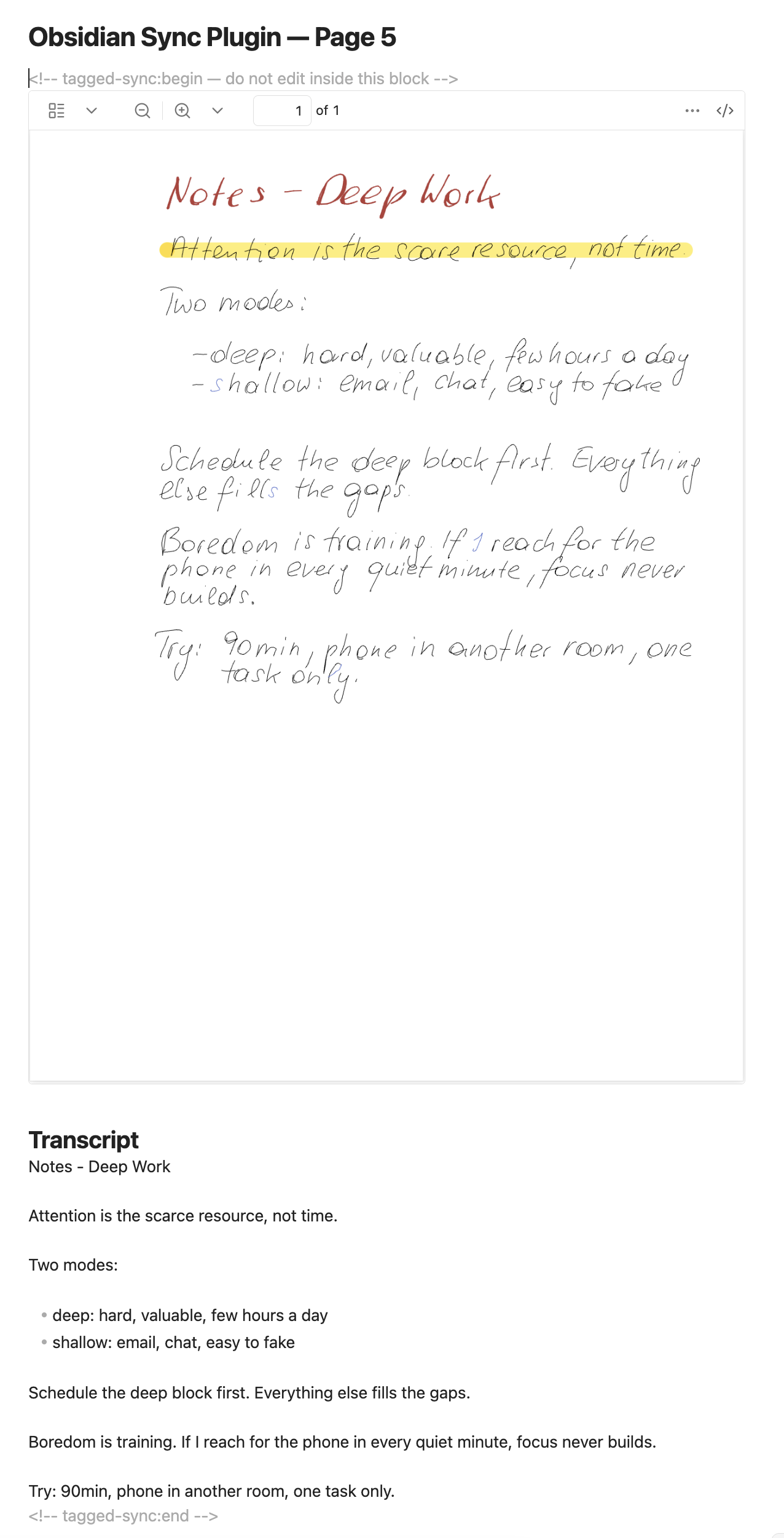
The pages as you drew them, embedded in the note, plus a searchable transcript underneath — split
by page, so a long notebook stays navigable. On a Mac, the pages themselves are searchable too:
click into the page and Cmd+F finds a handwritten word right on it.
A PDF you marked up
Every passage you highlighted or underlined, quoted with the sentence around it and filed under the section it came from. Each quote carries a block ID, so you can link a single passage from anywhere in your vault. None of it goes through transcription, so this works the same on Windows and Linux as it does on a Mac.
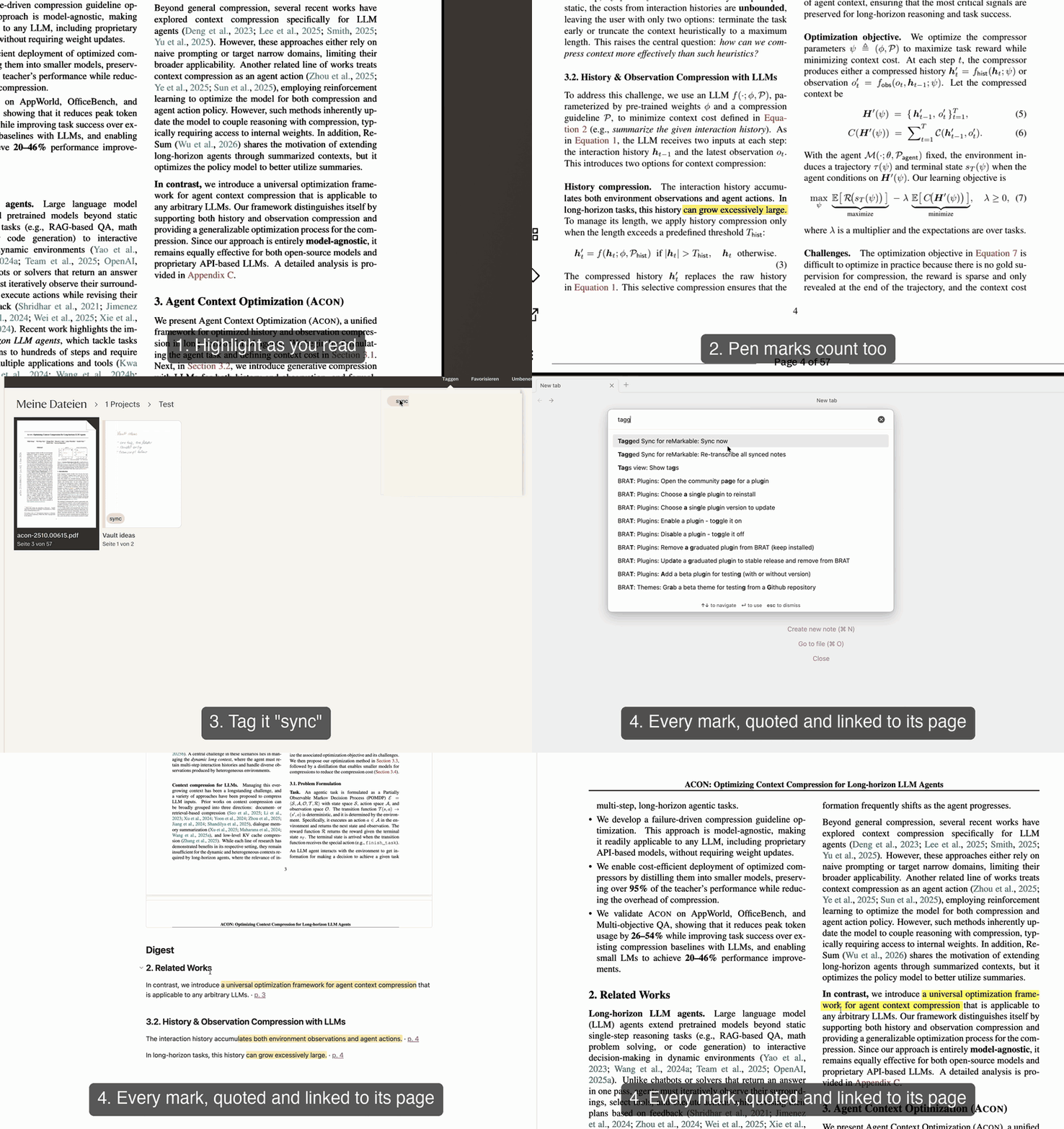
PDF shown: Kang et al., ACON: Optimizing Context Compression for Long-horizon LLM Agents, CC BY 4.0.
Desktop only · one-way (reMarkable → Obsidian, and → Zotero and Readwise) · Sync never writes to your tablet. Send puts a PDF on it only when you run it — and only adds, never changes, deletes or moves anything.
What makes it different
Every feature at a glance, Free against Pro. Most rows link to the section that explains them.
Pro is €24, once — no subscription. See Tagged Sync Pro.
Works with
| Device / accessory | Status |
|---|---|
| reMarkable 2 | ✓ |
| reMarkable 1 | ✓ |
| reMarkable Paper Pro | ✓ — its larger canvas, its colour palette, and the shader highlighter are all handled; the fixes came from Paper Pro users' own files |
| reMarkable Paper Pure | ✓ |
| Type Folio (typed text) | ✓ — taken from the file exactly as you typed it, never transcribed |
| "Read on reMarkable" browser extension | ✓ — a sent article counts as a document to mark up |
| EPUB books | ✓ — read as the book the device made of them, not as ink on blank pages |
Obsidian itself must be the desktop app — see Limitations.
Contents
- Before you install
- How it works
- Install and set up
- Handwriting transcription
- Typed text and the Type Folio
- Tagged Sync Pro
- Zotero
- Readwise
- Syncing without the cloud
- Annotated PDFs
- What gets synced
- Limitations
- Privacy and permissions
- Support
- Reporting a problem
- Requesting a feature
Before you install
Two limits, so you know them up front:
- The plugin syncs one tag. You map one reMarkable tag to one vault folder. You can change or remove that mapping at any time. Syncing more than one tag is what Tagged Sync Pro is for — €24 once, with a 14-day trial. Everything listed under Tagged Sync Pro needs a licence; the rest of this README works without one.
- Text transcription is built in on macOS 13 or later. Everywhere else — Windows, Linux, older Macs — you can transcribe by pointing the plugin at a local AI server you run yourself (Ollama, LM Studio, or any OpenAI-compatible server), or by using the optional managed local model where your machine qualifies. With none of those set up, your notes still sync with the full handwriting render embedded — but there is no transcript. Marked-up PDFs and typed documents are unaffected: both are read from the file itself and need no transcription at all, so they work everywhere.
How it works
- Tag a notebook, a PDF, a single page, or a whole folder on your reMarkable — e.g.
sync. - It syncs to the reMarkable cloud as usual — or, with Pro, the plugin reads it straight off the tablet and the cloud never comes into it.
- In Obsidian, map that tag to a vault folder in the plugin settings.
- Run Sync now (or let automatic sync do it).
- You get a Markdown note with the render embedded, and either a searchable transcript or a digest of your marks below it.
Install and set up
You need Obsidian 1.13.4 or later on desktop (Windows, macOS, or Linux — Obsidian on mobile is unsupported), and a reMarkable account with cloud sync switched on — unless you sync straight from the tablet, which needs no account at all.
- In Obsidian, open Settings → Community plugins → Browse, search for Tagged Sync for reMarkable, and click Install, then Enable.
- Open Settings → Tagged Sync for reMarkable, and follow the "Connect" link to
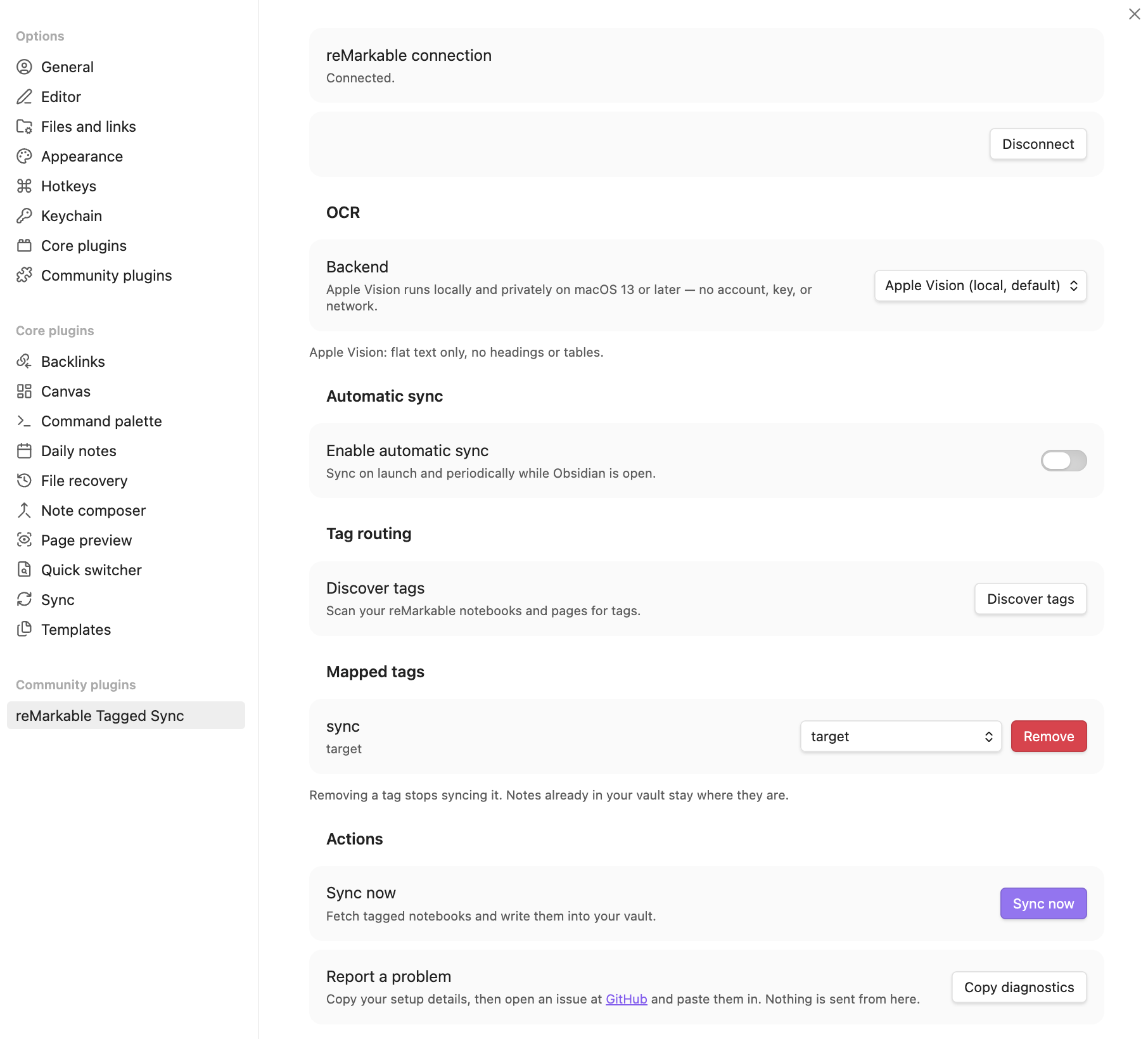
my.remarkable.com/device/browser/connectto get a one-time code. Enter it and click Connect. Codes expire after a few minutes, so get a fresh one if it is refused. - Under Tag routing, click Scan to find the tags on your reMarkable notebooks, pages and folders, then click the tag you want to sync and choose a vault folder for it. Only a mapped tag is synced — an unmapped tag is simply not selected, not lost.
- Click Sync beside Sync now.
Sync is also available from Obsidian's command palette (Ctrl/Cmd + P) as Tagged Sync for
reMarkable: Sync now.
Stopping a sync
While a sync is running, the status bar shows a turning icon. Click it and confirm, or run Tagged Sync for reMarkable: Stop sync from the command palette. This works for an automatic sync and for re-transcribing too.
Stopping is safe rather than instant: the note being transcribed right now is finished first, so it
can take a moment — the status bar says stopping… meanwhile. Everything already written is kept,
and the next sync carries on from where it left off.
Automatic sync
Off by default. Under Automatic sync you can turn on a sync when Obsidian launches, plus an interval backstop while it stays open. A manual sync pushes the next automatic one out rather than triggering a redundant run.
Re-transcribing
Two commands, depending on how much you want re-read.
Tagged Sync for reMarkable: Re-transcribe this note re-reads just the note you have open. Use it to repair a single garbled transcript: on a paid backend it tells you how many pages that notebook is before it sends any of them, and if you have corrected that note by hand it asks first, because re-transcribing replaces what you wrote there. It says no in three cases — the open note was never synced from reMarkable, its notebook is no longer on your tablet, or the note has no transcript section to write into.
On a PDF, your margin notes and added pages are kept as a digest, so the command reads them again and starts a sync to write them; on a paid backend it asks first. It says no when you edited that note by hand, because a sync leaves such a note alone, and when Your notes on PDFs is off. What the new reading changes also reaches Zotero and Readwise, if you use them.
Tagged Sync for reMarkable: Re-transcribe all synced notes does the same for every synced note in the vault, margin notes on PDFs included, except in notes you edited by hand. That is the one to run after switching backends. It asks for confirmation first.
Both re-fetch the notebook and rewrite the transcript region, leaving your own notes untouched. They also write the embedded PDF again, with the same name and the same pages, so that on a Mac its text layer follows the new transcript.
Re-transcribing is also the way to fill in a transcript that never arrived — a note synced while the local model was still downloading, or while its engine was missing, keeps its render and no text, and nothing refills it on its own. Re-transcribing does. With the local model selected, the whole-vault confirmation tells you how long the run will take on your machine, measured from your own pages.
Handwriting transcription
Three backends can read your handwriting entirely on your own machine — no account, no API key,
no page image or text ever leaving the device. They are free, and they are the default. Whichever
you pick, each page is rendered to a temporary PNG under your OS temp directory (os.tmpdir()) and
deleted as soon as it has been read.
| Backend | Where it runs | Set-up |
|---|---|---|
| Apple Vision | macOS 13 or later | none, it is the default there |
| A local server you run yourself | everywhere | install Ollama or LM Studio |
| Managed local model | Apple Silicon, Windows on ARM | one opt-in click, a 1.6 to 6.2 GB download depending on the model |
Four cloud backends are also available, with Tagged Sync Pro. They are one of two cases where a page image leaves your device — the other is Add the render to Zotero: you choose them, they use your own API key, and they are off unless you turn them on.
Apple Vision aside, you name the model yourself. The Model field starts empty on every backend, local and cloud alike, and the plugin suggests nothing: a model id shipped inside a plugin goes stale the day its provider retires it, and the error you then get reads like a problem with your API key rather than what it is. Take a current name from your provider's own list. Until you do, settings says so, and a sync reports "No model is set for this OCR backend" rather than quietly producing no transcript.
On Windows and Linux nothing transcribes by default: notes sync with the handwriting render
embedded and no ## Transcript text, until you set up one of the other two local backends. You can
also set the backend to Off on purpose if you only want the render.
Apple Vision (macOS)
The default on macOS 13 or later, and nothing to configure. It auto-detects language and reads cursive well, but produces flat text — no headings, lists, task lists, or tables. Its structured API is macOS Swift-only and unavailable here. It can also misread; see Writing your own notes.
For transparency: the page PNGs are transcribed by invoking the built-in /usr/bin/osascript
binary, which drives Apple's Vision framework. This runs on your machine with no network
egress. On a Mac it also runs alongside any other backend, to place the
text layer.
A local server you run yourself
If you already run — or are willing to install — a local AI server, the plugin can send each page to it and get the text back. Nothing leaves your machine, and there is no account or key. This is the one free route that works everywhere, including Windows on x64 and Linux.
- Install and start Ollama, LM Studio, or any other server that speaks the OpenAI
/chat/completionsAPI, and load a vision model into it. - In the plugin settings, set Backend to that server and enter the model's name. The address is pre-filled for Ollama and LM Studio; change it only if yours runs elsewhere.
Which model you use is your choice. For what it is worth: I measured Qwen2.5-VL-7B at 7.6 % character error — about three times more accurate than Apple Vision on the same pages — but I measured it running the model directly, not through one of these servers, so treat it as a starting point rather than a promise. That number is the 7B build: a smaller variant of the same family is a different model, and I have measured none of them. Issue #116 carries a user's own measurements of the smaller ones, with the caveats they put on them.
Two things settings will tell you about the model you name, where the server can be asked. A
text-only model cannot read a page image at all. And a model that reasons before answering
transcribes far more slowly and can lose a page: the answer runs past what the model may return, and
that page is left out rather than saved half-read. If that happens, the sync says so at the end —
switch to a model that does not reason (often the -instruct build of the same family) and run
Re-transcribe all synced notes, because a later sync will not pick those pages up on its own.
The reasoning hint needs Ollama, LM Studio 0.4.0 or newer, or — with Pro — OpenRouter; other servers expose nothing to read it from, and then settings says nothing rather than guessing.
If the server is not running, settings says so, and a sync that hits it leaves the notes with their render and reports it at the end rather than failing quietly.
Local model (optional, opt-in)
On some machines you can switch the backend to a local AI model instead. It reads handwriting two to eight times more accurately than Apple Vision, depending on the model, and keeps headings and lists, and like Vision it runs entirely on your machine. It is never a default: a fresh install downloads nothing, and Apple Vision stays the default on macOS.
Choosing it downloads 1.6 to 6.2 GB of model files plus a 12 MB program, after an explicit opt-in in settings — three models ship, and settings offers the ones your machine can run, with the most accurate marked as the default. Every file is checked against a SHA-256 published in the plugin before anything runs. It is slow compared with Vision — roughly 15 seconds a page on a fast Mac against Vision's 0.4 — and it holds between 3 and 16 GB of memory while it runs, depending on the model (Qwen2.5-VL-7B is the heavy one).
Offered only on:
| Requirement | |
|---|---|
| macOS | Apple Silicon, 8 GB of memory or more; 16 GB for Qwen3-VL-8B (the most accurate), 18 GB for Qwen2.5-VL-7B |
| Windows | ARM (Snapdragon X and similar), 16 GB of memory or more; 24 GB for Qwen3-VL-8B (the most accurate) and Qwen2.5-VL-7B |
Intel Macs, Windows on x64 and Linux do not get the option, and settings says why on the machine
itself. Windows x64 is excluded because Windows Defender quarantines the engine — the
llama.cpp builds for x64 have been flagged as Trojan:Win32/Wacatac.B!ml for years, the builds
are unsigned, and nothing this plugin does to its own download changes what a malware scanner
decides about someone else's binary. Windows on ARM uses a different build, which is not flagged.
Like any transcription it misreads sometimes, and it misreads differently: Vision's mistakes usually look broken on the page, while this model writes its mistakes as fluent text. Check anything that matters against the handwriting.
Cloud backends (Pro)
Which model you name is still your choice. For what it is worth: in October 2026 I measured seven cloud models on 264 handwritten pages (German scans, English phone photos and my own reMarkable pages), with the request exactly as 1.8.4 sends it and the cost as each provider billed it. Gemini 3.1 Flash-Lite was the cheapest, the fastest, and the best or close to the best reader on every set. Claude Haiku 5.5 costs the same per page and is the one to set if you copy published text by hand: Gemini declines to transcribe text it recognises as published, and since 1.8.5 the sync names such a page at the end instead of writing it blank. Gemini 4 Argon halves the errors on scanned paper at eight times the price.
A page cost about 0.05 cents with either of the first two, so 250 pages a month come to 12 or 13 cents. The provider bills your own API key directly; that is separate from the price of Pro. A model that thinks before it answers is billed for the thinking too, so the list price per token says little about the price of a page. The full measurement is in Which cloud model reads handwriting best.
The text layer
On a Mac, the PDF of your pages is searchable. Click into the page embedded in the note, or open the
PDF in Preview, press Cmd+F, and the word you wrote is highlighted on the page. Anywhere else in
the note, Cmd+F searches the note as usual. Spotlight finds the PDF. The page looks exactly as
before.
The text layer is free: on a Mac, every PDF of a handwritten notebook or page the plugin writes carries your transcript as invisible, searchable text, whichever backend read it. On Windows and Linux the PDF has no text layer yet; the transcript under the note is still searchable.
Apple Vision finds where each word sits on the page, whatever transcription backend you chose. The words come from your backend's transcript, so the PDF and the note say the same thing. A word Vision cannot locate is left out of the layer; it stays in the transcript. With the backend set to Off there is no transcript, and so no text layer.
There is nothing to switch on. Notes you synced before 1.9.0 get the layer on the first sync after the update. A note you edited by hand is skipped, as always, and keeps its PDF without the layer until you run Re-transcribe this note on it.
Obsidian's own search pane does not look inside PDFs. What it finds is the transcript under the note.
Typed text and the Type Folio
Not everything on a reMarkable is ink. Text you type with the Type Folio — or send over with the "Read on reMarkable" browser extension — is stored inside the notebook as text, not as strokes. The plugin treats it accordingly:
- Typed text is never transcribed. It is taken from the file exactly as you typed it, so no typed word can come out misspelled.
- Where it lands in a transcript depends on the backend. Apple Vision reads one page at a time and knows where each line sits, so your typed text stays where it is on the page, between the handwriting around it — a typed heading over handwritten notes stays a heading over those notes. The other backends transcribe without those positions, so typed text is added at the end of its own page instead.
- A typed page you marked up is a document. A page whose typed text reads like a document — an article sent from the browser, prose you typed with the Type Folio — is treated like a PDF: what you highlight or underline on it arrives as a digest, quotes, sections, block IDs and all. A typed line or two inside a handwritten page stays part of the transcript instead; the plugin tells the two apart by how the text is set, not by guessing.
- Page by page, not notebook by notebook. One such page does not make the whole notebook a
document. Its handwritten pages are still transcribed, and the note then carries a
## Digestand a## Transcripttogether. A typed page the digest has nothing to show for is named in the transcript — Page 4 is typed text — see the embedded page. — rather than read back by a transcription backend, since its words are already legible in the embedded page above. - Such a page needs no transcription at all. Its digest is read from the file, exactly as a marked-up PDF's is, so it arrives on Windows and Linux with no transcription backend set up.
- Highlights on typed text reach your vault like any other highlight.
Tagged Sync Pro
Everything not listed here is free and stays free. These are paid:
- Cloud transcription — Anthropic, OpenAI, Google and OpenRouter as transcription backends, with your own API key and a model you name yourself.
- Unlimited tag mappings. The plugin syncs one tag; Pro syncs as many as you like.
- Syncing without the reMarkable cloud — the plugin reads your tablet directly over USB or Wi-Fi.
- Frontmatter properties — each synced note carries its reMarkable tags and metadata as Obsidian properties, for Dataview and Bases queries.
- Zotero write-back, the desktop app and group libraries — what you marked on the tablet lands in Zotero as native annotations, the plugin can talk to the Zotero desktop app instead of only to zotero.org, and it can use your group libraries. Sending a paper to the tablet over SSH is Pro too, as part of syncing without the cloud. Sending a paper over the reMarkable cloud and the note's link to its Zotero item are free.
- Pushing to Readwise — your highlights and margin notes go into your Readwise library and come up in your Daily Review.
€24, once. No subscription, no renewal, no expiry. The licence is for one person, on up to 50 devices, at home and at work.
Every future Tagged Sync Pro feature is included — no upgrade fee, ever.
Try it for 14 days — one click in the plugin settings, no key and no email needed. The click
asks taggedsync.com for this vault's signed start date, once (see
Privacy and permissions); a connection is needed for that one moment.
Buy a licence — you get your key on the page straight after paying, and by email as a backup. Paste it into the plugin settings.
14 days, no questions asked — just write to me. One person, up to 50 devices.
The licence is granted by me; the sale itself is handled by Polar, who are the seller. See LICENSE-COMMERCIAL.md, PRIVACY.md and IMPRESSUM.md.
What I do not control
This plugin talks to the reMarkable cloud. I do not work for reMarkable. I have no contract with them and no advance warning of their plans. They can change or switch off their cloud at any time. This already happened: in April 2026 a format change broke every tool in this space.
If it happens again:
- I will work on a fix as fast as I can. I cannot promise a date.
- Your notes are safe. Everything already synced is plain Markdown and PDF in your own vault. It stays there. Nothing is deleted.
- I do not refund for the days the sync is broken, because the cause is not mine.
- If reMarkable shuts the cloud down for good, or changes it so that no fix is possible, I will say so in public and stop selling licences. I will not take money for something that cannot work.
The same applies to the transcription providers (Anthropic, OpenAI, Google, OpenRouter, Ollama, LM Studio). They set their own models, prices and rules. I do not control those either.
Updates come through the Obsidian plugin store, to everyone, for as long as the plugin is sold. What I promise is effort, not dates.
None of this changes your rights as a consumer under EU law.
Zotero
Your reMarkable highlights land in Zotero as native annotations. No script, no Python, no Zotero plugin, no closed Zotero.
What goes into your vault is free; what is written into Zotero is Tagged Sync Pro. In other words: sending a paper to the tablet and the note knowing which paper it is work with a zotero.org API key and no licence. Writing your highlights, the pages you added and the render into Zotero, and talking to the Zotero desktop app, are the Pro half — covered by the 14-day trial like everything else.
The loop is three steps:
- In Obsidian, run Send Zotero PDF to reMarkable… and search your library the way you
remember the paper — half a title, an author, a year. The PDF lands on your tablet in a
Zoterofolder, untagged: the plugin never puts a tag on a document for you. - On the tablet, give it your sync tag, then read it and mark it up: highlighter, pen underlines, notes in the margin.
- Sync. The digest arrives in your vault knowing which paper it is, and — with Pro — what you marked appears in Zotero as real highlights and underlines you can click, colour, search and cite. A margin note anchored to a passage becomes that annotation's comment. Without Pro the note says so in its top line: highlights stay in the vault.
Or start in Zotero. Tag the paper to-remarkable (the Send tag in Zotero setting under
Settings → Zotero → Send to your tablet; change it if you like), then run Send tagged Zotero
papers to reMarkable. Every paper carrying the tag lands on your tablet, in the same Zotero folder as
Send and without a sync tag — you tag it on the tablet when you want it back. Tag the paper in
Zotero, not the PDF. Nothing is ever taken off the tablet, and the Zotero tag is left where you put
it; a paper that is already there is simply skipped, and if every tagged paper is there already, the
notice says so. A paper with two PDFs, or one Zotero has no copy of, is named in the notice and
waits for Send Zotero PDF to reMarkable…, which is where questions get asked. No sync sends:
only that command does, so the scheduler never puts anything on your tablet.
Each half stands on its own. A PDF that reached the tablet some other way is recognised at sync time — by the file's own hash, or by asking you once — and a note gets its Zotero link whether or not you ever use write-back. A note that is already in your vault can be pointed at an item by hand with Link to Zotero item….
What the note gets. One line in the block at the top, naming the paper and linking to it in
Zotero, to your web library, and to your own literature note if you keep one. Once written back, every quote gets an
in Zotero link that opens the reader at that annotation on that page. With frontmatter
properties on, the note also carries zotero-key and — if the item
has one — citekey, which is the same vocabulary other Zotero tools in Obsidian use; a paper in a
group library adds zotero-library with the group's id.
Pages you added (Pro). A page you inserted into the PDF on the tablet becomes a note under the paper in Zotero, titled Added page after p. 12, with what you wrote and typed on it. Edit it in Zotero and your version wins; delete the page on the tablet and the note goes to Zotero's trash. Your zotero.org key needs notes access for this; without it the plugin writes your highlights as before and the note's Zotero line says added pages not written back: the API key has no notes access.
The render in Zotero (Pro, off until you switch it on). Add the render to Zotero puts the PDF as it looks on your tablet, ink and all, under the paper as a second attachment, Annotated PDF, and keeps it current on every sync. It goes over zotero.org into your Zotero Storage and counts against your quota there; if your files sync over WebDAV, leave it off. Only a document tagged as a whole is uploaded, and only into your personal library. Rename it, and your name stays; annotate it in Zotero, and it is never replaced again; trash it, and it is not recreated. Both switches sit under Settings → Zotero → Into Zotero.
Connecting
Either connection is enough on its own, and you can have both:
| zotero.org | The Zotero desktop app (Pro) | |
|---|---|---|
| What you need | Use zotero.org switched on, and an API key from zotero.org with read, write and notes access to your personal library | Use the Zotero desktop app switched on, Zotero 10 running, with Allow other applications on this computer to communicate with Zotero on |
| Works with Zotero closed | ✓ | — |
| Finds your PDFs | the copies synced to zotero.org | any file on your disk |
Each connection has its own switch, on the plugin's Zotero settings page, so whether anything goes over the internet is one thing to look at: with Use zotero.org off, nothing Zotero-related leaves your machine, whatever key is stored. With both set up the desktop app is asked first and zotero.org is the fallback, so a paper Zotero never uploaded still gets sent. If neither is set up, nothing Zotero-related runs and your sync is exactly what it was.
Group libraries (Pro). Your own library is always on. Under Settings → Zotero → Libraries, every group your account is in is a switch of its own, off until you name it — a group is other people's work, and highlights written into a group library are visible to everyone in that group. A group you switch on is searched by Send, sent from by the tag command, matched against at sync time and, with write-back, written into like your own library; the note then links into the group. Where the same PDF is in your library and in a group, you are asked which, once, with the library named. A group you may only read is named in the note — no write access to … — and nothing is written into your own library instead. Both connections handle groups; the desktop app knows the groups it syncs, zotero.org the ones your key can read.
Sending needs a way onto the tablet: the reMarkable cloud, or a paired tablet with Send over SSH when the cloud is not connected switched on. Sending over SSH restarts the tablet's reading app, which closes whatever you have open — that is the only way it notices a new file. The home screen is back in about six seconds.
What leaves your machine. Your handwriting does not, unless you switch on Add the render to Zotero. What write-back sends is text: your highlights, the transcribed and typed text of your margin notes and of the pages you added, into your own Zotero library — and to zotero.org if that is the connection carrying it. Write text to Zotero is on once a connection is set up, and switching it off stops it. Add the render to Zotero is the one exception for the ink: off until you switch it on, and then the PDF as it looks on your tablet, ink and all, is uploaded to your Zotero Storage at zotero.org. With no connection nothing is sent at all.
Colours
Your highlights arrive in Zotero in the colour you chose, in Zotero's own eight. A tablet colour goes to the Zotero colour of the same hue, not to the nearest by number — so the Paper Pro's pastel green stays green instead of turning grey. What a device can record differs:
| Device | Records | Arrives in Zotero as |
|---|---|---|
| reMarkable 2 (firmware 3.1 sample) | yellow, green, pink — the device shows them as three greys, the desktop app in colour | yellow, green, magenta |
| Paper Pro highlighter (firmware 3.14–3.15 samples, and the maintainer's own pages of September 2026) | yellow, green, pink, blue, orange, grey | yellow, green, magenta, blue, orange, gray |
| Paper Pro shader | the pen palette | the Zotero colour of the same hue; black becomes gray |
| Paper Pro, text selected by hand | yellow, green, pink, like the reMarkable 2 | yellow, green, magenta |
| Paper Pure | not measured yet — a page from one is welcome |
A colour code planned on the laptop therefore has three colours on a reMarkable 2 and six on a Paper Pro. The digest in your vault uses the same names, so a mark is the same green in the note and in Zotero. Recolouring in Zotero afterwards is safe: your edit of a colour wins from then on.
When something does not reach Zotero
Your notes are never held up by Zotero: the vault half of a sync always finishes first, and whatever happens afterwards costs you the Zotero half of one note and nothing else. When that happens the note says so in its own top line, in place of the write-back date:
- Zotero could not be reached — no connection answered.
- the Zotero desktop app is not letting other applications talk to it — the setting in Zotero's Advanced pane is off.
- Zotero refused this plugin permission — the desktop app asks the first time; choose Always Allow.
- Zotero rejected the API key — the key is wrong, or has no write access.
- Zotero asked for a pause — its rate limit; nothing is wrong.
- the Zotero item was no longer found — the attachment was deleted or moved to the trash. Here the line reads Zotero: item no longer found instead: the note keeps every quote it has and simply stops claiming a paper it can no longer point at.
- Zotero answered with an error — its end, not yours.
Every one of these is retried by the next sync, and there is nothing to clean up first: write-back adds, refreshes and trashes, and each of those is safe to repeat. If half the highlights of a document made it, the rest are written next time; the ones already there are not written twice.
Zotero is never the truth for your note. The annotations this plugin creates are a copy, marked
with a tagged-sync tag. Edit one in Zotero and your version wins from then on — that field is
never overwritten again. Delete one and it stays deleted. Your own highlights, made in Zotero, are
never read and never touched. Erase a highlight on the tablet and its annotation goes to Zotero's
trash on the next sync — unless you have edited it in Zotero, in which case it stays: what you built
on there is yours. Nothing is ever erased for good; the trash keeps it. On the tablet side nothing is
ever removed. Switching Write text to Zotero or Add the render to Zotero off stops new writes and
leaves what is there. To remove it, filter your library by the tag tagged-sync in Zotero, select
what it shows, and move it to the trash.
Readwise
Your reMarkable highlights land in your Readwise library as ordinary highlights, and come up in your Daily Review.
What you need: Tagged Sync Pro, and a Readwise account on a plan that includes API access — Full or Highlights. Readwise is free for 30 days, then paid; its Lite plan has no API access. Readwise is a separate service with its own subscription; nothing of it is sold through this plugin.
What arrives. Each document becomes one entry in Readwise: an EPUB arrives as a book, anything else — a PDF, a typed document, an article sent with Read on reMarkable — as an article. Its title and author come from Zotero when the note knows its Zotero item, otherwise from the EPUB itself, otherwise it is the document's name on the tablet, with no author. Every passage you marked is one highlight: the sentence it sits in, with the words you marked in bold, and its page number. A margin note anchored to the passage becomes that highlight's note; a margin note on its own, and a page you added on the tablet, become highlights of their own. The typed pages of a notebook go too; handwritten notebook pages are never pushed. In Readwise, each highlight's (Page 12) is a link: click it and Obsidian opens the PDF in your vault at that page. It works from the Readwise app on your phone too, as long as the vault and its PDFs are on the phone, and Obsidian switches to the right vault by itself.
Each link is fixed when the highlight is first pushed, because Readwise recognises a highlight by it. So if you later add a page in front of a highlight, its link opens a page too early, and if you rename the vault, the links already in Readwise stop working. Renaming or moving a note changes nothing.
The highlights stay in page order. One limit: a mark you make later, above marks already sent on the same page, shows last on that page in Readwise.
Setting it up
- Under Settings → Tagged Sync → Readwise, switch on Push highlights to Readwise.
- Under Readwise access token, pick or create an entry in Obsidian's keychain and paste your token from readwise.io/access_token. The token stays in the keychain of this computer and is not synced with your vault, so add it on each computer that should push. A computer without it still notes what is to be sent; the one with the token sends it. Use the same Readwise account on every computer: if two computers push to two different accounts, both stop, and the settings say so.
- Sync. The first sync re-reads every note once, so your margin notes and the pages you added go to your transcription backend again — on a cloud backend that is paid once more, on a local model it takes time — and then everything is pushed. A licence that lapses and is renewed costs this once more. From then on, each sync sends only what changed.
Connection, at the top of the Readwise page, says how many books and highlights are in Readwise and whether anything is waiting.
When something changes
The tablet wins. Change a mark on the tablet, and the highlight in Readwise changes with it. Erase it, and it is deleted in Readwise — also if you edited it there. Edits you make in Readwise stay until the same highlight changes on your tablet, or until the plugin reads its margin note anew and reads it differently. Discard a highlight in Readwise and it stays discarded. Rename a book in Readwise, edit its author or move it to another category, and your choice stays; a sync may show the document's own title for a moment before putting yours back.
A book you delete in Readwise stays deleted. The plugin never sends it again by itself — not after switching off and on, and not when it re-reads every note. If you deleted one by mistake, sync once so the plugin notices, then open its note and run Push to Readwise again: it starts a sync that pushes the document as a new book, and reads its margin notes once more for that. Deleting a large book in Readwise's web app takes several clicks, each removing a part of it; until it is all gone, a highlight you change on the tablet can come back into it.
Switching Push highlights to Readwise off, removing the token, or a lapsed licence only stops the pushing: nothing is deleted in Readwise. Switched back on, the plugin catches up on whatever changed in between.
Your notes are never held up by Readwise: the push runs after the sync and nothing in a note says
whether it reached Readwise. If readwise.io cannot be reached, or asks for a pause, the next sync
tries again; on a sync you started, a notice says so. A highlight Readwise refuses is set aside until
it changes on the tablet, and Connection counts it.
Readwise's own Obsidian plugin
If you also use Readwise's own Obsidian plugin, it copies these books back into your vault, one file per book, each highlight linking to its page in the PDF. To keep them out, turn on Select Items to be Exported in Readwise and uncheck each Tagged Sync book. Every new book arrives checked, so each new document has to be unchecked by hand.
Daily Review and commands
Your highlights come up in Daily Review like any others. The review email's subject can name a book's author. Readwise's Highlight Quality Filter, on by default, may hide a very short highlight — a one-line margin note, say — from the review; the highlight itself stays.
Open in Readwise opens the Readwise book of the note you are in. Push to Readwise again appears only in a note whose book you deleted in Readwise.
Syncing without the cloud
Everything above goes through the reMarkable cloud, which works well and has one weakness worth being honest about: the interface it uses is not documented or promised by reMarkable. It has been worked out by reading what the official apps do. That is how every tool of this kind talks to a reMarkable account, and it means a change on their side can break syncing for everybody at once.
So Pro can skip it. The plugin connects to the tablet itself — over the USB cable, or over your Wi-Fi — and reads the notes off it. Nothing in between: no reMarkable account, no server of mine, no internet connection needed at all. On a slow line it is also simply faster, because the notes travel across your desk instead of twice across the world.
Switching costs nothing. The plugin works out the same fingerprints for your notes as the cloud does, so a vault that has been syncing through the cloud for a year can switch to the cable and carry straight on. Nothing is re-rendered, nothing is transcribed again, and no cloud API bill is run up doing it. You can also switch back whenever you like.
You can set a second source as a fallback: sync from your tablet and fall back to the cloud when it is asleep, or the other way round when your internet is out. A background sync checks whether the tablet is awake before it starts, so a device in a drawer is a quiet skip and not a failure.
What your tablet needs
reMarkable 1 and reMarkable 2 — nothing to turn on. They accept these connections as they come out of the box.
reMarkable Paper Pro and Paper Pure — read this before you buy Pro for this feature. These devices only allow the connection in Developer Mode, and turning Developer Mode on erases the tablet. Your notes come back from the reMarkable cloud afterwards, and the tablet shows a warning screen every time it starts from then on. That is reMarkable's decision, not something this plugin can work around. If that trade is not worth it to you, the cloud sync works exactly as before — and the plugin says all of this in the settings, before it asks you for anything.
Pairing asks for the root password, which is on the tablet under Settings → Help → About → Copyrights and licenses, at the end of the GPLv3 section. It is used for that one connection, to install a key for your vault, and is never stored.
The tablet identifies itself, and the plugin remembers it. Before anything is installed, pairing shows you the tablet's own key fingerprint and pins it to this vault. If a device at that address ever answers with a different key, the sync stops and says so, instead of handing your notes to whatever picked the address up.
Whether you need the cable depends on the firmware. Newer reMarkables keep Wi-Fi access switched off until something turns it on, so the first pairing goes over USB; the plugin then offers to switch it on for you, and after that the cable is never needed again. It asks first, and saying no keeps the tablet cable-only. Older reMarkables accept Wi-Fi straight away, and the plugin uses whichever address answers.
Windows note: recent Windows versions have been dropping support for the driver the USB connection uses, so Wi-Fi is the more reliable route there.
Annotated PDFs
A PDF you marked up gets a ## Digest in place of the transcript: your marks, quoted with the
sentence around them, grouped under the section of the document they came from.
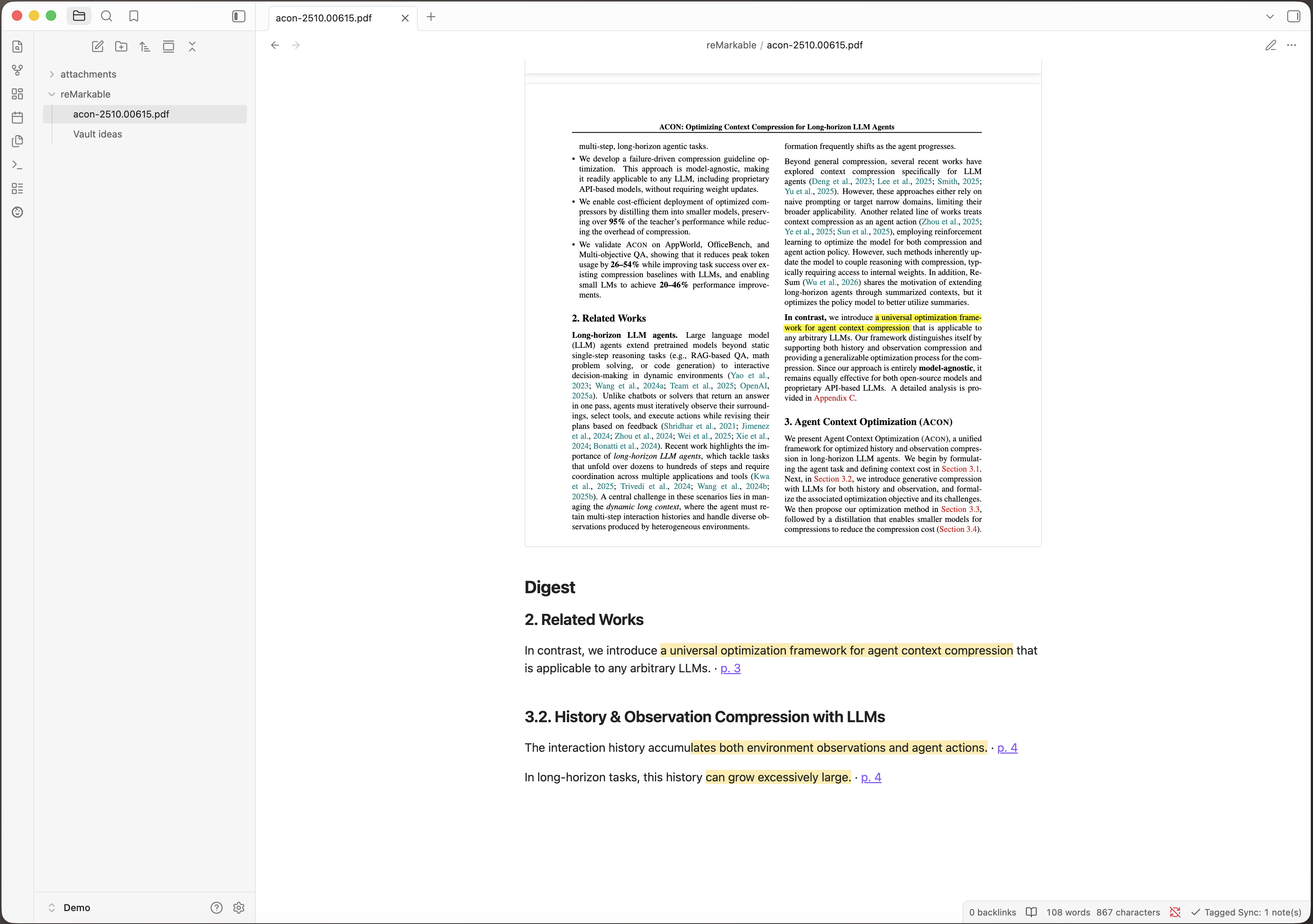
Both the highlighter and the pen count. A passage you marked with the highlighter — or with the Paper Pro's shader — and one you underlined or circled with the pen arrive the same way: a quote with its surrounding sentence, the section it sits under, and a link to the page. Marking with the pen used to reach your vault as nothing at all.
Your colours come with it. A mark you made in green is green in the note, in the same eight colours Zotero uses (the table below) — no snippet to install; a theme can restyle them. A pen mark, which has no colour, is Obsidian's ordinary highlight.
None of this goes through transcription. The words come from the PDF's own text, not from a picture of it, so the digest works the same on Windows and Linux as it does on a Mac — and no marked word can come out misspelled.
Every quote is linkable on its own. Each entry ends with a block ID — Obsidian's anchor for
one single block of text — so an annotation can be embedded anywhere in your vault:
![[My Book^hl-d449a3]] pulls in that one quote and nothing else. The IDs are stable across syncs.
The document's note is its digest. There is no separate digest note collecting every document — the marks live in the note of the document they belong to, in the folder you mapped.
Books you read as EPUB
A book you tagged arrives as the book, with everything above true of it. A reMarkable has no EPUB reader: it converts the book to a PDF on the tablet and reads that. Tagged Sync reads the same PDF, so a highlight in a book comes through as the quote it is, under the chapter it sits in — the chapter named the way the book's own table of contents names it.
One thing to know before you start, and it is the device's doing rather than the plugin's. Changing a book's font, its size, or its margins makes the reMarkable lay the whole book out again and rebuild that PDF. Measured on a real tablet: every mark survived that — and every mark kept its exact position while the text moved out from under it. A highlight that had covered one sentence covered a different one after the change.
Tagged Sync mirrors what the device holds, so it cannot put those marks back where they belong. What it does is tell you it happened: a book whose page count has changed since its notes were written is reported after the sync, and so is a note that comes back with fewer highlights than it had. Nothing else would ever flag it — a quote you never marked reads exactly like one you did.
So: settle the font before you start annotating, which is the advice reMarkable readers give each other anyway.
The notes you write in the margin
Switch them on under Settings → Your notes on PDFs (called Handwritten notes before 1.10.0), and what you wrote or typed beside the text, or on a page you added, arrives with what you marked. They are off until you say otherwise: transcribing handwriting is work your machine does per note, and it needs a transcription backend — the same one a handwritten notebook uses.
Each note is printed where you wrote it: under the section heading it sits in, or beside the sentence it points at, with a link to its page. And you can look at the handwriting itself. The eye in the corner of an entry draws the strip of page the note sits on, cut out of the PDF the note already embeds — it appears when you press it and not before, and no image is ever written to your vault.
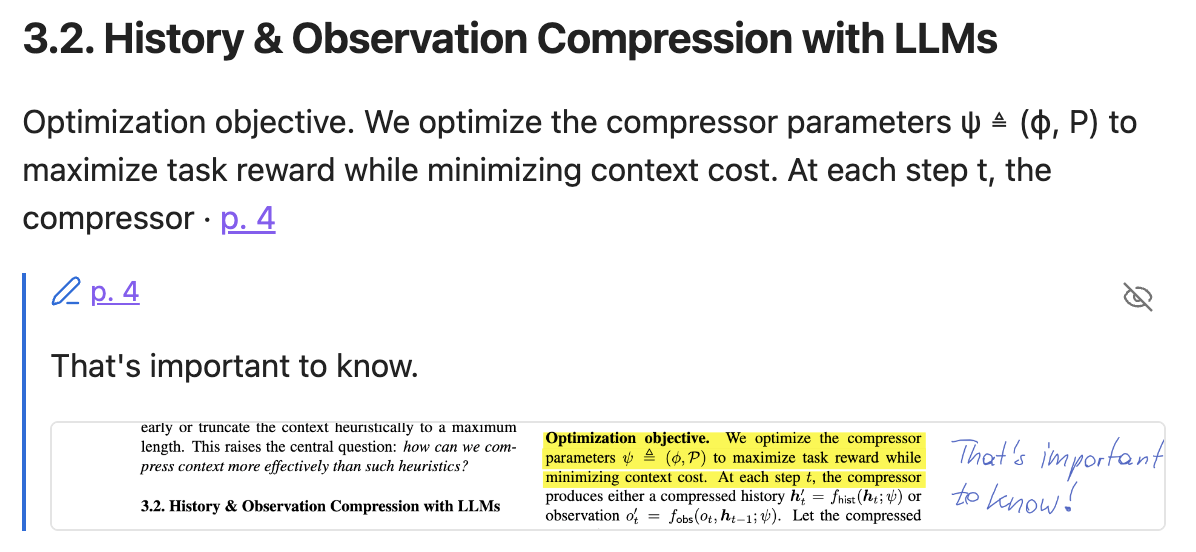
A note whose handwriting could not be transcribed says so rather than standing empty, and keeps its anchor and its page link.
Three things worth knowing before you rely on it:
- Without margin notes switched on, the digest is built from what you marked, not from what you wrote. Handwriting then stays in the render where you wrote it — no text is extracted from it, and a PDF you only wrote on syncs with the render and no text at all.
- It reads the PDF's own text. A scanned page that is only a picture gives less: highlights arrive as the words your tablet recorded, and pen marks are not recognised as marks at all.
- Section headings are partly guessed. They come from the PDF's own outline where it has one, and from a font-size guess where it does not — so a document without bookmarks can file a quote under the wrong heading.
What gets synced
- A notebook tagged with a mapped tag syncs as one note for the whole notebook.
- An individual page tagged with a mapped tag syncs as its own note, independent of any notebook-level tag.
- A folder tagged with a mapped tag hands that tag to everything inside it — every notebook and PDF, and the ones in folders nested below as well. Each of them then syncs exactly as if you had tagged it yourself. One tag can therefore bring in a great deal at once, so look at how much sits under a folder before you tag it — with a cloud backend, transcribing all of it costs money.
- A handwritten notebook's note has the rendered PDF embedded, then a
## Highlightssection (one quote callout per page, if you highlighted anything on the tablet), then the## Transcript. If transcription is off, fails, or finds nothing, the note is still created with the render and no## Transcriptsection — the render is never lost. An annotated PDF gets a## Digestinstead, and a notebook with typed pages among handwritten ones can carry both. - On a Mac, the embedded PDF carries a text layer: your transcript as invisible text over the handwriting, so searching the PDF finds what you wrote. Typed text is real text in the PDF already.
- Typed text is taken from the file, never transcribed, and joins the transcript of the page it is on — at the position it sits at with Apple Vision, at the end of the page with the other backends. A typed page that reads like a document gets the digest treatment instead, like a PDF.
- The transcript is split by page. Each page that produced text gets its own heading linking into that page of the embedded PDF, so a long notebook stays navigable. Pages with nothing to read are named once at the end instead of taking a heading each, and a page transcription could not read says so where it happened. Notes synced before this keep the transcript they have — run Re-transcribe all synced notes to bring them over.
- A synced note carries no frontmatter by default — no YAML block at the top. Everything the
sync needs to track lives in the plugin's own
data.json, not in your notes. If you want your notes queryable, Frontmatter properties (Pro) writes the device's tags and metadata into each note's properties — opt-in, and your own frontmatter lines are never touched. - Removed or untagged units are never deleted. The plugin stops updating them and leaves the note exactly where it is, so nothing you already have can disappear.
- A page note is named after the page's position in the document at the time it was written. Insert a page on the tablet and everything after it moves down one — but a note whose own page did not change is not rewritten, so it keeps the name it had. Its contents stay right: the links inside it address the page of the source PDF, which insertion does not renumber. Only the file name can go stale, and only until that page changes and the note is written again. A note that would land on a name already taken gets a suffix rather than overwriting anything.
- A book laid out again on the tablet is reported. Its page count changes when its font, size or margins do, and marks made before that keep their place while the text moves — so their quotes may no longer be the sentences you marked. Said once per book, when the sync first sees the new count.
- A note that comes back with fewer highlights than it had is reported. The sync mirrors the device, so a mark you removed on the tablet leaves the note too — but a mark that went missing without you removing it is worth hearing about while a backup of the note is still recent. The notice says how many notes; Copy diagnostics in settings says which.
Frontmatter properties (Pro)
Turn on Frontmatter properties in the plugin settings (under Vault output) and every synced note gets a small block of Obsidian properties, straight from the device:
---
tags:
  - remarkable/projekt-x
remarkable-modified: 2026-08-25T16:20
remarkable-synced: 2026-08-25T17:02
remarkable-folder: Work/Projekt X
remarkable-type: notebook
remarkable-pages: 12
remarkable-pinned: true
remarkable-uuid: aaaa0002-0000-0000-0000-000000000000
remarkable-note-id: 3f9a1c04-0000-0000-0000-000000000000
---
remarkable-pages is how many pages this note covers, which is also what it costs to
transcribe: a backend is asked once per page. Sorting by it before a large sync tells you which
notebooks are the expensive ones. A note made from a page tag covers one page, and says which one:
remarkable-pages: 1
remarkable-page: 7
A note made from a notebook tag covers pages 1 to n and so carries no remarkable-page at all —
which makes the key itself the filter for "page notes only".
Every document tag — the sync tag included — arrives namespaced under remarkable/, so each synced
note answers FROM #remarkable. With Dataview,
your latest five synced notes are:
```dataview
TABLE remarkable-synced AS "Synced", remarkable-folder AS "Device folder"
FROM #remarkable
SORT remarkable-synced DESC
LIMIT 5
```
The same fields drive tag filters (FROM #remarkable/meeting), favourites
(WHERE remarkable-pinned = true), grouping by source type, or a "synced this week" view — and
Obsidian's built-in Bases can query them too.
The plugin manages only its own lines: frontmatter you write yourself is preserved byte-for-byte, and the plugin's keys mirror the device (hand edits to them are overwritten on the next sync). Turning the setting on writes the properties into every already-synced note, so views are complete from day one; turning it off removes exactly what the plugin added and leaves your own frontmatter alone. When a plugin update adds a property, one sync brings your existing notes up to date — you do not have to toggle anything.
Identity: what you can key automation on
Two of these fields are meant to be relied on by scripts, so here is exactly what they promise.
remarkable-uuidis the document on your reMarkable. Several notes can carry the same one: a document routed by two mapped tags produces two notes, and a page note carries its notebook's id. It is the document's identity, not the note's.remarkable-note-idis this one note. No two notes share it.
While Frontmatter properties is on, every note the plugin writes carries both. Neither is ever changed or regenerated for a note that already has one — not when the document is synced again, not when you rename the mapped tag, and not when you move the note somewhere else in your vault.
One limit, so it does not surprise you: a note whose tag mapping you removed is no longer written by the plugin, and keeps whatever it had at its last write. It is not given the keys after the fact. Automation that looks for them will pass such a note by — which is the safe direction to fail in.
Writing your own notes
A synced note belongs to the plugin: every sync rewrites it from scratch. Each note says so at the top, in a collapsed callout. So keep your own writing in a note of your own, and link back to the synced one.
If you do edit a synced note — for example to fix a misread word — the plugin notices and refuses to overwrite it, telling you how many notes it skipped. Your edit is never silently erased; that note simply stops updating until you undo the change.
Notes synced by earlier versions had a free area below the sync block. Anything you wrote there stays where it is and is still preserved on every sync — new notes just no longer offer it.
Limitations
- Desktop only. Obsidian on mobile is unsupported.
- One-way sync: reMarkable → Obsidian, and → Zotero and Readwise. Nothing on your tablet is ever changed, deleted, moved, renamed or re-tagged; Send only ever adds a file to it.
- Zotero works with PDF attachments only — an EPUB in your library cannot be sent, and a book you read on the tablet is not matched to one.
- The render in Zotero needs Zotero Storage. Add the render to Zotero uploads over zotero.org only; a library whose files sync over WebDAV cannot receive it, and the plugin cannot tell the two apart, so leave the switch off there. The desktop-app connection alone cannot carry it either.
- One tag → folder mapping without Pro; Tagged Sync Pro maps as many as you like.
- Transcription with Apple Vision requires macOS 13 or later, and its transcripts are flat text — no headings, lists, task lists, or tables.
- The optional local model keeps headings and lists, but needs Apple Silicon with 8 GB of memory or Windows on ARM with 16 GB, and a download of 1.6 to 6.2 GB depending on the model. Tables come out as plain lines.
- Windows on x64 and Linux get the render and no handwriting transcript out of the box — a local server you run yourself is the only free route there; the cloud backends of Pro work on every platform. The digest of a marked-up PDF and of a typed document are unaffected and work everywhere: both are read from the file, not transcribed. Typed text on a handwritten page needs a backend like any other transcript, since it is the transcript it joins.
- A PDF you only wrote on syncs with the render and no text. The digest quotes what you marked; handwriting on the page is not read.
- The text layer is Mac only. On Windows and Linux the PDF has no text layer yet; the transcript under the note is still searchable. On a Mac it covers handwritten notebooks and pages: handwriting on a typed document, and margin notes on a PDF or book, get no layer.
- The text layer is only as good as the transcript. A word Apple Vision cannot locate is left out. In a table, a word can land in the wrong cell. A word with a letter the PDF's standard font cannot write is written without accents: Łódź is in the layer as Lodz. And Preview's search tells accents apart, so Gruße does not find Grüße.
- The reMarkable cloud API used here (via
rmapi-js) is reverse-engineered and unversioned; firmware changes on reMarkable's side can break sync. See below. Syncing straight from the tablet avoids that interface entirely, and is what Pro buys you as a way out — on a Paper Pro or Paper Pure at the cost of a factory reset.
What I do not control
This plugin talks to the reMarkable cloud. I do not work for reMarkable. I have no contract with them and no advance warning of their plans. They can change or switch off their cloud at any time. This already happened: in April 2026 a format change broke every tool in this space.
If it happens again:
- I will work on a fix as fast as I can. I cannot promise a date.
- Syncing without the cloud does not go through any of this. It reads the tablet on your own network, so a change to their cloud cannot stop it.
- Your notes are safe. Everything already synced is plain Markdown and PDF in your own vault. It stays there. Nothing is deleted.
Privacy and permissions
Network use
This plugin makes network requests to exactly one place by default:
- reMarkable cloud (the default source; not needed if you sync straight from the
tablet) — the plugin authenticates to
my.remarkable.comvia a one-time device code, then reads your notebook/page list, tags, and content over the reMarkable cloud API to sync it into your vault. It reads only; the one thing it ever writes is a PDF you sent yourself with Send a Zotero PDF. Nothing already in your reMarkable account is changed, deleted, moved, renamed or re-tagged.
Your tablet, over your own network — only if you set it up (Syncing without the cloud, Tagged Sync Pro):
An SSH connection to your reMarkable, at the address you pair with — the USB address (
10.11.99.1) or the tablet's address on your Wi-Fi. The plugin reads the notes directory over SFTP and runs two commands on the device: one to list the files with their sizes and times, andsha256sumto hash them so it can tell what changed. It reads only, with three exceptions, each of which you ask for: pairing appends one public key to/home/root/.ssh/authorized_keys; if you agree when asked,rm-ssh-over-wlan onkeeps the tablet accepting connections over Wi-Fi; and Send a Zotero PDF over SSH writes the new document's three files and restarts the tablet's reading app so it notices them. Nothing already on the tablet is touched.This connection stays on your network. It goes to your tablet and nowhere else; no server of mine and none of reMarkable's is involved, and with it configured a sync needs no internet connection at all. The root password you type while pairing is used for that one connection and is never stored.
Your Zotero library — only if you set it up (Zotero):
api.zotero.org— with your own API key, and only for your personal library. The plugin searches it, reads your PDF attachments, and — with Tagged Sync Pro — writes the annotations and notes it made from your tablet, and — if you switch it on — uploads the render. Nothing you did not mark or write on the tablet is sent, and no annotation of yours is read. Without Pro the plugin only reads.The Zotero desktop app on
localhost:23119(Pro) — the same thing over your own machine's loopback interface. Nothing leaves your machine.Both are off unless you configure them; a vault with no Zotero API key and no desktop app switched on never causes either call.
Your Readwise library — only if you set it up (Readwise, Tagged Sync Pro):
readwise.io— with your own access token. On each sync the plugin pushes the highlights of your annotated PDFs, EPUBs and typed pages into your Readwise library: the sentence each mark sits in, with the marked words in bold; the transcribed text of your margin notes and of pages you added on the tablet; the page number; the document's title and author; and a link back to the page in the PDF, which carries your vault's name and the reMarkable document's id, but not the document's name or any folder. It reads back only the list of books it pushed itself and, when it has to, the ids of its own highlights — to notice a book you deleted, to delete a highlight you erased, and to tell whether a new token belongs to a different account. Handwritten notebook pages are never pushed, and your handwriting and page images never leave your machine.Off unless you switch on Push highlights to Readwise and add a token; without Pro nothing is sent. Readwise's own terms apply — among them, a passage you highlight may count, without your name or notes, toward the popular highlights Readwise shows other readers of the same book.
A transcription backend you choose yourself. Which of these is contacted, if any, depends entirely on the backend selected in settings:
- Apple Vision and a local server you run yourself — nothing leaves your machine.
- A cloud backend (Anthropic, OpenAI, Google, OpenRouter — Tagged Sync Pro) — the page image is sent to that provider, using your own API key, and the transcript comes back. This is one of two cases where your handwriting leaves your device; the other is Add the render to Zotero. You choose it, you pay for it, and it is off unless you turn it on. The provider's own terms apply.
On a Mac, Apple Vision also reads each page locally to place the text layer, whichever backend you chose; nothing leaves your machine.
Two more hosts are contacted only if you opt in to the local model (see above), once, to download it — never during a sync, and never again once the files are on disk:
huggingface.co— the two model files, fromQwen/Qwen3-VL-8B-Instruct-GGUF,Qwen/Qwen3-VL-2B-Instruct-GGUForggml-org/Qwen2.5-VL-7B-Instruct-GGUF, each pinned to one commit.github.com— thellama.cppengine, from releaseb10295ofggml-org/llama.cpp(11–12 MB depending on platform).
Nothing is uploaded to either.
The licence check — polar.sh, and only if you own or are trialling
Tagged Sync Pro. It is called only when you enter your key, press
Deactivate this vault, add a tag mapping beyond the first, or start a sync, re-transcribe or
frontmatter run while a cloud transcription backend is selected — and at most once every 7
days; a valid answer is remembered in between. It carries your
licence key, the activation id of this vault and the plugin's public organization id — no email
address, no note content. Whenever this vault activates the key — when you enter it, and again if
its activation is lost — the call also sends this vault's name, so you can tell your devices apart
in Polar. A free user never causes this call. Details in PRIVACY.md.
The trial ticket — taggedsync.com, once, when you press Start free trial. It sends a
12-character hash of this vault's Obsidian id and nothing else, and answers with the trial's start
date, signed; the plugin keeps the signed date and checks it on every load. The server keeps the
hash, the date it first saw it and how often it was asked — that is how a deleted data.json or a
reinstalled plugin gets the same trial back rather than a new one. Never on load, never on sync,
never for somebody who does not press the button. Details in PRIVACY.md.
No telemetry or analytics of any kind are collected or sent by this plugin. The trial ticket above is the one request it makes to a server of mine, and it is the request that issues the trial — there is no separate counting.
Accessing files outside of Obsidian vaults
Two things, both only on the paths your OS reserves for exactly this:
Page images during transcription. Each page is written as a temporary PNG under your OS temp directory (
os.tmpdir()) — never under Documents/Desktop/Downloads/iCloud — and deleted as soon as the page has been read.The local model, if you opt in to it. The model files (1.6 to 6.2 GB) and the engine are written to the standard per-application data directory —
~/Library/Application Support/remarkable-tagged-sync/on macOS,%LOCALAPPDATA%\remarkable-tagged-sync\on Windows — and read from there when you transcribe.They live outside your vault on purpose: inside it they would go through Obsidian Sync and every vault backup, once per vault, and several gigabytes is not something to put in someone's backup without saying so. The price is that uninstalling the plugin does not delete them. The Delete the model button in settings does, and settings names the exact size before you agree to download anything.
Other permissions this plugin uses
Three behaviours show up in Obsidian's automated plugin review, so they are spelled out here:
Clipboard — write only. The Copy diagnostics button in settings writes your plugin version, Obsidian version, platform, whether Apple Vision is available, the selected transcription backend, a few transcription and text-layer counters, the number of mapped tags, how Zotero and Readwise are set up and how much they hold (counts only, never a key, a token or a title), the last sync time and the last error to the clipboard, so you can paste them into a bug report. The last error can name a notebook or document — look before you paste it anywhere public. The plugin never reads your clipboard, and nothing is sent anywhere — you choose where to paste it.
Vault folder list. The tag-routing settings read the list of folders in your vault to fill the folder picker you choose a tag's folder in. Only folder paths are read; note contents are never scanned for this, and the list never leaves your machine.
Running programs on your computer. Four programs, each for one job:
/usr/bin/osascript, built into macOS, drives Apple Vision whenever a page is transcribed on a Mac.- The
llama.cppengine reads each page, but only if you opted in to the local model. tar, the one your OS ships, unpacks that engine once, right after it is downloaded.xattrclears the engine's macOS quarantine flag, and only if macOS kills the engine on its very first start.
Nothing else is executed. The programs and their options are fixed in the plugin's code and started directly, never through a shell; the only things filled in are the plugin's own temporary page images, the folder it keeps the local model in, and its built-in transcription prompt — nothing you type is passed to them.
Support
- Found a bug or have a question? Open a GitHub issue. I read every issue.
- This is a one-person project. I answer as time allows, and I promise effort, not dates.
- Payment, invoices and refunds are handled by Polar.
- If your licence key did not arrive, or your report contains private data, email me at [email protected].
Support is the same whether you paid or not. The money buys the feature, nothing else.
Reporting a problem
Open an issue at github.com/thomas-hochbichler/obsidian-remarkable-tagged-sync/issues.
Before you write it, press Copy diagnostics in the plugin settings and paste the result into the issue. What it contains is listed under Other permissions; nothing is sent anywhere by pressing it.
Requesting a feature
Suggest a feature by opening a feature request. Vote on existing requests with a 👍 reaction — the most-wanted features rise to the top.
Development
npm install
npm run dev      # watch build
npm run build    # typecheck + production build
npm test         # vitest
License
Apache-2.0 for the plugin, except pro/, which is under the PolyForm Strict License 1.0.0
(noncommercial purposes only) — see LICENSING.md and pro/LICENSE. Paid
commercial use is granted by LICENSE-COMMERCIAL.md. Third-party notices
are in NOTICE.