Search...Search plugins and themes...
⌘K
Sign in
  • Get started
  • Download
  • Pricing
  • Enterprise
  • Account
  • Obsidian
  • Overview
  • Sync
  • Publish
  • Canvas
  • Mobile
  • Web Clipper
  • CLI
  • Learn
  • Help
  • Developers
  • Changelog
  • About
  • Roadmap
  • Blog
  • Resources
  • System status
  • License overview
  • Terms of service
  • Privacy policy
  • Security
  • Community
  • Plugins
  • Themes
  • Discord
  • Forum / 中文论坛
  • Merch store
  • Brand guidelines
Follow us
DiscordTwitterBlueskyThreadsMastodonYouTubeGitHub
© 2026 Obsidian

Release Timeline Base View

Jared CherupJared Cherup52 downloads

Render release-style timelines from Bases.

Add to Obsidian
Release Timeline Base View screenshot
  • Overview
  • Scorecard
  • Updates8

This plugin renders release-style timelines as a custom Obsidian Bases view.

It no longer depends on Dataview. Create a Base, filter the notes you want, and select the Release Timeline Base View custom view for that Base.

This project is based on the original release timeline plugin by cakechaser: https://github.com/cakechaser/obsidian-release-timeline. It has been adapted for native Obsidian Bases support.

How to use

1. Store a date in note properties

Add a date property to the notes that will feed the Base. The plugin accepts:

  • 2022
  • 2022-12
  • 2022-12-31

2. Create a Base and select the custom view

Example .base file:

filters:
  and:
    - note.releaseDate
views:
  - type: release-timeline-base-view
    name: Release Timeline View
    mode: year
    dateProperty: note.releaseDate
    labelProperty: file.name
    sortDirection: desc

View settings:

  • mode: year, month, or week
  • sortDirection: asc or desc
  • bulletPoints: show bullets for multi-item periods
  • itemLayout: stacked for one item per line, or inline for delimiter-separated entries
  • inlineDelimiter: custom delimiter used when itemLayout is inline
  • properties: use the Base's built-in properties selector to show selected fields inline after each note
  • collapseEmptyYears: compress long runs of empty years in year mode
  • collapseLimit: minimum consecutive empty years required before year collapse
  • collapseEmptyWeeks: reduce empty weeks in week mode
  • collapseEmptyMonths: reduce empty months in week mode
  • weekDisplayFormat: weekNames (W15), dateNames (2025-08-19), or monthDayRange (Feb 13-20)
  • accentAlternationMode: none, year, month, or both
  • widthPx: set the rendered view width in pixels
  • color pickers for the primary and alternate accent colors so embeds can match the original wiki-like styling

Note: note titles open on click and show hover previews on hover.

Screenshots

Captured from a small demo Base in Obsidian's default theme.

Month view
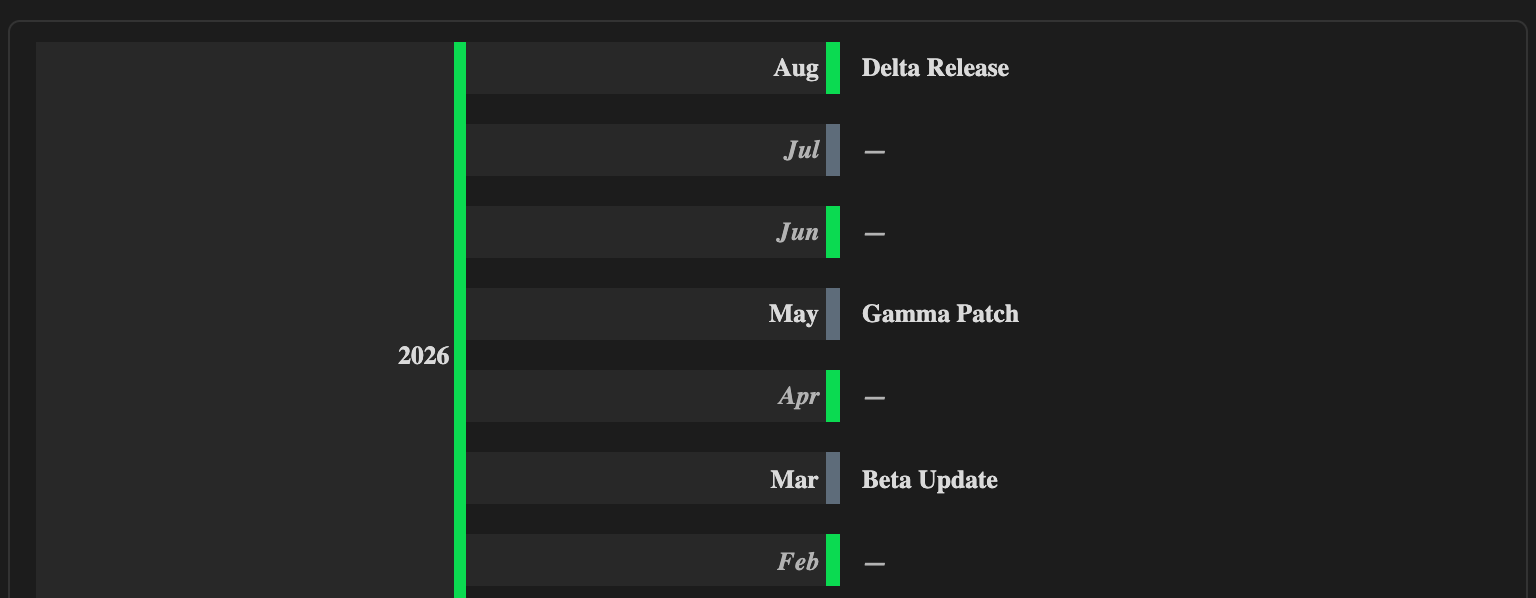
Release Timeline View month demo

Year view

Release Timeline View year demo

Quick compile and test

npm run verify

That command builds the plugin and runs a smoke test against the timeline core.

HealthExcellent
ReviewPassed
About
Render release-style timelines as a custom Obsidian Bases view with native support and no Dataview dependency. Feed timelines from a note date property (YYYY, YYYY-MM, YYYY-MM-DD), choose year/month/week modes, collapse empty periods, toggle stacked or inline layouts, alternate accents, and open notes on click with hover previews.
BasesVisualizationDates
Details
Current version
0.1.8
Last updated
3 days ago
Created
2 weeks ago
Updates
8 releases
Downloads
52
Compatible with
Obsidian 1.10.0+
Platforms
Desktop, Mobile
License
GPL-3.0
Report bugRequest featureReport plugin
Sponsor
Ko-fi
Author
Jared CherupJared Cherupjarbochov
wyomingjarbo.com
GitHubjarbochov
social.4score7pongs.com
Threadsjarbochov
Blueskywyomingjarbo.com
  1. Community
  2. Plugins
  3. Bases
  4. Release Timeline Base View

Related plugins

Maps

Adds a map layout to bases so you can display notes as an interactive map view.

Prisma Calendar

Prisma turns any note with a date into a flexible planning system inside Obsidian. There are no rigid schemas or predefined structures — just your data, your rules, fully under your control.

Yearly Glance

Year at a glance - overview of annual events with customizable management options.

Markwhen

Create timelines, gantt charts, calendars, and more using markwhen.

TTRPG Tools - Timeline

Timeline-Renderer für Calendarium-Frontmatter (fc-date/fc-end). 200×315 Bild, Callout-Stil, native Popover, mobilfreundlich.

Excalidraw

Visual PKM powerhouse. Create and edit Excalidraw drawings.

Advanced Canvas

Supercharge your canvas experience. Create presentations, flowcharts and more.

TaskNotes

Note-based task management with calendar, pomodoro and time-tracking integration.

Breadcrumbs

Visualise the hierarchy of your vault using a breadcrumb trail or matrix view.

Thino

Quickly capture memos and display them in the sidebar with a heatmap. (Closed source)
