Read Progress
 Goupl Fesim17 downloads
Renders a reading progress bar below each markdown note in the file explorer.
- Overview
- Scorecard
- Updates5
Renders a reading progress bar below each markdown note in the Obsidian file explorer.
Screenshots
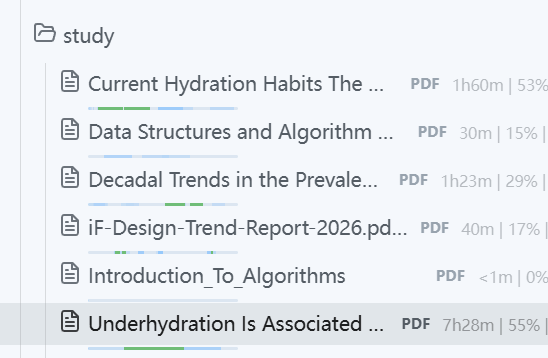
English example:
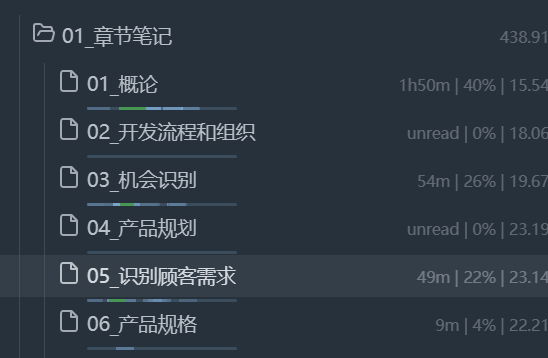
Chinese example:
Features
- Per-note progress bar: a thin bar under every
.mdand.pdfentry in the file explorer, aligned under the note title. - PDF reading support: tracks reading position and time for PDFs (continuous scroll and single-page modes), including zoom boundary handling.
- Time Counting Mode (Beta): tracks the regions you actually read instead of the cursor position. Re-read areas appear denser; quick scans stay faint. Density scales with reading time up to your goal, then turns into the complete color.
- Reading time tracking: WeChat-Read-style timer. Pauses when the window is unfocused, a modal is open, or you scroll away; caps a single region after 5 minutes of idle.
- Info display: show Read Time, Est. Time, Last Read date, or Read Progress % at the right side of each file (compatible with Novel word count).
- Progress stored in
data.json: no frontmatter changes to your notes.
Usage
- Install the plugin and enable it in Settings → Community plugins.
- Open any markdown note and scroll — a progress bar appears under the note in the file explorer.
- Enable Time Counting Mode (Beta) in the plugin settings to track real reading regions.
- Set How long do you prefer reading? (minutes) to control when a region reaches the complete color.
Settings
| Setting | Description |
|---|---|
| Time Counting Mode (Beta) | Track actually read regions with time instead of the cursor position |
| How long do you prefer reading? | Reading goal in minutes (e.g. 5 = 5min) |
| Bar width | Width of the progress bar in the file explorer (px) |
| Line width | Thickness (height) of the progress bar line (px) |
| Rounded corners | Fully rounded (pill-shaped) progress bar ends |
| Vertical offset | Distance the bar moves down from the note title (px) |
| Pending color | Fill color while reading is in progress (empty = system accent color) |
| Complete color | Fill color when the reading goal is reached (empty = green) |
| 1st / 2nd / 3rd Info Display | Extra info at the right side of each file: Read Time, Est. Time, Last Read, Read Progress (slots are exclusive) |
| Restore Markdown Position | Remember the last reading position of each note and restore it when reopening |
Notes
- System scale above 100% (e.g. 120%, 144%) affects rendering precision; avoid these scale settings for now.
- Requires Obsidian 1.5.0 or later.
HealthExcellent
ReviewSatisfactory
About
Render a thin reading progress bar under each Markdown note in the file explorer, aligned to the note title. Track real reading regions with Time Counting Mode: denser marks for re-reads, color progress toward a time goal, pause when unfocused or idle, and store progress in data.json without changing note frontmatter.Details
Current version
0.1.4
Last updated
Yesterday
Created
2 days ago
Updates
5 releases
Downloads
17
Compatible with
Obsidian 1.5.0+
Platforms
Desktop, Mobile
License
MIT