Rainbow-Colored Sidebar
 kovah19k downloads
Automatically color your sidebar like a rainbow. No configuration needed.
- Overview
- Scorecard
- Updates20
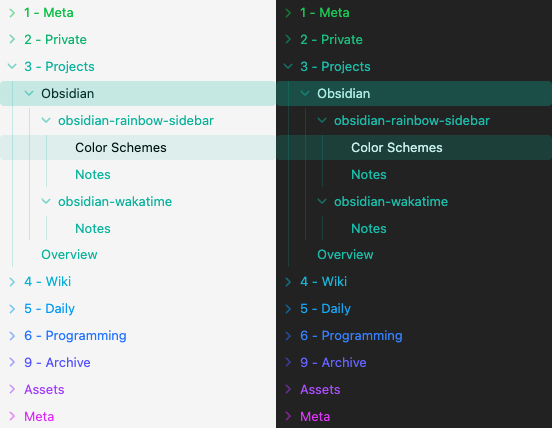
This Obsidian plugin automatically colors your sidebar based on a color scheme you select. No CSS tweaking needed. No configuration for single folders. No folder prefixes.
I built this plugin because I wasn't satisfied with the options for colored sidebars that are currently available. There is no limit in the number of folders in your sidebar, as the color theme repeats infinitely.
[!IMPORTANT] This plugin automatically colors your sidebar based on the folder list sorted from A-Z. The ordering of folders in your file manager cannot be taken into account, so it's possible that some colors might end up mixed.
Features
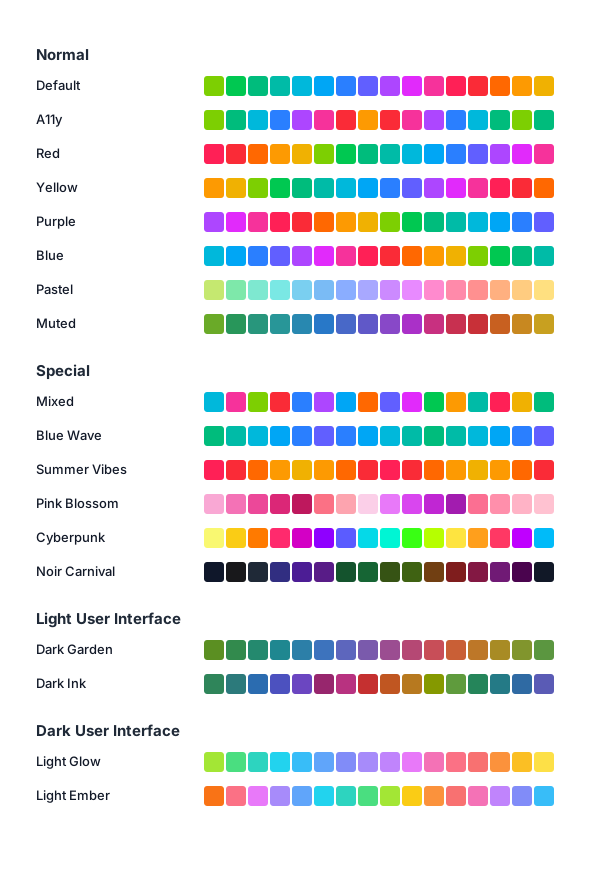
- 18 Color Themes compatible with both the dark and light mode of Obsidian.
- Normal schemes for general use, including Default, A11y, Pastel, and Muted.
- Special schemes with stronger visual themes, including Blue Wave, Summer Vibes, Pink Blossom, Cyberpunk, Noir Carnival, and Mixed.
- Light user interface schemes with darker colors for lighter Obsidian themes.
- Dark user interface schemes with brighter colors for darker Obsidian themes.
- Automatic coloring of sub-folders and files, with an indicator for active files.
- Additional option to toggle an accessibility mode which increases the color contrast.
- Option to restart the coloring for subfolders so larger structures may get their own styling.
Available Themes
Installation
From Community Plugins
- Open Obsidian or the Plugin Marketplace
- Go to
Settings>Community plugins. - Click on
Browseand search forRainbow-Colored Sidebar. - Click
Installand thenEnable.
From Release Download
- Download the latest release from the GitHub releases page.
- Extract the downloaded zip file.
- Copy the extracted folder to your Obsidian plugins directory:
/.obsidian/plugins/. - Open Obsidian and go to
Settings>Community plugins. Click the reload icon. - Find
Rainbow-Colored Sidebarand clickEnable.
Configuration
- Open Obsidian.
- Go to
Settings>Rainbow-Colored Sidebar.
Base Settings
- Select the Color Scheme: Choose your theme. Done. Nothing else is needed.
Accessibility Settings
- Increase Contrast: Increases the color contrast if enabled for better readability.
Enable Independent Color Scheme for Specific Folders
This restarts the color scheme for selected sub folders to distinguish them from top level folders
- Select folders: Select a folder from your Vault to restart the color scheme for that folder.
Contributing
Contributions are welcome. If you want to add a new theme or feature, please read the contribution guide before opening a pull request.
This project is inspired by the Colored Sidebar CSS Snipped.
❤️ Support my work via Patreon, Github Sponsors or Liberapay.