Search...Search plugins and themes...
⌘K
Sign in
  • Get started
  • Download
  • Pricing
  • Enterprise
  • Account
  • Obsidian
  • Overview
  • Sync
  • Publish
  • Canvas
  • Mobile
  • Web Clipper
  • CLI
  • Learn
  • Help
  • Developers
  • Changelog
  • About
  • Roadmap
  • Blog
  • Resources
  • System status
  • License overview
  • Terms of service
  • Privacy policy
  • Security
  • Community
  • Plugins
  • Themes
  • Discord
  • Forum / 中文论坛
  • Merch store
  • Brand guidelines
Follow us
DiscordTwitterBlueskyThreadsMastodonYouTubeGitHub
© 2026 Obsidian

Quick Expense

Tang MoTang Mo33 downloads

Log an expense in seconds: type what and how much, tap a category, done. Your location carries over, and each expense is a plain note you can sum with Bases.

Add to Obsidian
  • Overview
  • Scorecard
  • Updates3

Log an expense in seconds. Type what you bought and how much, tap a category, done.
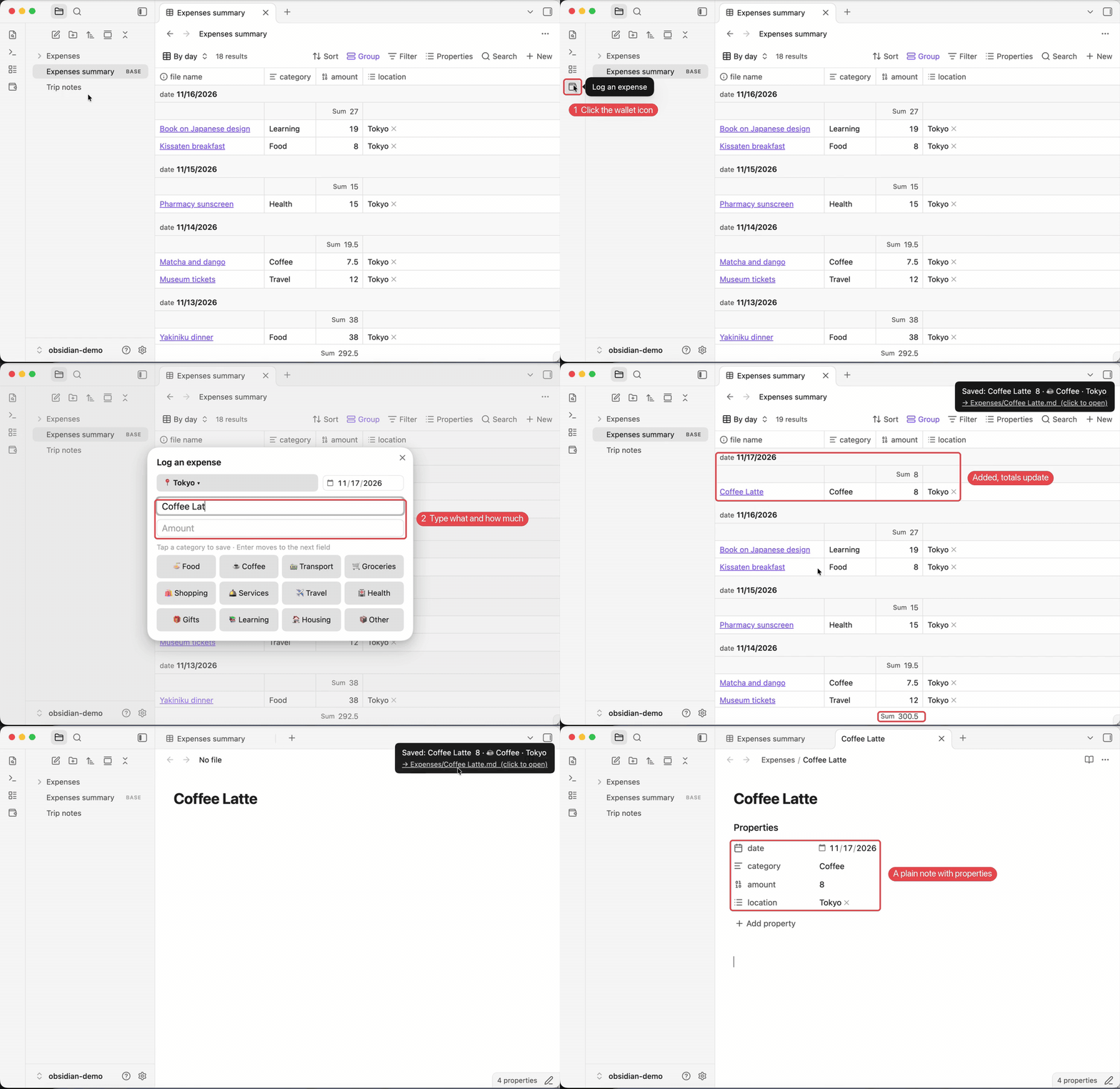
中文说明

Log an expense: click the wallet icon, type what and how much, tap a category

How to use

  1. Click the wallet icon in the left sidebar (or run Log an expense).
  2. Type what you bought, press Enter, type the amount.
  3. Tap a category. Saved.

What you get

  • Every expense is a note in the Expenses folder, with date, category, amount and location.
  • Totals by day and month. Click Summary table in settings to create a table that adds everything up.
  • Location carries over. Log a week of trip expenses without retyping the city. Tap 📍 to change it.
  • Your categories. Edit the list in settings. The ones you use most come first.

Want it to fit notes you already have? You can change the folder and property names in settings.

License

MIT


中文说明

几秒记一笔账。 写买了什么、多少钱,点一下类别就存好。

  1. 点左边栏的钱包图标(或命令「记一笔」)。
  2. 写买了什么,回车,填金额。
  3. 点类别,存好。
  • 每笔都是一篇笔记,在 消费 文件夹里,带日期、类别、金额、地点。
  • 按天、按月自动合计:设置里点「汇总表」,生成一个自动求和的表格。
  • 地点自动沿用:旅行时在一个城市连着记,不用每次填。点 📍 可以换。
  • 类别自己定:在设置里改,常用的排前面。

想和已有的记账笔记保持一致?文件夹和属性名都能在设置里改。

HealthExcellent
ReviewPassed
About
Log expenses in seconds by typing what you bought and the amount, then tap a category to save. Save each expense as a plain Markdown note with date/category/amount/location frontmatter, carry over the last location across entries, and total expenses with Dataview or Bases.
FinanceProperties
Details
Current version
1.0.2
Last updated
Last week
Created
2 weeks ago
Updates
3 releases
Downloads
33
Compatible with
Obsidian 1.8.7+
Platforms
Desktop, Mobile
License
MIT
Report bugRequest featureReport plugin
Sponsor
Buy Me a Coffee
Author
Tang MoTang Motangmo
GitHubmoboku
Xmologic
Threadstangmo_think
mtang25
  1. Community
  2. Plugins
  3. Finance
  4. Quick Expense

Related plugins

Advanced Canvas

Supercharge your canvas experience. Create presentations, flowcharts and more.

Meta Bind

Make your notes interactive with inline input fields, metadata displays, and buttons.

Force note view mode

Force the view mode for a note by using frontmatter: YAML block with 'obsidian_ui_mode' as key.

Update modified date

Automatically update a frontmatter modified date field when the file is modified.

MetaEdit

Manage your metadata.

Featured Image

Automatically set a featured image property in your notes based on the first image.

Base Board

Organize notes into Kanban boards using frontmatter properties. Drag and drop cards between columns powered by Bases.

Multi Properties

Add properties to multiple notes at once. Either right-click a folder or select multiple notes and right-click the selection.

Journalit

Trading journal with analytics, prop-firm tracking, broker imports and sync, trade reviews, and custom trading workflows.

Front Matter Title

Define a title in frontmatter to be displayed as the filename.