Quick Ask
 frank-smith30 downloads
Ask AI about selected Markdown text and files, with local conversation history and explicit context control.
- Overview
- Scorecard
- Updates4
English · 简体中文
Repository · Releases · Changelog
Ask AI about Markdown text and files you explicitly choose, directly in an Obsidian sidebar. Keep conversation history locally and control what becomes context for each conversation.
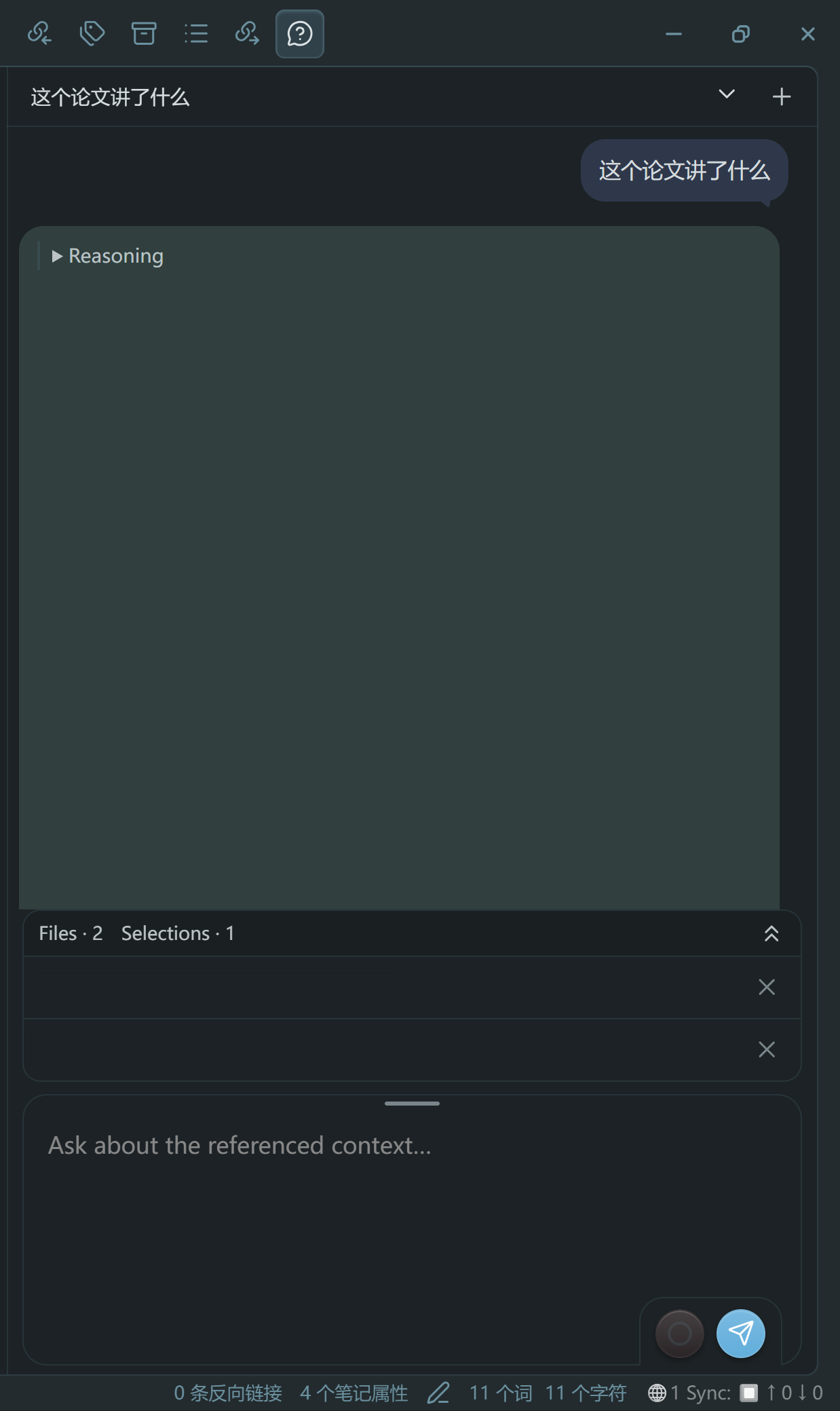
Why Quick Ask
- Lightweight. One focused sidebar plugin: about 1.3 MiB installed (≈306 KiB gzipped), no plugin telemetry and no developer-operated backend. It runs no background timers or polling, downloads nothing at runtime, and contacts your provider only when you submit. Conversations are plain append-only JSONL files under the plugin folder — a new session starts under 1 KB and grows with the full text you track — and never leave your Vault.
- Ask and answer immediately. Open the sidebar, type a question and submit it; selected text and referenced files are staged and sent in a single step.
- Comfortable drag and drop. Drag a text selection or a file from the file explorer straight into the composer, and remove any staged reference before sending.
- Refined interface. Native Obsidian controls with theme-aware bubbles, readable reasoning, and a configurable display style (assistant tint, font size and paragraph spacing).
- Token-efficient context. You decide what enters a conversation; tracked files send only their changed text and long conversations compact automatically, so each request stays small.
Installation
Quick Ask is available in the Obsidian community plugin directory. Installing it from there is recommended:
- Open Settings → Community plugins → Browse.
- Search for Quick Ask and select Install.
- Enable Quick Ask, open its settings and configure your provider before submitting a question.
You can also install it manually from GitHub Releases:
- Download
main.js,manifest.jsonandstyles.cssfrom Releases. - Create
.obsidian/plugins/quick-ask/inside your Vault (use your Vault's actual configuration directory if customized). - Copy the three files into that directory and enable Quick Ask in Settings → Community plugins.
- Open Quick Ask settings and configure your provider before submitting a question.
Configuration and use
Requires Obsidian 1.13.7+ on desktop. Mobile is not supported. Settings use Obsidian's 1.13 declarative settings and named secret storage.
Configure a request protocol, Base URL, model, and named API secret. Choose Responses (default) or Chat Completions explicitly to match your service. For OpenAI, an example Base URL is https://api.openai.com/v1; do not append /responses or /chat/completions. Protocol changes apply to new sessions only; existing sessions keep their protocol and the plugin never auto-switches after errors. No model or API access is included with the plugin.
Chat Completions uses local conversation replay and model-generated structured summaries for compaction. Server-side search is unavailable for that protocol; select DuckDuckGo or a configured independent search API instead.
Use the plain effort label inside the Composer to cycle Off / Low / High / XHigh / Max, or use the command palette's Quick Ask reasoning-effort command. High is the default. Changes apply to the next question; the provider decides which requested levels it supports. Readable Chat Completions reasoning is shown when returned by the API.
New file context and full-file tool results include physical line numbers for citations. Source notes remain unchanged. Search/effort clicks stay in memory until a question starts, so unsent choices are not retained across plugin restart.
Select Markdown text or add a Markdown file as context, type a question and submit it. The model may request the complete contents of files already included in that conversation. It cannot search arbitrary files or edit your notes. PDF/image input is not supported in this release. Interface language supports English and Simplified Chinese, with some remaining English interface text.
Accounts, costs and network use
The plugin itself is free and requires no Quick Ask account. Your selected AI provider may require an account, API key or paid credits; its API usage and pricing apply separately. An AI chat subscription does not necessarily include API access.
Quick Ask connects to the Base URL you configure, such as OpenAI or another service compatible with the selected protocol. It sends prompts, selected text, referenced file content and conversation context to generate answers and support token counting/compaction. During an active request, follow-up model/tool calls may send updated or complete contents of previously added files. Recovery or deletion of older provider-stored responses can also contact that configured service. Merely opening/enabling the sidebar does not submit note content.
No plugin telemetry, analytics, ads or separate developer-operated backend is included. The provider's own retention and privacy policies apply to data sent to it. Review your chosen provider's policies before using sensitive notes. The plugin does not install/update itself or download executable dependencies at runtime.
Local data and privacy
- Preferences and a secret reference, not the API key value, are saved in the plugin's
data.json. Key values are resolved from Obsidian's secret storage. - Conversations and included context are stored as readable files under the plugin directory's
quick-ask/subdirectory. Local history is not encrypted by this plugin. - Optional preserved copies write plaintext backups to a Vault folder you choose. Clipboard export/import contains conversation content; secret values are excluded.
- The plugin accesses files in the current Vault and its own plugin-data directory; it does not read files outside the Vault. Vault sync/backup tools may copy these files according to their own configuration.
Development
Clone this repository to develop or try changes locally:
npm ci
npm run build
npm test
npm run check
For bugs, questions or feature requests, open an issue. Filing an issue is preferred: describe the behavior and how to reproduce it before proposing code changes.
License
Copyright 2026 FRANK-SMITH. Quick Ask is licensed under Apache License 2.0; see NOTICE. Bundled dependencies retain their original MIT/BSD licenses, reproduced in main.js and THIRD_PARTY_NOTICES.md.