
- Overview
- Scorecard
- Updates2
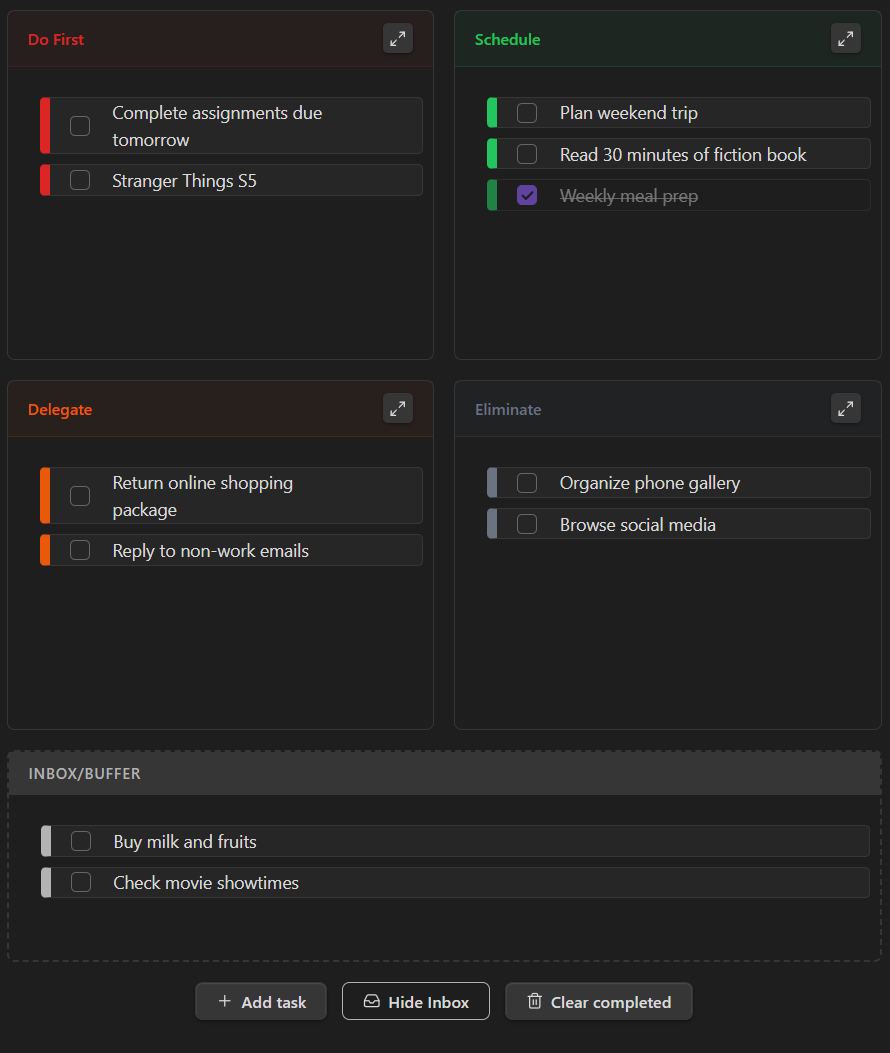
A visual task management plugin for Obsidian based on the Eisenhower Matrix.
QuadTasks helps you prioritize your workload by categorizing tasks into four distinct quadrants based on urgency and importance. Unlike standard to-do lists, QuadTasks forces you to make decisions about what truly matters, helping you focus on execution rather than just collection.
Key Features
- Interactive Matrix: A fully interactive 2x2 grid representing the Eisenhower Matrix (Do First, Schedule, Delegate, Eliminate).
- Drag & Drop: Seamlessly move tasks between quadrants or reorder them within lists using native drag-and-drop.
- Integrated Inbox: A toggleable "Inbox" buffer to capture tasks quickly ("Decide later") without breaking your flow.
- Focus Mode: Zoom into a single quadrant to eliminate distractions and focus on specific priority groups.
- Markdown Native: Tasks are stored as plain text within your notes. Supports standard Obsidian syntax including
[[wikilinks]],#tags, and formatting. - Smart State: Remembers your view preferences (Inbox visibility, Focus mode) per file.
Usage
1. Creating a Matrix
To add a matrix to any note, insert a code block using the eisenhower, eisen, or todoeh alias:
```eisenhower
```
2. Adding Tasks
You can add tasks using the "Add task" button in the UI, or by manually typing them inside the code block.
Manual Syntax: The plugin uses a specific format to track quadrants. You generally don't need to type this manually, but it is useful for bulk editing:
- [ ] (urgent-important) Finish Report
- [ ] (not-urgent-important) Schedule dentist appointment
- [ ] (urgent-not-important) Reply to incidental emails
- [ ] (not-urgent-not-important) Scroll social media
- [ ] (buffer) Buy groceries
3. The Quadrants
- Do First (Urgent & Important): Crises, deadlines, and immediate problems.
- Schedule (Not Urgent & Important): Strategic planning, and long-term goals.
- Delegate (Urgent & Not Important): Interruptions, some meetings, and proximate pressing matters.
- Eliminate (Not Urgent & Not Important): Time wasters and trivial activities.
Installation
Note: QuadTasks is not yet listed in the Obsidian Community Plugins directory.
You will need to install it manually until it becomes available there.
Manual Installation
- Download the latest release from the GitHub Releases page.
- Extract the files (
main.js,manifest.json,styles.css) into your vault folder:.obsidian/plugins/quadtasks/. - Reload Obsidian.
Development
If you want to customize or contribute to QuadTasks:
- Clone the repository.
- Run
npm install. - Run
npm run devto start the compiler in watch mode.
About Siran
QuadTasks is built by Siran.
We create tools that support organization and focus, helping you manage your digital workflow more effectively.
Siran includes a growing set of open-source and premium tools designed to improve everyday productivity.
Learn more at siran.app.
License: MIT