Quick Review
 Bitcoming133 downloads
Multi-agent review and polish plugin for Obsidian notes.
- Overview
- Scorecard
- Updates3
QuickReview
QuickReview is a multi-agent review and polishing plugin for notes. It helps you inspect facts, improve wording, expand ideas, and optionally write a polished version back into the editor.
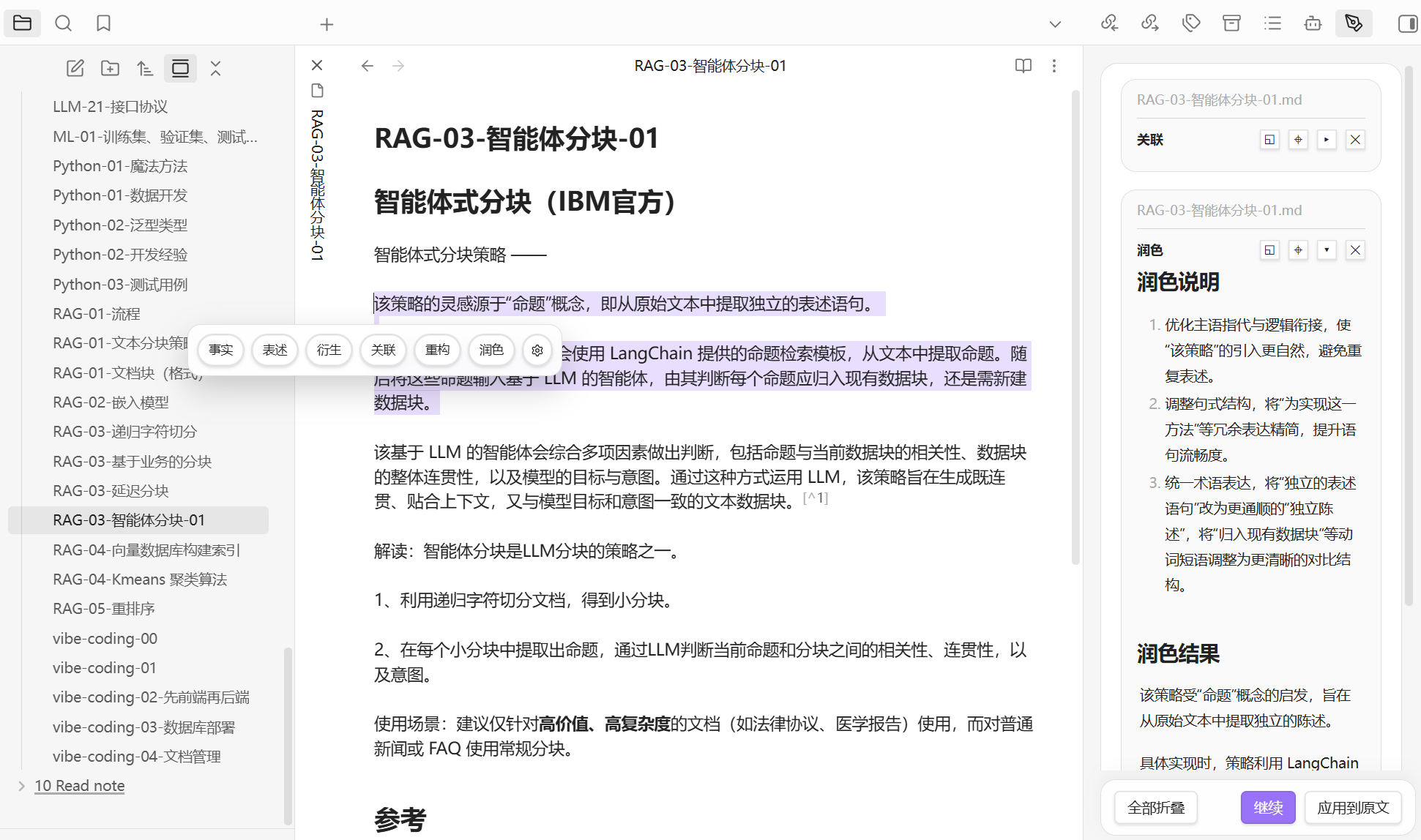
It is useful when you want to:
- review a newly written note for factual, logical, or wording issues
- inspect only the selected text without touching the whole note
- gather feedback from multiple agent roles with different focuses
- polish the current selection and replace it in place
- continue asking follow-up questions based on the review results
Features
- Multi-agent review
- Built-in agents for factual review, wording, expansion, connection, restructuring, and polishing
- Run a single agent or a combined review
- Selection and full-note modes
- Review only the selected text
- Review the entire active note
- One-click polish
- Rewrite the selected text conservatively
- Apply the polished result directly back to the editor
- Follow-up chat
- Review results open in a dedicated view
- Continue the discussion with follow-up questions
- Configurable agents
- Customize each agent's
id,label,title,systemRole, andfocus - Add, remove, or restore built-in agents
- Customize each agent's
- Configurable tools
current-date: returns the current local date, weekday, timezone, and UTC offsetweb-search: searches for recent public information on the web
- Configurable context menu
- Show or hide action buttons
- Reorder them with drag and drop
- Multiple API styles
OpenAI-compatibleAnthropic Messages
Default agents
The plugin includes these roles by default:
Facts: checks factual errors, concept confusion, timeline issues, and weak evidenceWording: checks clarity, structure, readability, and logical flowExpansion: suggests topics, context, and examples worth addingConnection: adds frameworks, classic concepts, study paths, and authoritative viewpointsRestructure: distills the core point, reorganizes structure, and compresses redundancyPolish: improves language without changing the original meaning
Installation
This plugin is currently intended for manual installation.
- Open your vault folder.
- Go to
.obsidian/plugins/. - Create or open a folder named
quick_review. - Copy these files into that folder:
manifest.jsonmain.jsstyles.css
- Enable
QuickReviewfrom the community plugins settings.
Configuration
After enabling the plugin, open Settings -> QuickReview.
1. LLM API settings
Required:
API typeOpenAI-compatibleAnthropic Messages
API URLAPI KeyModel name
Optional:
TemperatureMax output tokensCustom headersOutput language
Notes:
- Settings are saved in the plugin's
data.json API URLshould be the full endpoint URLCustom headersmust be valid JSON
2. Tavily API settings
To let some agents search recent information, configure:
Tavily API KeyTavily API URLSearch result count
Notes:
- If no
Tavily API Keyis provided, the plugin attempts Tavily keyless mode - Web search is most useful for fact checking, recent events, changing rules, and date-sensitive content
3. Agent settings
In the Agent settings tab you can:
- add an agent
- delete an agent
- restore built-in agents
- change display names and role instructions
- attach tools to an agent
Each agent supports:
id: unique identifier, preferably kebab-case Englishlabel: short display label for buttons and commandstitle: title shown in the result viewtools: enabled tool listsystemRole: system role promptfocus: review focus
4. Context menu
In the Context menu tab you can:
- control which buttons appear in the selection toolbar
- drag to reorder buttons
Usage
Review selected text
- Select text in the editor.
- Click the QuickReview action button.
- Choose an agent,
Combined review, orPolish. - Read the result in the review pane.
Run from the command palette
The plugin registers commands for each agent, including:
Review selectionReview full noteCombined review: selectionCombined review: full notePolish selection
Ask follow-up questions
In the result view you can:
- click
Follow up - enter another question
- continue in a dedicated chat view
Apply polished text
After running Polish, click Apply to original to replace the current selection with the generated version.
Result view
QuickReview shows results in a dedicated pane and supports:
- multiple results in sequence
- collapse or expand individual items
- collapse all or expand all
- delete a result
- jump back to the original selection
Tools
current-date
Returns local date information including:
- ISO date
- year, month, and day
- weekday
- timezone
- UTC offset
Useful for:
- interpreting relative dates such as today, yesterday, tomorrow, or this week
- checking logs, journals, reports, and retrospectives
web-search
Uses Tavily to search recent public information and returns:
- summaries
- source links
- result snippets
Useful for:
- checking whether recent information is accurate
- cross-verifying facts, rules, dates, news, and public references
Recommendations
For more reliable results:
- use
Factswithcurrent-dateorweb-search - use
WordingorRestructurefor medium or long notes - use
ExpansionorConnectionto extend study or research notes - use
Polishas a final language pass, not as a fact-checking tool
Development
Install dependencies
npm install
Build
npm run build
Test
npm test
Verify
npm run verify
Project structure
src/
  core/        core actions, prompts, and agent definitions
  llm/         model requests, streaming responses, tool calls
  services/    review flow, editor context, view coordination
  settings/    settings tab and agent configuration UI
  views/       result views and follow-up chat views
test/          unit tests
Known limitations
- This is currently a desktop-only plugin and
manifest.jsonsetsisDesktopOnly: true - Web search depends on Tavily availability
- Review quality depends heavily on your configured model and prompts
- Reviewing long full-note content increases token usage and response time
License
This repository includes an MIT license in LICENSE.