Search...Search plugins and themes...
⌘K
Sign in
  • Get started
  • Download
  • Pricing
  • Enterprise
  • Account
  • Obsidian
  • Overview
  • Sync
  • Publish
  • Canvas
  • Mobile
  • Web Clipper
  • CLI
  • Learn
  • Help
  • Developers
  • Changelog
  • About
  • Roadmap
  • Blog
  • Resources
  • System status
  • License overview
  • Terms of service
  • Privacy policy
  • Security
  • Community
  • Plugins
  • Themes
  • Discord
  • Forum / 中文论坛
  • Merch store
  • Brand guidelines
Follow us
DiscordTwitterBlueskyThreadsMastodonYouTubeGitHub
© 2026 Obsidian

pycalc

pycalc-pluginpycalc-plugin1k downloads

Executing Python code directly within the editor by pressing the Enter key.

Add to Obsidian
  • Overview
  • Scorecard
  • Updates1

The pycalc plugin enables the execution of Python code directly within the editor upon pressing the Enter key.

Based on Brython 3.13.
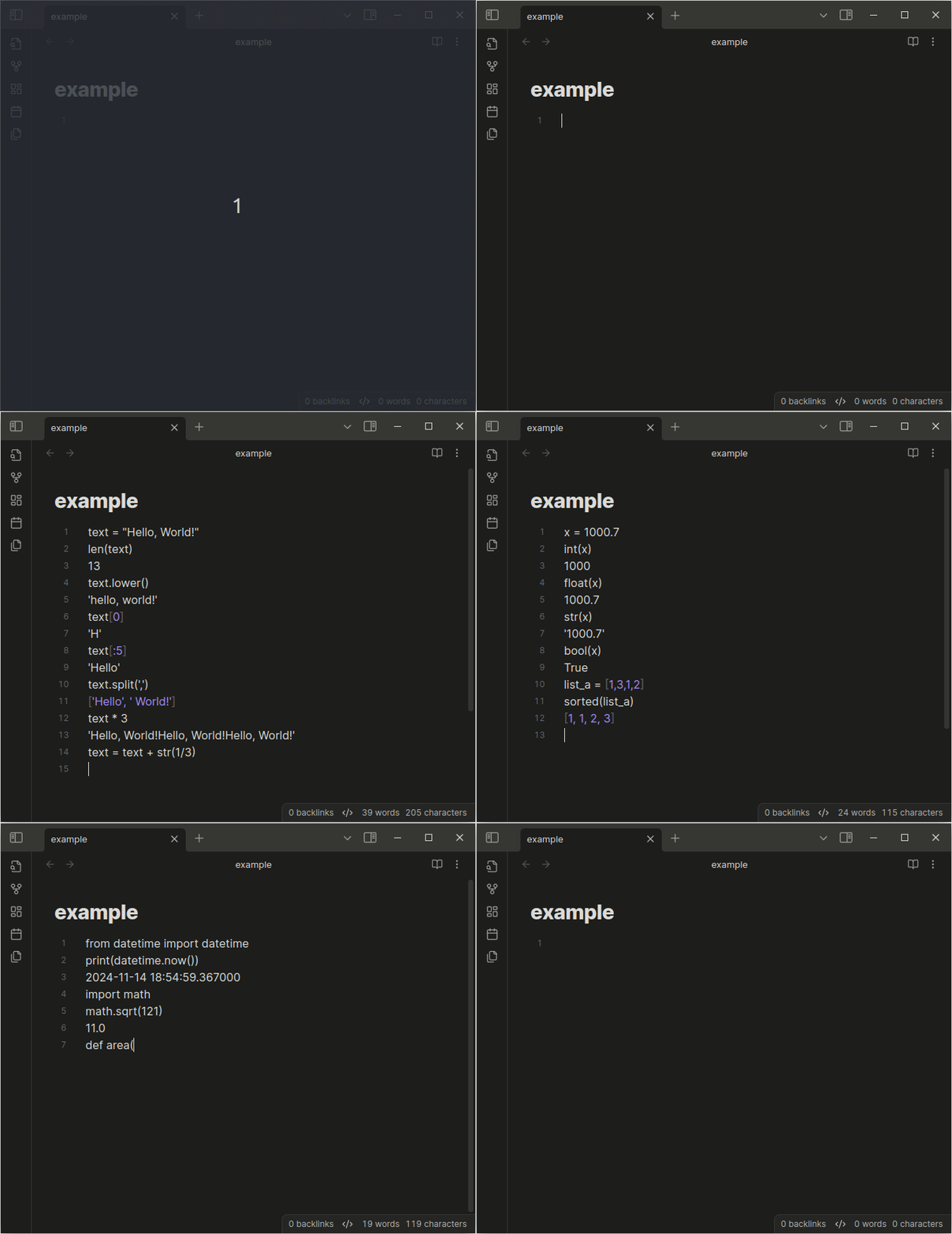
screenshot

71%
HealthGood
ReviewCaution
About
Execute Python code inline in the editor by pressing Enter. Run Brython 3.13-powered Python directly in your notes for quick calculations and simple scripting.
CodeLanguagesEditing
Details
Current version
1.0.0
Last updated
Last year
Created
2 years ago
Updates
1 release
Downloads
1k
Compatible with
Obsidian 0.15.0+
Platforms
Desktop, Mobile
License
Apache-2.0
Report bugRequest featureReport plugin
Author
pycalc-pluginpycalc-plugin
github.com/pycalc-plugin
GitHubpycalc-plugin
  1. Community
  2. Plugins
  3. Code
  4. pycalc

Related plugins

Simplified Chinese Word Splitting

Adds Simplified Chinese word splitting support for the editor and Vim mode.

Easy Typing

Auto format when typing.

LanguageTool

Unofficial integration of the LanguageTool spell and grammar checker.

VSCode Editor

Edit Code Files like VSCode.

Code Space

Professional code file management with visual dashboard, syntax highlighting editor, and Markdown embedding.

Advanced Tables

Improved table navigation, formatting, and manipulation.

Templater

Create and use dynamic templates.

Meta Bind

Make your notes interactive with inline input fields, metadata displays, and buttons.

Outliner

Work with your lists like in Workflowy or Roam Research.

Mermaid Tools

Improved Mermaid.js experience: visual toolbar with common elements and more.