Search...Search plugins and themes...
⌘K
Sign in
  • Get started
  • Download
  • Pricing
  • Enterprise
  • Account
  • Obsidian
  • Overview
  • Sync
  • Publish
  • Canvas
  • Mobile
  • Web Clipper
  • CLI
  • Learn
  • Help
  • Developers
  • Changelog
  • About
  • Roadmap
  • Blog
  • Resources
  • System status
  • License overview
  • Terms of service
  • Privacy policy
  • Security
  • Community
  • Plugins
  • Themes
  • Discord
  • Forum / 中文论坛
  • Merch store
  • Brand guidelines
Follow us
DiscordTwitterBlueskyThreadsMastodonYouTubeGitHub
© 2026 Obsidian

PropMove

SHU-redSHU-red664 downloads

Move notes based on a frontmatter property value.

Add to Obsidian
  • Overview
  • Scorecard
  • Updates10

Automatically move notes based on frontmatter properties. It just works.

💡 Built with AI — This plugin is developed and maintained via AI agents. I use AI as my primary tool for implementation, issue handling, and maintenance. You are free to choose whether to use this plugin based on that.

Flexible mapping based on property values

Simple. Manually map specific values:
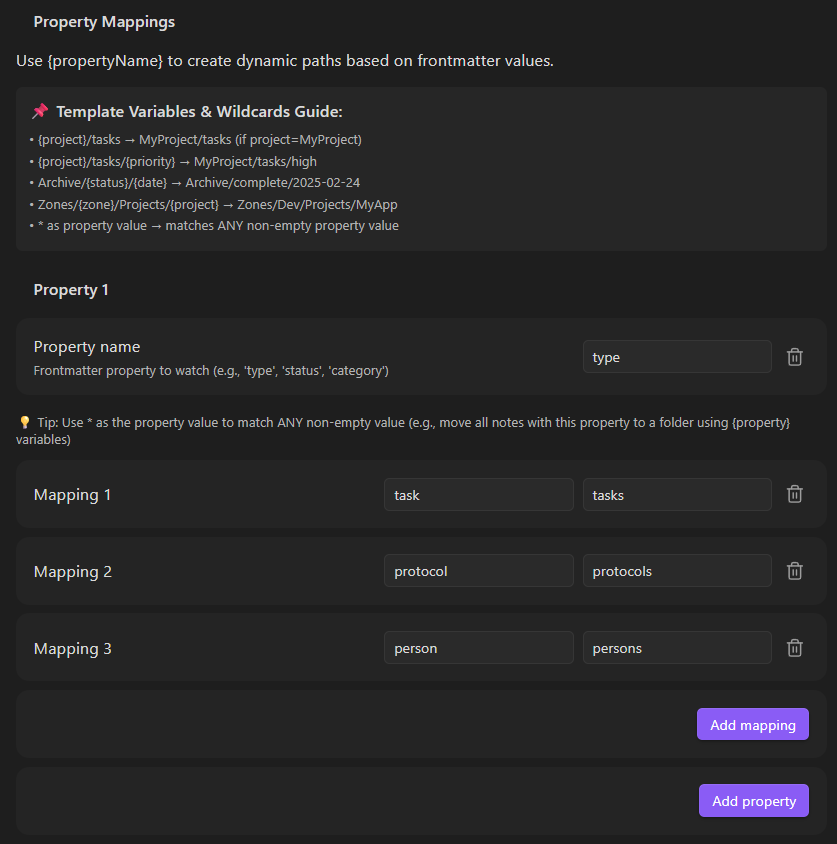
PropMove Settings

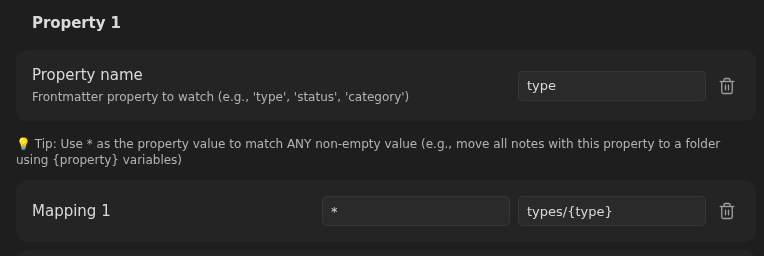
Variable. Use wildcards to let the extension create folders based on whatever value your property has:

PropMove Settings

Features

  • Auto-move on create/update: Watches frontmatter changes and moves notes automatically
  • Multiple property mappings: Define value-to-folder rules per property
  • Smart conflict handling: Appends unique suffixes (note 1.md, note 2.md) when targets exist
  • Ignore folders: Protect template folders by excluding them from processing
  • Auto folder creation: Creates missing target directories automatically
  • Wiki-link stripping: [[Project]] in property values resolves to clean folder names (Project)

Installation

cd /path/to/your/vault/.obsidian/plugins/
git clone https://github.com/SHU-red/propmove.git

Enable in Obsidian Settings → Community plugins

Configuration

Property Mappings

Set up properties with value-to-folder rules:

Property: type
  • task → Tasks
  • protocol → Protocols
  • daily → Daily

Property: status
  • draft → Inbox/Drafts
  • final → Archive

Ignore Folders

Prevent files in specific folders from being moved (useful for templates):

Ignore Folders:
  • templates
  • _archive
  • drafts/work-in-progress

How It Works

  1. When a note is created or frontmatter changes, PropMove checks its properties
  2. If the note is in an ignored folder, it's skipped
  3. First matching property mapping determines the target folder
  4. If target file exists, a numeric suffix is appended (configurable)
  5. Note is moved to destination; folders created if needed

Settings

Setting Default Description
Auto-append suffix ON Append numbers to avoid conflicts
Ignore Folders — Folders to exclude from processing
Properties — Property name + value→folder mappings

License

MIT

93%
HealthExcellent
ReviewPassed
About
Move notes automatically based on frontmatter properties and value→folder mappings. Watch for creations and frontmatter updates, create missing target folders, skip ignored folders, and append numeric suffixes when naming conflicts occur.
FilesFoldersProperties
Details
Current version
1.9.1
Last updated
Yesterday
Created
3 months ago
Updates
10 releases
Downloads
664
Compatible with
Obsidian 1.5.0+
Platforms
Desktop, Mobile
License
MIT
Report bugRequest featureReport plugin
Sponsor
Support
Buy Me a Coffee
Author
SHU-redSHU-redshu-red
github.com/SHU-red
GitHubshu-red
  1. Community
  2. Plugins
  3. Files
  4. PropMove

Related plugins

Multi Properties

Add properties to multiple notes at once. Either right-click a folder or select multiple notes and right-click the selection.

Flexplorer

Enhance the file explorer with custom sorting, pinning, and hiding.

Custom File Explorer sorting

Manual or automatic config-driven reordering and sorting of files and folders in File Explorer.

File Explorer Note Count

See the number of notes in each folder within the file explorer.

Create Note in Folder

Add commands to create a note in a specific folder.

File Tree Alternative

An alternative file tree view with separate folder and file panes.

Quick Explorer

Perform file explorer operations (and see your current file path) from the title bar, using the mouse or keyboard.

Trash Explorer

Restore and delete files from the Obsidian .trash folder.

File Explorer++

Hide and pin files and folders in the file explorer using custom filters.

Auto Note Mover

Automatically move the active notes to their respective folders according to rules you set.