Property Suggester Enhanced
 eternalsoap56 downloads
Enhance the obsidian property suggestions through the use of custom rules. With some additional styling options.
- Overview
- Scorecard
- Updates1
Autocomplete Properties Enhanced improves the native obsidian suggester for frontmatter properties with a custom 'strategy builder'. Define custom rules for what values a property may take. Additionally apply custom icons to properties.
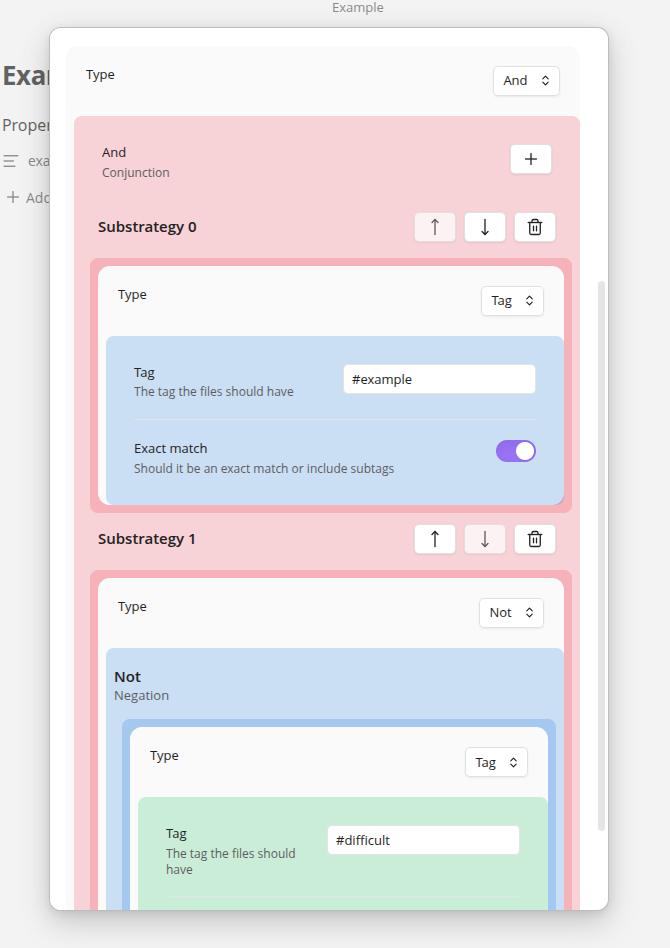
Strategy Builder
With the strategy builder you can build complex queries to select which values a property may contain. The following strategy types are defined:
- Tag: Match all files that include the tag.
- List: Define a list of values with custom color options
- Folder: Match all files in a folder
- Negation (Not): Invert the nested strategy
- Conjunction (And): Include only options that match all nested strategies
- Disjunction (Or): A union of the nested strategies
- Code: Execute user scripts, needs to be enabled in plugin settings.
Code
You can write custom scripts which returns options. It should return an array of TFile, string or {label:string, value:string}
The script will be wrapped in an async function. The signature is as follows:
declare type SuggestionValue = string | TFile | {value : string, label: string, color? : HexString}
declare async function fun(app : App, ctx : Context) : SuggestionValue[]
Limitations
In order for a strategy to be valid it needs to be able to produce some value. Therefore, there are a few limitations to when a strategy is valid. There will be a visual indication on when a target is valid. In short, If negations are only part of a conjunction then a query is valid .
Negations
- Negation of list: A negation of a list cannot be queried and is only allowed to be used inside a conjunction to filter the results
- Negation of code: A negation of code cannot be queried and is not allowed, if you need more complex logic use a pure code strategy instead.
- Negation of conjunction : A negation of conjunction (and) cannot be queried, it can be used inside another conjunction to filter the results
- Negation of disjunction : A negation of a disjunction cannot be queried, it can be used to ,
Disjunctions
All the strategies inside the disjunction should produce a value individually, unless the disjunction is part of a conjunction which will then be used.