Property Order
 ZhengYX2k downloads
Reorder property values and customize property key suggestion order in Obsidian.
- Overview
- Scorecard
- Updates22
English · 简体中文 · 繁體中文 · 日本語 · 한국어 · Deutsch · Français · Español · Português (Brasil) · Русский · Tiếng Việt · العربية
Control property suggestions and list values in Obsidian Properties.
- Property name suggestions: pin, hide, group, and sort names such as
statusandownerwhen adding a property. - Property value suggestions: choose how values are suggested for each property, including presets such as
todo,doing, anddone. - List value ordering: reorder list items or move them between supported properties in the same note, by dragging or using the command palette.
These are independent features. Property Order manages suggestion menus and list values; it does not rearrange the property fields themselves in a note. Requires Obsidian 1.12.7 or later, on desktop or mobile.
Property name suggestions
Make the property names you use easier to find in Obsidian's native Add property suggestions.
- Open Settings → Property Order → Key suggestions.
- Pin frequently used names, place occasional names at the bottom, and hide unwanted names with exact names or wildcard rules.
- Choose Name, Recently used, or Note count sorting. Optional property-type grouping groups normal candidates by Obsidian type while keeping pinned names first and bottom names last.
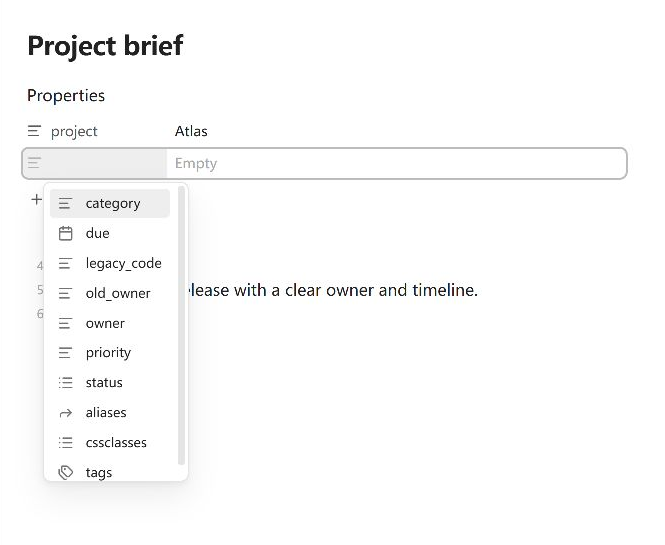
For example, pin status and owner, then hide legacy_code. Open Add property in a note to see the result. These rules organize the names Obsidian already offers; pinning a name does not create a new candidate or move a field in the note.
Native suggestions, before applying these rules:
The same suggestions with frequently used names pinned and an unwanted name hidden:
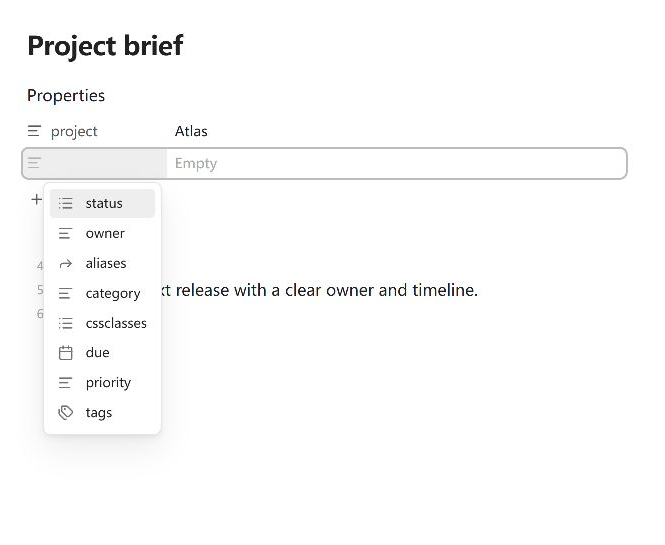
Recently used means the order of confirmed additions, not hovering or browsing. Name and Recently used sorting do not scan the Vault. Note count sorts by the number of Markdown notes containing each property, using cached metadata.
Property value suggestions
Control the values offered after you select a property, such as todo and done for status. This feature is off by default and is independent of property-name suggestions.
- Open Settings → Property Order → Value suggestions and turn on Customize property value suggestions.
- Set a default behavior for unassigned properties, or assign an exact property name to Native, Name, Selection frequency, Note count, No suggestions, or Custom candidates.
- For a reusable
statuslist, add a Custom candidates rule card, addstatus, then entertodo,doing, anddoneusing Add preset candidate.
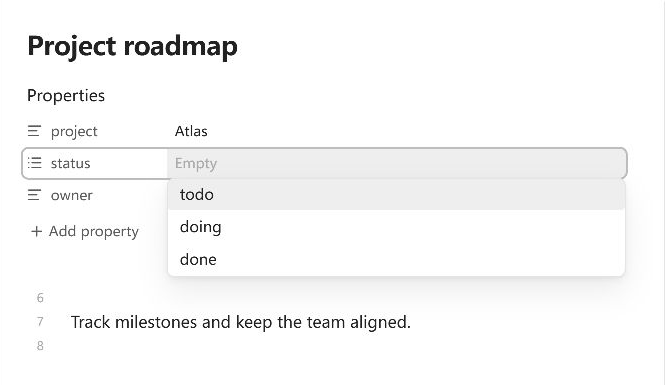
Custom candidates have Pinned, Normal, and Bottom sections. Explicit presets stay available even before any note uses them, and are filtered by what you type. ↔ (Move to normal) removes a preset's fixed position while keeping it available; removing a preset from settings does not delete note content.
Selection frequency counts choices only after Obsidian confirms the value was written. Note count measures Markdown notes containing the value, not how often you chose it. No suggestions keeps manual typing available. Changing suggestion rules alone does not edit notes.
List value ordering
Reorder supported top-level YAML text-list values directly in Properties, or move a value to another list property in the same note. Cross-property dragging is enabled by default and can be disabled in Value order.
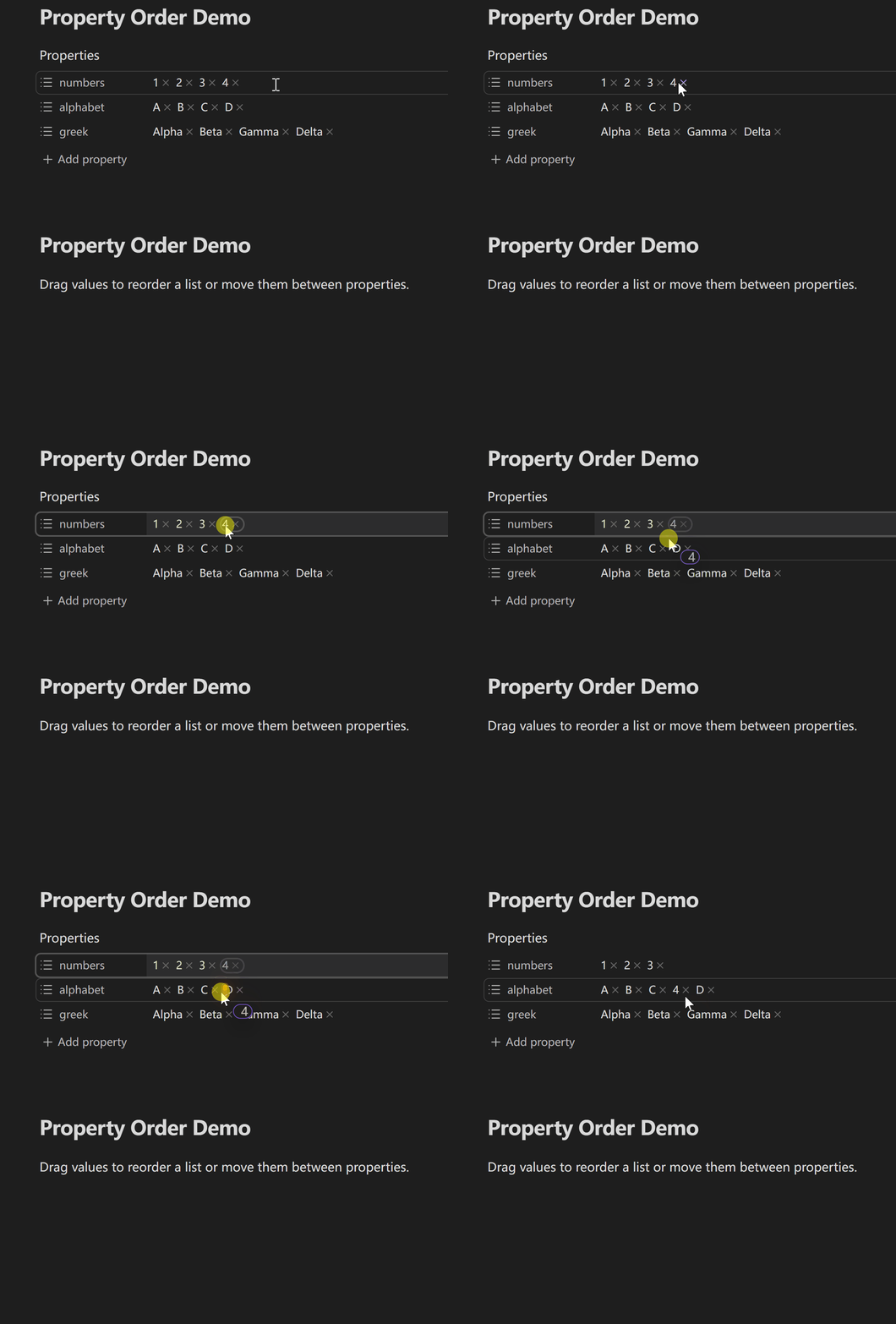
- Desktop: drag a value to its new position or to another supported list property.
- Mobile: long-press a value, choose Reorder or Reorder or move in Obsidian's native menu, then drag that value. If the host menu cannot be extended, native editing stays available and the plugin does not substitute a look-alike menu.
- Keyboard: run Property Order: Reorder property values from the command palette. Choose a source property and value, then move it up, down, to a position starting at 1, to first/last, or to the end of another property. No shortcut is assigned by default. The command works when dragging is disabled; the cross-property drag toggle applies only to pointer dragging.
Each completed reorder or move is one undoable edit. Before starting an update, Escape or Cancel leaves the note unchanged. Once updating starts, wait for completion and use Undo in the editor if needed. Dragging supports wrapped and RTL layouts, scrolling near supported panel edges, and screen-reader status announcements.
Check value types before reordering: non-text items in supported text lists can become strings, such as true becoming "true" and 123 becoming "123". This changes the value type. If numeric or boolean types matter, check the result.
Preserve is the default list format. You can choose bracket lists or one item per line in Value order. Switching to bracket-list format can discard comments or blank lines; keep Preserve when those matter. Expand Format examples beside List format after reordering to compare the options.
Installation
Community Plugins (recommended)
In Obsidian, open Settings → Community plugins → Browse, search Property Order, then choose Install and Enable. You can also open its Community Plugins page.
Manual installation and upgrades
Download property-order-<version>.zip from the latest release and extract it into Vault/.obsidian/plugins/. It contains the property-order/ directory with main.js, manifest.json, and styles.css. Reload Obsidian and enable Property Order under Community plugins.
When upgrading manually, back up and preserve the existing data.json. Replace only main.js, manifest.json, and styles.css; delete data.json only when you explicitly want to reset all plugin preferences.
Settings reference
All supported Obsidian versions use the same four tabs:
| Tab | What it controls |
|---|---|
| General | Plugin language and optional diagnostic notices. Follow Obsidian uses the matching language, or English if unavailable. |
| Value order | Same-property and cross-property dragging, plus the list format after reordering. Turning dragging off preserves the separate cross-property preference. |
| Key suggestions | Pinned, bottom, and hidden property names; Name, Recently used, and Note count sorting; optional property-type grouping; recent-history clearing and a rule-test field. |
| Value suggestions | The opt-in default behavior, per-property rules, custom presets, and selection-count clearing. |
Property order in these settings only arranges the properties inside rule cards and the custom editor. It does not change fields in notes or the order of value suggestions.
The interface and README support English, Simplified Chinese, Traditional Chinese, German, French, Spanish, Brazilian Portuguese, Russian, Japanese, Korean, Vietnamese, and Arabic.
Compatibility and limitations
- Value dragging supports ordinary top-level YAML property lines that Obsidian displays as text lists. Whole-document
{ ... }mappings, object lists, nested lists, multiline flow sequences, source-mode line dragging, and cross-file moves are not supported. - Empty or scalar values can participate when Obsidian identifies their property as a list. Some type-mismatch rows also work when individual values are clear. Ambiguous mixed-value rows are handled conservatively and may only accept an appended value.
- The keyboard command needs a visible, supported Properties panel in the active Markdown pane. If the file or values change while the dialog is open, reopen the command.
- Preset candidates appear only while editing values in Properties. If no native suggestion popup is available, the plugin may show presets beside the input. If it cannot identify the editor or native suggestion UI safely, normal typing or native suggestions remain available.
- Value ordering checks the YAML before asking Obsidian to save. Unsupported or conflicting content is left unchanged. Selecting or editing a property in Obsidian can change the note; configuring suggestions alone does not.
Privacy and security
Property Order works locally. It requires no account, uploads no note content, and calls no remote service. Reordering or moving values changes only the properties involved.
Note count uses cached frontmatter metadata rather than reading every note body. Recent property-name history (at most 100 names) and confirmed value-selection counts live only in this Vault's local storage on the current device, separately from data.json. They are not synced and can be cleared from settings. Hovering, browsing, cancelling, and unconfirmed edits do not update them.
Development and support
Use Node.js 24.19.0 and npm 11.17.0. Install the recorded dependencies and run the repository checks:
npm ci
npm run check
- Documentation: Product requirements, UX specification, Architecture, and Testing strategy.
- Project information: Changelog, Contributing guide, and Security policy.
- Discussions: Q&A, Ideas, and Show and tell.
- Use the structured GitHub issue forms for reproducible bugs and concrete feature requests. Report vulnerabilities privately through the security policy.
Remove private Vault paths, note content, YAML values, and credentials before posting publicly.
License
MIT © ZhengYX