Search...Search plugins and themes...
⌘K
Sign in
  • Get started
  • Download
  • Pricing
  • Enterprise
  • Account
  • Obsidian
  • Overview
  • Sync
  • Publish
  • Canvas
  • Mobile
  • Web Clipper
  • CLI
  • Learn
  • Help
  • Developers
  • Changelog
  • About
  • Roadmap
  • Blog
  • Resources
  • System status
  • License overview
  • Terms of service
  • Privacy policy
  • Security
  • Community
  • Plugins
  • Themes
  • Discord
  • Forum / 中文论坛
  • Merch store
  • Brand guidelines
Follow us
DiscordTwitterBlueskyThreadsMastodonYouTubeGitHub
© 2026 Obsidian

Extension Drawers

Bohdan RakBohdan Rak94 downloads

Organise community and core plugins into folders in a single Plugins tab.

Add to Obsidian
  • Overview
  • Scorecard
  • Updates1

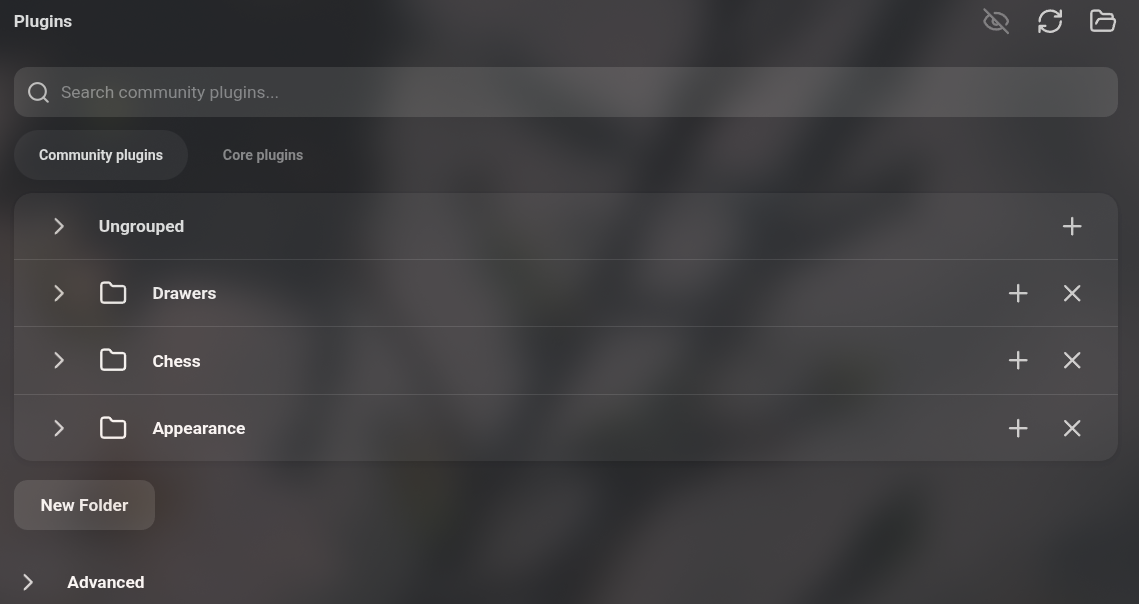
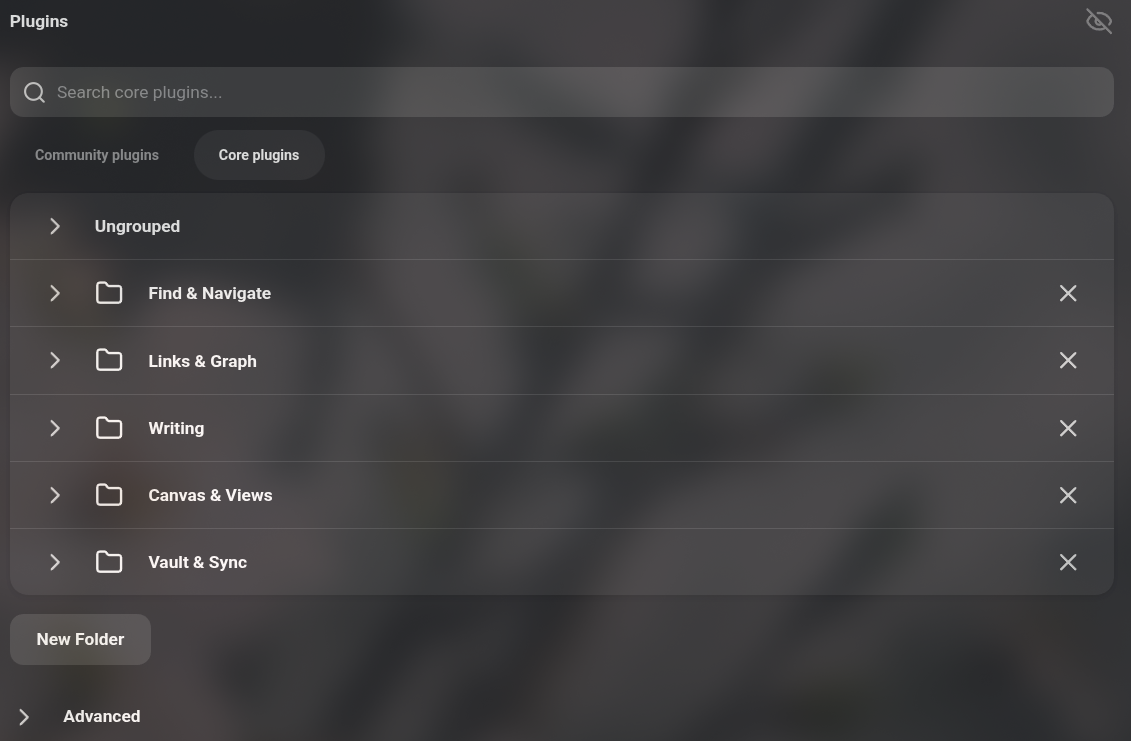
Organise Obsidian's community and core plugins into collapsible folders, in one Plugins tab.

Community plugins Core plugins
Community plugins list Core plugins list

Features

  • Merges the Community plugins and Core plugins tabs into a single Plugins tab.
  • Group plugins into folders. The core list starts out sorted into five folders.
  • Rename, collapse and delete folders.
  • Install community plugins directly into a certain folder
  • Hide/Show plugins' options in the Preferences sidebar

Usage

Open Settings -> Plugins. Choose Community plugins or Core plugins under the search box, click New Folder below the list to create a folder, then drag plugins into it. To browse community plugins, use a folder's + button.

While the plugin is enabled it replaces Obsidian's built-in plugin lists and hides the Core plugins tab. Disabling it restores both tabs as they were.

IMPORTANT FOR REVIEW: This plugin overrides Obsidian's native functionality

Compatibility

Desktop only. Requires Obsidian 1.13 or later.

Installation

Install Extension Drawers from Settings -> Community plugins -> Browse, then enable it.

To install manually:

Copy main.js, manifest.json and styles.css from the latest release into <vault>/.obsidian/plugins/plugin-drawers/.

HealthExcellent
ReviewPassed
About
Organize community and core plugins into collapsible folders inside a single Plugins tab. Group, rename, collapse, and delete folders; install community plugins directly into a folder and toggle plugin options visibility in Preferences.
FoldersInterface
Details
Current version
1.0.2
Last updated
2 weeks ago
Created
2 weeks ago
Updates
1 release
Downloads
94
Compatible with
Obsidian 1.13.0+
Platforms
Desktop only
License
MIT
Report bugRequest featureReport plugin
Author
Bohdan RakBohdan Rakbsdbx
GitHubbsdbx
  1. Community
  2. Plugins
  3. Folders
  4. Extension Drawers

Related plugins

Settings Sidebar Organizer

Groups Community Plugins into folders, allows renaming, reordering, and compacting the sidebar.

Hider

Hide interface elements such as tooltips, status bar, titlebar, and more.

Meta Bind

Make your notes interactive with inline input fields, metadata displays, and buttons.

Quick Explorer

Perform file explorer operations (and see your current file path) from the title bar, using the mouse or keyboard.

Editing Toolbar

The Editing Toolbar is modified from cMenu, which provides more powerful customization settings and has many built-in editing commands to be a MS Word-like toolbar editing experience.

Flexplorer

Enhance the file explorer with custom sorting, pinning, and hiding.

Note Toolbar

Add customizable toolbars to your notes.

Hover Editor

Transform the Page Preview hover popover into a fully working editor instance.

Agent Client

Chat with Claude Code, Codex, Gemini CLI, and more via the Agent Client Protocol — right from your vault.

Folder notes

Create notes within folders that can be accessed without collapsing the folder, similar to the functionality offered in Notion.