PlanFlow
 YH151 downloads
基于Obsidian的计划自动拆解行动系统:年度计划自动拆解,量化任务自动流转,每日行动打卡/周/月/年度目标/看板/甘特六视图目标追踪,自统计徽章激励系统。
- Overview
- Scorecard
- Updates5
An Obsidian plugin that turns your annual plans into executable daily actions: automatic plan decomposition, quantified task flow, six-view goal tracking (Daily / Week / Month / Year / Kanban / Gantt), and a self-driven reward system.
- Plan decomposition + daily check-in: break goals down into actionable daily items
- Clear goal tracking: six views in one — Today / Week / Month / Year / Kanban / Gantt
- Automated stats & rewards: check-in streaks + bronze/silver/gold badges + achievement wall
- One source of truth: pure Markdown, single data flow, no clutter
📖 Full illustrated guide (design / features / usability): docs/USAGE.md (Chinese)
Design Philosophy
1. A plan is a flow, not a pile of tables
Most planning tools keep "yearly goals, monthly plans, daily check-ins" as three disconnected datasets that you have to sync by hand. PlanFlow decomposes plans automatically and keeps all data in one flow:
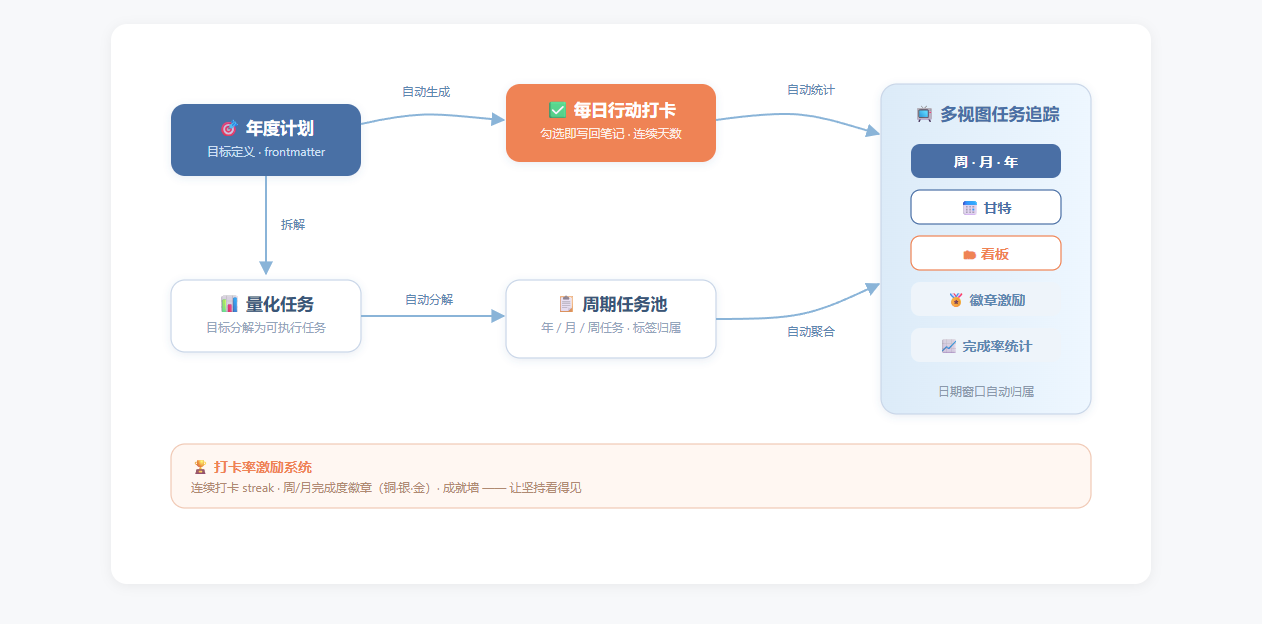
- Data is produced once: yearly plans live in the
年度计划.mdfrontmatter, tasks live in the task pool, check-ins write back to daily notes — no duplicate entry. - Cross-view aggregation: week/month/year progress, Kanban, Gantt and badges are all aggregated automatically by date window — zero configuration.
- Automatic date windows: give a task a start/end date; the week view uses ISO weeks, the month view uses calendar months, the year view uses the current year — no manual parent/child links, nothing breaks.
2. Execution first
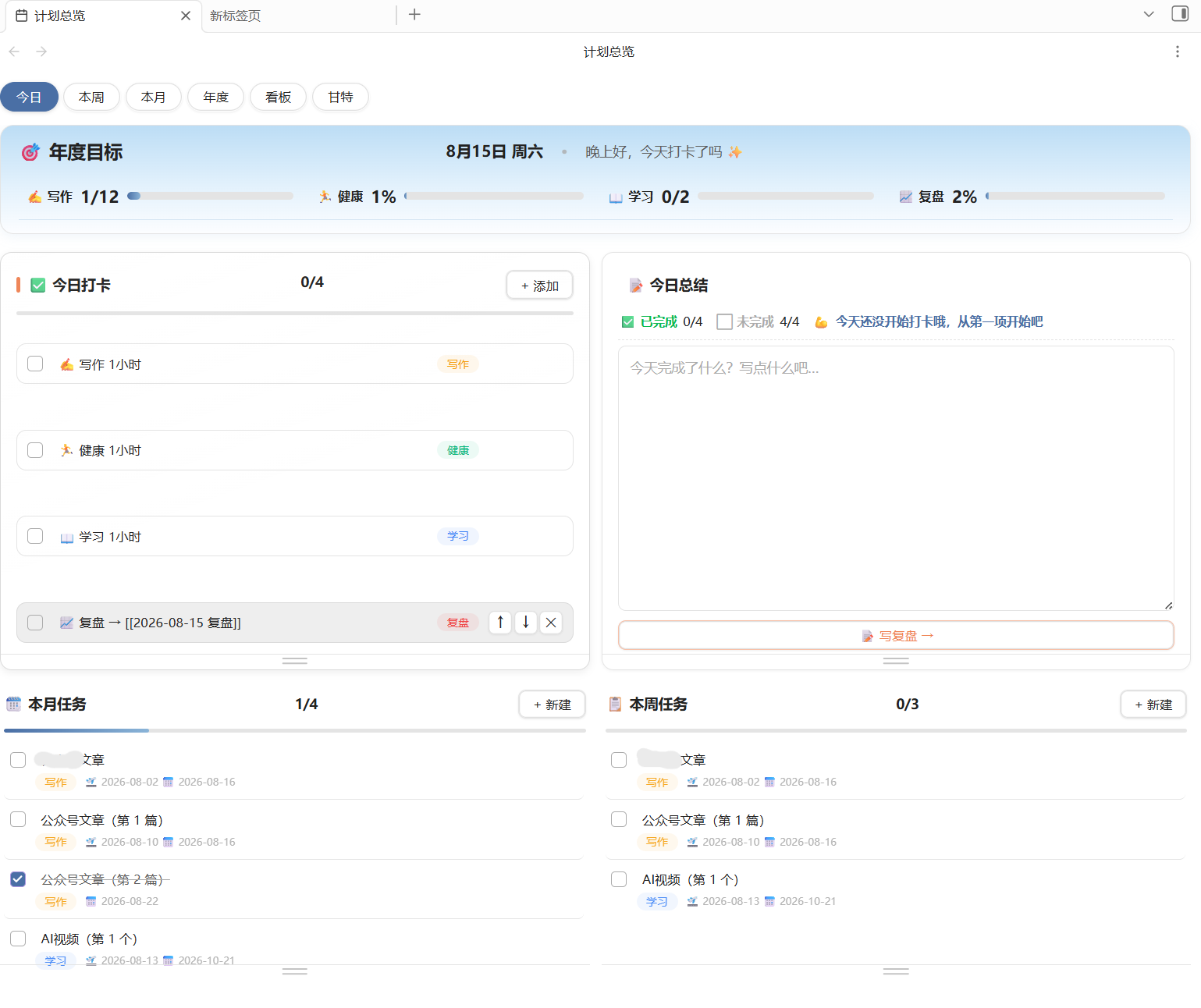
"Today's check-in + Today's summary" sits at the visual center, with the annual progress bar pinned at the top — the first thing you see when opening Obsidian is "what to do today, and how much is done".
✨ Features
| View | Purpose | Core actions |
|---|---|---|
| Year | Plan overview & goal management | New plans auto-generate daily check-in items; quantified goals auto-decompose into month/week tasks |
| Today | Goal → execution → review | Check items, write daily summary, one-click review note |
| Week / Month | Period task preview & progress | Add ad-hoc tasks, view completion rates |
| Kanban | Execution board grouped by plan | Drag column headers to resize, filter by plan |
| Gantt | Timeline scheduling | Drag to reschedule, spot overlaps |
Other features:
- 🏆 Check-in streaks + week/month completion badges (bronze/silver/gold)
- 📊 Per-plan completion stats, automatic annual goal progress
- 🎨 Deep-space blue theme + coral action areas + per-plan accent colors (light/dark adapt)
- 📝 Daily notes auto-generated (built-in template), summaries auto-derived
🚀 Installation
Option 1: Community plugins (recommended)
- Obsidian settings → Community plugins → turn off Restricted mode if needed
- Click Browse and search for PlanFlow
- Install and enable (updates are handled by Obsidian)
Or open it directly: obsidian://show-plugin?id=planflow
Option 2: BRAT (beta / pre-release tracking)
- Install the BRAT plugin
- BRAT settings → Add Beta plugin → enter
yezhangdeng01/PlanFlow - Enable PlanFlow (new releases update automatically)
Option 3: Manual install
- Download
main.js,manifest.json,styles.cssfrom the latest Release - Create
.obsidian/plugins/planflow/in your vault and place the three files inside - Obsidian settings → Community plugins → enable PlanFlow
📂 Data Format (pure Markdown in your vault)
raw/计划/                  ← root path (configurable in settings)
├── 2026/
│   ├── 年度计划.md         ← plan definitions (frontmatter: plans)
│   ├── 任务.md             ← task pool (all tasks across plans)
│   ├── 成就.md             ← badge records
│   ├── 每日/2026-08-15.md  ← daily check-in notes (auto-generated)
│   └── 周/2026-W33.md      ← weekly goals (auto-aggregated)
Example yearly-plan frontmatter:
---
plans:
  - name: Reading
    type: quantified
    target: 24
    unit: books
    desc: book notes
  - name: Fitness
    type: habit
    target: 100
    unit: days
---
Tasks are assigned to a plan via the #计划/写作 tag or frontmatter; date windows (week = ISO week, month = calendar month) aggregate into the matching views automatically.
🛠 Development
npm install
npm run build    # tsc + esbuild → main.js
npm run typecheck
⚠️ Notes
- The UI is currently in Chinese (data formats and field names stay in English, so internationalization is straightforward)
- Fully local: no network calls, no telemetry, no data leaves your vault
📄 License
MIT © 2026 JCH