Personal Finance
 lberts1k downloads
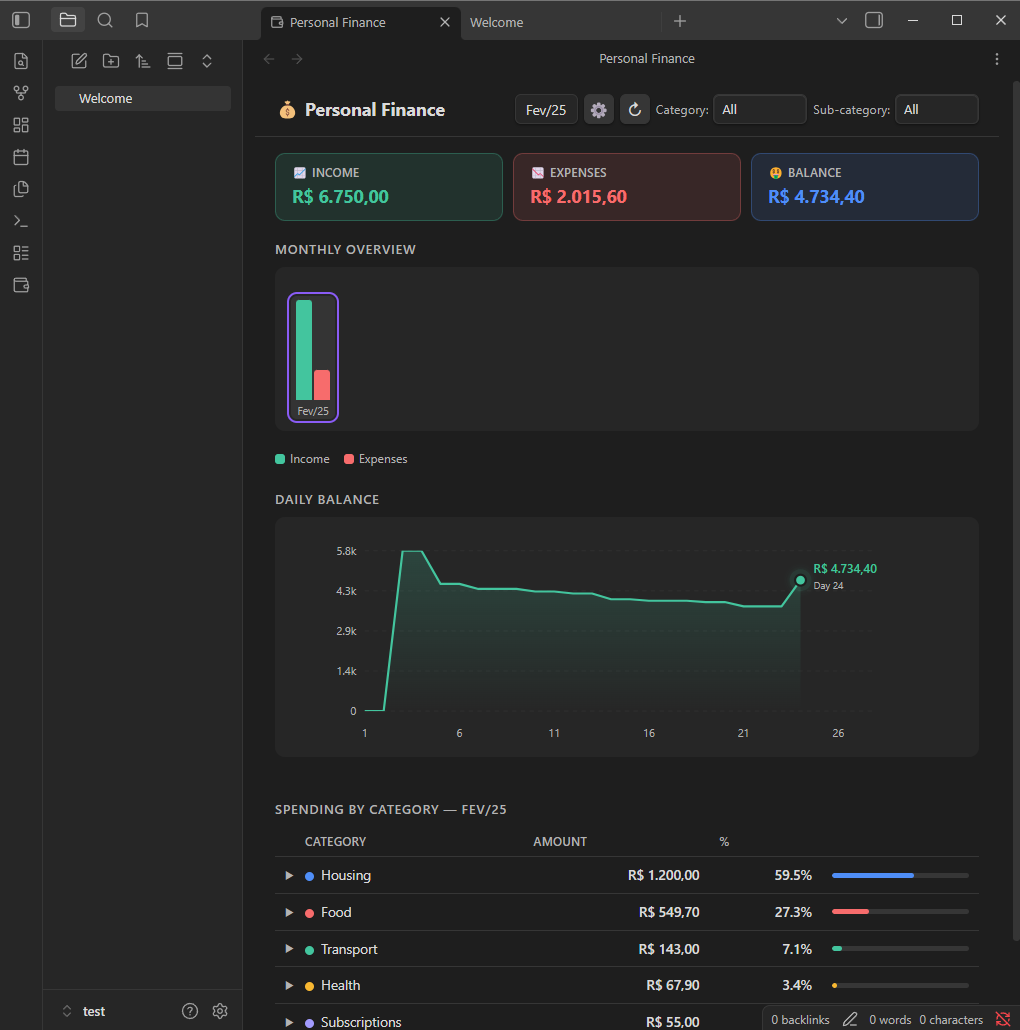
Visualize your monthly finances, summary cards, daily balance chart, monthly evolution and spending by category.
- Overview
- Scorecard
- Updates1
Track and visualize your monthly finances directly in Obsidian — summary cards, daily balance chart, monthly evolution, and spending by category, all powered by a simple CSV file.
✨ Features
- Summary cards — Income, Expenses, and Balance for the selected month (negative balance shown in red with a
−sign) - Daily balance chart — cumulative line chart day by day, with colored area (green = positive, red = negative)
- Monthly bar chart — income × expenses across all months; click any bar to navigate to that month
- Category breakdown table — sorted by amount, with proportional progress bar and percentage
- Category & sub-category filters — filter the entire page simultaneously
- Auto-refresh — detects changes to the CSV and updates automatically
- Mobile-friendly — responsive layout for small screens
📋 CSV Format
The plugin reads a CSV file with the following columns (column names are case-insensitive):
| Column | Required | Example |
|---|---|---|
date |
✅ | 2025-01-15 |
category |
✅ | Food |
sub-category |
— | Groceries |
description |
— | Weekly shopping |
amount |
✅ | $9,120.00 or -$200.00 |
accumulated-value |
— | ignored by the plugin |
- Dates must be in
YYYY-MM-DDformat - Positive values = income; negative values = expenses
- Currency prefix (
$) and thousand separators are handled automatically - Empty rows or rows without a valid date are silently ignored
Minimal example:
date,category,sub-category,description,amount,accumulated-value
2025-01-05,Salary,,January salary,$9120.00,$9120.00
2025-01-10,Food,Groceries,Weekly shopping,-$350.00,$8770.00
2025-01-15,Transport,Fuel,Gas station,-$200.00,$8570.00
🚀 Installation
Via Community Plugins (recommended)
- Open Obsidian → Settings → Community plugins
- Click Browse and search for
Personal Finance - Install and enable the plugin
Manual
- Download
main.jsandmanifest.jsonfrom the latest release - Copy both files to
<vault>/.obsidian/plugins/personal-finance/ - Reload Obsidian and enable the plugin under Settings → Community plugins
⚙️ Configuration
- Click the 💰 icon in the left ribbon (or open the Command Palette and run
Open Financial Overview) - Click the ⚙ button in the top-right corner to set the path to your CSV file
- The path is relative to the vault root
The default path is personal-finance.csv (vault root).
📸 Screenshots
🛠️ Development
# Clone the repository
git clone https://github.com/YOUR_USER/personal-finance
cd personal-finance

# No dependencies — the plugin is plain CommonJS JavaScript
# Copy files to your vault to test:
cp main.js manifest.json <vault>/.obsidian/plugins/personal-finance/
To publish a new version:
- Update
versioninmanifest.jsonandversions.json - Create a Git tag matching the version exactly (e.g.
1.0.1) - GitHub Actions will automatically create a release with the required files attached
📄 License
MIT © Lucas Berta
HealthGood
ReviewSatisfactory
About
Track monthly finances in Obsidian from a simple CSV file and view summary cards for income, expenses, and balance. Display a daily cumulative balance chart with colored positive/negative areas and a monthly income vs expenses bar chart. Explore sortable category and sub-category breakdowns with live CSV auto-refresh and a mobile-friendly layout.Details
Current version
1.0.0
Last updated
7 months ago
Created
7 months ago
Updates
1 release
Downloads
1k
Compatible with
Obsidian 1.4.0+
Platforms
Desktop, Mobile
License
MIT