Search...Search plugins and themes...
⌘K
Sign in
  • Get started
  • Download
  • Pricing
  • Enterprise
  • Account
  • Obsidian
  • Overview
  • Sync
  • Publish
  • Canvas
  • Mobile
  • Web Clipper
  • CLI
  • Learn
  • Help
  • Developers
  • Changelog
  • About
  • Roadmap
  • Blog
  • Resources
  • System status
  • License overview
  • Terms of service
  • Privacy policy
  • Security
  • Community
  • Plugins
  • Themes
  • Discord
  • Forum / 中文论坛
  • Merch store
  • Brand guidelines
Follow us
DiscordTwitterBlueskyThreadsMastodonYouTubeGitHub
© 2026 Obsidian

Path in tab title

d9kd9k27 downloads

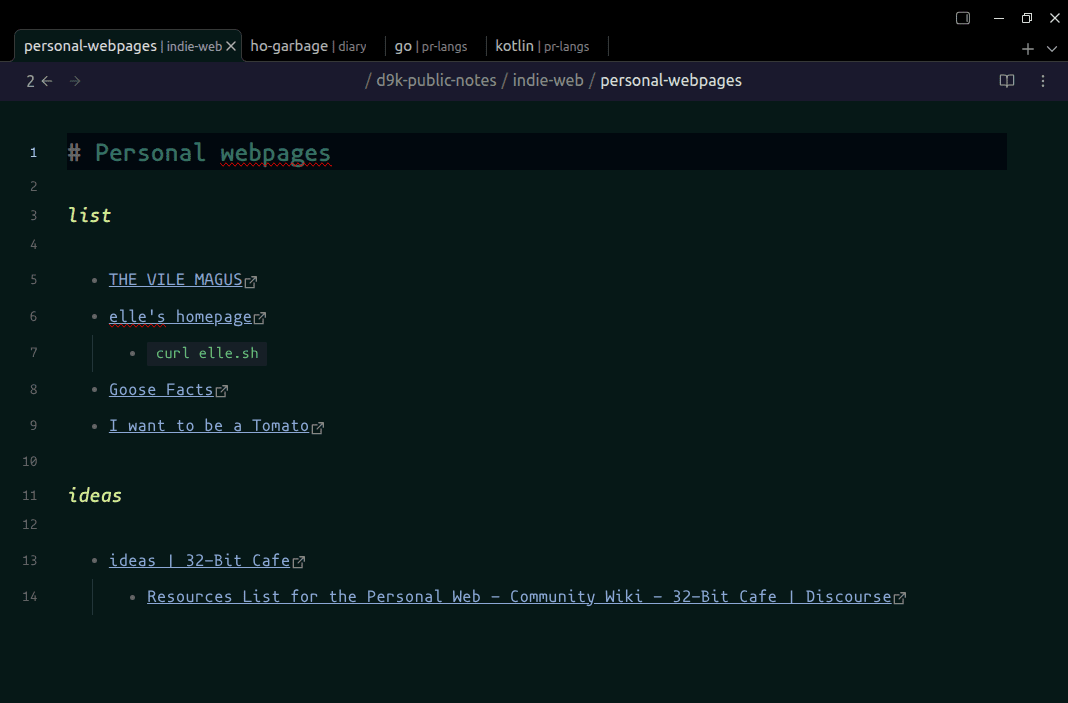
Show folders names in the tabs titles.

Add to Obsidian
  • Overview
  • Scorecard
  • Updates3

plugin screenshot

Installation

Copy over main.js, manifest.json to your vault into subfolder .obsidian/plugins/path-in-tab-title/. Restart Obsidian, enable plugin in settings ([Cogwheel button] -> Community plugins -> Installed Plugins)

Known limitations

  • There is the delay before updating tab title.
  • Tabs titles are reset to default after the app restart.
  • Only focused tabs titles are changed

Styling

Recommended styles:

.workspace-tab-header-inner-title small {
  opacity: 70%;
}

Build with

  • obsidian-sample-plugin by obsidianmd
    • Template for Obsidian community plugins with build configuration and development best practices.

See also

  • d9k-obsidian-style-guide

Alternative approach

Better to replace this code in app.js

            t.prototype.getDisplayText = function() {
                return this.file ? this.file.basename : im.interface.noFile()
            }

with something like

            t.prototype.getDisplayText = function() {
                      // return this.file ? this.file.basename : im.interface.noFile()
                if (!this.file) {
                    return im.interface.noFile();
                }

                return this.file.path.split('/').slice(-2).join('/')
            }

But I don't know how to patch Electron app :man_shrugging:

82%
HealthExcellent
ReviewSatisfactory
About
Display the file path in the active tab title so you see contextual folders instead of only the filename. Update only focused tabs with a short delay before refreshing; tab titles revert to defaults after restarting Obsidian.
InterfaceFilesAppearance
Details
Current version
0.1.0
Last updated
Last month
Created
Last month
Updates
3 releases
Downloads
27
Compatible with
Obsidian 0.13.8+
Platforms
Desktop only
License
0BSD
Report bugRequest featureReport plugin
Author
d9kd9k
t.me/d9kd9k
GitHubd9k
  1. Community
  2. Plugins
  3. Interface
  4. Path in tab title

Related plugins

Hider

Hide interface elements such as tooltips, status bar, titlebar, and more.

Note Toolbar

Add customizable toolbars to your notes.

Notebook Navigator

A better file browser and calendar inspired by Apple Notes, Bear, Evernote and Day One.

Local REST API & MCP Server

Unlock your automation needs by interacting with your notes over a secure REST API.

Minimal Theme Settings

Control the colors and fonts in Minimal Theme.

QuickAdd

Quickly add new notes or content to your vault.

Recent Files

Display a list of recently opened files.

Omnisearch

Intelligent search for your notes, PDFs, and OCR for images.

Claudian

Embeds Claude Code/Codex as an AI collaborator in your vault. Your vault becomes agent's working directory, giving it full agentic capabilities: file read/write, search, bash commands, and multi-step workflows.

Meta Bind

Make your notes interactive with inline input fields, metadata displays, and buttons.