PastePolish
 riverise267 downloads
Polish your AI-generated notes by properly removing redundant blank lines while protecting critical Markdown rendering.
- Overview
- Scorecard
- Updates2
PastePolish is an Obsidian plugin that fixes the “spatial bloating” commonly introduced when pasting content from AI assistants such as ChatGPT, Gemini, or Claude.
When rich text is converted into Markdown, it often produces excessive blank lines. PastePolish intelligently compresses these gaps while preserving Markdown structure, allowing you to clean pasted content safely in Edit Mode.
✨ Features
Smart Markdown Protection
PastePolish detects Markdown block elements and preserves the required buffer lines above them.
Protected structures include:
- Tables
- Setext headings and horizontal rules
This prevents formatting breakage caused by overly aggressive whitespace removal.
Gradual Refinement (x → x − 1)
A unique mode that reduces consecutive blank lines one step at a time.
This allows you to gradually adjust the spacing of a document instead of applying a single irreversible cleanup.
Aggressive Cleanup
Instantly collapse all redundant blank lines into exactly one line, restoring clean Markdown formatting with a single command.
Preview
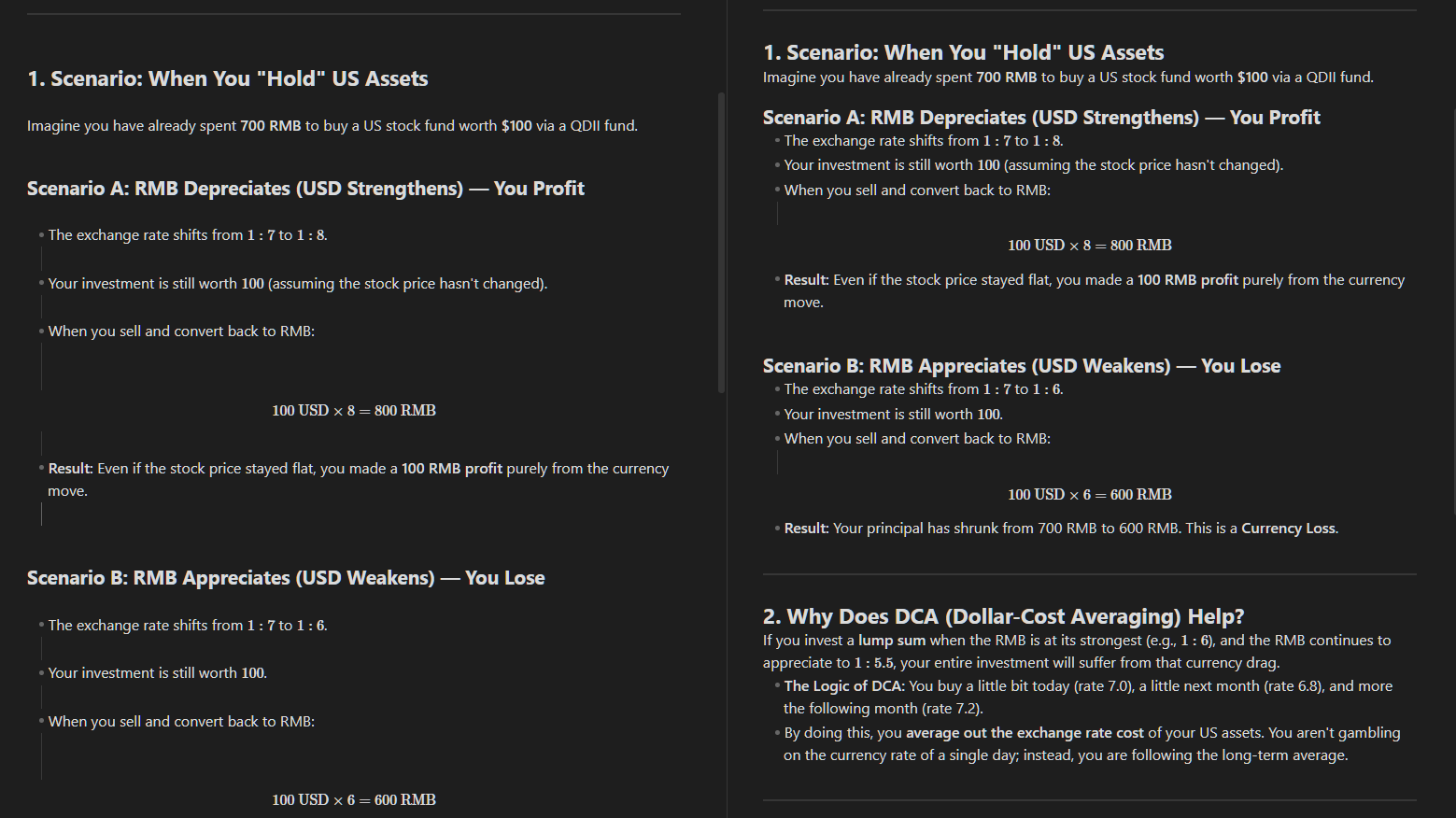
Example showing text pasted from Gemini Web. HTML-to-Markdown conversion introduced excessive blank lines, which PastePolish cleans up while preserving structural spacing.
🚀 Installation
Community Plugins (after official review)
- Open Settings → Community plugins
- Search for PastePolish
- Install and enable
Manual Installation
Download
main.jsandmanifest.jsonfrom the latest release.Place both
main.jsandmanifest.jsoninside your vault:
.obsidian/plugins/paste-polish
- Reload Obsidian and enable the plugin in Community Plugins.
🧭 Usage
- Paste content into a note
- Select the text you want to clean
- Run the command:
PastePolish: Polish pasted spacing
You can trigger this via the Command Palette or assign a custom hotkey.
⚙️ Settings
Compression Mode
Gradual (Default) Reduces consecutive blank lines by one per execution.
Aggressive Collapses all consecutive blank lines into exactly one.
🔍 Implementation Overview
PastePolish uses a context-aware regex engine rather than simple global replacement.
Block Detection
The plugin identifies Markdown block syntax using patterns such as:
/^[ \t]*([-=]{3,}|\|)/
These heuristics allow the plugin to maintain safe spacing around structural elements.
State-Based Gap Reduction
A newline counter tracks consecutive blank lines and safely reduces them while respecting platform-specific line endings (\n or \r\n).
⌨️ Hotkeys
Hotkeys can be configured in Settings → Hotkeys.
Search for PastePolish to bind your preferred shortcut.
📄 License
MIT License