Search...Search plugins and themes...
⌘K
Sign in
  • Get started
  • Download
  • Pricing
  • Enterprise
  • Account
  • Obsidian
  • Overview
  • Sync
  • Publish
  • Canvas
  • Mobile
  • Web Clipper
  • CLI
  • Learn
  • Help
  • Developers
  • Changelog
  • About
  • Roadmap
  • Blog
  • Resources
  • System status
  • License overview
  • Terms of service
  • Privacy policy
  • Security
  • Community
  • Plugins
  • Themes
  • Discord
  • Forum / 中文论坛
  • Merch store
  • Brand guidelines
Follow us
DiscordTwitterBlueskyThreadsMastodonYouTubeGitHub
© 2026 Obsidian

Paste link with title

haradaiko100haradaiko100249 downloads

Automatically converts pasted URLs to reference-style markdown links with page titles.

Add to Obsidian
  • Overview
  • Scorecard
  • Updates2

An Obsidian plugin that automatically converts pasted URLs into reference-style markdown links with page titles.

Features

  • Automatic URL Conversion: When you paste a URL, it automatically fetches the page title and converts it to a reference-style markdown link
  • Manual Conversion Command: Convert selected URLs using the command palette
  • Customizable Settings: Configure auto-conversion behavior and placeholder text
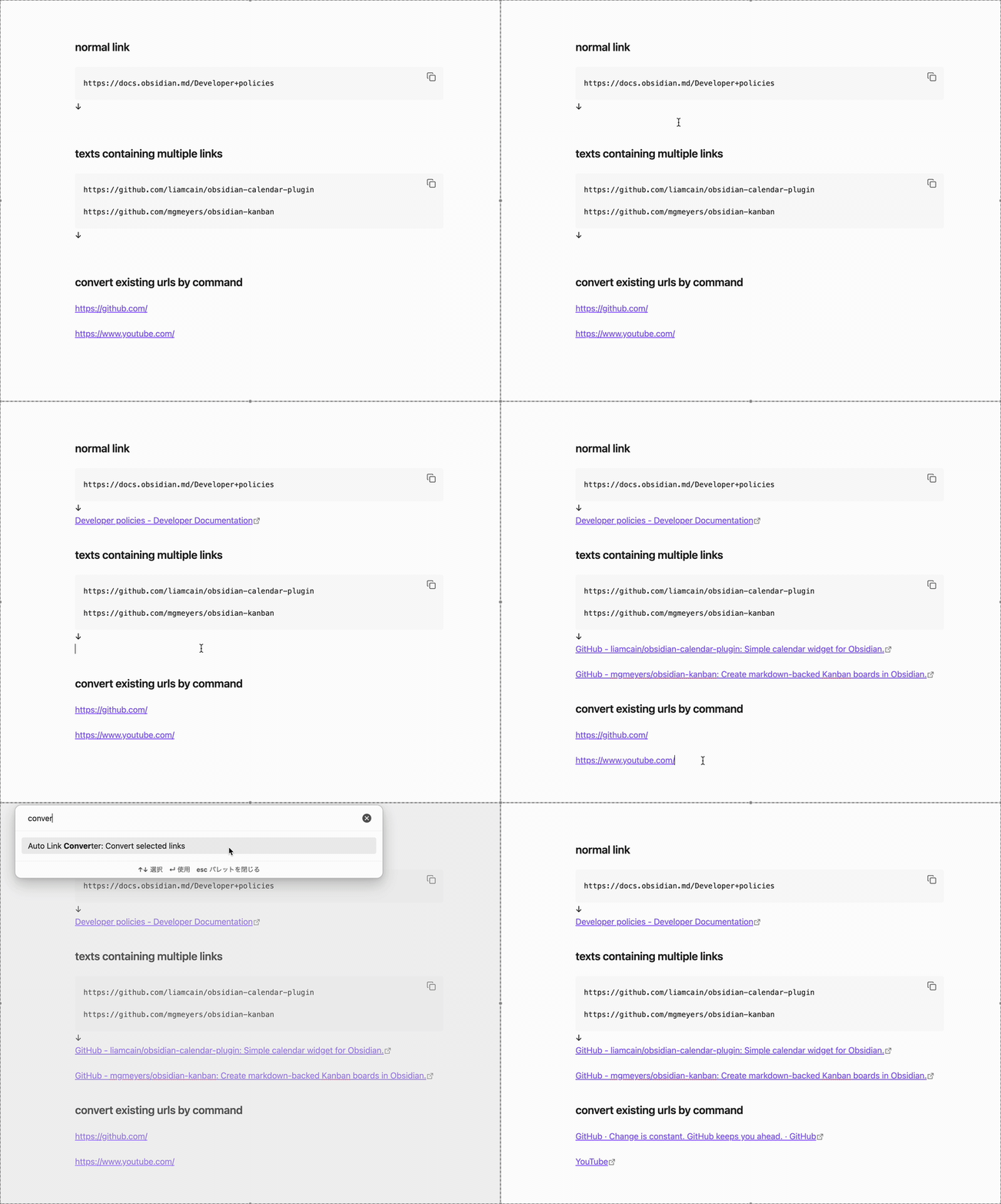
auto link converter usage example

Usage

Automatic Conversion (Paste)

  1. Copy text containing a URL (or URLs) to your clipboard
  2. Paste it into your note (Ctrl/Cmd + V)
  3. The plugin will automatically:
    • Fetch the page title
    • Convert the URL to a reference-style link

Manual Conversion (Command)

  1. Select one or more URLs in your note
  2. Open the command palette (Ctrl/Cmd + P)
  3. Run "Auto Link Converter: Convert selected links"
  4. Selected URLs will be converted to reference-style links

Settings

  • Enable auto-conversion: Whether to automatically convert pasted URLs to reference-style links
  • Placeholder text: The text to display when the title cannot be fetched from the URL (default: "Untitled")
82%
HealthExcellent
ReviewSatisfactory
About
Convert pasted URLs into reference-style Markdown links by fetching page titles. Run a command to convert selected URLs manually and replace unfetchable titles with a configurable placeholder.
LinksAutomationCommands
Details
Current version
1.0.1
Last updated
3 months ago
Created
4 months ago
Updates
2 releases
Downloads
249
Compatible with
Obsidian 0.15.0+
Platforms
Desktop, Mobile
License
MIT
Report bugRequest featureReport plugin
Sponsor
Buy Me a Coffee
Author
haradaiko100haradaiko100
github.com/haradaiko100/
GitHubharadaiko100
  1. Community
  2. Plugins
  3. Links
  4. Paste link with title

Related plugins

Advanced URI

Control everything with URI.

Waypoint

Easily generate dynamic MOCs in your folder notes using waypoints. Enables folders to show up in the graph view and removes the need for messy tags!

Auto Link Title

Automatically fetches the titles of links from the web.

Task Collector (TC)

Change task status and collect tasks within a document using hotkeys and context menus.

Paste URL into selection

Paste URL "into" selected text.

Attachment Management

Customize attachment path, auto-rename attachments, etc.

Shell commands

Define system commands that you want to execute via command palette, hotkeys, URI links or automated events. E.g. open external applications or perform automated file modifications.

Link Embed

Convert URLs in your notes into embeded previews.

Find orphaned files and broken links

Find files that are not linked anywhere and would otherwise be lost in your vault. In other words: files with no backlinks.

PodNotes

Write notes on podcasts with ease.