Pass Countdown
 rexxall52 downloads
Count down a multi-use pass with a deadline: uses left, time left on the running pass, the latest moment to start the next one, and reminders before each one ends.
- Overview
- Scorecard
- Updates6


Start in three steps
- Install Pass Countdown from Settings → Community plugins → Browse and enable it, then click the ticket icon in the left ribbon.
- In Settings → Pass Countdown, set the name, total uses, days per pass and the deadline.
- Right after you activate a pass, click Record activation.
No pass yet? Click Load a sample in the empty panel.
Needs Obsidian 1.10 or later, desktop or mobile. Costs nothing: no account, no key, no network.
Everything else
Every feature
Count down a multi-use pass with a deadline: see uses left and time left on the running pass, and know the latest moment to start the next one.
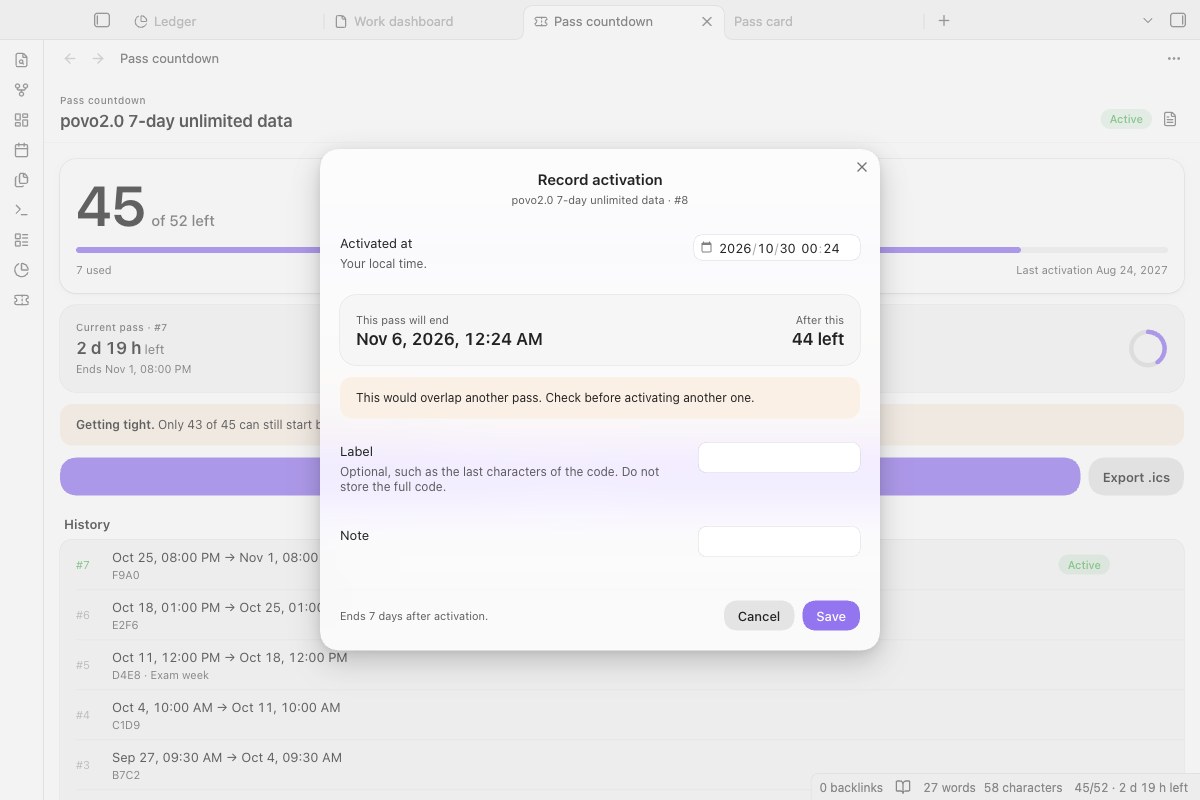
Before you save, the dialog shows when the pass will end, how many will be left, and whether it would overlap the running one.
- Keeps count for you. Some prepaid bundles give a number of uses, each lasting a fixed time, with a last date to activate them, and do not tell you how many you have used. Record each activation and the panel does the rest.
- Warns before you waste one: an overlap warning if a new pass would run alongside the current one, and the pace you need to use them all before the deadline.
- Reminds you inside Obsidian and through calendar alerts (.ics) before a pass ends.
- Panel: uses left, time left on the current pass, days to the deadline, and pace: the latest moment to start the next pass if you want to use every one back to back. Once that has passed, it tells you how many can still fit.
- Status bar:
47/52 · 3 d 4 h left. - Calendar reminders. Export an
.icsfile with one event per pass and alerts before it ends (12 h, 1 h and at the end by default) for Apple Calendar, Google Calendar or Outlook. - Reminders inside Obsidian, once when the running pass is about to end and once when the latest start that still fits every pass is near.
- Countdown view for Bases. In any base, switch the view to Countdown: one card per note with the days left until a date property (a deadline, an exam, a visa renewal), soonest first, with the ones that have passed below. Pick a start property to see how far along each one is. With Bases turned off nothing changes.
- Markdown report of every activation, import from notes with
activated_at/expires_atfrontmatter, and edit a record if you typed the wrong start time.

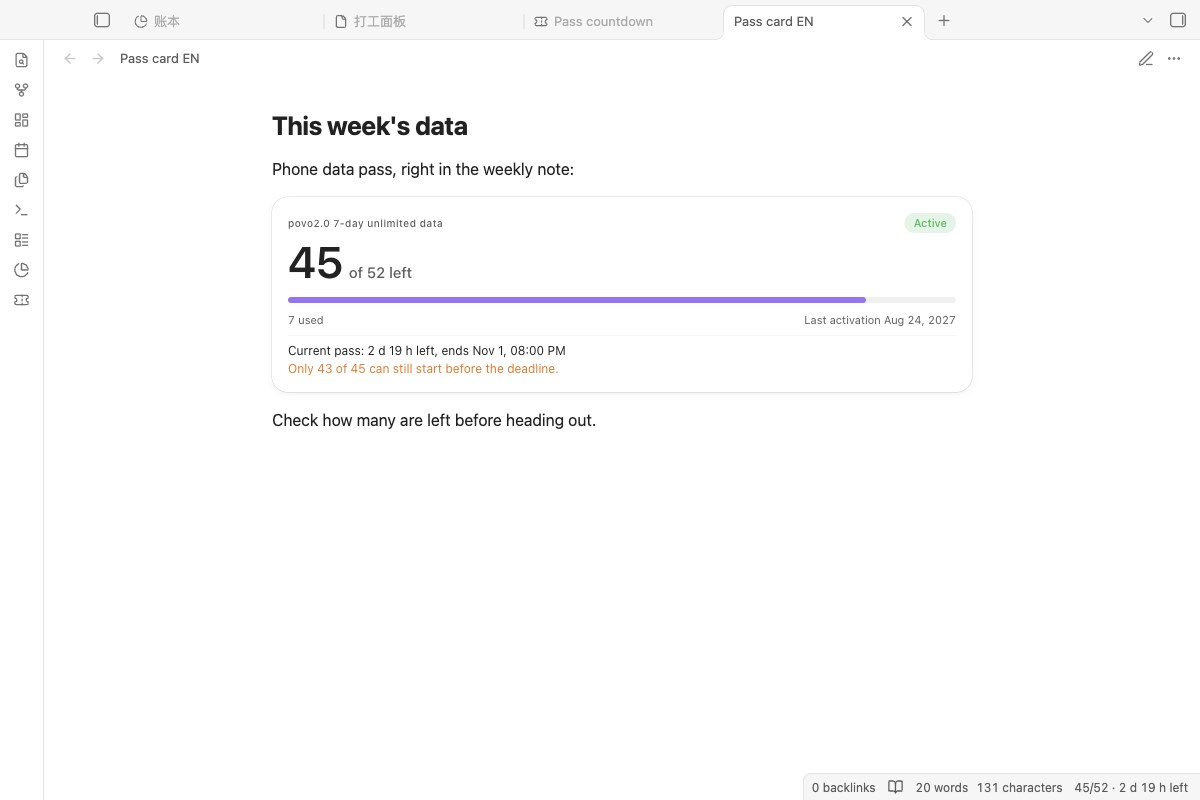
A pass-countdown code block shows the same count inside any note. It updates every minute.
The plugin started with a Japanese mobile data bundle (52 uses of 7-day unlimited data, to be activated by 24 August 2027), and works for any pass of the same shape: gym visits that expire, ticket books, trial periods.
Start here, step by step
- Install and enable Pass Countdown, then click the ticket icon in the left ribbon.
- With no records yet, click Load a sample to see the countdown, ring and pace with one made-up pass. It is never exported or reminded about, and Remove sample deletes it.
- In Settings → Pass Countdown, set the name, total uses, days per pass and the deadline.
- Right after you activate a pass, click Record activation.
Where your data goes and what the plugin touches
| Obsidian | 1.10 or later, desktop and mobile (1.8 and 1.9 stay on 1.4.1) |
| The plugin | Free, MIT licence |
| Network | None. The plugin makes no network requests and needs no account or key. |
Nowhere. Records live in this plugin's data.json in your vault; the report and the .ics file are written where you choose. Store a short label if you need one, never the full prepaid code.
- Reads its own
data.json; once, on a first start with no data, thedata.jsonof the older tracker it grew out of (povo-7day-tracker), if that exists; and, only when you run an import, the frontmatter of the notes in the folder you name. - Writes its own
data.json, and, only when you export, the report note and the.icsfile at the paths in settings (Pass Countdown/report.mdandPass Countdown/reminders.icsby default). Both paths are inside the vault, and an existing file there is replaced. - Never makes network requests, uses the clipboard, runs other programs, or reads or writes outside the vault.
Install by hand, and an example setup
From Obsidian (once listed): Settings → Community plugins → Browse, search for Pass Countdown.
Manually: download main.js, manifest.json and styles.css from the latest release into <vault>/.obsidian/plugins/pass-countdown/, reload Obsidian and enable the plugin.
Checking a download: from 1.4.1 on, GitHub Actions builds the release files and signs where they came from. Check one with gh attestation verify main.js --repo Rexxall/obsidian-pass-countdown.
Example: povo2.0 7-day data (52 uses). This is the default setup: 52 uses, 7 days each, deadline 2027-08-24T23:59:00+09:00. Check your own purchase for the exact terms.
How it works
- Times are stored in UTC and shown in your local time, so travelling or a different system time zone does not shift a pass.
- Deadline means, by default, the last moment a pass can be activated. A pass started just before the deadline still runs its full length. If your passes must also end by the deadline, switch The deadline is in settings: every date then moves one pass length earlier.
- Latest next start = deadline − (uses left − 1) × days per pass. Pace turns orange when not every remaining pass can still be started in time.
Limits
- One pass type per vault.
- Reminders reach your phone through the calendar you import the
.icsinto; re-export after recording new passes. - In-app reminders only appear while Obsidian is open.
Development and changelog
npm install
npm run build
npm test   # end times, pace, overlap, .ics, report escaping, import, editing, reminders, migration
styles.css is generated: edit styles/plugin.css and run npm run styles. For CI, releases and reporting issues, see CONTRIBUTING.md.
1.5.0: a Countdown view for Bases: days left until a date property, one card per note. Needs Obsidian 1.10.
1.4.0: no findings left in the community directory's review, with the same look.
1.3.0: a sample pass for a new panel, the interface language read with Obsidian's getLanguage(), and a README in English and Chinese. Full history in CHANGELOG.md.
日本語
「N 回分・1 回 D 日間・有効化の期限あり」の回数券を数えるプラグインです。残り回数、今の回の残り時間、すべて使い切るための次回開始の最終時刻を表示し、まだ有効な回と重なると警告します。Obsidian 内の通知と、カレンダー用の .ics 書き出しに対応。通信は一切行わず、クリップボードも使いません。データは保管庫の中だけに保存されます。コード全体は保存しないでください。
MIT License