PARA-Tree
 Devin Krizwold153 downloads
A git-graph-style view of your PARA vault: Areas are trunks, projects are feature branches, resources are commits — see how work ladders up to your life-areas.
- Overview
- Scorecard
- Updates2
A git-graph-style view of your PARA vault second brain for Obsidian. It reads the frontmatter/metadata you already have and draws your work the way a commit graph draws a repo — so you can see, at a glance, how scattered work ladders up to (or peels off from) your life-areas.
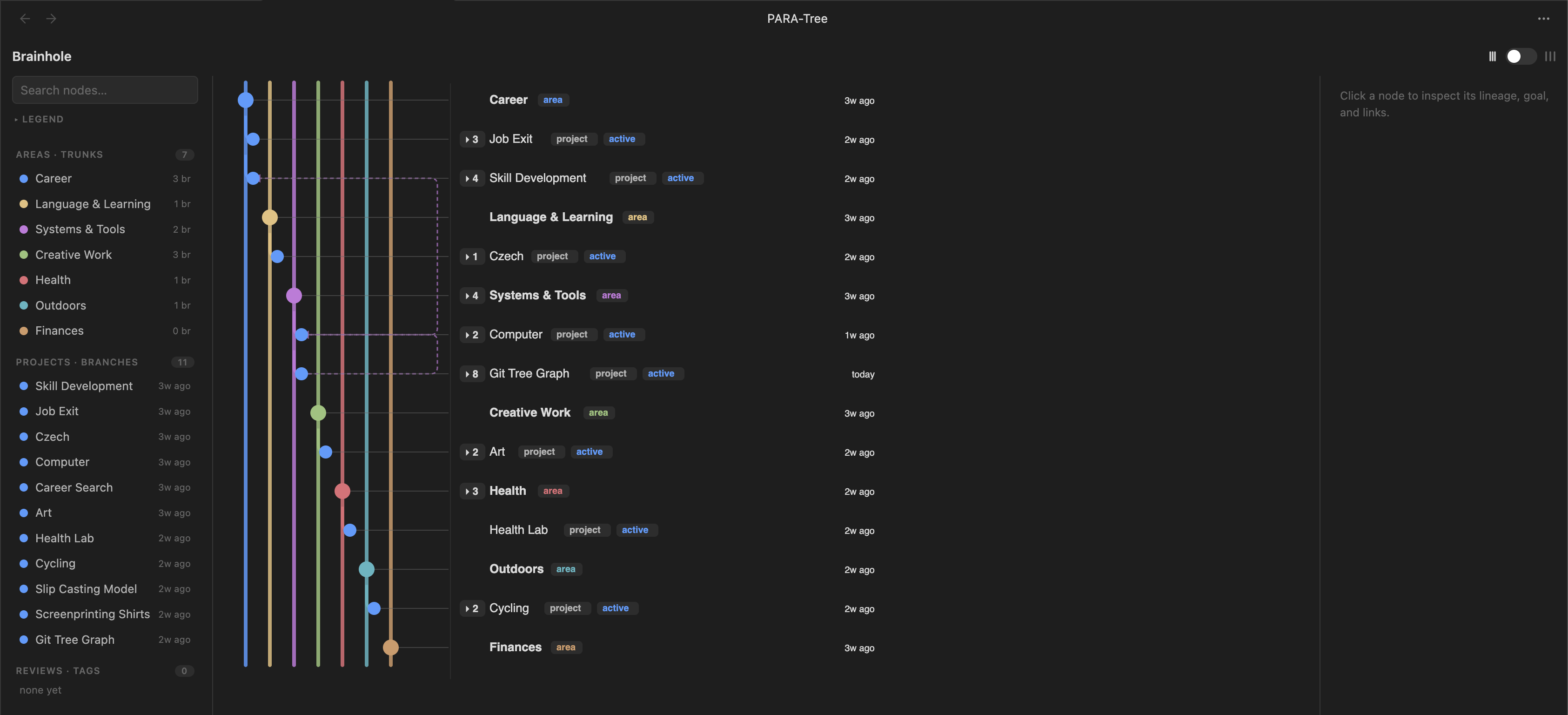
Git, meet PARA, PARA meet Git
- Areas = trunks — long-lived vertical spines (one per
area:), likemain. - Projects = feature branches — fork off their area, nest by
branched-from, and merge back whenstatusis done/ready. - Resources = commits — notes filed under a project (
project:) ride that branch; area-level resources sit on the trunk. contributes-to= merges — dashed cross-links (cross-area is fine) — the convergence a plain tree can't show.- Color = identity for areas, status for work (active / in-progress / done / idea).
- Last-edited is visible per row across PARA types to track attention and progress.
It's read-only and live: edit a note's frontmatter and the graph updates.
Features
- Three panes — a sidebar navigator (Areas / Projects / Reviews + search & legend), the graph, and an inspector (goal, next-action, last-edited, cadence, linked notes, open-note).
- Packed ↔ Spread lane toggle; collapse/expand subtrees (
▸N); the active area "breathes" to a full spread while the rest stay compact. - Focus on a node or area (click again to deselect); search jumps to any node.
- Attention indicator — set a
cadence:and overdue projects get a small amber dot next to their last-edited time. - Resizable panes; right-angle filleted connectors.
- Desktop-only for now — this wide, hover-driven view is built for the desktop app; mobile support is planned for a later release.
Frontmatter it reads
type: project          # required for a project node (also: type: area, type: resource)
area: "[[Career]]"     # the trunk this project branches from
status: active         # active | in-progress | idea | done | ready-to-publish | archived
created: 2026-06-11    # used for row ordering
cadence: 14d           # optional review rhythm (14d / 2 weeks / weekly / monthly / 72h) → attention dot
goal: "…"              # shown in the inspector
next-action: "…"       # shown in the inspector
branched-from: "[[Job Exit]]"          # optional: branch off another project
contributes-to: ["[[Career Search]]"]  # optional: merge into another lane (cross-area ok)
promoted-to: "[[New Area]]"            # optional: project graduates into its own trunk
project: "[[Skill Development]]"       # on a resource note: the project it commits to
Notes in _templates, 04 Archive, and 06 Reviews are excluded. "Last edited" comes from the file's modified time — no field to maintain.
Note: nodes are matched by note name (like Obsidian wikilinks), so give projects/resources unique basenames — two notes with the same filename will collide.
Install
Just getting started with Second Brains | PARA Note taking? Setup a new Obsidian vault with this template that explains how this framework works and comes with PARA-Tree already installed.
Beta via BRAT (recommended while in beta): install BRAT, then Add beta plugin → Sparky-code/para-tree.
Manual: copy main.js, manifest.json, and styles.css into <vault>/.obsidian/plugins/para-tree/, then enable PARA-Tree under Settings → Community plugins.
Usage
Open via the workflow ribbon icon or the command "Open PARA-Tree." Click a node to focus its lineage; click a row label to open the note; drag the dividers to resize panes; use the lane toggle (far right) to switch between a dense and spread out view.
Build from source
npm install
npm run build      # type-check + esbuild → main.js  (npm run dev to watch)
License
GNU AGPL-3.0 — see LICENSE. Free to use, study, and modify. If you distribute it or run a modified version as a network service, you must release your source under the same license — so PARA-Tree (and any fork) stays open. For a commercial license outside these terms, get in touch.