Page Lock
 Robert Fleming74 downloads
Lock notes against editing until unlocked, with a frontmatter-synced lock that blocks the editor and other plugins.
- Overview
- Scorecard
- Updates1
Lock a note so it cannot be edited until you unlock it — like Notion's "lock page", but for Obsidian. A locked note shows a lock icon in the view header and an optional slim banner; unlock with a click, a command, or the file menu.
Page Lock is deliberately small and local-first. It does not collect telemetry or make network requests. The only thing it ever writes to a note is the lock property itself.
Features
- Locks a note against every edit: typing, paste, drag-and-drop, cut, and undo are all blocked in Live Preview and Source mode.
- Blocks rendered task checkboxes, Meta Bind fields/buttons, and property controls in Reading view and Live Preview, while keeping note links and unlocking available.
- Blocks writes from other plugins too (Templater, linters, formatters) while a note is locked.
- Stores the lock as a frontmatter property (
locked: trueby default), so it syncs to your other devices along with the note itself. - Locks the inline title too, so a locked note cannot be renamed from the editor.
- Theme-aware pill banner at the top of the editor with a one-click/tap unlock.
- Lock/unlock icon in the view header of every note — an open lock to lock, a closed lock to unlock — visible in Reading view too.
- Reading view stays completely clean: no banner, so PDF exports are untouched.
- Lock or unlock via the command palette (hotkeyable), the file menu / three-dots menu, the banner, or the view-header icon.
- Works on desktop and mobile; the keyboard does not pop up on a locked note.
- Optional confirmation prompt before unlocking.
See it in action
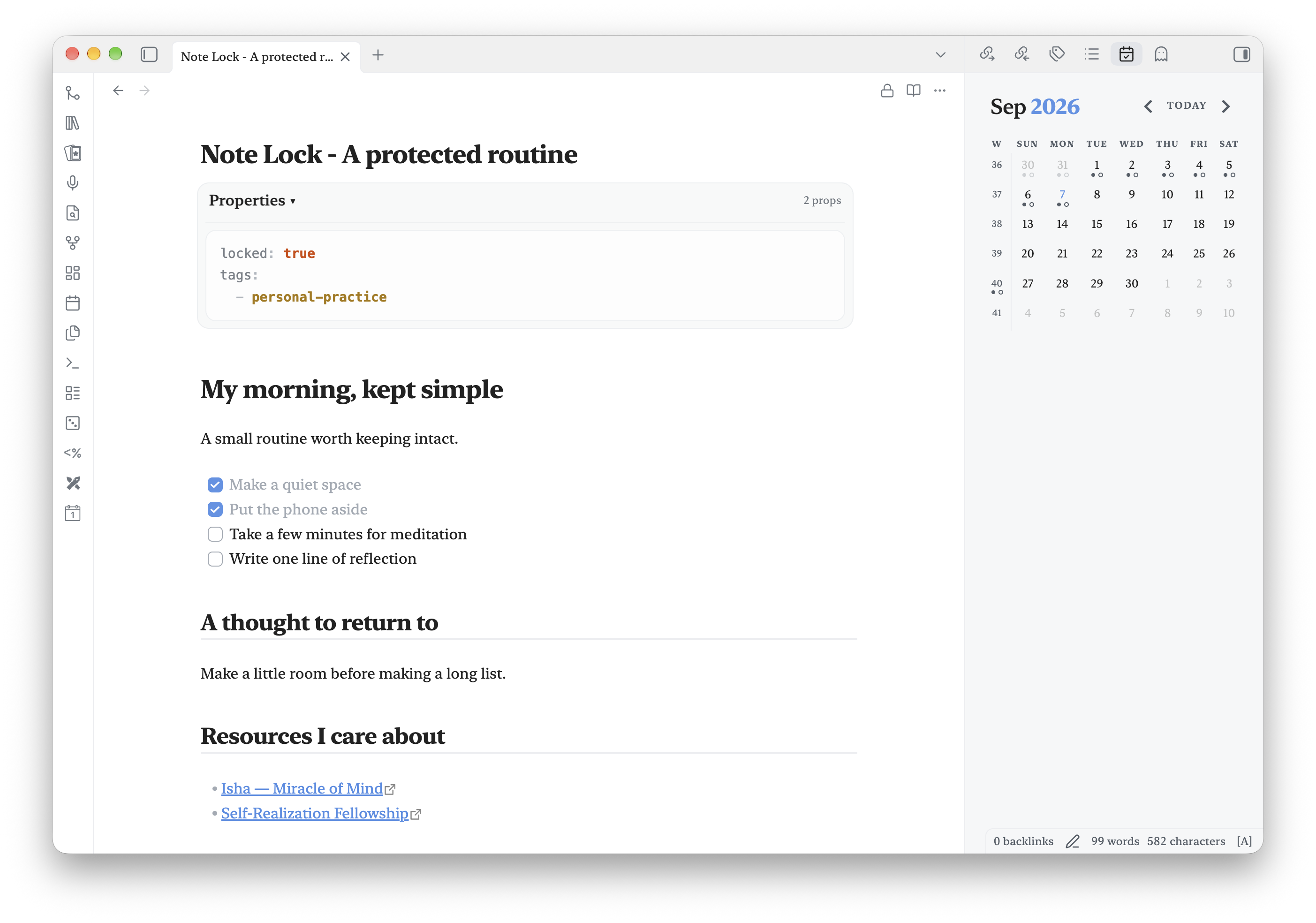
Notion-style page locking
Keep a routine protected against accidental edits, with the lock available in the note header.
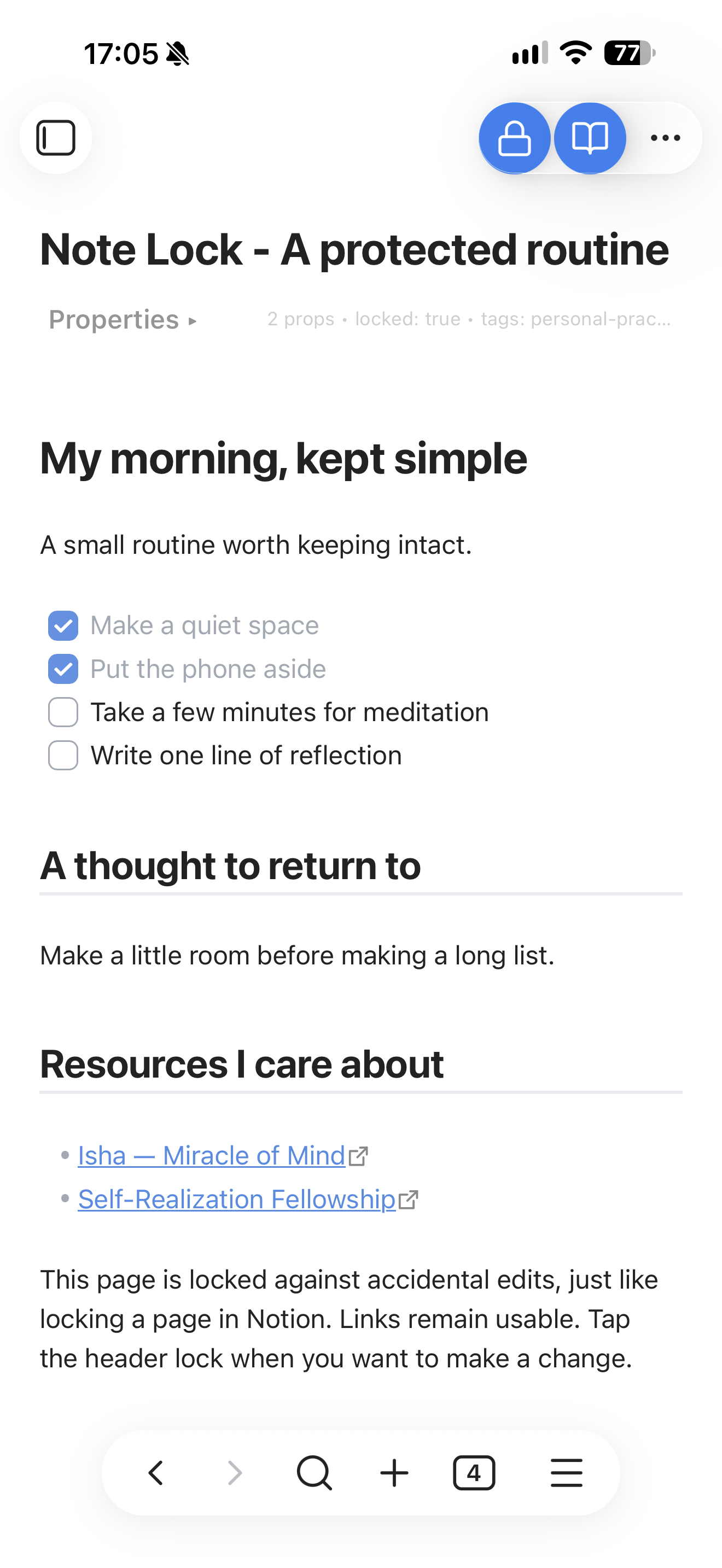
A clean mobile note
The header lock remains visible below the status area, with the optional banner hidden.
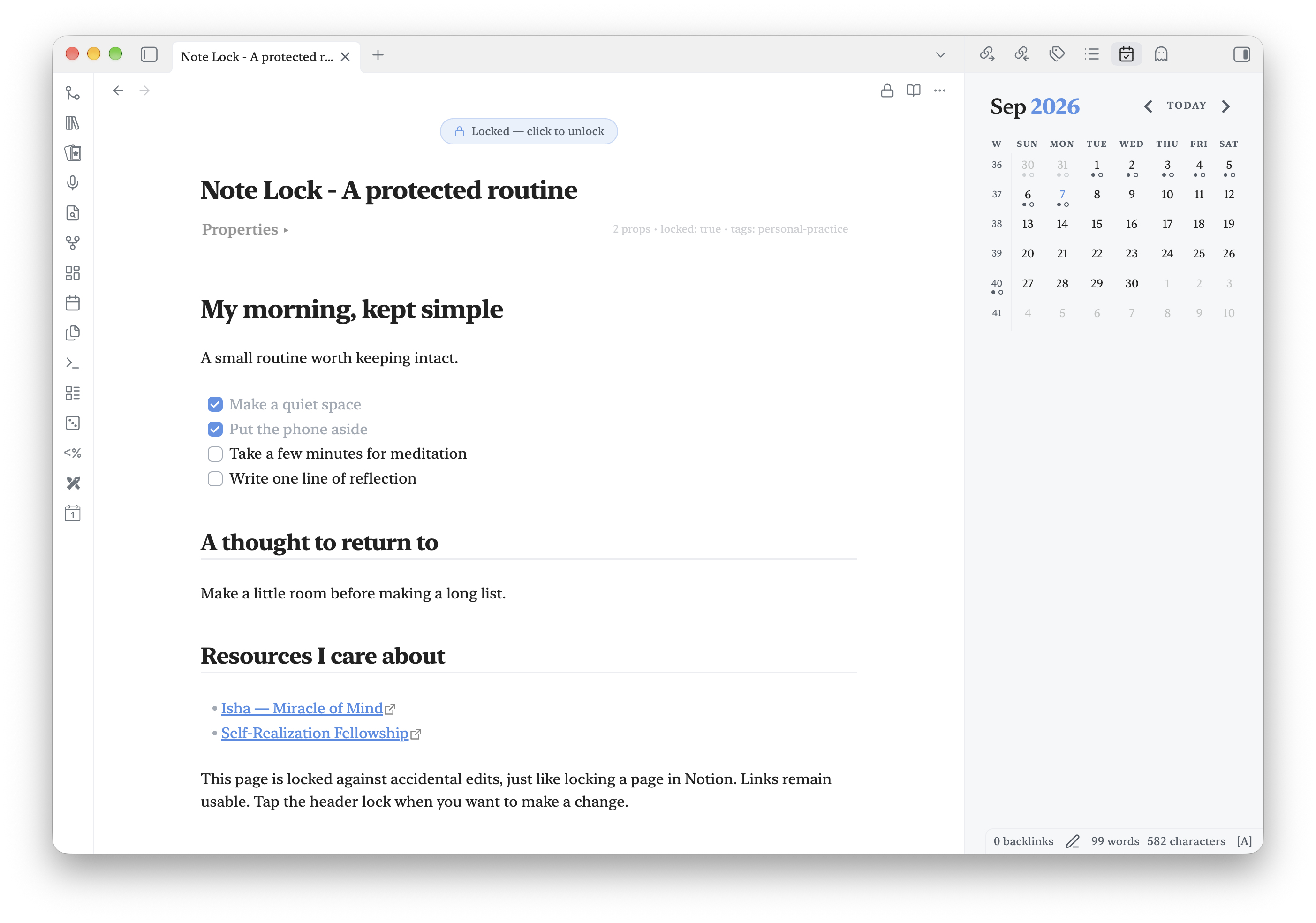
An optional unlock banner
Show a visible unlock reminder above the note when you want it.
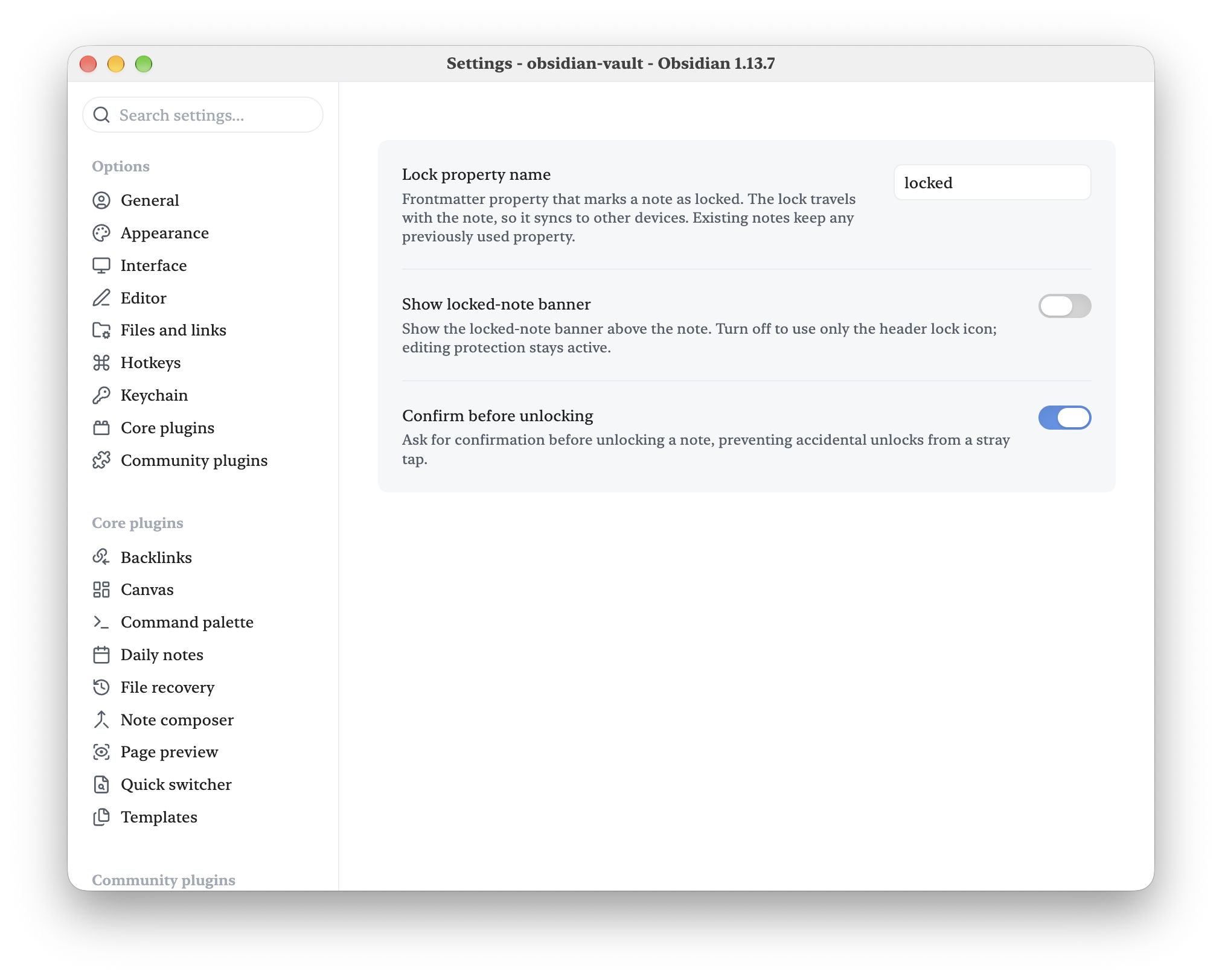
Choose how locking looks
Hide the banner while keeping protection active, and require confirmation before unlocking.
Usage
- Lock — click/tap the open-lock icon in the view header, run Toggle lock on current note from the command palette, or choose Lock note from the three-dots menu or the file explorer's context menu.
- Unlock — click/tap the banner, the lock icon in the view header, or use the same command or menu item again.
- Assign a hotkey to Toggle lock on current note under Settings → Hotkeys for one-keystroke locking.
How it works
The lock lives in the note's frontmatter (default property: locked). While it is set:
- The editor becomes read-only at the CodeMirror level, so no edit can reach the document.
- Frontmatter writes are checked before a plugin’s callback can change metadata.
- Obsidian's file-write API refuses changes to the note from any plugin, with a notice.
- Sync and external tools can still update the file — locking protects against edits inside Obsidian, not against your sync service.
Unlocking simply removes the property. Because the lock is a plain frontmatter property, it travels with the note through sync, backups, and vault moves.
Scope
Markdown notes only. The lock applies wherever the note is edited — tabs, split panes, popout windows, and embedded editors. Canvas files and other non-markdown files are not affected.
Settings
Show locked-note banner — Turn off to remove the banner and use only the header lock icon. Editing protection stays active. This applies immediately to open notes.
Lock property name — the frontmatter property that marks a note as locked (default
locked).Confirm before unlocking — ask before unlocking, preventing accidental unlocks from a stray tap (default off).
Migrating from Note Lock
Page Lock replaces this project's former note-lock plugin ID. Disable the old plugin before installing this version; do not enable both copies. Preserve its data.json in the new page-lock folder and update command hotkeys to the new prefix. The locked frontmatter property is unchanged, so existing locked notes stay locked.
For an existing installation of Robert Fleming's Note Lock, close Obsidian and run python3 scripts/migrate-install.py /path/to/vault from the source repository before deploying Page Lock. The script backs up the old installation and preserves settings, enabled state, and command hotkeys. Restart Obsidian afterward. This migration is not for the unrelated community plugin also named Note Lock.
The screenshots were captured before the rename and still show the former name; the locking interface is unchanged.
Installation
Community Plugins
Once accepted, install Page Lock from Settings → Community plugins → Browse.
Manual installation
Copy main.js, manifest.json, and styles.css from a release into:
<vault>/.obsidian/plugins/page-lock/
Then reload Obsidian and enable Page Lock under Community plugins.
Development
Requires Node.js 20 or newer.
npm install
npm run dev     # esbuild watch mode
npm run build   # type-check + production build
npm run lint
Release checklist
- Run
npm run buildandnpm run lint. - Test locking and unlocking in Live Preview, Source mode, and Reading view, on desktop and mobile if available.
- Run
npm version patch,npm version minor, ornpm version major. The version script keepsmanifest.jsonandversions.jsonin sync. - Push the resulting numeric tag (for example
1.0.1). GitHub Actions builds the plugin and attachesmain.js,manifest.json, andstyles.cssto the GitHub Release.
On the maintainer workstation, use the USA OS plugin release command. It pushes the exact
main commit to private Forgejo and public GitHub, verifies both tips, and atomically updates
the primary vault's runtime copy while preserving its settings.
Contributing
Bug reports and pull requests are welcome. Please keep the plugin focused: it should remain a
simple, dependable note lock that respects local-first Obsidian workflows. Before opening a
pull request, run npm run build and npm run lint.
Support
If Page Lock improves your workflow, you can support its continued development on Buy Me a Coffee.
Acknowledgements
Robert Fleming directed and reviewed this work. Recent refinements, documentation, and screenshot preparation were developed in collaboration with OpenAI Codex, powered by GPT-6. Thank you to the AI collaborators who helped bring these ideas into a usable community plugin.
License
MIT
Screenshot demo
A ready-to-use screenshot kit includes demo notes and capture instructions.
Feedback
Bug reports are welcome in this repository’s issue tracker when available. Include your Obsidian and plugin versions, desktop or mobile, a short reproduction, and expected versus actual behavior. Use a small sample note without personal content. This is a spare-time project; fixes and replies have no guaranteed schedule. Contributions and forks are welcome; donations are optional.