Search...Search plugins and themes...
⌘K
Sign in
  • Get started
  • Download
  • Pricing
  • Enterprise
  • Account
  • Obsidian
  • Overview
  • Sync
  • Publish
  • Canvas
  • Mobile
  • Web Clipper
  • CLI
  • Learn
  • Help
  • Developers
  • Changelog
  • About
  • Roadmap
  • Blog
  • Resources
  • System status
  • License overview
  • Terms of service
  • Privacy policy
  • Security
  • Community
  • Plugins
  • Themes
  • Discord
  • Forum / 中文论坛
  • Merch store
  • Brand guidelines
Follow us
DiscordTwitterBlueskyThreadsMastodonYouTubeGitHub
© 2026 Obsidian

Outline Jump

yujiayujia29 downloads

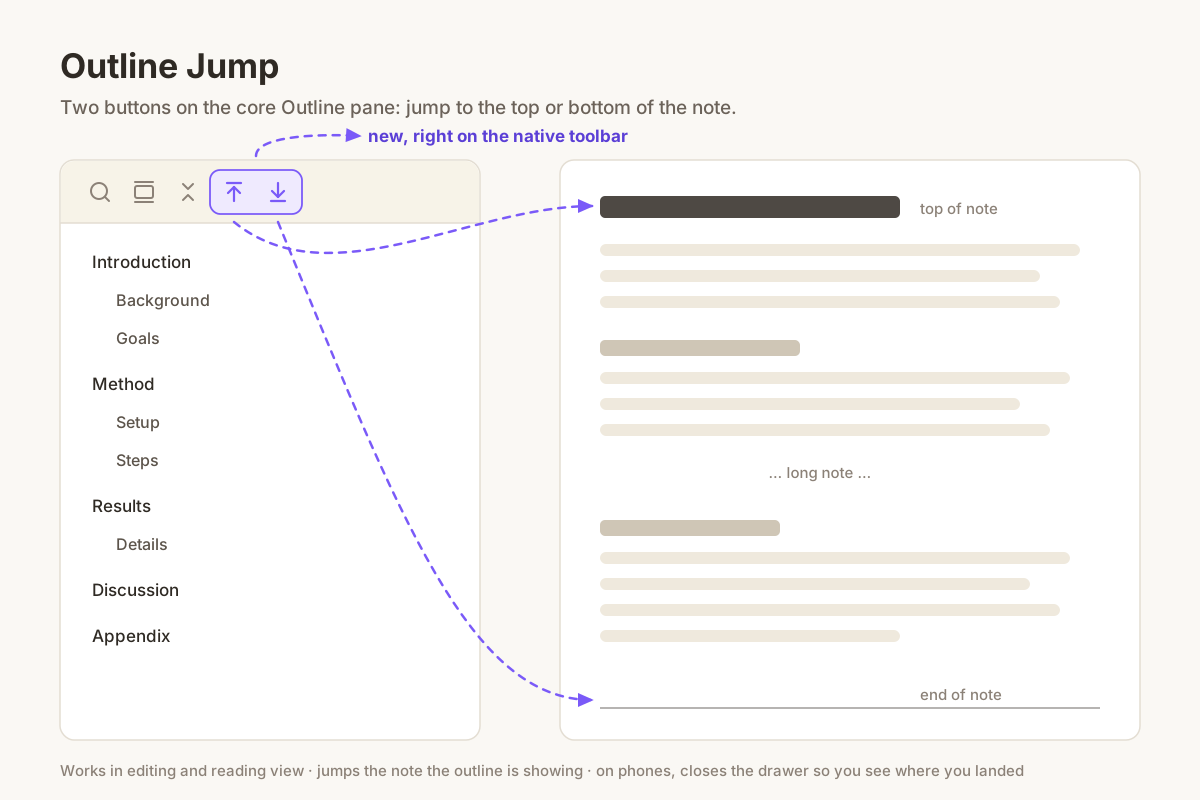
Adds jump-to-top and jump-to-bottom buttons to the core Outline pane.

Add to Obsidian
Outline Jump screenshot
  • Overview
  • Scorecard
  • Updates2

Outline Jump adds two buttons to the core Outline pane

The core Outline pane lets you jump to any heading, but not to the very top or the very bottom of the note. On a long note that means a lot of scrolling.

This plugin adds two buttons to the Outline pane's own toolbar, next to search and collapse:

  • Jump to top — scrolls the note back to its first line.
  • Jump to bottom — scrolls the note all the way to the end.

Details

  • Works in both editing and reading view. Reading view renders long notes lazily, so the bottom jump keeps going until it really reaches the end.
  • It jumps the note the outline is currently showing, so it does the right thing with split panes.
  • On phones the outline lives in a drawer that covers the note, so the drawer closes after a jump and you see where you landed.
  • Only scrolls. It never moves your cursor or changes the note.

Install

Search for Outline Jump in Settings → Community plugins, or copy main.js and manifest.json from the latest release into <vault>/.obsidian/plugins/outline-jump/.

The core Outline plugin needs to be enabled.

License

MIT

HealthExcellent
ReviewPassed
About
Add two buttons to the Outline pane to jump to the top or bottom of the current note. Support both editing and reading views, follow the outline's active pane in splits, and close the outline drawer on phones after jumping.
NavigationSidebar
Details
Current version
0.1.1
Last updated
2 weeks ago
Created
2 weeks ago
Updates
2 releases
Downloads
29
Compatible with
Obsidian 1.0.0+
Platforms
Desktop, Mobile
License
MIT
Report bugRequest featureReport plugin
Author
yujiayujiarainajia716
GitHubrainajia716
  1. Community
  2. Plugins
  3. Navigation
  4. Outline Jump

Related plugins

Notebook Navigator

A better file browser and calendar inspired by Apple Notes, Bear, Evernote and Day One.

Vertical Tabs

Offer an alternative view that displays open tabs vertically, allowing users to group and organize tabs for a better navigation experience.

Recent Files

Display a list of recently opened files.

Reveal Active File Button

Add a button to the top of the File Explorer, to reveal the active file.

TagFolder

Show tags as folder.

Portals

Pin folders and tags as customizable tabs with icons, colors, and folder notes for easier navigation.

Homepage

Open a note, base, or workspace on startup, or set it for quick access later.

Breadcrumbs

Visualise the hierarchy of your vault using a breadcrumb trail or matrix view.

Tag Wrangler

Rename, merge, toggle, and search tags from the tag pane.

Quick Switcher++

Enhanced Quick Switcher, search open panels, and symbols.