
- Overview
- Scorecard
- Updates32
Usage
By default org files are not shown in the sidebar.
To display them you need to go into the obsidian settings, section Files and links and check Detect all file extensions.
To create an org file in your vault, you currently have to create it outside obsidian, as obsidian doesn't allow to create a non-markdown file.
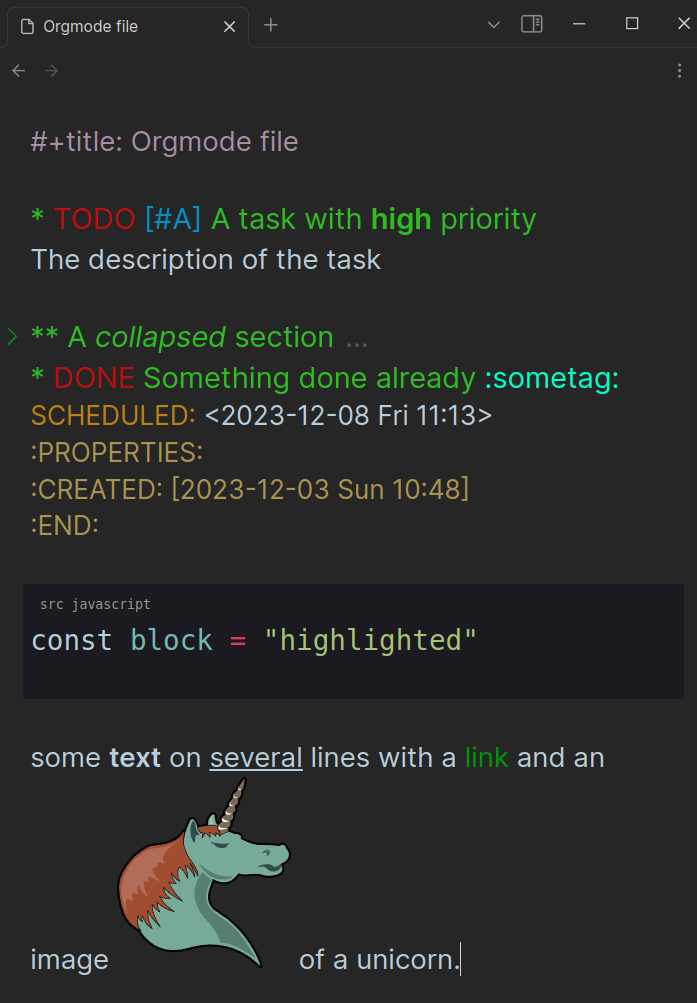
If you don't already have an org file, try to create a file called todo.org with the following content:
* TODO [#A] A task with *high* priority

The description of the task

* A collapsed section

You cannot see the description when collapsed

* DONE something done already :sometag:
SCHEDULED: <2023-12-08 Fri 11:13>
:PROPERTIES:
:CREATED: [2023-12-03 Sun 10:48]
:END:

a [[https://github.com/BBazard/obsidian-orgmode-cm6][link]]

#+begin_src javascript
const block = "highlighted"
#+end_src
Supported features
Orgmode Editor
- Live Preview
- Syntax highlighting (with overridable css classes)
- Customizable Todo Keywords in settings
- Folding (click in the gutter on the first line of the element to fold it)
- Wiki links (
[[unicorn]]will open the file unicorn.org anywhere in the vault or fallback to unicorn.md) - Inline images (
[[myimage.png]]will display the image if it exists in the vault) - ID links (
[[id:12345]]will redirect to the heading with the matching :ID: in a property drawer located in any org file in the vault) - Vim support (if activated in Obsidian)
- Source blocks highlighting (supported: c, c++, css, html, java, javascript, json, php, python, rust, sass, xml)
Orgmode Parser (syntax highlighting)
Following Org Syntax
- Heading (nested, no support for COMMENT heading)
- Section (including zeroth section)
- Text markup (bold, italic, underline, etc...)
- Link (regular link, angle link, plain link)
- Combination of markup and link
- Comment line
- Keyword line
- Planning line
- Property Drawer
- Lesser Block (unformatted except source blocks)
- Dynamic Block (not possible as obsidian doesn't allow arbitrary execution in plugins)
- Drawer
- List and Checkbox
- Horizontal rule
- Timestamp
- Clock
- Diary Sexp
- Footnote
- Table
- Latex
- : Fixed-width line (you can use a Block instead)
Implementation details
The orgmode files are handled with a codemirror 6 instance which is separate from the one used by the markdown files. That means the plugin has to re-implement all features working for markdown files.
The parser reads an orgmode file and builds a tree of syntax nodes by using a lezer grammar with custom tokenizers. This approach allows to match tokens more precisely than the regex-based approach of Emacs. For example, planning lines are only matched after a heading and not in the middle of a section.
Overlapping tokens are not considered valid. Take for example:
*one _two three* four_. Emacs, using regexes would have*one _two three*as bold and_two three* four_as underline. The lezer parser is instead considering*one _two three*as bold andfour_as normal text, it makes it possible to have the text markup range as its own syntax node.There is no limits to the level of headings (so no Inlinetask) or the number of lines of a text markup.
Show orgmode tasks in markdown files
This feature is unstable and will likely change in breaking ways in the future.
Currently only TODO and DONE are handled.
https://github.com/BBazard/obsidian-orgmode-cm6/assets/10139245/b071b2c8-b56e-4050-8fcf-02a922fdd1c0
To filter, orgzly search expression are supported (implemented: s, d, c, i, it, ad).
filepath: Orgmode/Orgmode file.org
query: it.todo or it.done
Development
git clone https://github.com/bbazard/obsidian-orgmode-cm6
cd obsidian-orgmode-cm6
npm install
npm run build
npm test
cp main.js styles.css manifest.json "$OBSIDIAN_VAULT"/.obsidian/plugins/obsidian-orgmode-cm6/