Search...Search plugins and themes...
⌘K
Sign in
  • Get started
  • Download
  • Pricing
  • Enterprise
  • Account
  • Obsidian
  • Overview
  • Sync
  • Publish
  • Canvas
  • Mobile
  • Web Clipper
  • CLI
  • Learn
  • Help
  • Developers
  • Changelog
  • About
  • Roadmap
  • Blog
  • Resources
  • System status
  • License overview
  • Terms of service
  • Privacy policy
  • Security
  • Community
  • Plugins
  • Themes
  • Discord
  • Forum / 中文论坛
  • Merch store
  • Brand guidelines
Follow us
DiscordTwitterBlueskyThreadsMastodonYouTubeGitHub
© 2026 Obsidian

Optimize Canvas Connections

felixchenierfelixchenier25k downloads

Declutter a canvas by reconnecting notes using their nearest edges.

Add to Obsidian
  • Overview
  • Scorecard
  • Updates10

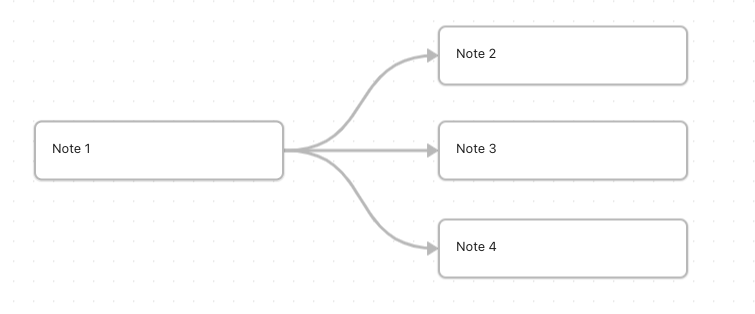
Suppose you start a canvas.

Figure 1

Then you move everything around while you brainstorm. The connections between notes may quickly become a mess.
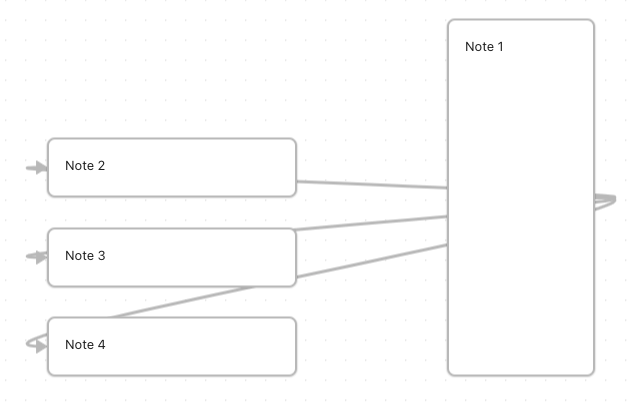
Figure 2

This simple plugin automatically reconnect notes together, using their nearest edges.

Select the notes to reconnect, then run command:

Optimize Canvas Connections: Optimize selection (preserve axes)

or

Optimize Canvas Connections: Optimize selection (shortest path)
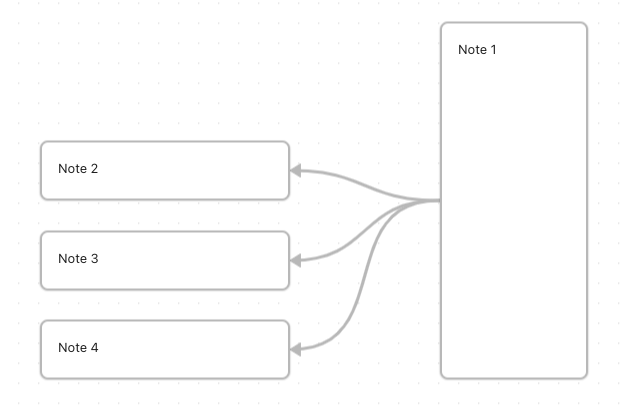
Figure 3

Shortest path

The shortest path option reconnects notes using their nearest edges, always using the shortest path possible. This is the most drastic approach.

Preserve axes

The preserve axes option also reconnects notes using their nearest edges, but it respects the axes on which a connection originally begins and ends. For instance, a connection that begins on the right side of a note could be changed to begin from the left, but not from the top or bottom. Use this option to preserve meaning in vertical and horizontal flow (e.g., top-to-bottom = time, left-to-right = details).

In doubt, use preserve axes.

In both cases, when no note is selected, the optimization is applied to the whole canvas.

65%
HealthFair
ReviewSatisfactory
About
Reconnect scattered canvas notes using nearest-edge connections to clean up messy wiring. Choose shortest-path mode for the absolute shortest links or preserve-axes mode to keep original vertical/horizontal flow; apply to a selection or the whole canvas when nothing is selected.
CanvasVisualizationAutomation
Details
Current version
1.0.0
Last updated
3 years ago
Created
3 years ago
Updates
10 releases
Downloads
25k
Compatible with
Obsidian 1.1.9+
Platforms
Desktop, Mobile
License
Apache-2.0
Report bugRequest featureReport plugin
Author
felixchenierfelixchenier
felixchenier.uqam.ca
GitHubfelixchenier
  1. Community
  2. Plugins
  3. Canvas
  4. Optimize Canvas Connections

Related plugins

Advanced Canvas

Supercharge your canvas experience. Create presentations, flowcharts and more.

QuickAdd

Quickly add new notes or content to your vault.

Templater

Create and use dynamic templates.

Homepage

Open a note, base, or workspace on startup, or set it for quick access later.

BRAT

Easily install a beta version of a plugin for testing.

Mermaid Tools

Improved Mermaid.js experience: visual toolbar with common elements and more.

Maps

Adds a map layout to bases so you can display notes as an interactive map view.

Readwise Official

Sync highlights from Readwise to your vault.

Linter

Format and style your notes. Linter can be used to format YAML tags, aliases, arrays, and metadata; footnotes; headings; spacing; math blocks; regular Markdown contents like list, italics, and bold styles; and more with the use of custom rule options.

Life Tracker

Capture and visualize the data that matters in your life.