Search...Search plugins and themes...
⌘K
Sign in
  • Get started
  • Download
  • Pricing
  • Enterprise
  • Account
  • Obsidian
  • Overview
  • Sync
  • Publish
  • Canvas
  • Mobile
  • Web Clipper
  • CLI
  • Learn
  • Help
  • Developers
  • Changelog
  • About
  • Roadmap
  • Blog
  • Resources
  • System status
  • License overview
  • Terms of service
  • Privacy policy
  • Security
  • Community
  • Plugins
  • Themes
  • Discord
  • Forum / 中文论坛
  • Merch store
  • Brand guidelines
Follow us
DiscordTwitterBlueskyThreadsMastodonYouTubeGitHub
© 2026 Obsidian

Open with Natural Language Dates

charliecmcharliecm980 downloads

Open a daily note using natural language. Requires "Natural Language Dates" plugin to work.

Add to Obsidian
  • Overview
  • Scorecard
  • Updates1

An Obsidian plugin that adds a command that lets you quickly open a daily note using natural language. It requires the Natural Language Dates plugin to be enabled.
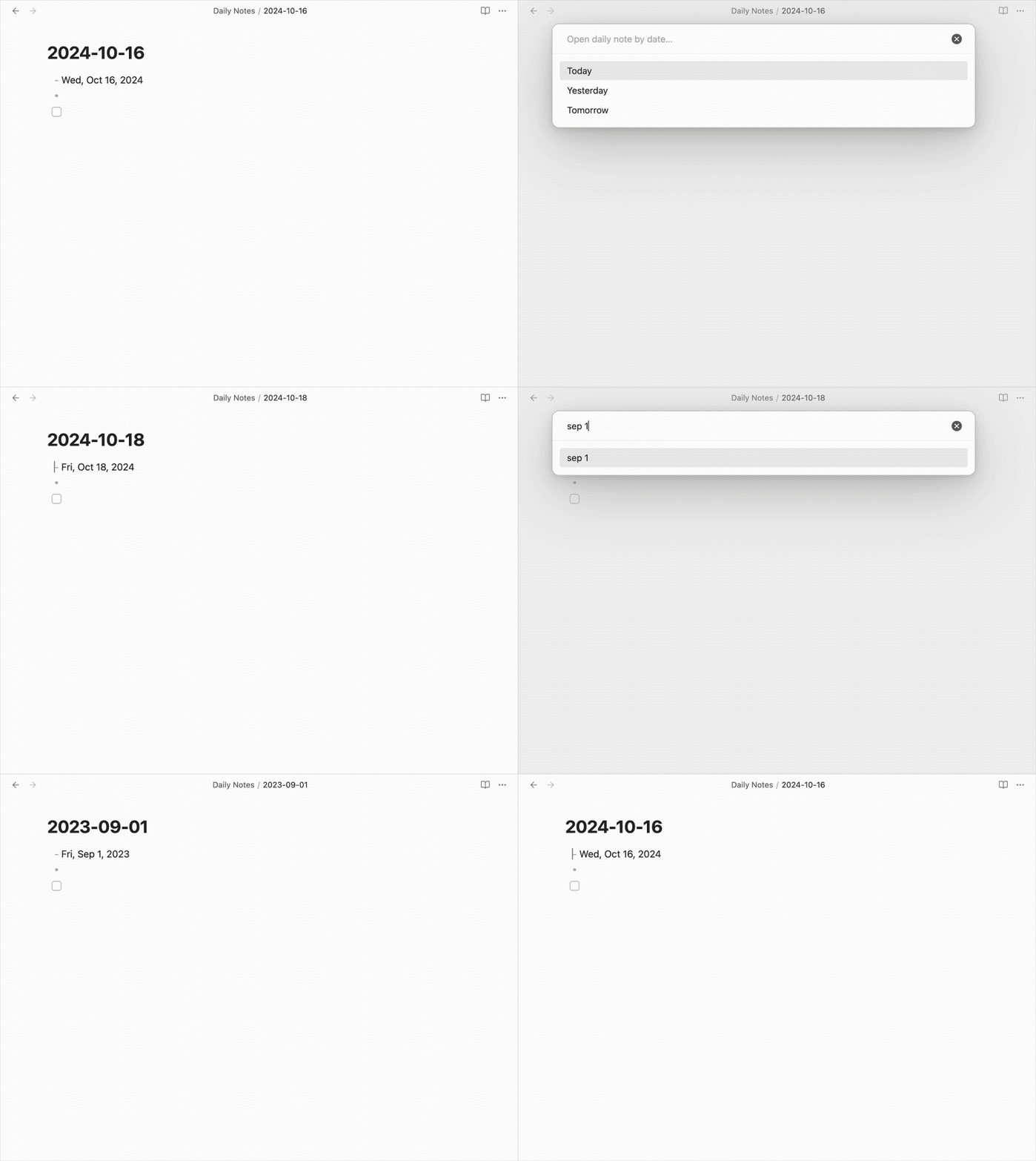
I wrote this plugin because I needed a faster way to open a daily note without needing to use a calendar or remember the exact file name. This is useful if you're trying to recall something or want to add to a future daily note. Thanks @argenos for writing Natural Language Dates, which inspired this plugin.

How to Install

From inside Obsidian…

  1. Go to Settings → Community plugins.
  2. Disable Safe mode.
  3. Click Browse, search for Line Commands, and click Install.
  4. Click the toggle button to enable the plugin.

For manual installation, download this repo and copy over main.js and manifest.json to your vault: VaultFolder/.obsidian/plugins/obsidian-open-with-nldates/.

Development

  1. Clone this repo.
  2. yarn to install dependencies.
  3. yarn dev to start compilation in watch mode.
  4. bash install-built.sh /path/to/your/vault -d to create symbolic links of built files to your vault for quick development.

Release

  1. Run yarn build.
  2. Run npm version [patch/minor/major] to bump version in manifest.json and versions.json.
  3. Add changes in CHANGELOG.md.
  4. Add a new version tag and push it.
    git tag -a 1.0.1 -m "1.0.1"
    git push origin 1.0.1
    
  5. Go to “Releases” in GitHub and edit the latest release (created by GitHub Actions). Insert the changelog texts in the description and ensure main.js and manifest.json are attached.
  6. Click “Publish release”.

Support

If you really like this plugin and want to support its development, please consider buying me a coffee 🙂 Thanks!

77%
HealthGood
ReviewSatisfactory
About
Open daily notes by typing natural-language dates instead of searching the calendar or file names. Use the Natural Language Dates plugin to parse phrases like "next Friday" or "3 days from now" and jump directly to past or future daily notes.
Commands
Details
Current version
1.0.0
Last updated
2 years ago
Created
2 years ago
Updates
1 release
Downloads
980
Compatible with
Obsidian 1.6.7+
Platforms
Desktop, Mobile
License
MIT
Report bugRequest featureReport plugin
Sponsor
Buy Me a Coffee
Author
charliecmcharliecm
github.com/charliecm
GitHubcharliecm
  1. Community
  2. Plugins
  3. Commands
  4. Open with Natural Language Dates

Related plugins

Quick Switcher++

Enhanced Quick Switcher, search open panels, and symbols.

Commander

Customize your workspace by adding commands everywhere, create macros and supercharge your mobile toolbar.

Note Toolbar

Add customizable toolbars to your notes.

Open vault in VS Code

Ribbon button and command to open vault as a Visual Studio Code (VSCode) workspace.

Task Collector (TC)

Change task status and collect tasks within a document using hotkeys and context menus.

Paste URL into selection

Paste URL "into" selected text.

Tray

Run Obsidian from the system tray for customisable window management and global quick notes.

Attachment Management

Customize attachment path, auto-rename attachments, etc.

Leader Hotkeys

Add leader hotkey support to any command (like tmux or vim).

Shell commands

Define system commands that you want to execute via command palette, hotkeys, URI links or automated events. E.g. open external applications or perform automated file modifications.