On2Od
 lalogeorgi104 downloads
Spatial import and GPU rendering of Microsoft OneNote notebooks in Obsidian using PixiJS. Floating Sticky Note Windows with synchronized Markdown projection.
- Overview
- Scorecard
- Updates7
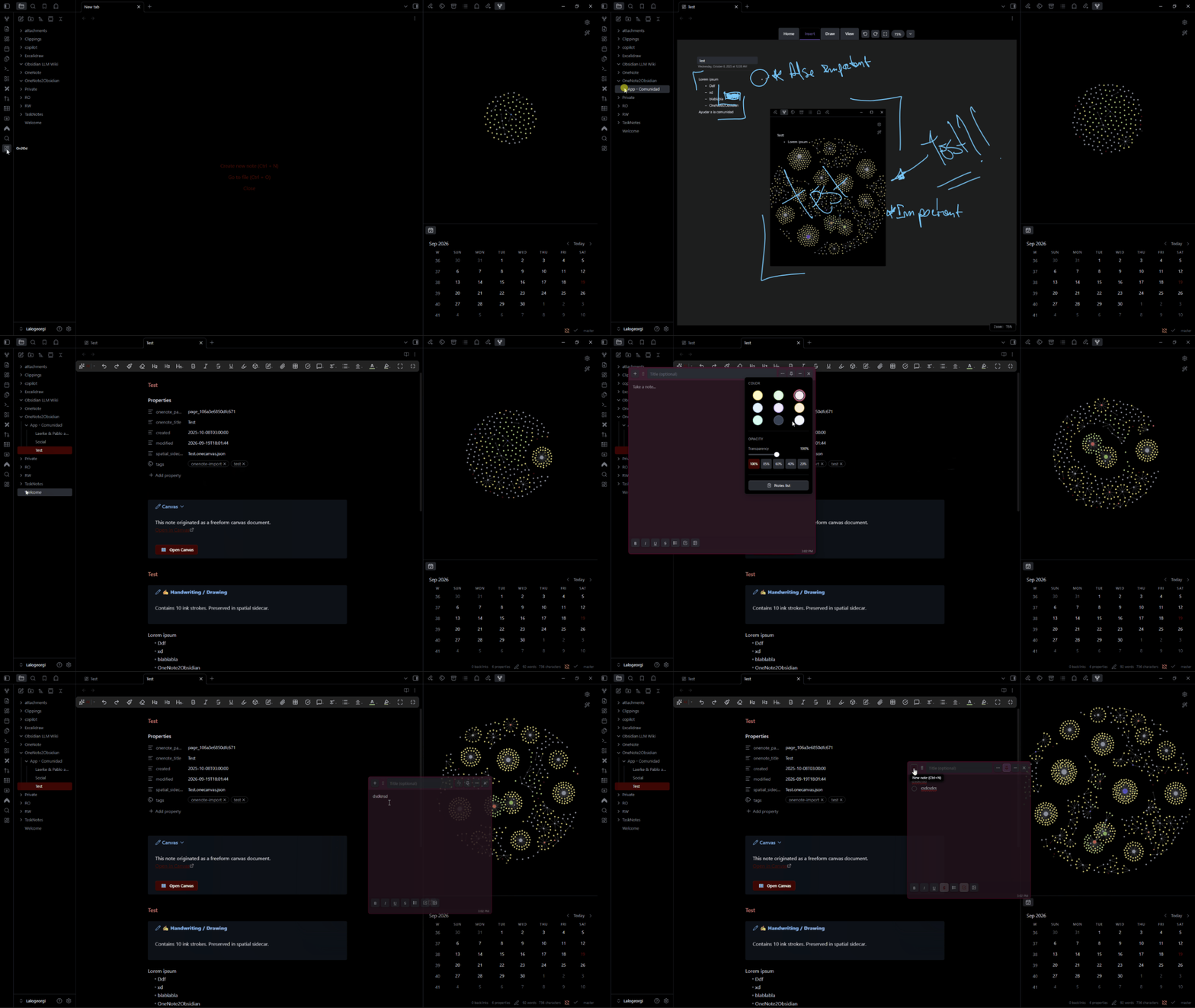
OneNote2Obsidian is an open-source Obsidian plugin designed to import Microsoft OneNote .one and .onepkg files while preserving their freeform spatial canvas — including positioned text frames, images, handwriting/ink, arrows, drawings, tables, file attachments, and multi-layer overlapping annotations — using PixiJS as the high-performance spatial rendering engine.
Includes also Floating Sticky Note Windows with synchronized Markdown projection.
🎯 Purpose & Spatial Fidelity Objective
Traditional document converters flatten OneNote notebooks into linear plain Markdown, destroying the spatial relationships between diagrams, handwritten math, sticky notes, margin comments, and annotations sketched directly over images.
OneNote2Obsidian establishes a dual-representation architecture:
                       Original OneNote Source (.one / .onepkg)
                                          │
                         [Immutable Source Provenance]
                                          │
                    ┌─────────────────────┴─────────────────────┐
                    ▼                                           ▼
      Spatial View (.onecanvas.json)              Semantic View (.md)
   • 60 FPS PixiJS GPU Canvas                  • Standard Obsidian Markdown Note
   • Vector Ink & Highlighters                 • Full-Text Searchable
   • Spatial Anchors & Overlays                • Backlinks & Graph View
   • Sticky Notes & Annotation Groups          • Asset Links & Tags
   • Interactive 8-Point Transform             • Dual Synchronized Split View
- Spatial Representation (
.onecanvas.json): An interactive, 60 FPS GPU-accelerated canvas that preserves exact 2D coordinates, stroke pressure, highlighters, and multi-layer visual layouts. - Semantic Projection (
.md): A clean GitHub Flavored Markdown document enabling Obsidian's full-text search, backlinks, tag indexing, and graph view.
🚀 Key Features
1. High-Fidelity Drawing Import Parity
- Accurate Binary Extraction: Direct extraction of authentic 24-bit RGB stroke colors (
0x340f) and HIMETRIC float dimensions (0x340c) converted to screen pixels. - Intelligent Tool Classification (
penType): Distinguishes between highlighters, ballpoint pens, gel pens, and pencils based on OneNote ISF stream flags, palette colors, and stroke widths. - OneNote Palette Matching: Native support for OneNote highlighter tones (yellow, green, cyan, pink, orange, lavender) with multiply blending on bottom ink layers.
2. Sticky Notes & Knowledge Layer
- Sticky Notes: Sticky notes exist as native canvas objects with customizable color presets (Yellow, Green, Blue, Purple, Pink, Orange, Charcoal), collapsible titles, embedded rich text formatting toolbars, and synchronized Markdown projection.
- Mandatory Variable Opacity & Transparency: Real-time opacity slider and quick presets (from 20% transparent glass mode for viewing underlying drawings/diagrams to 100% solid opacity), synchronized smoothly into PixiJS display objects and DOM text overlays.
- Floating Sticky Note Windows: Any sticky note is an independent floating desktop window (
FloatingStickyNoteWindow) with always-on-top pinning, live two-way canvas synchronization, and automatic position restoration. - Sticky Notes Hub: Dedicated central search modal (
StickyNotesHubModal) and dockable view (OneNoteStickyNoteView) for filtering, previewing, and navigating to any note across your entire notebook library. - Spatial Anchors & Annotations: Bind handwritten ink annotations, highlighters, or comments directly to pictures, tables, or text outlines so they remain locked together during canvas drag and transform operations.
- Spatial Groups: Multi-element hierarchical grouping allowing coordinated movement, z-ordering, and structured layout management.
- Spatial Backlinks & Link Graph: Interactive visual links connecting spatial canvas elements directly to corresponding Obsidian Markdown vault notes.
- Page Properties & Frontmatter Sync: Real-time YAML frontmatter editing and canvas metadata management via the interactive Page Properties Modal.
5. Spatial Canvas & Architecture
- PixiJS v8 Rendering Pipeline: Decoupled 2.5D GPU canvas with a 9-layer scene graph (Page Background, Images, Vector Ink, Outlines/Text, Tables, Shapes, Attachments, Selection Gizmos, HUD).
- Catmull-Rom Vector Ink: Pressure-sensitive freehand handwriting with authentic color blending and Catmull-Rom curve smoothing.
- Interactive Transform Gizmo: 8-point interactive resize, rotate, and translation gizmo with aspect-ratio locking.
6. High-Performance Architecture
- 2D Spatial Hash Grid: Sub-millisecond viewport queries ($1.2\mu\text{s}$ hit-testing) across thousands of objects.
- Batched Vector Strokes: Up to 1,250x fewer draw-call flushes for ink-heavy notebook pages.
- Delta Frustum Culling: Smooth 60 FPS viewport transforms on expansive $5000\times 5000\text{px}$ canvas layouts.
- SHA-256 Asset Deduplication: Zero duplicated storage across repetitive image payloads.
7. Zero-Trust Security & Data Safety
- 100% Local & Offline: Zero telemetry, zero analytics, zero external network requests.
- Archive Sandboxing: Strict defenses against path traversal (
../), Windows reserved device names (CON,NUL), and decompression bombs. - Source File Immutability: The original
.oneand.onepkgfiles are treated as immutable read-only provenance and are never altered. - Vault Safety: Atomic write operations with sandboxed staging cleanup on abort or failure.
📦 Supported File Formats
| Format | Extension | Description | Support Status |
|---|---|---|---|
| OneNote Section | .one |
Individual section file (OneNote 2010–2016 / 365 format) | ✅ Full Support |
| OneNote Package | .onepkg |
Multi-section notebook archive (MSCF Cabinet format) | ✅ Full Support |
| Notebook Table of Contents | .onetoc2 |
Section hierarchy and display order metadata | ✅ Full Support |
| Spatial Sidecar | .onecanvas.json |
Plugin-owned editable 2.5D spatial document schema | ✅ Version 1 Schema |
🚦 Current Status & Known Limitations
[!WARNING] Alpha Status: OneNote2Obsidian is currently in active alpha development. Core parsing, rendering, and spatial editing are fully operational, but complex third-party embedded objects and legacy 2003 formats have known limitations.
Known Limitations
- Password-Protected Sections: Encrypted sections cannot be decrypted automatically. Unlock and export them in Microsoft OneNote before importing.
- OneNote 2003 / 2007 Format: Legacy pre-2010 binary structures must be upgraded to 2010–2016 format in OneNote prior to import.
- Embedded OLE Objects (e.g. live Excel spreadsheets): Extracted as static file attachments; live in-cell formula editing requires external desktop applications.
- Complex MathML Equations: Rendered as text representation; can be converted to standard LaTeX
$...$in the semantic Markdown note. - Platform Support: Desktop Only (Windows, macOS, Linux). Multi-gigabyte archive extraction and binary stream parsing rely on Node.js runtime APIs.
🛠️ Development & Testing
# Clone the repository
git clone https://github.com/Lalogeorgi/OneNote2Obsidian.git
cd OneNote2Obsidian

# Install dependencies
npm install

# Run strict typecheck, production build, and all 67 test suites (340 tests)
npm run check

# Run ESLint validation
npm run lint

# Development watch mode
npm run dev
📜 Documentation Index
- Compatibility & Supported Features Matrix
- Third-Party Licenses & Software Provenance
- Contributing Guidelines
- Security Policy
- Code of Conduct
- Changelog
- Release Checklist
📄 License & Attribution
- Plugin License: MIT License (c) 2026 OneNote2Obsidian Contributors.
- Third-Party Libraries: THIRD_PARTY_LICENSES.md (Pixi.js, DOMPurify, RBush).
- Clean-room TypeScript parser implemented based on Microsoft's publicly available Open Specifications (
[MS-ONE],[MS-ONESTORE],[MS-CAB],[MS-ISF]).
⚖️ Trademark Notice & Legal Disclaimer
Microsoft OneNote, OneNote, and Microsoft Office are trademarks or registered trademarks of Microsoft Corporation in the United States and/or other countries. OneNote2Obsidian is an independent open-source project and is neither affiliated with, endorsed by, nor sponsored by Microsoft Corporation.