

AI Agents in Obsidian: Claude Code, Codex, Cursor, Grok, OpenCode, Oh My Pi, Pi, and DeepSeek Harness for note chat, inline editing, and file diff review.
- Overview
- Scorecard
- Updates55
Turn scattered notes into a clear next step, with an agent working inside Obsidian.
Bring your existing Claude Code, Codex, or another supported coding agent into your vault. Compare source notes, draft a linked summary, inspect file-edit diffs, and keep the result in Markdown.
Install · Quick start · Try the sample workflow · 简体中文 · Releases · Report a bug
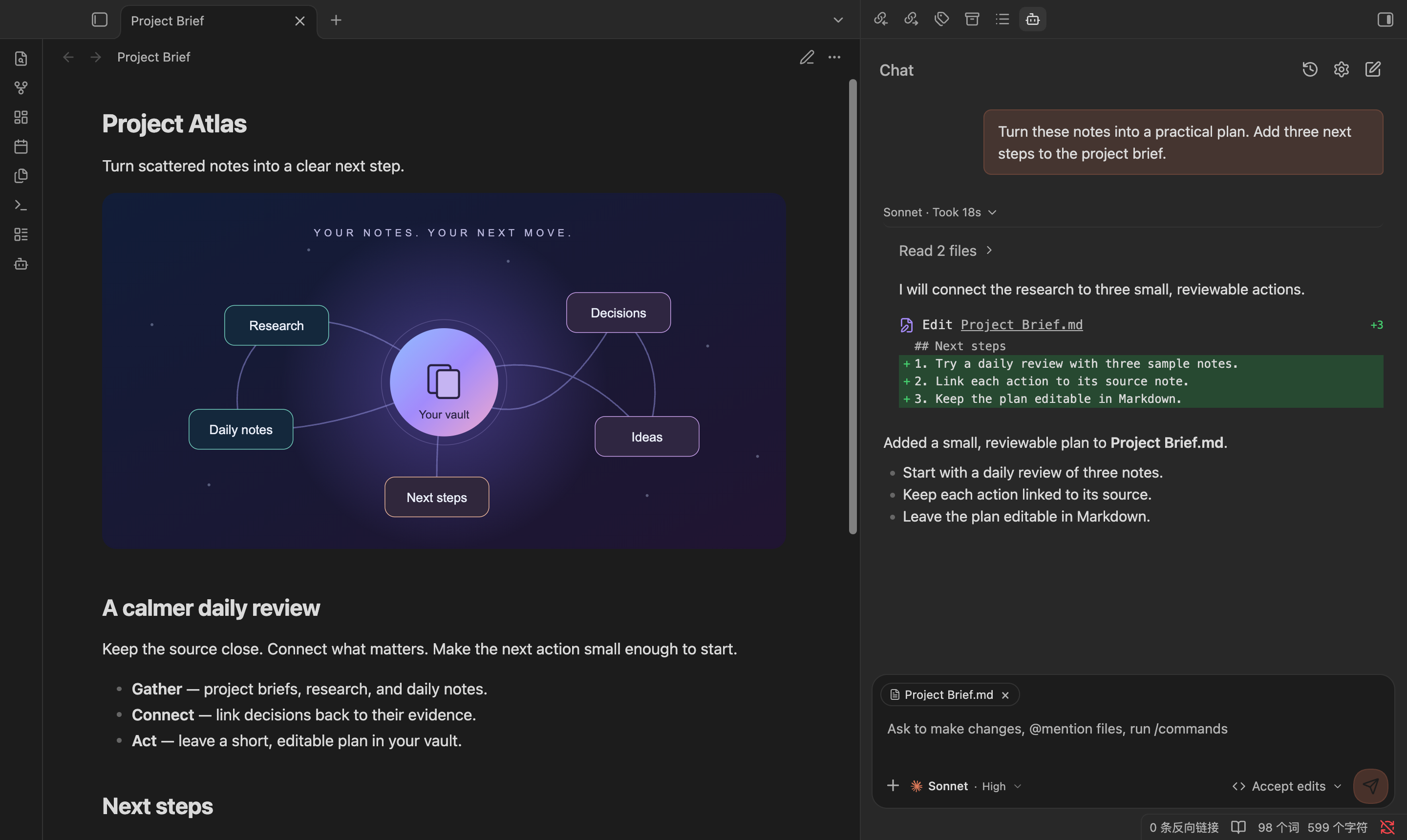
Real Obsidian interface with a sample conversation. Appearance varies by theme and provider.
Start with a result
- Make sense of scattered notes. Attach a project brief and research notes, then ask for a summary that links each conclusion to its source.
- Improve a draft in place. Select note text, request an inline edit, review the word-level diff, and apply the result.
- Keep longer work readable. Read the latest answer while completed tool activity folds into expandable summaries. Scroll back without losing your reading position.
- Keep your agent setup. Use provider-native authentication, models, permissions, and supported commands from the Obsidian sidebar.
Quick start
You need desktop Obsidian 1.7.2+ and access to a supported agent. The plugin is free and MIT-licensed; your provider's subscription, API charges, and usage limits still apply. It does not include a model subscription.
1. Install the plugin
Open Settings → Community plugins → Browse, search for Oh My Claudian, install it, and enable it. You can also use the community plugin page.
2. Connect one agent
Choose the CLI you already use. Verify that it can start and authenticate in your terminal, then configure that same provider in the plugin.
| Claude Code | Codex | |
|---|---|---|
| Provider setup | Follow the Claude Code quick start. Run claude and complete its sign-in if needed. |
Follow the Codex guide. Run codex and complete its sign-in if needed. |
| Existing account | Use an account or API configuration supported by Claude Code. | Use an account or API configuration supported by Codex. |
| Plugin settings | Open Settings → Oh My Claudian → Providers → Claude Code and enable the provider. | Open Settings → Oh My Claudian → Providers → Codex and enable the provider. |
| Readiness | Check Readiness, correct the CLI path if needed, and enable a chat model. | Check Readiness, load the model catalog, and enable a chat model. |
Readiness checks the provider, CLI, model catalog, and selected models. It can offer an install or update action for supported CLIs; the command is shown for confirmation and its result is checked afterward. Authentication stays with the provider's own CLI.
If the CLI works in a terminal but is not found here, set its absolute executable path in that provider's settings. Obsidian launched from a desktop shortcut may have a different PATH. If Claude authentication fails while subscription sign-in works in the terminal, see the credential conflict guidance.
3. Get your first answer
Open Oh My Claudian: Open chat view from the command palette or use its ribbon icon. Select the enabled model, type @ to attach a note, and send:
Summarize this note in three bullets. Link the source note and suggest one next step. Do not modify any files.
You should see the attached note as a context chip and an answer in the conversation. Once that works, try the workflow below. If there is no model to select or no answer arrives, start with Troubleshooting.
Try the sample workflow
Use the three small notes in docs/demo-vault. Copy them into a test vault, install and configure the plugin there, and attach all three with @.
- Ask the agent to compare the notes and propose three actions. The prompt asks for a read-only comparison.
- Review the proposed plan, then ask it to add a
Next stepssection toProject Brief.md, with links to the source notes. - Expand the file-edit card to inspect the diff when your provider supplies supported edit data, then open the changed note. A chat edit may already have been applied under your provider's permission mode; inline editing has a separate preview-and-apply flow.
The sample walkthrough includes exact prompts, expected results, and a recording plan. This is a reproducible sample, not a promise about a provider's speed or output.
If this helps you work with your notes, a GitHub star helps others discover the project. Bug reports and concrete workflow feedback are welcome too.
Relationship to Claudian
Oh My Claudian began as a fork of Claudian by Yishen Tu. It retains Claudian's MIT-licensed foundation and core workflows: sidebar chat, @ mentions, slash commands, and inline editing. It is independently maintained and is not an official Claudian release.
Alongside the inherited foundation, this project focuses on the workflows below:
| What you are looking for | What to try in Oh My Claudian |
|---|---|
| Cursor Agent or Oh My Pi in your vault | Choose either integration alongside Claude Code, Codex, Grok Build, OpenCode, and Pi. |
| Help getting a local agent ready | Provider-specific Readiness checks and supported CLI install/update actions. |
| Easier review of longer conversations | Expand completed work, inspect edit diffs, and keep your position while reading. |
| Actions that understand Obsidian's vault structure | Claude, Codex, DeepSeek Harness, OpenCode, and Pi can inspect backlinks, manage frontmatter, and move files with Obsidian link updates. |
Upstream evolves independently. See Claudian's current README when comparing available features. There is no need to migrate if your current setup already meets your needs.
Supported providers
The built-in provider integrations are:
For DeepSeek Harness, configure dsh web or open DeepSeek Harness Desktop once before enabling it in Providers → DeepSeek Harness. Discover the native model catalog, then explicitly select the models to show in chat. Auto prefers dsh; set the Desktop .app path or Windows installation folder to use its bundled runtime. The integration reuses your native profile, credentials and MCP servers. It supports native history/resume, images, permissions and Stop, with optional code mode and additional preset plugins. Chat presets include Obsidian-native vault tools through a session-scoped local bridge. Planning is not exposed by this integration.
Provider capabilities are intentionally different. The plugin exposes controls only when the selected provider supports them; model discovery, permissions, history, planning, MCP, and runtime behavior remain provider-specific. The Obsidian-native vault actions below are currently available in Claude, Codex, DeepSeek Harness, OpenCode, and Pi.
Usage
Give the agent context
Type @ to choose vault files or provider resources, or drag files and folders into the composer. Attachments appear as clickable context chips. Files from outside the vault must be attached explicitly; see Safety and privacy for access boundaries.
Type / to discover commands and skills supported by the selected provider. Instruction mode and Mermaid rendering are also available; provider-specific resources and controls depend on that provider's capabilities.
Keep chat available while reading
On desktop, collapse the sidebar containing Oh My Claudian to move its existing chat into a floating panel over your notes. Click the activity preview to expand or collapse the conversation; reopen the sidebar to restore the full view. Drafts, running responses and pending approvals stay in the same session.
Drag the handle below the panel to move it, or focus the handle and use arrow keys (Shift for larger steps). Press Home or double-click the handle to return to the bottom-center dock. The position is remembered. Disable Enable zen mode in the plugin's general settings to keep the sidebar-only behavior. Main-area chat tabs and popout windows do not float.
An empty conversation shows only the composer. Assign hotkeys to Toggle Zen panel to temporarily hide or restore it, and Toggle Zen conversation history to expand or collapse existing messages. Restoring the panel focuses the same composer; reopening its sidebar resets temporary hiding. Model and permission menus open toward available workspace space.
Read a conversation and inspect changes
The chat uses one conversation panel with history and session navigation. Start a new conversation or choose an earlier session to continue it. Resume, fork, and compact behavior depends on the selected provider.
Completed work is grouped into expandable summaries. Open a summary to inspect its tool calls; expand a file-edit card to see the diff when the provider supplies supported edit data.
Select text in a chat message and choose Save to note beside Quote to review and edit the selected content, then create a note or append to an existing Markdown note. Headings, emphasis, links, lists, tables, and code blocks are converted back to Markdown from the rendered selection. Existing folders can be included in the note path. The success dialog offers Open note and Undo saved text; undo preserves later additions and refuses conflicting edits. Undoing a new note removes the saved text and keeps the note file.
With Auto-scroll during streaming enabled, new content follows the bottom. Scroll up to read earlier content; return to the bottom to resume following. Expanded work history keeps its own reading position. Use Expand file edits by default in the display settings if you prefer to see edit details immediately.
Switch focus between a note and chat
Assign a shortcut to Oh My Claudian: Toggle chat input focus in Settings → Hotkeys. It moves focus to an existing visible chat input in the current window; press it again to return to the previous control without changing your draft or editor selection. Hidden inputs are skipped, and the command does not open a chat. No shortcut is assigned by default.
Edit selected text
Select text in a note and run the inline-edit command from Obsidian's command palette. Describe the change, inspect the word-level diff, and apply the result.
Choose a model
Only models enabled in provider settings appear in the composer. The button shows the selected catalog name; configured aliases can override supported custom-model labels. Claude names come from its SDK model catalog, so a tier may display the name reported by your configured backend. Environment mappings still determine execution routing.
Use Obsidian-native vault actions
Claude, Codex, DeepSeek Harness, OpenCode, and Pi can inspect backlinks, update or remove note frontmatter properties, move or rename vault files while Obsidian handles link updates, and send files to Obsidian trash.
DeepSeek exposes these actions as obsidian_vault in chat presets. Passive and read-only auxiliary presets do not receive this tool. See DeepSeek tool integration for lifecycle and packaging boundaries.
The UI is available in 10 locales, including Simplified and Traditional Chinese.
Troubleshooting
| Problem | What to check |
|---|---|
| Provider CLI is not found | Check Readiness in the provider's settings. If the CLI works in a terminal but is not discovered in Obsidian, set its executable path. GUI applications can have a different PATH. |
| No model is available | Refresh the provider's model catalog, enable the models you want, and check CLI authentication. |
| A control or command is missing | Check whether the selected provider supports it. Provider integrations expose different capabilities. |
| An edit card has no diff | The provider must return a supported diff or edit payload. A successful tool status alone does not include changed lines. |
For provider installation and authentication, use the official documentation linked under Supported providers. For a plugin issue, report a bug with your plugin version, Obsidian version, operating system, provider, CLI version, and reproduction steps. Remove credentials and private note content from logs or screenshots.
Claude authentication fails while the CLI subscription works
If Claude reports authentication_failed in Obsidian while the same CLI works with a subscription in your terminal, an inherited ANTHROPIC_API_KEY or ANTHROPIC_AUTH_TOKEN may be taking precedence over subscription sign-in. Choosing another CLI path does not clear those inherited credentials.
In Settings → Oh My Claudian → Providers → Claude Code → Environment → Custom variables, add an empty assignment only for the conflicting credential you intend to disable:
ANTHROPIC_API_KEY=
Use ANTHROPIC_AUTH_TOKEN= instead when that is the conflicting credential. Keep these assignments in Claude's provider settings so other providers remain unaffected. Retain credentials needed for custom API endpoints. When requesting help, share variable names rather than secret values.
Safety and privacy
Oh My Claudian is local-first and does not send telemetry. Your prompts, attachments, and tool results are sent to the provider you select and its configured model services. Network access also includes CLI version checks against the npm registry and configured MCP endpoints. CLI discovery and launches read relevant local environment variables, such as PATH, HOME, and USERPROFILE, to locate and run provider CLIs. These values are used locally and are not collected for plugin telemetry; provider CLI processes may use their inherited environment according to their own behavior.
The vault is the agent's working directory, not an operating-system security boundary. A local CLI, shell command, MCP server, plugin, or child process may access files, network services, and credentials available to your OS account. Safe/approval mode reduces accidental actions but cannot guarantee isolation. Review provider permissions carefully, especially before enabling YOLO, bash mode, browser access, MCP servers, or external context paths.
External files are attached explicitly as context. Attaching or mentioning a file does not grant write access; direct edits outside the vault are subject to the provider approval flow when supported.
Development
Use Node.js 24 and the pnpm version declared in package.json. To build directly in a vault:
cd /path/to/vault/.obsidian/plugins
git clone https://github.com/lee259/oh-my-claudian.git
cd oh-my-claudian
pnpm install
pnpm run build
Enable the plugin under Settings → Community plugins. For ongoing development:
pnpm run dev
pnpm run typecheck
pnpm run lint
pnpm run test
pnpm run build
pnpm run dev watches TypeScript, styles, and manifest.json. See CONTRIBUTING.md for contribution and validation guidance. GitHub Releases contains version-specific changes.
License
Licensed under the MIT License.