Search...Search plugins and themes...
⌘K
Sign in
  • Get started
  • Download
  • Pricing
  • Enterprise
  • Account
  • Obsidian
  • Overview
  • Sync
  • Publish
  • Canvas
  • Mobile
  • Web Clipper
  • CLI
  • Learn
  • Help
  • Developers
  • Changelog
  • About
  • Roadmap
  • Blog
  • Resources
  • System status
  • License overview
  • Terms of service
  • Privacy policy
  • Security
  • Community
  • Plugins
  • Join the community
  • Discord
  • Forum / 中文论坛
  • Merch store
  • Brand guidelines
Follow us
DiscordTwitterBlueskyThreadsMastodonYouTubeGitHub
© 2026 Obsidian

Toggl Track

mcndtmcndt31k downloads

Add integration with the Toggl Track API to manage your timers.

Add to Obsidian
  • Overview
  • Scorecard
  • Updates25

Toggl Track Integration for Obsidian

Add integration with the Toggl Track API to manage your timers inside Obsidian.

Functionality

  • ✨ NEW: Generate time tracking reports inside of your notes with code blocks
  • See your current timer and how long it has been running in the status bar
  • Get a summary of your day in the side panel
  • Create, start, and stop a new timer using the command palette, or restart an recent one
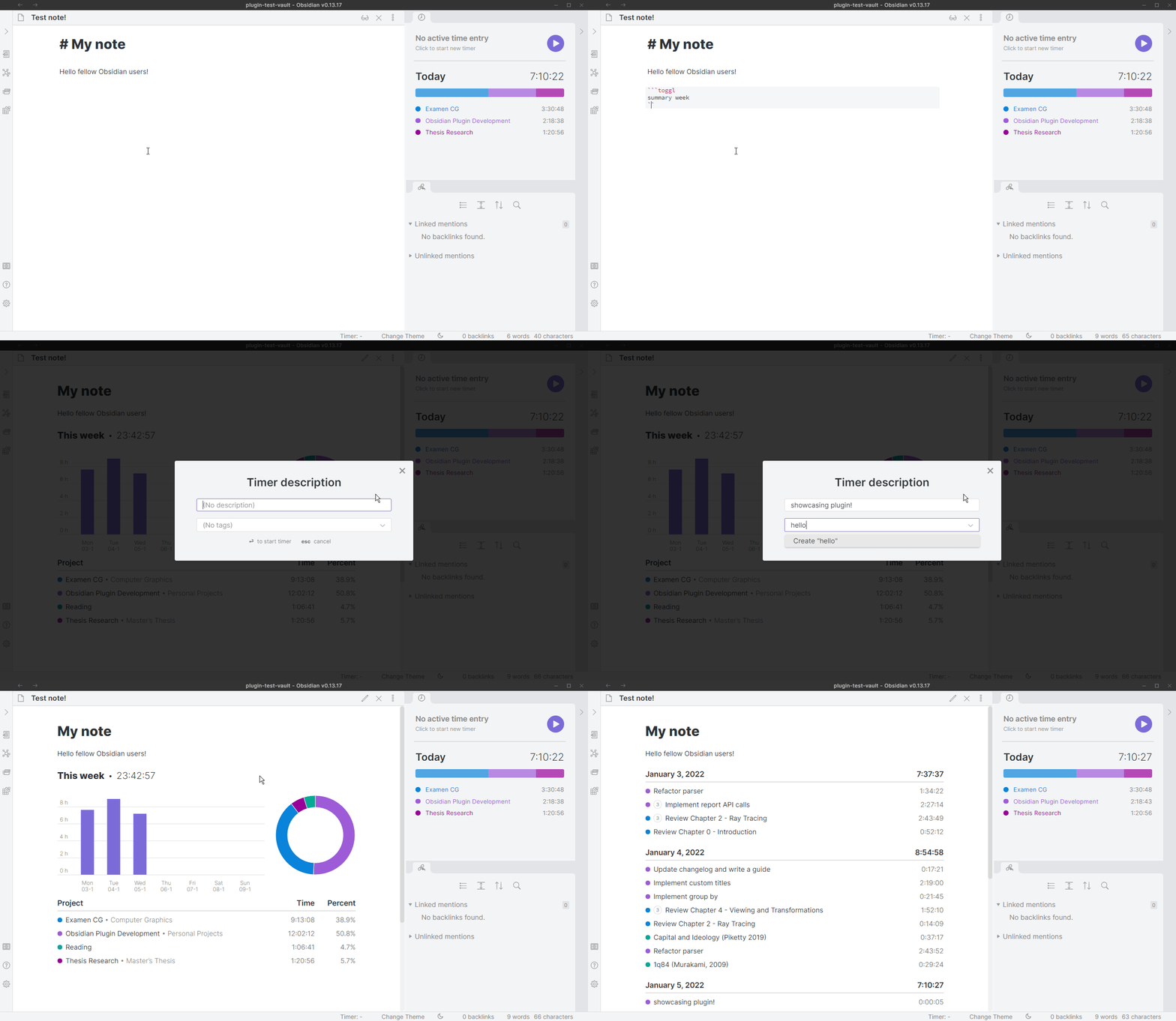
Rendering time reports inside your notes

Using simple code blocks it is possible to render time tracking reports inside your Obsidian notes. For example,

```toggl
SUMMARY
PAST 7 DAYS
```

Will result in something like:

example-summary-report

You can find a full tutorial and reference on rendering time reports in the plugin wiki.

Setup

Configuring this plugin requires you to first request an API token from Toggl. More info on how to do this can be found here.

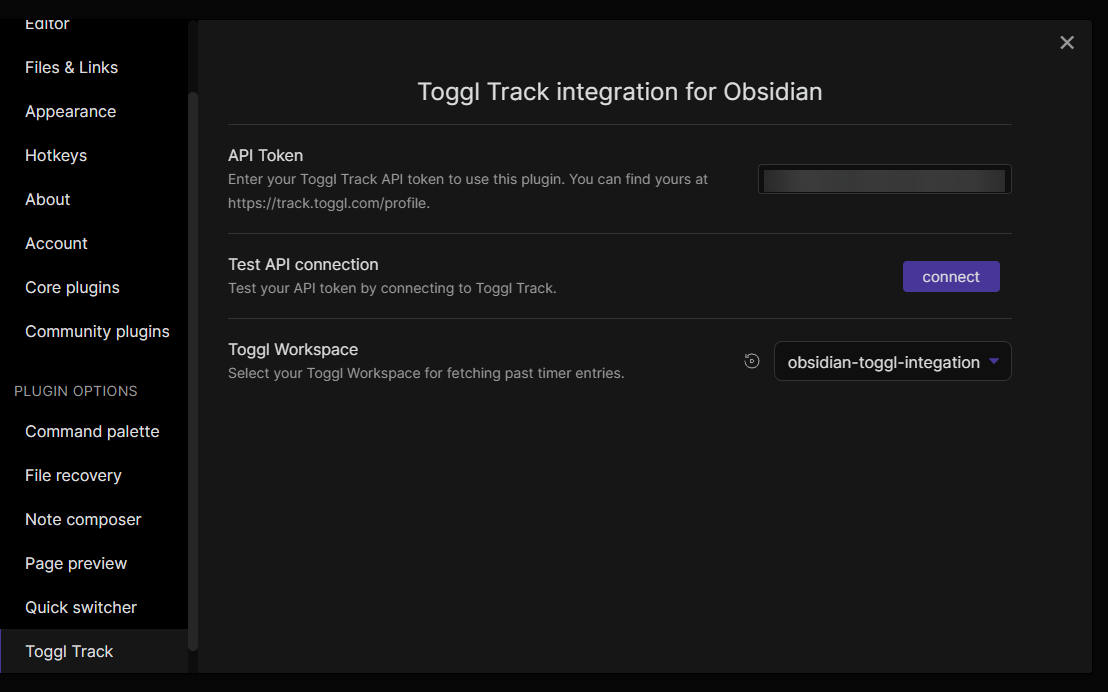
To set up this plugin, simply enter your API token in the settings tab, click connect and select the Toggl Workspace you wish to use.
settings

Use with other plugins:

QuickAdd

The developer of the QuickAdd plugin has created a preset menu for timers using QuickAdd. Instructions are available here and you can find out how he did it on the Obsidian Discord server (link to message).

Roadmap

You can see my more detailed roadmap for this plugin on this page: Development Roadmap. I try to keep the cards in each column sorted by priority.

Feature Requests

Please make feature requests in the GitHub discussions tab: click here

If you would to like to talk about the plugin with me more directly, you can find me in the Obsidian Discord server as Maximio#6460. Feel free to tag me!

Dependencies

Currently I rely on this repo for providing a JavaScript interface with the Toggl Track API: https://github.com/saintedlama/toggl-client

However in the future I might write fork this so I can refactor it to use mobile friendly APIs (e.g. using Obsidian’s own request API).

Support

If you like this plugin and want to support me, you can do so via Buy me a Coffee:

67%
HealthFair
ReviewRisks
About
Manage Toggl Track timers directly inside Obsidian, creating, starting, stopping, and restarting recent timers from the command palette. Generate time-tracking reports inside notes with simple code blocks and view your current timer in the status bar plus a daily summary in the side panel.
IntegrationsProject managementStatus bar
Details
Current version
0.11.0
Last updated
3 years ago
Created
5 years ago
Updates
25 releases
Downloads
31k
Compatible with
Obsidian 0.11.13+
License
GPL-3.0
Report bugRequest featureReport plugin
Author
mcndtmcndt
mcndt.github.io/
GitHubmcndt
  1. Community
  2. Plugins
  3. Integrations
  4. Toggl Track

Related plugins

Jira Issue

Track the progress of Atlassian Jira issues from your notes.

Super Simple Time Tracker

Multi-purpose time trackers for your notes.

BRAT

Easily install a beta version of a plugin for testing.

Tasks

Track tasks across your vault. Supports due dates, recurring tasks, done dates, sub-set of checklist items, and filtering.

Zotero Integration

Insert and import citations, bibliographies, notes, and PDF annotations from Zotero.

Maps

Adds a map layout to bases so you can display notes as an interactive map view.

Smart Composer

AI chat with note context, smart writing assistance, and one-click edits for your vault.

LanguageTool Integration

advanced spell/grammar checks with the help of language-tool.

Readwise Official

Sync highlights from Readwise to your vault.

MCP Tools

Securely connect Claude Desktop to your vault with semantic search, templates, and file management capabilities.