Latex Environments
 raineszm29k downloads
Quickly insert and change LaTeX environments within math environments.
- Overview
- Scorecard
- Updates12
Quickly insert and change latex environments within math blocks in Obsidian.
The internals have been rewritten for version 0.3.0. See Version 0.3.0 rewrite below.
Installation
If you have Obsidian version 0.9.8 or greater:
- Open the options pane
- Go to
Third-party plugins - Ensure that
safe-modeis off. (WARNING: Please verify for yourself the safety of any plugins before using them.) - Click
Browsenext to Community Plugins - Search for
Latex Environments - Click
Install - Go back to the
Third-party pluginspage and enableLatex Environments
To update simply go back to the Third-Party plugins page for Latex Environments and click Update.
Manual Installation
To manually install
- download the latest
zipfrom the latest Github Release - unzip the contents into the
.plugins/obsidian-latex-environmentssubdirectory of your vault. - reload obsidian
- go into settings > third party plugins and activate obsidian-latex-environments
For details see the forums.
Usage
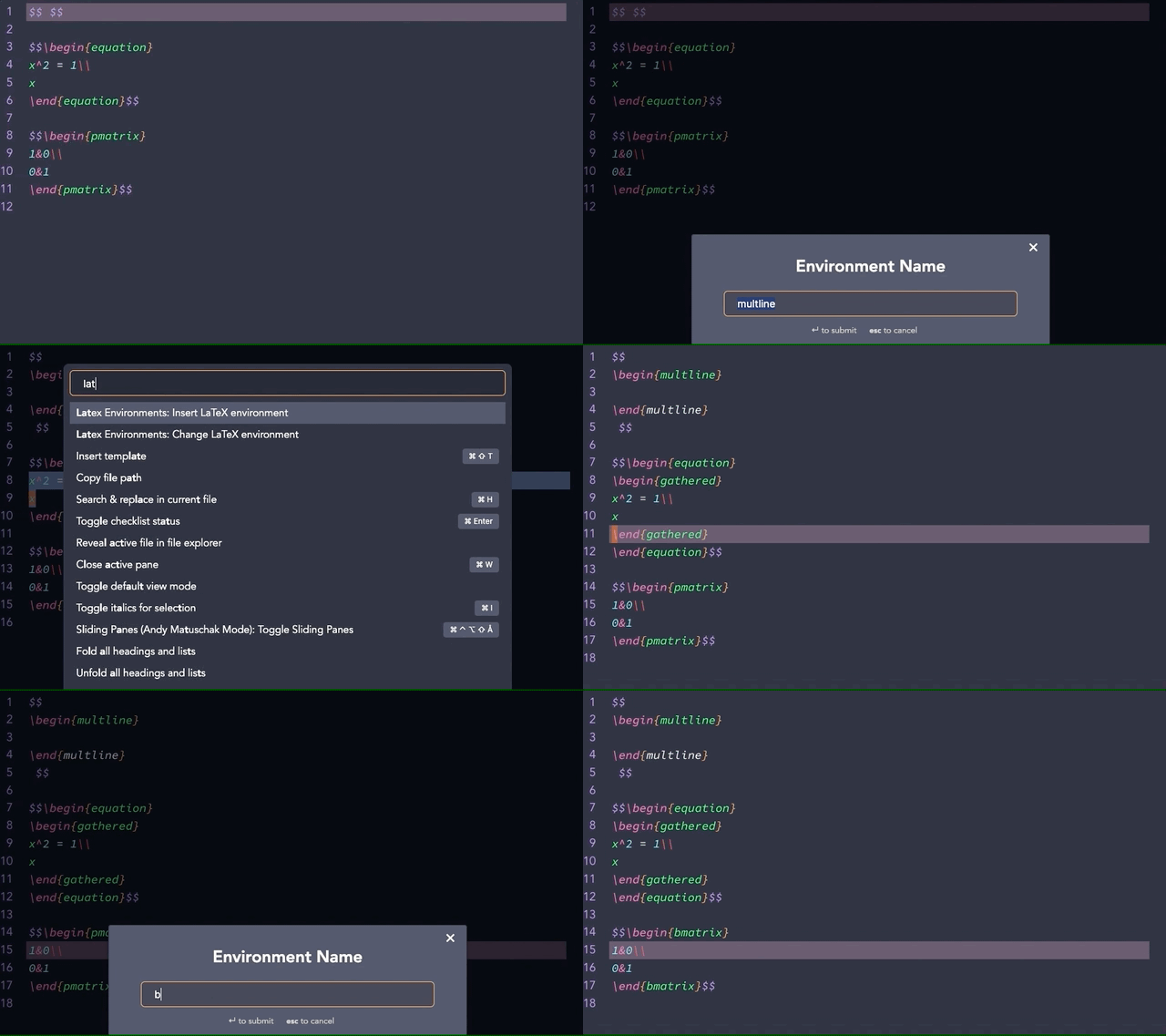
Commands
This plugin currently provides 3 commands, which do not have default bindings. Both commands only work when the cursor is inside a math block. Both commands will also query for the name of the environment.
Insert Environment
Insert a new LaTeX environment at the cursor.
With a selection inserts a new LaTeX environment around the selection. 0.
Change Environment
Change the name of the surrounding LaTeX environment.
If the cursor is on a \begin or \end, it is the corresponding environment that will be changed.
Delete Environment
Remove the innermost LaTeX environment enclosing the cursor.
Version 0.3.0 Rewrite
In order to support the Live Preview feature of obsidian the internals of this plugin needed to be rewritten. The aim is to leave functionality unaffected but there may be some differences from previous versions. Please file a bug report if you discover something that worked with 0.2.0 but not 0.3.0
Contributing
Pull requests are welcome. For major changes, please open an issue first to discuss what you would like to change.
Please make sure to update tests as appropriate.