Jira Issue

Track the progress of Atlassian Jira issues from your notes.
- Overview
- Scorecard
- Updates3
📢 Maintenance & Acknowledgement
This plugin was originally created and maintained by @marc0l92 (Marc), to whom the entire community is deeply grateful for his dedication and foundational work.
It is now actively maintained and updated by the Obsidian-jira-plugin community team.
This plugin allows you to track the progress of Atlassian Jira issues from your Obsidian.md notes.
🚀 Fork enhancements
This fork adds Android compatibility, safer credentials, flexible Jira links, animated overflow for issue tags, configurable Render Styles, and robust Epic Link/Parent alias resolution.
- Jira responses containing valid JSON are accepted on Android even when the
Content-Typeresponse header is missing or uses different casing. - Jira passwords and API tokens can be moved out of plain-text configuration into Obsidian secure storage, or encrypted with an AES-GCM master passphrase for cross-platform vault synchronization. Existing configurations remain in plain text until the storage method is changed explicitly.
- Each account can define an optional Web Base URL when its browser-facing Jira address differs from the API host.
- Long issue summaries and statuses stay compact and can optionally scroll to reveal their complete text in inline issues,
jira-issueblocks, and list search results. - Render Style Selector: Switch dynamically between Modern (Obsidian-native pastel status badges and borders) and Classic (legacy Bulma tags) from
Settings > Jira Issue > Render stylewith instant live workspace re-rendering. - Epic Link & Parent Aliases: Custom field columns
$Epic Link,$Epic Name,$Parent, and$Parent Linkinjira-searchqueries automatically fall back to Jira's modernparent/epicAPI objects, preserving compatibility with both legacy Jira Server and modern Jira Cloud instances. - Maximum widths are configurable from
Settings > Jira Issue > Renderingand default to20remfor summaries and2remfor statuses. - Overflow animation is disabled by default. It can be enabled from
Settings > Jira Issue > Rendering, only runs when text actually overflows, and respects the operating system's reduced-motion preference.
Documentation
Check out the complete documentation to start using Jira-Issue.
Installation
From the obsidian app go in Settings > Third-party plugins > Community Plugins > Browse and search for jira-issue.
Configuration
Use the plugin settings (Settings > Jira Issue) to configure your Atlassian Jira connections, security preferences, and visual styling:
- Security & Credential Storage: Choose between OS Keychain (SecretStorage) (desktop native), Master Passphrase (AES-256-GCM) (encrypted for synced vaults), or Plaintext (
data.json). - Render Style: Choose Modern (soft pastel badges, Obsidian-native) or Classic (legacy Bulma tags).
- Web Base URL: Optional browser-facing base URL used for links rendered in notes (useful when your public web address differs from the internal API endpoint or reverse proxy).
- Disable Icon Fetching: Per-account toggle to disable downloading icons and avatars from the Jira server and instead use upstream official Atlassian SVG icons.
- Use 2025 search api: Account toggle for modern Jira Cloud search API compatibility (prevents HTTP 410 errors).
Markdown Syntax
The plugin support the following components:
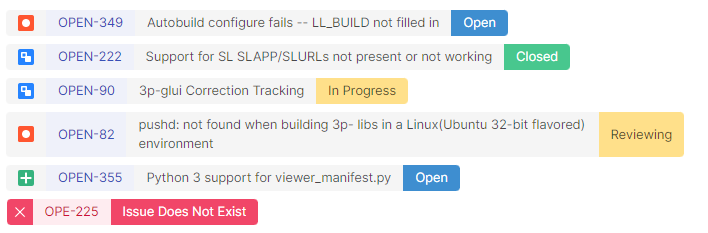
📃jira-issue:
- Documentation
- Example:
```jira-issue
AAA-111
AAA-222
https://my.jira-server.com/browse/BBB-333
# This is a comment
```
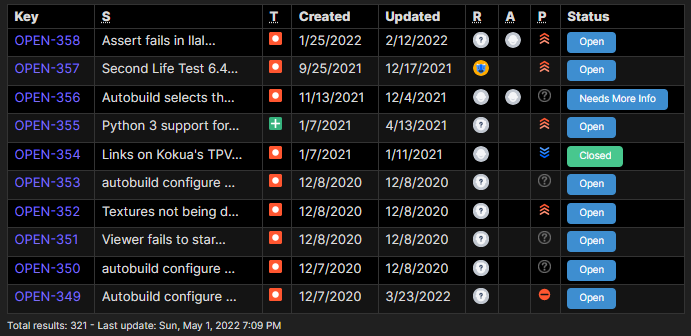
🔎jira-search
- Documentation
- Simple example:
```jira-search
resolution = Unresolved AND assignee = currentUser() AND status = 'In Progress' order by priority DESC
    ```
- Advanced example:
```jira-search
type: TABLE
query: status = 'In Progress' order by priority DESC
limit: 15
columns: KEY, SUMMARY, -ASSIGNEE, -REPORTER, STATUS, NOTES
```
🔢jira-count
- Documentation
- Example:
```jira-count
project = REF AND status changed to (Done, "Won't Fix", Archived, "Can't Reproduce", "PM Validated") after -14d
```
🏷️Inline issues
- Documentation
- Example:
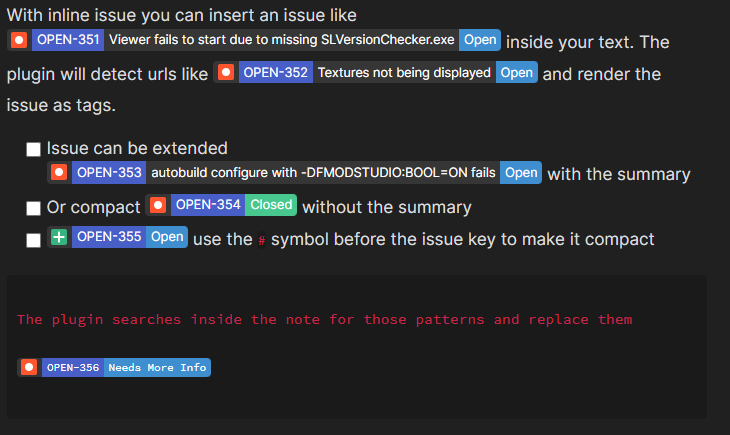
With inline issue you can insert an issue like JIRA:OPEN-351 inside your text.
The plugin will detect urls like https://jira.secondlife.com/browse/OPEN-352 and render the issue as tags.
- [ ] Issue can be extended JIRA:OPEN-353 with the summary
- [x] Or compact JIRA:-OPEN-354 without the summary
- [ ] JIRA:-OPEN-355 use the `-` symbol before the issue key to make it compact
```
The plugin searches inside the note for those patterns and replace them
JIRA:-OPEN-356
```
Contribution and Feedbacks
Feel free to share your experiences, feedbacks and suggestions in the by opening a GitHub issue.
Pull requests are welcome.
License
Jira-Issue is licensed under the GNU AGPLv3 license. Refer to LICENSE for more information.