Image Toolkit
 Obsidian Community Archive134k downloads
Click images to preview with zoom, move, rotate, flip, invert, and copy.
- Overview
- Scorecard
- Updates16
An Obsidian plugin for providing some image viewing toolkit
简体中文
·
English
About the Plugin
When you click an image, it will be popped up and you can preview, zoom, move, rotate, flip, invert and copy the image.
Basic Features
- Zoom in or out an image by mouse wheel or clicking toolbar zoom icons
- Move an image by dragging mouse cursor or pressing keyboard arrow keys
- Preview an image in full-screen mode
- Rotate or flip an image by clicking footer toolbar icons
- Invert the color of an image
- Copy an image
Normal Mode
When you turn off 'Pin an image' on the settings page, it's in Normal Mode.
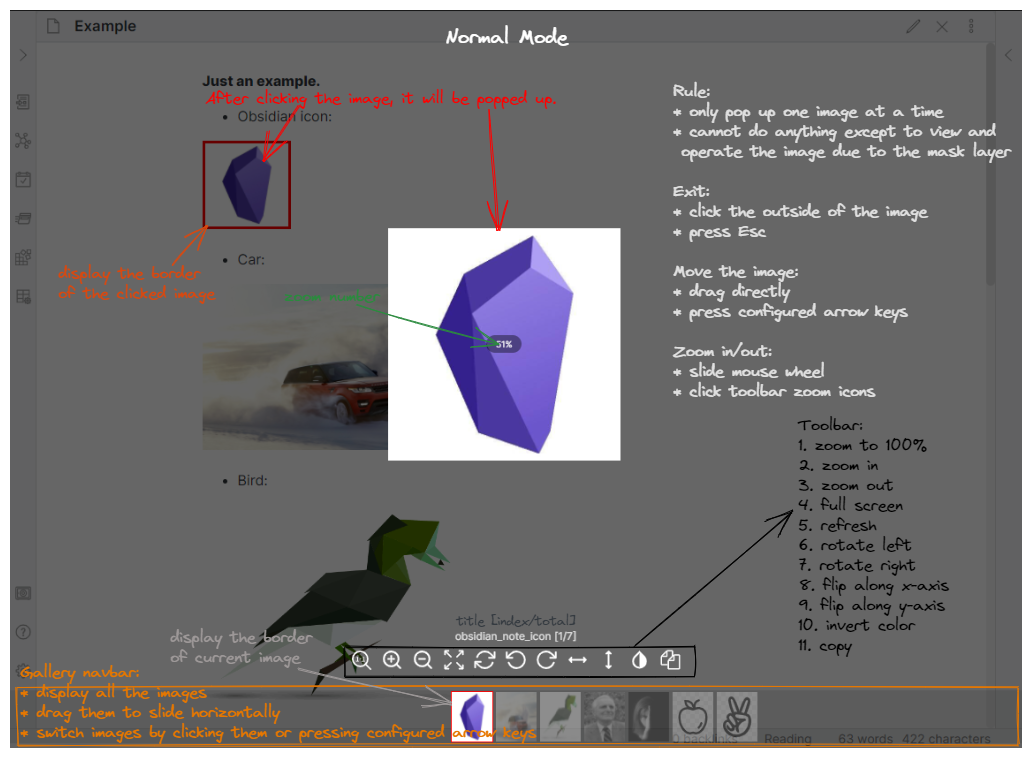
Rule:
- After clicking the image, the image will be popped up with transparent mask layer on the background
- You can only click and preview one image at a time
- You cannot edit and look through your notes, or other operations except to view and operate the image in the Normal Mode
Gallery Navbar:
- All the images in the current note will be displayed at the bottom, and you can switch these thumbs to view any image
- To be able to use this functionality, you need to turn on 'display gallery navbar' on the plugin settings page
- The background color of the gallery navbar and the border color the selected image can be set on the plugin settings page
Exit:
- Click the outside of the image
- Press Esc
If it's in full-screen mode, you need to exit full-screen mode firstly, then exit the image preview page and close popup layer.
Move the image:
- Put your mouse cursor on the image, and directly drag the image to move
- Press configured arrow keys to move the image
If you set modifier keys (Ctrl, Alt, Shift) for moving the image, you need to hold the modifier keys and press arrow keys at the same time.
Pin Mode
When you turn on 'Pin an image' on the settings page, it's in Pin Mode.
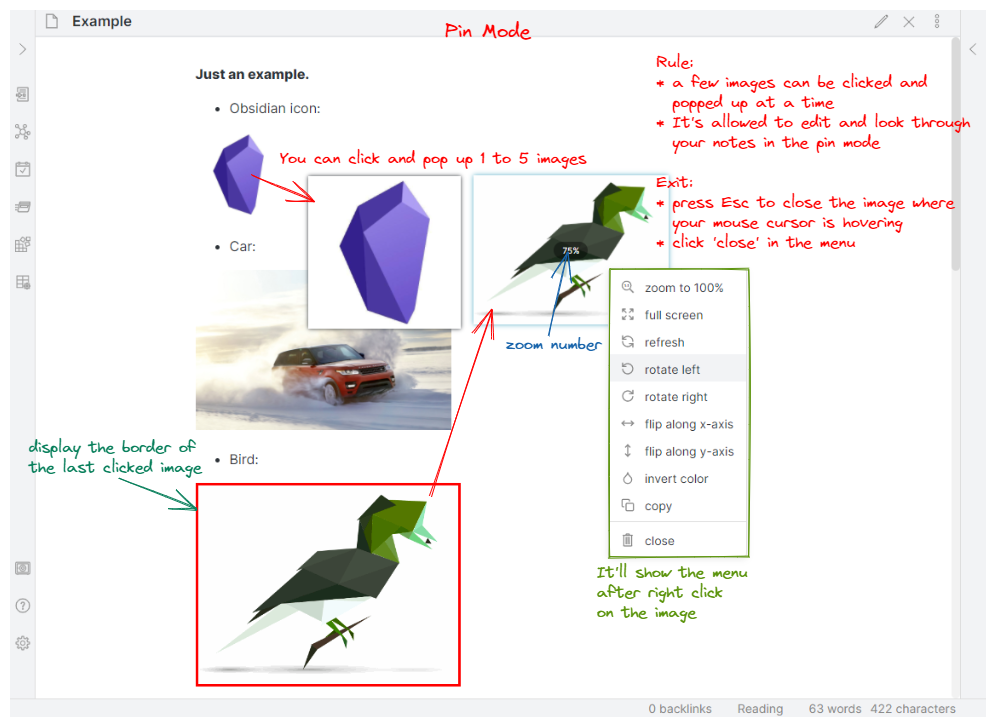
Rule:
- You can click and popped up 1 to 5 images at a time
- Comparing with normal mode, the image will be popped up without mask layer after clicking the image
- It's allowed to edit and look through your notes while images are being popped up and previewed
Menu:
- When you right click on the popped image, it will show the menu at the right side of your cursor. The menu contains several functions, like zoom, full screen, refresh, rotate, flip, copy, close, etc.
Exit:
- Press Esc to close the image where your mouse cursor is hovering
- click 'close' button in the menu
Move the image:
- Put your mouse cursor on the image, and directly drag the image to move
- NOT SUPPORT moving image by arrow keys
Installation
Installation from Obsidian's community plugins:
- Open Settings > community plugins
- Turn off 'Safe mode'
- Click 'Browse' button to browse plugins
- Search for 'Image Toolkit'
- Click 'Install' button
- Once installed, close the plugins browse window and go back community plugins window, and activate the newly installed plugin below installed plugins list
Manual installation:
- Download the latest release
- Extract obsidian-image-toolkit folder from the zip to your vault's plugins folder
<vault>/.obsidian/plugins/(Note:.obsidianfolder may be hidden, you need to show it firstly) - Open Settings > community plugins, and reload and activate the plugin below installed plugins list
Contact
If you've got any kind of feedback or questions, feel free to reach out via GitHub issues.
