Search...Search plugins and themes...
⌘K
Sign in
  • Get started
  • Download
  • Pricing
  • Enterprise
  • Account
  • Obsidian
  • Overview
  • Sync
  • Publish
  • Canvas
  • Mobile
  • Web Clipper
  • CLI
  • Learn
  • Help
  • Developers
  • Changelog
  • About
  • Roadmap
  • Blog
  • Resources
  • System status
  • License overview
  • Terms of service
  • Privacy policy
  • Security
  • Community
  • Plugins
  • Join the community
  • Discord
  • Forum / 中文论坛
  • Merch store
  • Brand guidelines
Follow us
DiscordTwitterBlueskyThreadsMastodonYouTubeGitHub
© 2026 Obsidian

Hotkeys for specific files

vinzent03vinzent0331k downloads

Add commands for specific files and open them with a hotkey.

Add to Obsidian
  • Overview
  • Scorecard
  • Updates10

Plugin for Obsidian

How to use

With this plugin, you can open specific files with a hotkey. You can set the files in the settings. A command will be generated for each file, then you can set your hotkey in the default hotkeys section in Obsidian.
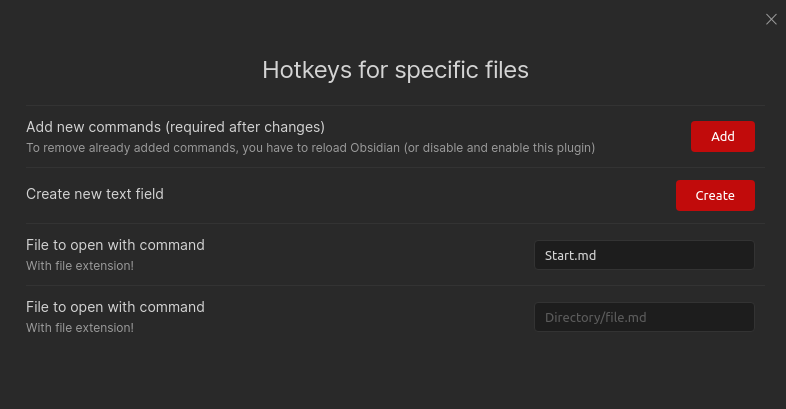
Settings

Hover Editor Support

This plugin supports the Hover Editor plugin. If you have the Hover Editor plugin installed, you can open the file in the Hover Editor by using the provided command. Needs the setting to be enabled.

Installing

From Obsidian

  1. Open settings -> Community plugins
  2. Disable Restricted mode
  3. Click Browse community plugins
  4. Search for "Hotkeys for specific files"
  5. Install it
  6. Enable it under Installed plugins

From GitHub

  1. Download the latest release
  2. Move manifest.json and main.js to <vault>/.obsidian/plugins/obsidian-hotkeys-for-specific-files
  3. Reload Obsidian (Str + r)
  4. Go to settings and disable safe mode
  5. Enable Hotkeys for specific files

If you find this plugin useful and would like to support its development, you can support me on Ko-fi.

56%
HealthFair
ReviewCaution
About
Open specific files with custom hotkeys for instant access. Generate a command per designated file and assign shortcuts in Obsidian's hotkey settings. Open files in the Hover Editor when Hover Editor support is enabled.
HotkeysFilesCommands
Details
Current version
1.4.1
Last updated
2 years ago
Created
5 years ago
Updates
10 releases
Downloads
31k
Report bugRequest featureReport plugin
Sponsor
Ko-fi
Author
vinzent03vinzent03
github.com/Vinzent03
GitHubvinzent03
  1. Community
  2. Plugins
  3. Hotkeys
  4. Hotkeys for specific files

Related plugins

Tray

Run Obsidian from the system tray for customisable window management and global quick notes.

Find orphaned files and broken links

Find files that are not linked anywhere and would otherwise be lost in your vault. In other words: files with no backlinks.

Code Editor Shortcuts

Add keyboard shortcuts (hotkeys) commonly found in code editors such as Visual Studio Code (VS Code) or Sublime Text.

Doubleshift

Open the command palette by pressing Shift (or any other key) twice like in IntelliJ and create your own shortcuts.

Text Transporter

Advanced text tools for working with text in your vault.

Notebook Navigator

Alternative file browser with folders, tags, properties, shortcuts, previews, keyboard navigation, drag and drop, and pinned notes.

Commander

Customize your workspace by adding commands everywhere, create macros and supercharge your mobile toolbar.

Recent Files

Display a list of recently opened files.

Omnisearch

Intelligent search for your notes, PDFs, and OCR for images.

Advanced URI

Control everything with URI.