
- Overview
- Scorecard
- Updates5
An Obsidian.md plugin to embed CircuitJS circuit simulations directly into your notes.
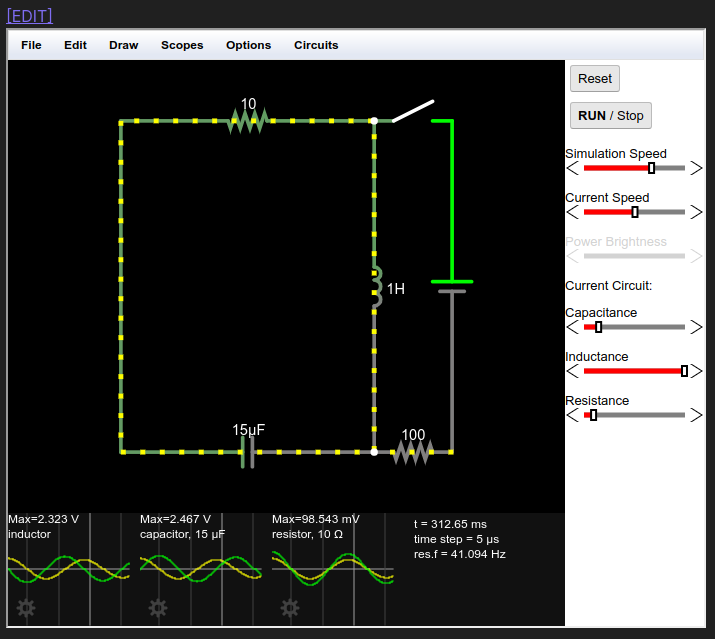
Table of Contents
- Purpose
- Features
- Installation
- Usage
- Settings
- Limitations
- Development
- Releasing
- Project Structure
- Architecture
- License
Purpose
This plugin bridges the gap between circuit design and documentation. CircuitJS is an excellent tool for sketching out circuit designs, and this plugin allows you to:
- Version Control: Keep circuit designs in version control alongside your Obsidian vault
- Documentation: Embed circuits directly in Markdown with extensive notes
- Organization: Reference and organize circuits within your knowledge base
- Backup: Circuits are backed up with the rest of your vault
Features
- Offline Mode (NEW in v2.0): Run simulations without internet using bundled CircuitJS
- Embedded Simulations: View fully interactive CircuitJS simulations directly in your notes
- Live Interaction: Interact with running simulations in Reading view
- Quick Editing: One-click link to open circuits in full CircuitJS browser
- LZ Compression: Efficient URL encoding using LZ-string compression
- Configurable: Customizable settings for editability and CircuitJS URL
Installation
From Obsidian Community Plugins (Recommended)
- Open Obsidian Settings
- Navigate to Community plugins
- Click Browse and search for "CircuitJS"
- Click Install, then Enable
Manual Installation
- Download the latest release from the releases page
- Extract the files to your vault's plugins folder:
<vault>/.obsidian/plugins/circuitjs/ - Reload Obsidian
- Enable the plugin in Settings → Community plugins
Usage
Basic Workflow
- Design your circuit in CircuitJS
- Export the circuit using
File → Export As Text... - Paste into Obsidian in a fenced code block with the
circuitjstag:
```circuitjs
$ 1 0.000005 10.20027730826997 50 5 43 5e-11
r 176 80 384 80 0 10
s 384 80 448 80 0 1 false
w 176 80 176 352 0
c 384 352 176 352 0 0.000015 -9.16123055990675 -10
l 384 80 384 352 0 1 -0.01424104005209455 0
v 448 352 448 80 0 0 40 5 0 0 0.5
r 384 352 448 352 0 100
o 4 64 0 4099 20 0.05 0 2 4 3
o 3 64 0 4099 20 0.05 1 2 3 3
o 0 64 0 4099 0.625 0.05 2 2 0 3
38 3 F1 0 0.000001 0.000101 -1 Capacitance
38 4 F1 0 0.01 1.01 -1 Inductance
38 0 F1 0 1 101 -1 Resistance
h 1 4 3
```
- Switch to Reading view to see the embedded simulation
CircuitJS Text Format Reference
The circuit text format uses single-letter codes for components:
| Code | Component |
|---|---|
$ |
Header/settings line |
r |
Resistor |
c |
Capacitor |
l |
Inductor |
v |
Voltage source |
s |
Switch |
w |
Wire |
o |
Oscilloscope/Output |
38 |
Slider control |
h |
Hint/display |
For complete documentation, see the CircuitJS documentation.
Settings
| Setting | Description | Default |
|---|---|---|
| Offline mode | Use bundled CircuitJS for offline support (desktop only) | true |
| Editable | Whether the embedded simulation can be interacted with | true |
| Show edit link | Show [EDIT] link to open circuit in full browser |
true |
| CircuitJS URL | Base URL for the CircuitJS application (used when offline mode is disabled) | https://falstad.com/circuit/circuitjs.html |
| Code block tag | Code block tag to trigger rendering | circuitjs |
Limitations
- Desktop Only: Offline mode requires Electron's webview (desktop Obsidian only)
- No Auto-Save: Changes made in the embedded simulation are not saved back to the code block
- Manual Export: To persist changes, use
File → Export As Text...in the simulation and paste the updated code back into your note - Mobile: Mobile users must disable offline mode and use the remote CircuitJS URL
Development
Prerequisites
Setup
# Clone the repository
git clone https://github.com/StevenGann/obsidian-circuitjs.git
cd obsidian-circuitjs

# Install dependencies
pnpm install

# Start development build (with watch mode)
pnpm dev

# Production build
pnpm build

# Run linting
pnpm lint
Development Workflow
- Create a symbolic link or copy the plugin folder to your test vault's
.obsidian/plugins/directory - Run
pnpm devto start the development build with hot reloading - Enable the plugin in Obsidian and use
Ctrl+Rto reload after changes
Releasing
This project uses GitHub Actions for automated releases. Releases are deliberately triggered — not every commit creates a release.
CI Pipeline
Every push and pull request runs the CI workflow which:
- Installs dependencies
- Runs linting (
npm run lint) - Builds the plugin (
npm run build) - Verifies the build output
Creating a Release
Update the version in
package.json:npm version patch # for bug fixes (1.0.0 → 1.0.1) npm version minor # for new features (1.0.0 → 1.1.0) npm version major # for breaking changes (1.0.0 → 2.0.0)This automatically updates
package.json,manifest.json, andversions.json.Push the changes and tag:
git push && git push --tagsCreate a GitHub Release:
- Go to the Releases page
- Click "Draft a new release"
- Select the tag you just pushed (e.g.,
1.0.1) - Add release notes describing the changes
- Click "Publish release"
Automated deployment:
- The release workflow automatically builds the plugin
- Attaches
main.js,manifest.json, andstyles.cssto the release - Obsidian's plugin registry automatically picks up the new version
How Obsidian Finds Updates
Obsidian's community plugin registry reads from your GitHub Releases. When you publish a release:
- The tag version must match the version in
manifest.json - The release must include
main.js,manifest.json, and optionallystyles.css - Users will see the update available in Obsidian's settings
Project Structure
circuitjs/
├── src/
│   ├── main.ts              # Plugin entry point
│   ├── settings.ts          # Settings interface and tab
│   └── circuitRenderer.ts   # Circuit rendering and iframe logic
├── styles.css               # Plugin styles
├── manifest.json            # Obsidian plugin manifest
├── package.json             # Node.js dependencies and scripts
├── tsconfig.json            # TypeScript configuration
├── esbuild.config.mjs       # Build configuration
├── eslint.config.mjs        # ESLint configuration
├── version-bump.mjs         # Version bump script
├── versions.json            # Version compatibility mapping
├── docs/
│   ├── screenshot.png       # Documentation screenshot
│   └── MODERNIZATION.md     # Modernization guide
└── README.md                # This file
Architecture
Core Components
src/main.ts - Plugin Entry Point
The main plugin class CircuitJsPlugin extends Obsidian's Plugin class and:
- Loads/saves plugin settings
- Registers the settings tab
- Registers the markdown code block processor for
circuitjsblocks - Delegates rendering to
CircuitRenderChild
src/settings.ts - Settings Management
Contains the settings interface, default values, and the settings tab UI:
interface CircuitJsSettings {
    editable: boolean;      // Allow simulation interaction
    editLink: boolean;      // Show edit link
    circuitJsUrl: string;   // CircuitJS base URL
    circuitTag: string;     // Code block tag
}
src/circuitRenderer.ts - Rendering Engine
The CircuitRenderChild class extends MarkdownRenderChild and handles:
- Compression: Uses LZ-string to compress circuit code for URL encoding
- URL Generation: Constructs CircuitJS URL with compressed circuit data
- DOM Creation: Creates iframe and optional edit link
- Lifecycle: Manages component mounting/unmounting
Data Flow:
Circuit Code → LZ Compression → URL Parameter → iframe src
Dependencies
| Package | Purpose |
|---|---|
obsidian |
Obsidian API types and base classes |
lz-string |
LZ-based compression for URL encoding |
esbuild |
Fast TypeScript bundler |
typescript |
TypeScript compiler |
typescript-eslint |
ESLint TypeScript support |
Build Process
The plugin uses esbuild for building:
- Development:
pnpm dev- Builds with watch mode and inline source maps - Production:
pnpm build- Type-checked, optimized build with tree shaking and minification
Output is a single main.js file in CommonJS format targeting ES2018.
Contributing
- Fork the repository
- Create a feature branch:
git checkout -b feature/my-feature - Make your changes
- Run linting:
pnpm lint - Test in a local Obsidian vault
- Submit a pull request
License
This project is licensed under the MIT License.
Credits
- CircuitJS by Paul Falstad
- Obsidian by Obsidian.md team
- Plugin developed by Steven Gann