Apply Patterns
 jglev13k downloads
Apply custom patterns of find-and-replace in succession to text.
- Overview
- Scorecard
- Updates16
Apply collections of regular-expression find/replace rules on text in Obsidian notes.
This plugin allows creating collections of find-and-replace "rules," and applying them to selections or whole lines of a document from a searchable menu.
Supports creating search and replace patterns of natural language dates, including ranges of dates.
Please submit bugs here: https://github.com/jglev/obsidian-apply-patterns-plugin
Please submit ideas here: https://github.com/jglev/obsidian-apply-patterns-plugin/discussions/categories/ideas
Please ask for help here: https://github.com/jglev/obsidian-apply-patterns-plugin/discussions/categories/q-a
For changes in each release, please check the releases page: https://github.com/jglev/obsidian-apply-patterns-plugin/releases
Screenshots
- The theme is Solarized Light.
- The theme has been enhanced for task management using this CSS snippet. See here for instructions on incorporating CSS snippets in Obsidian.
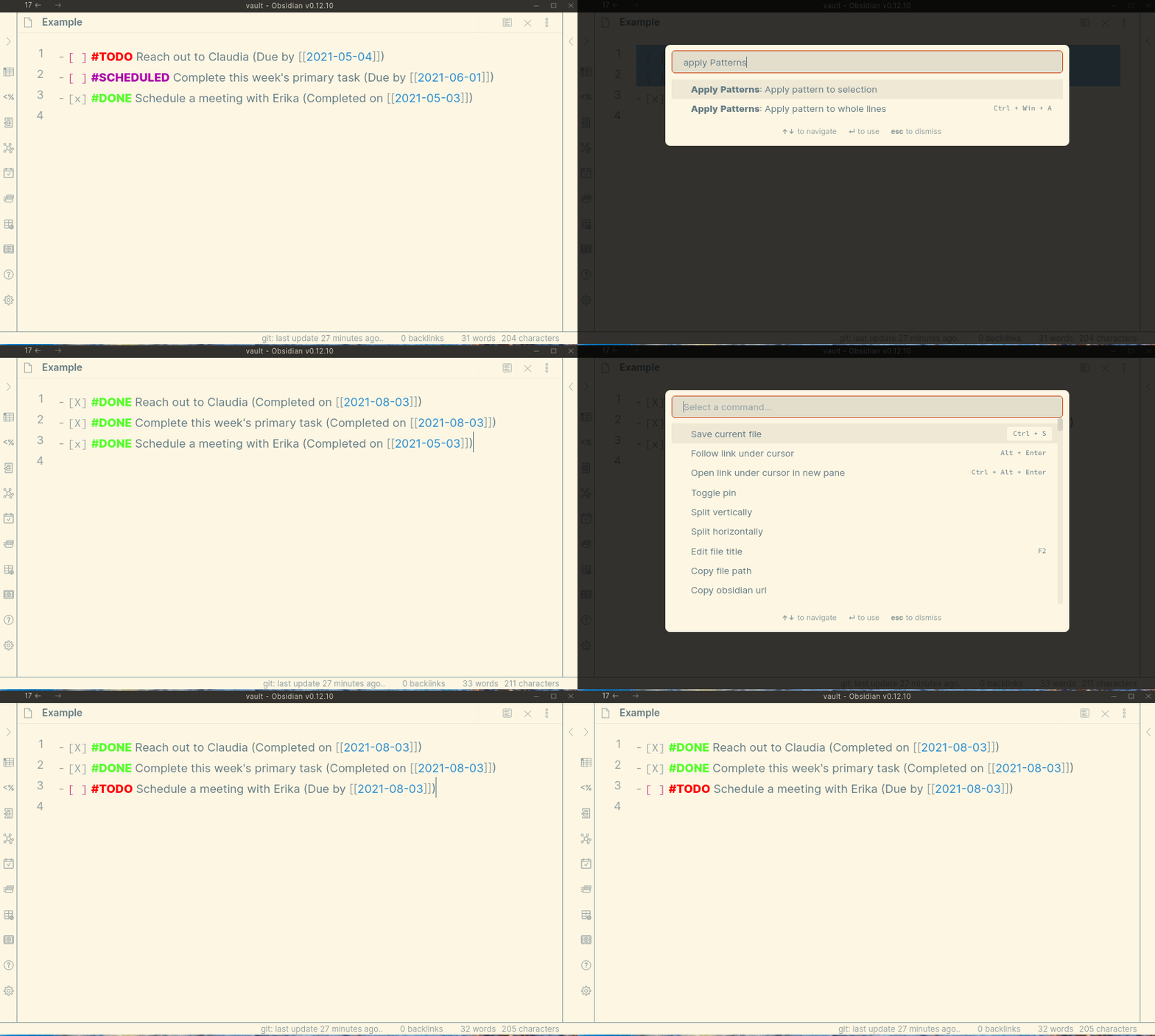
Two "Patterns" have been defined, each with one "rule." These settings can be imported into the plugin by copying this JSON to the clipboard and clicking the "Import from Clipboard" button in the plugin's settings tab within Obsidian:
[
  {
    "name": "Set open tasks as complete",
    "done": false,
    "rules": [
      {
        "from": "- \\[ \\] #(?:TODO|SCHEDULED)(.*?)\\(Due by \\[\\[(\\d{4}-\\d{2}-\\d{2})\\]\\]\\)",
        "to": "- [X] #DONE$1(Completed on [[{{date:today}}]])",
        "caseInsensitive": true,
        "global": false,
        "sticky": false,
        "multiline": false,
        "disabled": false
      }
    ]
  },
  {
    "name": "Reschedule closed task",
    "done": false,
    "rules": [
      {
        "from": "- \\[[Xx]\\] #DONE(.*?)\\(Completed on (.*?)\\)",
        "to": "- [ ] #TODO$1(Due by [[{{date:two weeks from today}}]])",
        "caseInsensitive": false,
        "global": false,
        "multiline": false,
        "sticky": false
      }
    ]
  }
]
The first Pattern, "Set open tasks as complete," will affect lines that have an open checkbox and a #TODO or #SCHEDULED hashtag, as well as the phrase "(Due by...)" with a date. It replaces a match with a closed checkbox, a #DONE hashtag, the original body of the line, and today's date.
The second Pattern, "Reschedule closed task," will affect lines that have a closed checkbox (-[x]) and a #DONE hashtag, as well as the phrase "(Completed on...)". It replaces a match with an open checkbox, a #TODO hashtag, and a "Due by" date that is two weeks in the future.
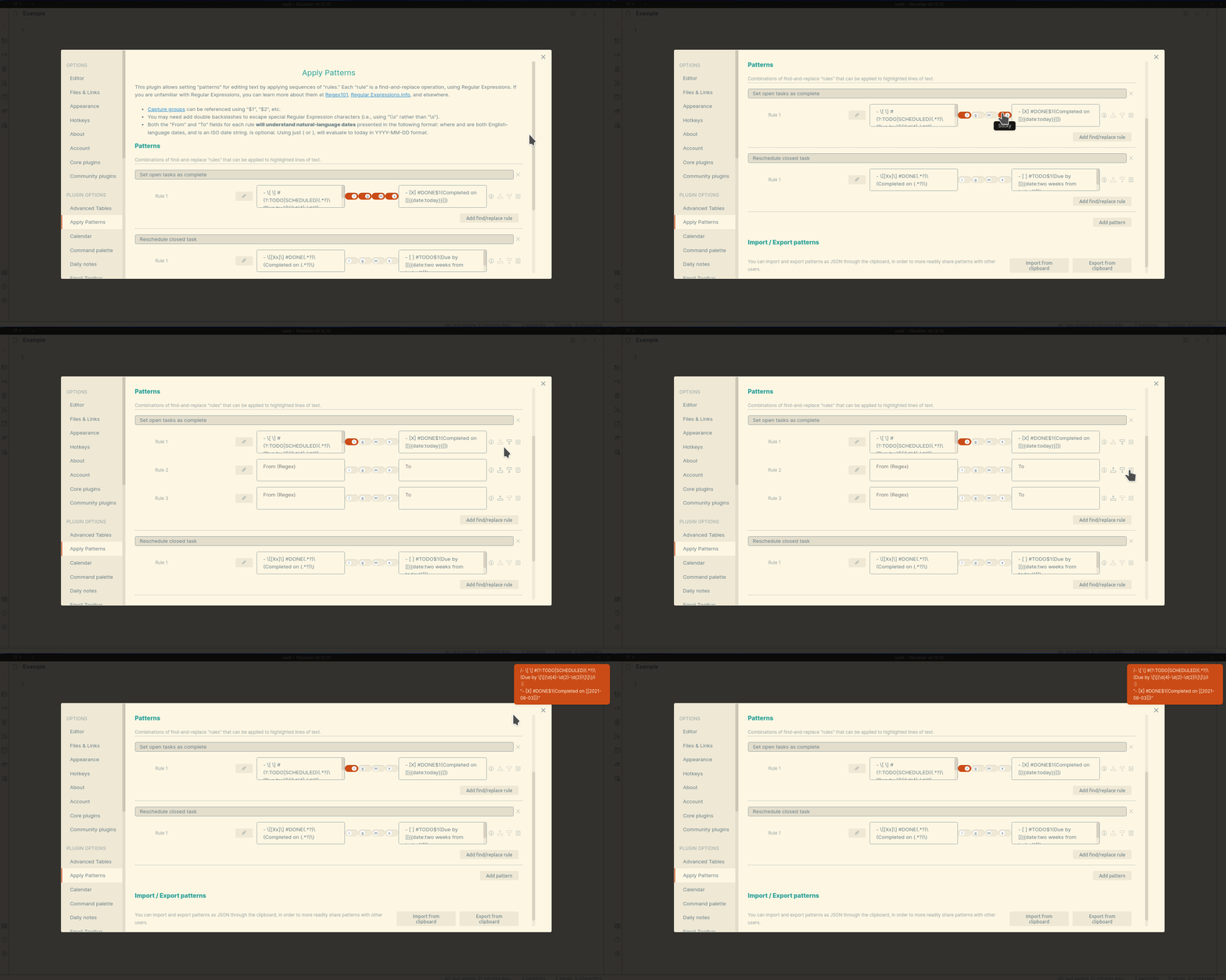
The plugin's Settings tab allows creating and removing Patterns, as well as importing and exporting patterns using the system's clipboard. Rules can be moved up and down within Patterns, and validated as correct in their {{date}} strings and Regular Expression syntax. Each rule can also have Regular Expression modes set.
Installation
Follow the steps below to install the plugin.
- Search for "Apply Patterns" in Obsidian's community plugins browser
- Enable the plugin in your Obsidian settings (find "Apply Patterns" under "Community plugins").
- Check the "Apply Patterns" settings tab. Add one or more patterns.
- (Optional) In the "Hotkeys" settings tab, add a hotkey for one or both of the "Apply Patterns..." commands.
Usage
- This plugin uses the ECMAScript / Javascript flavor of Regular Expressions.
- Within a Pattern, rules execute sequentially. Thus, the output of Rule 1 is passed as input to Rule 2, and the output of Rule 2 is passed as input to Rule 3, etc. At the end of the set of rules, the final output is used to replace the text in the editor.
- The plugin provides five commands by default:
Apply Patterns: Apply pattern to whole lineswill loop over each line that is selected in the editor, and apply the Pattern to the entirety of each line.Apply Patterns: Apply pattern to whole documentwill apply the Pattern to the entire document, as one (potentially multi-line) string.
Apply Patterns: Apply pattern to selectionwill apply the Pattern to just the text selected in the editor, as one (potentially multi-line) string.Apply Patterns: Apply pattern to whole clipboardwill apply the Pattern as with "Apply pattern to whole document" to the clipboard.Apply Patterns: Apply pattern to clipboard (line-by-line)will apply the Pattern as with "Apply pattern to whole lines" to the clipboard.- In addition, you can set additional commands in the Settings tab.
- Within the Settings tab:
- Each rule can be disabled, moved up, and moved down in the pattern.
- Clicking the information icon for a rule will open a Notice indicating whether the rule's
FromandToelements are valid. - Both the
FromandTotext boxes can use$1,$2, etc. to refer to capture groups from theFrombox. - Both the
FromandTotext boxes understand natural language dates (see below). - Additional commands can be created from collections of Patterns. If a command only matches one Pattern, it will apply that Pattern when the command is run. If the command matches more than one Pattern, it will ask which Pattern to apply.
- Custom commands can be created to run on whole lines, the current selection, or the whole document.
Dates
Within the From and To text boxes in a rule's settings, one can express dates in natural language, using the following format:{{date:start|end|format (default "YYYY-MM-DD")|separator (default "|")}}
start,end,format, andseparatorare all optional.{{date}}by itself will default to the current day inYYYY-MM-DDformat.formatcan be any format from DayJS.startandendare both parsed usingchrono-node.- Thus, the following formats are all valid:
| Date syntax | Output, if processed on 2021-08-03 |
|---|---|
| {{date}} | 2021-08-03 |
| {{date:today||YYYY-MM}} | 2021-08 |
| {{date:tomorrow}} | 2021-08-04 |
| {{date:two weeks from today}} | 2021-08-17 |
| {{date:today|two days from now}} | 2021-08-03|2021-08-04|2021-08-05 |
| {{date:today|tomorrow|DD}} | 03|04 |
| {{date:today|two days from now||, }} | 2021-08-03, 2021-08-04, 2021-08-05 |
This approach to expressing dates allows for powerfully searching for date ranges using Regular Expressions, or creating ranges of formatted dates in the output of a Pattern. For example, [[{{date:today|tomorrow||]], [[}}]] in the To text box of a rule will create the string "[[2021-08-03]], [[2021-08-04]]".
Development
Clone the repository, run yarn to install the dependencies, and run yarn dev to compile the plugin and watch file changes.
License
This plugin's code and documentation setup is based off of the Obsidian Tasks plugin by Martin Schenck. Like that plugin, this plugin is released under the MIT license.
Todo
Automated tests are not currently included in this code for this repository. Assistance in this, particularly using the Obsidian End-to-End testing approach, is especially welcome!