Search...Search plugins and themes...
⌘K
Sign in
  • Get started
  • Download
  • Pricing
  • Enterprise
  • Account
  • Obsidian
  • Overview
  • Sync
  • Publish
  • Canvas
  • Mobile
  • Web Clipper
  • CLI
  • Learn
  • Help
  • Developers
  • Changelog
  • About
  • Roadmap
  • Blog
  • Resources
  • System status
  • License overview
  • Terms of service
  • Privacy policy
  • Security
  • Community
  • Plugins
  • Themes
  • Discord
  • Forum / 中文论坛
  • Merch store
  • Brand guidelines
Follow us
DiscordTwitterBlueskyThreadsMastodonYouTubeGitHub
© 2026 Obsidian

Notification History

prometheus-makerprometheus-maker40 downloads

Keeps every pop-up notification from Obsidian and your plugins, so you can read the ones that vanished too fast. Bell in the status bar, ribbon and command.

Add to Obsidian
  • Overview
  • Scorecard
  • Updates2

Obsidian's pop-up notifications disappear after a few seconds, and there is no list of them anywhere. A plugin reports an error, a sync finishes, a file takes long to index, and if you were looking away it's gone. On desktop you can dig through the developer console; on mobile there is nothing. (forum request)

This plugin keeps them.
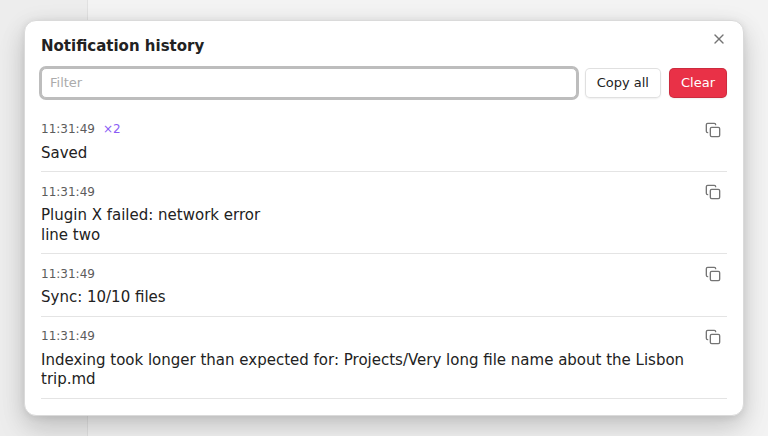
The history window: newest first, with time, a repeat count and a copy button per notification

Every notification that Obsidian or any plugin shows is saved with its time. Open the list with the bell in the status bar, the bell in the ribbon (that one works on mobile), or the command Notification History: Show history.

  • Newest first. The same message shown again within 10 seconds is counted (×2) instead of repeated.
  • Notifications that change while on screen, like progress messages, are saved with their last text.
  • Filter box, a copy button on each one, Copy all and Clear.
  • The status bar bell shows how many came in since you last looked.

Settings

  • Keep history after restart: on by default. Off keeps the list in memory only.
  • Notifications to keep: 50 to 1000, default 200.
  • Bell in the status bar: on by default.

The history is stored in the plugin's own data.json in your vault's .obsidian folder. Nothing leaves your device.

Install

In Obsidian: Settings → Community plugins → Browse, search for "Notification History", install and enable it.

Manual install: download main.js, manifest.json and styles.css from the latest release into <vault>/.obsidian/plugins/notice-history/.

Limits

It records notifications from the moment it loads, so the very first ones at startup, shown before community plugins load, are missed. It reads them from the screen, so text inside a notification is saved but buttons are not. Tested on Obsidian 1.15 desktop (Linux); not yet on mobile.

Same plugin for other apps

SiYuan, Logseq.

Licence

MIT

HealthExcellent
ReviewSatisfactory
About
Save every Obsidian and plugin popup with timestamps and view them in a searchable, newest-first list via a bell icon or command. Count repeated messages instead of duplicating them, copy individual entries or all at once, clear history, and store logs locally so notifications remain available after they disappear.
Status barUtilities
Details
Current version
1.0.1
Last updated
6 days ago
Created
6 days ago
Updates
2 releases
Downloads
40
Compatible with
Obsidian 1.4.0+
Platforms
Desktop, Mobile
License
MIT
Report bugRequest featureReport plugin
Author
prometheus-makerprometheus-maker
GitHubprometheus-maker
  1. Community
  2. Plugins
  3. Status bar
  4. Notification History

Related plugins

Lazy Loader

Load plugins with a delay on startup, so that you can get your app startup down into the sub-second loading time.

WebNovel Assistant

An all-in-one writing studio for novel and story writers. Features accurate word count tracking, daily goals, story timeline board, plot foreshadowing manager, chapter corkboard, and character lore gr

Custom Note Width

Effortlessly change the line width of each note individually. Provides multiple ways to customize the experience, making it both efficient and user-friendly to adjust line widths.

Day Planner OG

Day planning from a simple task list in a Markdown note (bare bones, preserves the features and behavior of the original plugin).

Colored Text

Color the selected texts.

Workspace++

Workspace session manager with a native-feeling UI/UX.

Plugin Update Tracker

Know when installed plugins have updates and evaluate the risk of upgrading.

Better Word Count

Count the words of selected text in the editor.

Chessboard Viewer

Render chess positions diagrams in note preview.

Autosave Control

An Obsidian plugin for delaying or disabling automatic saves.