Search...Search plugins and themes...
⌘K
Sign in
  • Get started
  • Download
  • Pricing
  • Enterprise
  • Account
  • Obsidian
  • Overview
  • Sync
  • Publish
  • Canvas
  • Mobile
  • Web Clipper
  • CLI
  • Learn
  • Help
  • Developers
  • Changelog
  • About
  • Roadmap
  • Blog
  • Resources
  • System status
  • License overview
  • Terms of service
  • Privacy policy
  • Security
  • Community
  • Plugins
  • Themes
  • Discord
  • Forum / 中文论坛
  • Merch store
  • Brand guidelines
Follow us
DiscordTwitterBlueskyThreadsMastodonYouTubeGitHub
© 2026 Obsidian

Note Progress Bar

Rob ColesRob Coles22 downloads

Whole-note checkbox progress bar via a code block, with configurable checked/unchecked characters.

Add to Obsidian
  • Overview
  • Scorecard
  • Updates1

An Obsidian plugin that shows a progress bar for the checkboxes in the current note.

Note progress bar example display

There are settings to tell the plugin what sort of checkboxes are considered complete.

Usage

Add a code block with the language progress-bar anywhere in a note:

Note progress bar example raw text

The block renders as a bar with a label such as "Progress: 3/5 completed, 60%". It counts every checkbox in the note and updates as you edit.

Settings

  • Checked characters: default xX
  • Unchecked characters: default a space plus ?>-/

Enter the characters with no separators. A checkbox whose character appears in neither field is ignored and not counted.

I use extended checkboxes via a CSS snippet and, for example, I consider a "forwarded" checkbox to be "complete". My settings are shown below.
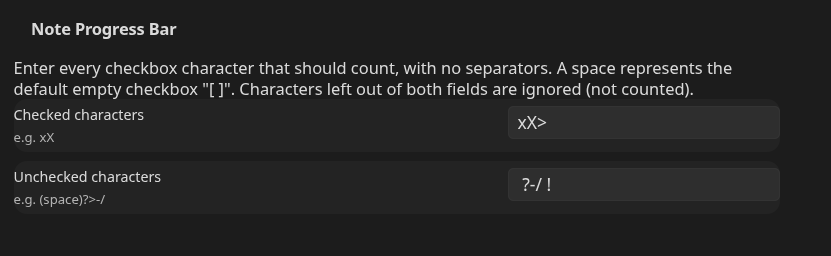
Note progress bar Settings

Installation

Install from Settings > Community plugins once the plugin is listed. To install manually, download main.js, manifest.json and styles.css from the latest release and place them in <vault>/.obsidian/plugins/note-progress-bar/.

Licence

MIT

HealthExcellent
ReviewPassed
About
Display a live progress bar summarizing checkbox completion for the current note. Render a progress-bar code block to show a labeled count and percentage that updates as you edit, with customizable characters to mark checked and unchecked boxes.
TasksVisualization
Details
Current version
1.0.0
Last updated
Last week
Created
Last week
Updates
1 release
Downloads
22
Compatible with
Obsidian 1.0.0+
Platforms
Desktop, Mobile
License
MIT
Report bugRequest featureReport plugin
Author
Rob ColesRob Colesrobc
robcoles.net
GitHubrobcoles
  1. Community
  2. Plugins
  3. Tasks
  4. Note Progress Bar

Related plugins

Task Board

Manage all your tasks throughout your vault from a single board and much more...

Excalidraw

Visual PKM powerhouse. Create and edit Excalidraw drawings.

Advanced Canvas

Supercharge your canvas experience. Create presentations, flowcharts and more.

ExcaliBrain

An interactive, structured mind-map of your Obsidian vault.

Breadcrumbs

Visualise the hierarchy of your vault using a breadcrumb trail or matrix view.

Mermaid Tools

Improved Mermaid.js experience: visual toolbar with common elements and more.

Tasks

Track tasks across your vault. Supports due dates, recurring tasks, done dates, sub-set of checklist items, and filtering. Maintained by Clare Macrae and Ilyas Landikov, created by Martin Schenck.

TaskNotes

Note-based task management with calendar, pomodoro and time-tracking integration.

Maps

Adds a map layout to bases so you can display notes as an interactive map view.

Vault Todos

Collect all outstanding TODOs from your vault and presents them in lists Today, Scheduled, Inbox and Someday/Maybe.