NodeFlow
 linczero1k downloads
Render node streams like ComfyUi, UE, Houdini, Blender, etc., to make it easy to write relevant notes.
- Overview
- Scorecard
- Updates4
[!warning]
近期重构中,以及增加功能效果,工作量较大,下一正式版本的 Release 需要等待较久
将该项目的作用分为两大类:
- 节点式笔记
- 用于记录节点式笔记,或者记录 comfyui/blender/ue4 等其他节点流软件的节点状况
- 该功能完全依赖于视觉,节点没有运行功能
- 功能工作流 (new in V2.0.0)
- 一些节点项,会为节点提供一些额外的功能。这些功能节点可以被运行起来
- 开发设计上让该功能尽可能通用。目前着重于文本笔记、网络请求流程、AI文本等工作流场景的建设
en
Render node streams like
ComfyUi,UE,Houdini,Blender, etc., to make it easy to write relevant notes.The plugin allows diagrams to be described using lightweight syntax or Json, and is available in both Obsidian and VuePress blogs
zh
渲染节点流,像
ComfyUi,UE,Houdini,Blender等,使其易于编写相关笔记。允许使用轻量语法或从上述软件导出的Json描述了图表,该插件在Obsidian与VuePress博客中均可使用
Docs (教程, 文档)
Tutorials, online effects, use cases, and more (教程、在线效果、用例等)
- Online effects (在线效果)、demo, Vuepress Version
- Online interaction (在线效果2、在线交互), App Version
Effect display (Partial) (效果展示 - 部分)
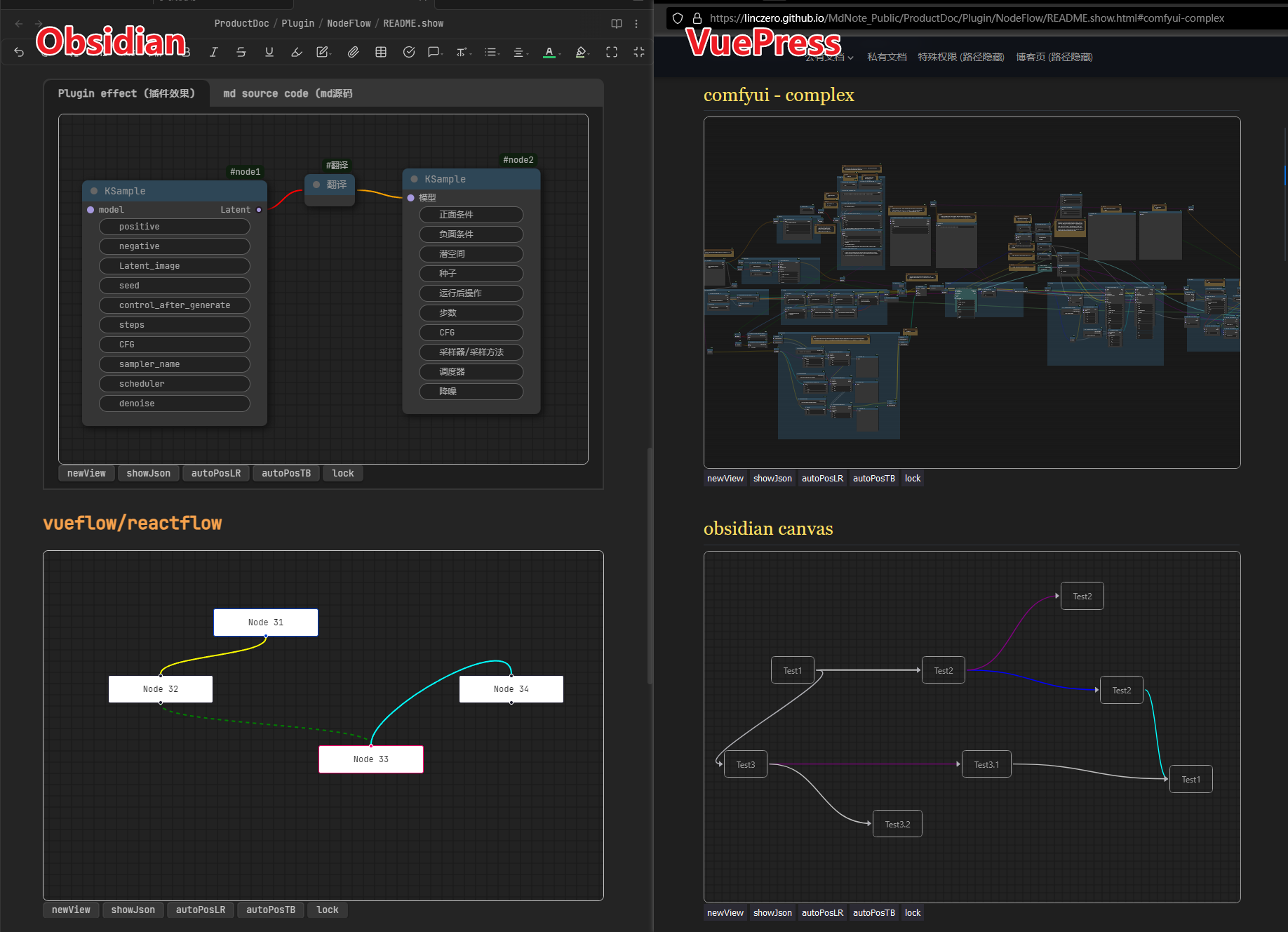
Usage
Method 1: Use code blocks (方式一: 使用代码块)
Supported code block types (支持的代码块类型):
["nodeflow-test", "nodeflow-vueflow", "nodeflow-obcanvas", "nodeflow-comfyui", "nodeflow-list", "nodeflow-listitem"]
- en
These code blocks are of different types.
nodeflow-comfyuiprefix, using the workflow json exported by comfyui software as contentnodeflow-obcanvasprefix, using the content of the obsidian canvas file (open with Notepad, you will find that it is a json format)nodeflow-listprefix, indicating that this is a reference mermaid/plantuml, using light text to describe the chart format. See NodeFlow List Grammer for detailsnodeflow-listprefix, in beta testing. Similar tonodeflow-list, but can support multiple item types, such as color, markdown, etc.- See the documentation for specific uses of these types
- zh
这些代码块的类型都不太一样
nodeflow-comfyui前缀的,使用comfyui软件导出的工作流json作为内容nodeflow-obcanvas前缀的,使用obsidian canvas文件的内容 (用记事本打开,会发现里面是一个json格式)nodeflow-list前缀的,表示这是一个对标mermaid/plantuml的,用轻文字描述图表的格式。 具体语法参考 NodeFlow List Grammernodeflow-listitem前缀的,beta测试中。与nodeflow-list相似,但能支持多种项类型,如颜色、markdown等- 这些类型更具体的用法见文档
Example - List Grammer (举例 - 列表语法):
```nodeflow-list
- nodes
  - node1:KSample
    - Latent, o
    - model, i
    - positive, i
    - negative, i
    - Latent, i
    - seed,
    - control_after_generate,, randomize
    - steps,, 20
    - CFG,, 8.0
    - sampler_name,, euler
    - scheduler,, normal
    - denoise,, 1.00
    - io defaultTest, i , test
    - io defaultTest, o, test
    - t1:noValueTest,
    - t2:,, noKeyTest
      mul lines test
  - node2:KSample
    - 潜空间, o
    - 模型, i
    - 正面条件, i
    - 负面条件, i
    - 潜空间, i
    - 种子,
    - 运行后操作,
    - 步数,
    - CFG,
    - 采样器/采样方法,
    - 调度器,
    - 降噪,
  - translate
- edges
  - node1,Latent, translate,l
  - translate,r, node2, 潜空间
```
You can alse use the demo use case by filling in demo/demo2/demo3 in the code block and checking that it works (你也可以在代码块内填写 demo/demo2/demo3 来使用demo用例,并检查其是否正常工作)
Method 2: Independent file (方式二: 独立文件)
en
Directly put comfyui's exported
workflow.jsonfile in the library, will automatically identify the json suffixDirectly modify the extension of comfyui's exported workflow.json file to
.workflow_json, which can also be correctly identifiedzh
直接将comfyui的导出
workflow.json文件放在库里,会自动识别json后缀的直接将comfyui的导出workflow.json文件扩展名修改成
.workflow_json,也能正确识别
TODO
- feat
支持socket的name-value显示(241027)Obsidian版本的全屏优化
- enhance
- 非全屏状态下的中间拖拽优化
- 带节点组的情况下进行自动布局
- 代码优化
整理一下,捋一下各种节点类型,以及对应的data数据,然后把socket与线色的关系再优化一下
- style
- scss代码优化问题
更好看的工具栏与样式
更多用法
详见 Online effects (在线效果)、demo,这里仅再列举部分:
复制以下内容到你的obsidian中:
```nodeflow-comfyui
demo
```

```nodeflow-obcanvas
demo
```

```nodeflow-list
demo
```

```nodeflow-vueflow
demo
```

```nodeflow-item
demo
```

```nodeflow-listitem
demo
```