New Tab
 Marcus Breiden734 downloads
Creates a customizable new tab view with beautiful backgrounds, quotes, search, and more.
- Overview
- Scorecard
- Updates15
A plugin for Obsidian that replaces the empty new-tab view with a customizable dashboard — beautiful backgrounds, a clock, a greeting, a quote, quick search, bookmarks, and recently edited files.
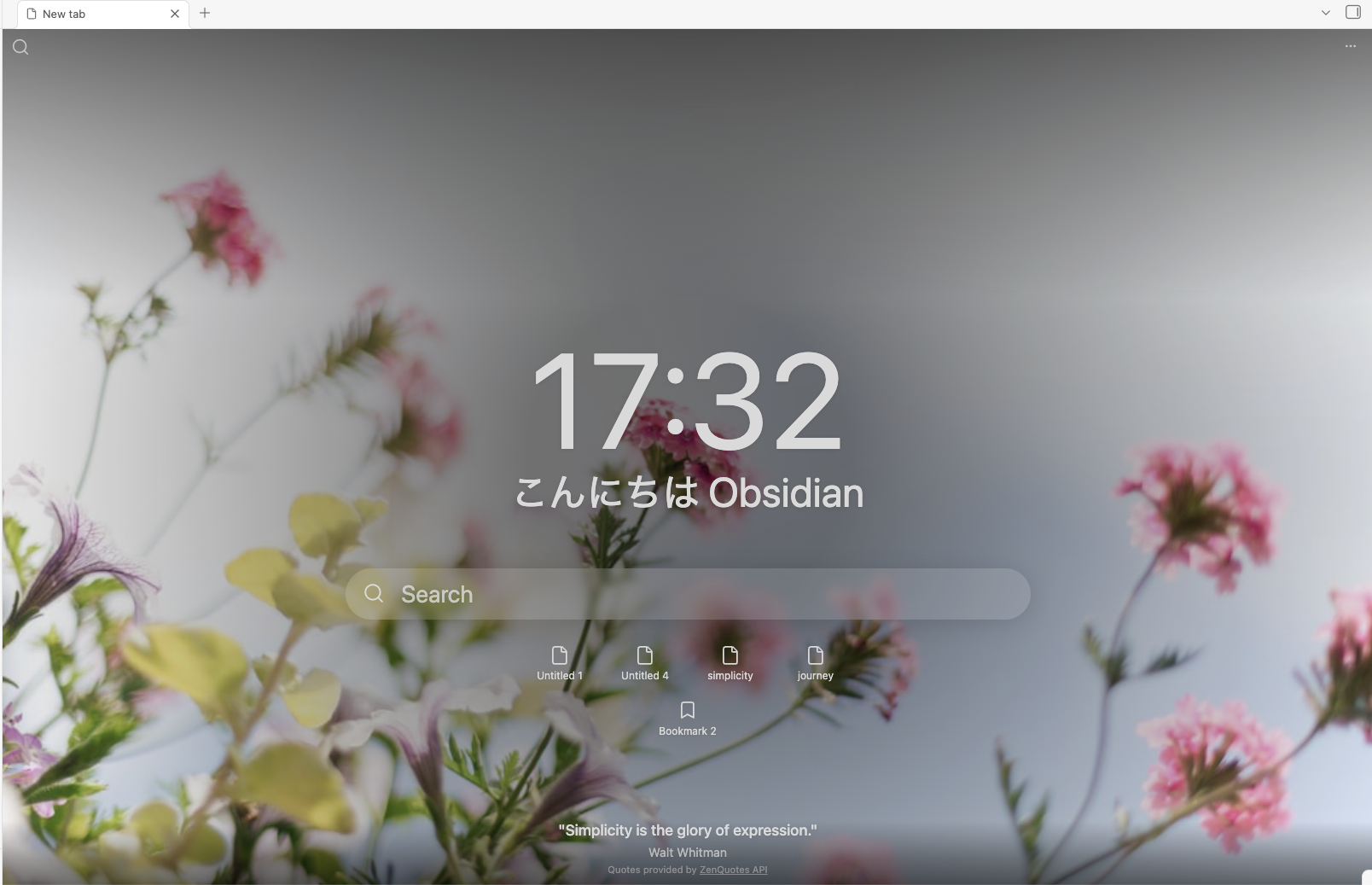
This is a personal version of, and derived from, obsidian-beautitab by Andrew McGivery (MIT). See Attribution.
Features
- Backgrounds — seasonal/holiday themes via Unsplash, your own local images, a custom URL, or transparent modes.
- Clock — 12- or 24-hour.
- Greeting — customizable and time-of-day aware, with markdown (
**bold**,*italic*) support, in 10 languages out of the box: English, Deutsch, Español, Français, Português, Italiano, Nederlands, Русский, 中文 (简体), and 日本語. - Quote — built-in online quotes (ZenQuotes) or your own custom quotes.
- Search — a top-left search button and an inline search box, each wired to a search provider of your choice.
- Bookmarks — from all groups or a specific group.
- Recent files — the five most recently edited notes.
- Text styles — give each element its own font, size, weight, italic, and color through reusable styles, with a system-font picker on desktop.
- Every element is individually toggleable and styleable from the settings tab, which is organized into a tab per element.
Install
New Tab is available in Obsidian's community plugin directory:
- Open Settings → Community plugins (turn off Restricted mode if it's on).
- Click Browse, search for New Tab, and choose the entry by Marcus Breiden.
- Click Install, then Enable.
Then open a new tab (Ctrl/Cmd + T) — the empty tab becomes the New Tab view. For pre-release (BRAT) installs, verifying, and updating, see docs/installation.md.
Migrating from BeautiTab
NewTab is derived from BeautiTab, so it can bring your existing BeautiTab configuration across in one click. When BeautiTab is set up in your vault, NewTab offers a one-time, opt-in, non-destructive import on first run — and leaves an Import from BeautiTab button in the settings tab if you dismiss it. See docs/migration.md for what carries over and what doesn't.
Documentation
Development
npm install
npm run dev      # esbuild watch (writes main.js + styles.css to the repo root)
npm run build    # typecheck + production build into build/
npm test         # vitest
npm run lint     # eslint (obsidianmd) + stylelint (scss)
To QA in a real Obsidian instance, this repo ships a test vault at test/NewTab/
with hot-reload. Open it as a vault and run:
DEPLOY_VAULT=1 npm run build
This mirrors the build into the vault's plugin folder with a dev-stamped version
so Obsidian reloads the bundle on every build. The canonical manifest.json is
never modified.
For user-facing guides — installation, configuration, usage, and known issues — see the docs/ directory.
Adding a greeting language
The {{greeting}} time-of-day phrase is translated per language in
React/Utils/greetings.ts. To add yours, add one
entry to GREETINGS (keyed by Obsidian's locale code, e.g. de) with the
morning/afternoon/evening phrases, plus a matching name in LANGUAGE_LABELS —
then open a PR. Nothing else needs to change; it appears in the Greeting
language dropdown automatically.
Privacy
New Tab is local-first and makes only a few optional, toggleable network requests (backgrounds, quotes). See PRIVACY.md.
Attribution
This plugin is derived from obsidian-beautitab by Andrew McGivery, used under the MIT License. Background images are served by Unsplash; built-in online quotes come from the ZenQuotes API.
Special thanks to Mara-Li, whose maintained fork Mara-Li/obsidian-beautitab fixed many of the issues in the original plugin — it's the version I ran until building New Tab, and several of her fixes informed this one.
License
MIT © Marcus Breiden