Multistate Checkboxes
 evgene-kopylov408 downloads
Theme-independent extended checkbox states with custom SVG icons
- Overview
- Scorecard
- Updates3
Extended checkbox states for Obsidian, theme-independent. SVG icons are embedded via data:image/svg+xml, colors use Obsidian CSS variables for automatic adaptation to any theme.
Features
- 20 checkbox states with unique SVG icons
- Theme-independent — all colors via Obsidian CSS variables
- Flexible configuration — enable/disable states, custom colors and icons
- Cycling — command to rotate through states in order
- Supports Reading view and Live Preview
Default States
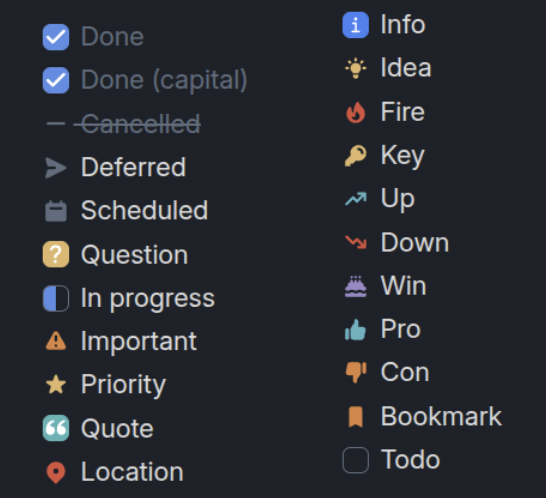
Installation
Manual
- Download the latest release from Releases
- Extract to
.obsidian/plugins/obsidian-multistate-checkboxes/ - Reload Obsidian
- Enable the plugin in Settings → Community plugins
From source
cd /path/to/vault/.obsidian/plugins/
git clone https://github.com/Evgene-Kopylov/obsidian-multistate-checkboxes.git
cd obsidian-multistate-checkboxes
npm install
npm run build
Usage
Creating a checkbox with a state
In a Markdown task, use the corresponding symbol inside the brackets:
- [x] Done
- [X] Done (capital)
- [-] Cancelled
- [>] Deferred
- [<] Scheduled
- [?] Question
- [/] In progress
- [!] Important
- [*] Priority
- ["] Quote
- [l] Location
- [i] Info
- [I] Idea
- [f] Fire
- [k] Key
- [u] Up
- [d] Down
- [w] Win
- [p] Pro
- [c] Con
- [b] Bookmark
- [ ] Todo
Cycling
- Place the cursor on a checkbox line
- Run the command
Multistate Checkboxes: Cycle checkbox state - The state will change to the next one in order
The cycle order can be configured in Settings → Multistate Checkboxes.
Settings
In Settings → Multistate Checkboxes you can:
- Enable/disable any state
- Override icon color (hex, rgb(), CSS variable)
- Replace the SVG icon with your own
- Configure the cycling order
Development
npm install        # install dependencies
npm run dev        # watch mode build
npm run build      # production build
# Install the plugin in a vault
# Symlink the current folder (with the build output) into the vault's plugins
ln -s "$PWD" "/home/death/obsidian-vault/.obsidian/plugins/multistate-checkboxes"
License
GPL-3.0 — see LICENSE
HealthExcellent
ReviewCaution
About
Add 20 theme-independent checkbox states with embedded SVG icons and CSS-variable colors that adapt to any theme. Cycle states in order from Reading view or Live Preview with a command, and customize which states, icons, and colors appear.Details
Current version
1.0.9
Last updated
Last month
Created
2 months ago
Updates
3 releases
Downloads
408
Compatible with
Obsidian 1.12.7+
Platforms
Desktop, Mobile
License
GPL-3.0