MovieLog
 tinazz672 downloads
Log your movie and TV show watching history with TMDB integration
- Overview
- Scorecard
- Updates11
An Obsidian plugin for tracking your movie and TV series watching history. Fetches media information via TMDB API, generates structured watch records, and displays them in a card wall view.
Features
- TMDB Search: Search movies and TV series via command palette, automatically fetch metadata
- Templated Records: Auto-generate Markdown files with posters, ratings, synopsis, etc.
- Series Support: Track TV series by season, including episode lists and watch progress
- Card Wall View: Browse all watch records in a visual card grid
- Personal Fields: Fill in your thoughts, personal rating, watch platform, watch status, etc.
Preview
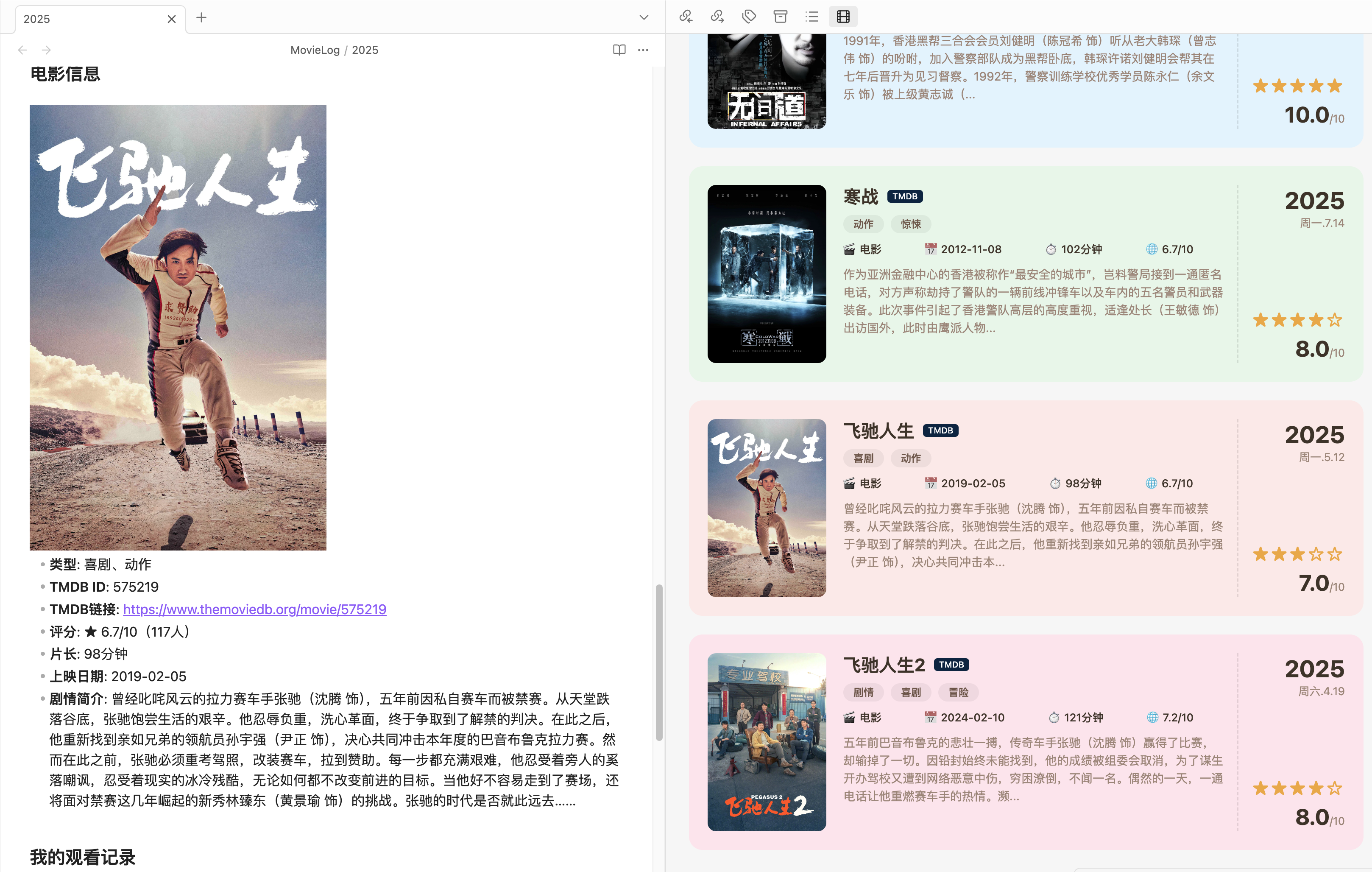

Installation
Method 1: Install from Obsidian Community Plugins (Recommended)
- Open Obsidian → Settings → Community Plugins → Browse
- Search for "MovieLog"
- Click Install and Enable
Method 2: Manual Installation
- Download the latest
main.js,manifest.json,styles.cssfrom Releases - Create the plugin directory in your Obsidian vault:
{your vault}/.obsidian/plugins/movielog/ - Copy the three downloaded files into that directory
- Open Obsidian → Settings → Community Plugins → Enable MovieLog
Method 3: Build from Source
# Clone the repository
git clone https://github.com/zzditto/MovieLog.git
cd movielog

# Install dependencies
npm install

# Build
npm run build

# Copy to your Obsidian vault
cp main.js manifest.json styles.css /path/to/your/vault/.obsidian/plugins/movielog/
Configuration
- Open Obsidian → Settings → Community Plugins → MovieLog
- Enter your TMDB API Key:
- Sign up at themoviedb.org
- Get your API Key from API Settings
- Configure other options:
- Default Save Folder: Directory for watch records (default:
MovieLog) - TMDB Language: Metadata language (default: Simplified Chinese)
- Sort By: Sort by watch date, title, rating, or release date
- Sub-Heading Style: Display format for section headings in records — either
> **bold blockquote**(default) or### heading
- Default Save Folder: Directory for watch records (default:
MovieLog currently supports Obsidian desktop only. Mobile has not been tested and is not supported.
Usage
Add Movie Record
- Press
Ctrl+P(Cmd+Pon macOS) to open the command palette - Type
MovieLog: Add Movie Record - Enter the movie name and search
- Select the movie from the result list
- A Markdown file with complete information is auto-generated
- Fill in your thoughts, rating, and other personal fields
Add TV Series Record
- Open the command palette, type
MovieLog: Add TV Series Record - Search for the TV series name
- After selecting the series, choose the season to record
- A file with series information and episode list is auto-generated
- Update watch progress and your thoughts
View Card Wall
- Click the movie icon in the left sidebar
- Or use the command palette and type
MovieLog: Open Card Wall - Browse all watch records, click a card to jump to the corresponding file
License
MIT License
HealthExcellent
ReviewCaution
About
Record movie and TV viewing history with TMDB metadata, generating structured Markdown notes that include poster, rating, synopsis, and release info. Track TV seasons and episode progress, add personal fields for review, score, platform and status, and browse entries in a visual card-wall grid.Details
Current version
0.8.4
Last updated
2 months ago
Created
4 months ago
Updates
11 releases
Downloads
672
Compatible with
Obsidian 1.7.2+
Platforms
Desktop only
License
MIT
Author