Search...Search plugins and themes...
⌘K
Sign in
  • Get started
  • Download
  • Pricing
  • Enterprise
  • Account
  • Obsidian
  • Overview
  • Sync
  • Publish
  • Canvas
  • Mobile
  • Web Clipper
  • CLI
  • Learn
  • Help
  • Developers
  • Changelog
  • About
  • Roadmap
  • Blog
  • Resources
  • System status
  • License overview
  • Terms of service
  • Privacy policy
  • Security
  • Community
  • Plugins
  • Themes
  • Discord
  • Forum / 中文论坛
  • Merch store
  • Brand guidelines
Follow us
DiscordTwitterBlueskyThreadsMastodonYouTubeGitHub
© 2026 Obsidian

Mouse Navigation

hobeomhobeom1k downloads

Enables smooth navigation using mouse gestures for scrolling and switching pages.

Add to Obsidian
  • Overview
  • Scorecard
  • Updates4

Mouse Navigation is an intuitive and powerful plugin for Obsidian that enhances navigation through mouse gestures. Whether you're scrolling through pages, switching between documents, this plugin provides a fluid experience by letting you control actions with simple mouse movements.

Features

  • Customizable Mouse Gestures: Currently, navigation is performed using right-click mouse gestures to move forward, backward, or scroll up/down.
  • Visual Feedback: Gesture actions are visually represented on the screen with smooth animations.
  • Draw-on-Screen: As you perform gestures, see your mouse movements tracked like a pencil on the screen, providing clear visual feedback.
  • Flexible Gesture Settings: Currently, gestures are fixed, but plans are in place for customizable gestures in future updates, allowing users to personalize their experience.

Key Capabilities

  • Next/Previous Navigation: Use left and right gestures to switch between documents.
  • Scroll Control: Up/down gestures let you scroll to the top or bottom of the document quickly.
  • Visual Indicator: A sleek visual overlay shows the detected gesture, making navigation clear and responsive.

Installation

  1. Go to the Community Plugins section in Obsidian.
  2. Search for Mouse Navigation.
  3. Install and activate the plugin.
  4. Customize the settings to configure your preferred gesture actions.

Usage

Once installed, simply hold the right mouse button and move your mouse in the desired direction to trigger the gesture action (e.g., move left to go back, right to go forward).
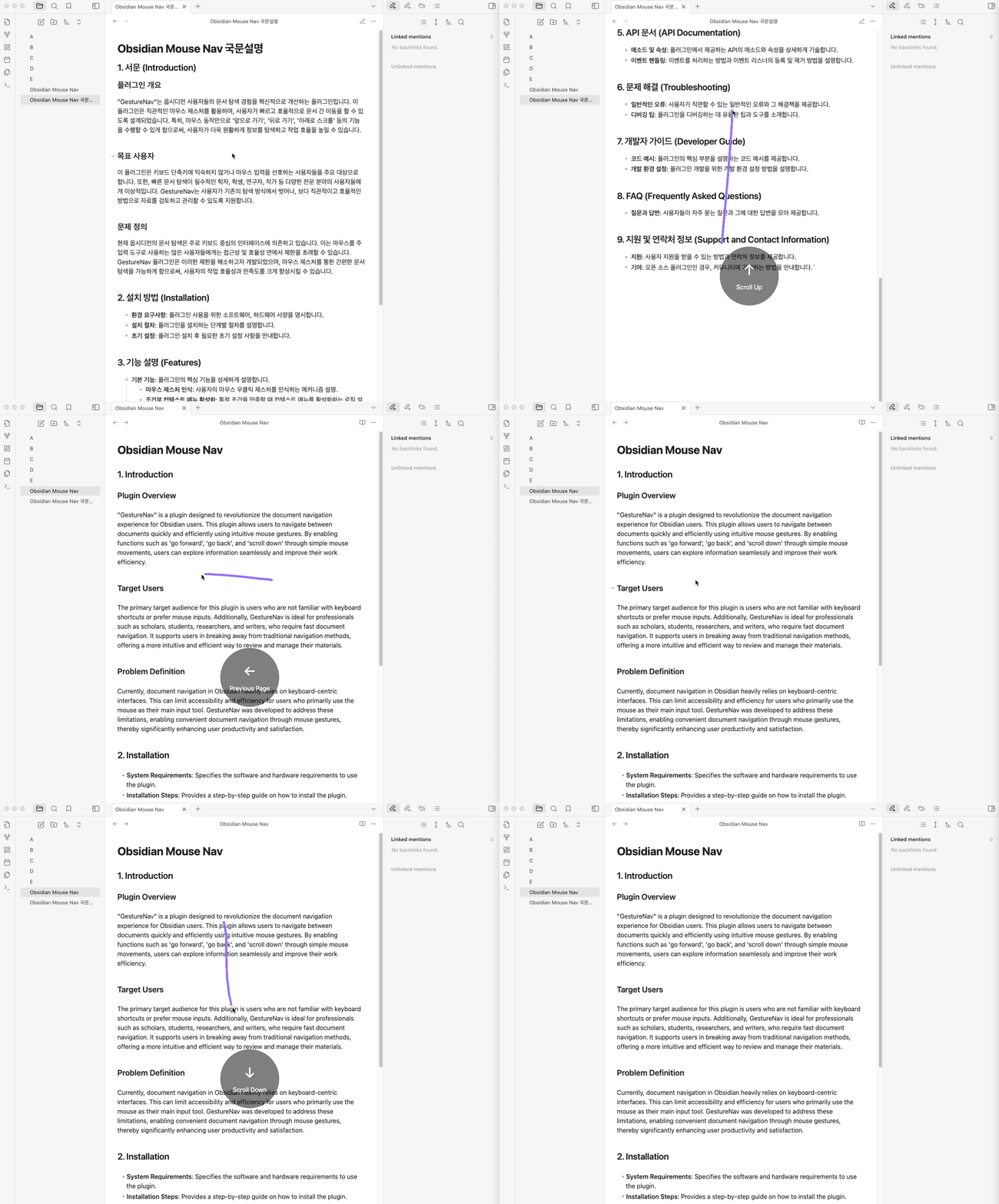
Demo

Development Plans

We are working on introducing support for more diverse mouse gestures and allowing users to fully customize which actions are triggered by specific gestures. Stay tuned for updates that will make navigation even more flexible and powerful!

78%
HealthExcellent
ReviewCaution
About
Navigate Obsidian with right-click mouse gestures to move between notes and jump to the top or bottom of a document. See smooth animated overlays and drawn gesture trails that show detected motions for clear visual feedback.
NavigationInterfaceVisualization
Details
Current version
1.1.0
Last updated
3 months ago
Created
2 years ago
Updates
4 releases
Downloads
1k
Compatible with
Obsidian 0.15.0+
Platforms
Desktop only
License
MIT
Report bugRequest featureReport plugin
Author
hobeomhobeom
github.com/hobeom
GitHubhobeom
  1. Community
  2. Plugins
  3. Navigation
  4. Mouse Navigation

Related plugins

Graph Banner

Display a local graph view to the note header

Hover Editor

Transform the Page Preview hover popover into a fully working editor instance.

Strange New Worlds

Reveal networked thought and the strange new worlds created by your vault.

Dragger

Drag and drop any block (paragraphs, headings, lists, etc.) to rearrange content like Notion.

Map View

An interactive map view for your notes.

Notebook Navigator

A better file browser and calendar inspired by Apple Notes, Bear, Evernote and Day One.

Advanced Canvas

Supercharge your canvas experience. Create presentations, flowcharts and more.

Homepage

Open a note, base, or workspace on startup, or set it for quick access later.

Recent Files

Display a list of recently opened files.

Hider

Hide interface elements such as tooltips, status bar, titlebar, and more.