Search...Search plugins and themes...
⌘K
Sign in
  • Get started
  • Download
  • Pricing
  • Enterprise
  • Account
  • Obsidian
  • Overview
  • Sync
  • Publish
  • Canvas
  • Mobile
  • Web Clipper
  • CLI
  • Learn
  • Help
  • Developers
  • Changelog
  • About
  • Roadmap
  • Blog
  • Resources
  • System status
  • License overview
  • Terms of service
  • Privacy policy
  • Security
  • Community
  • Plugins
  • Themes
  • Discord
  • Forum / 中文论坛
  • Merch store
  • Brand guidelines
Follow us
DiscordTwitterBlueskyThreadsMastodonYouTubeGitHub
© 2026 Obsidian

MOC Link Helper

bogdancodreanubogdancodreanu1k downloads

Helps with some MOC janitor-linking tasks.

Add to Obsidian
  • Overview
  • Scorecard
  • Updates13

Requires Dataview plugin to work.

Desktop only. Cannot use on mobile.


This is a plugin to help linking your child notes to your MOC notes. This task is usually achieved by two-way link:

  • The MOC note includes children notes in its content.
  • A child note has an up property saying that it comes from a specific MOC.

What this plugin does

Adds the command MOC Link Helper: Open View that will open the view to help you link notes and also find possible "lost notes" of your MOC.

The Open View command is also added as a ribbon button.

How to use

View - Notes Included

The Notes Included view is where you will see all the notes in the selected MOC and be able to do the following operations:

  • Add a link to this MOC to all of the notes up frontmatter property.
    • You will be warned with the notes that do not have an up-link to the current MOC not, but are included in your MOC.
  • Remove the link to this MOC from all included notes.
    • This can be useful for when you want to remove an MOC.

This view also contains 3 filtering options of the notes

  • All - shows you all included notes
    • Linking operations do not affect MOC notes on this filter.
  • Notes - shows you all included notes, except MOC notes
  • MOC - shows only included MOC notes
    • Operations will work on all MOCs. (If you want all the sub-MOCs to have an up-link to this note)
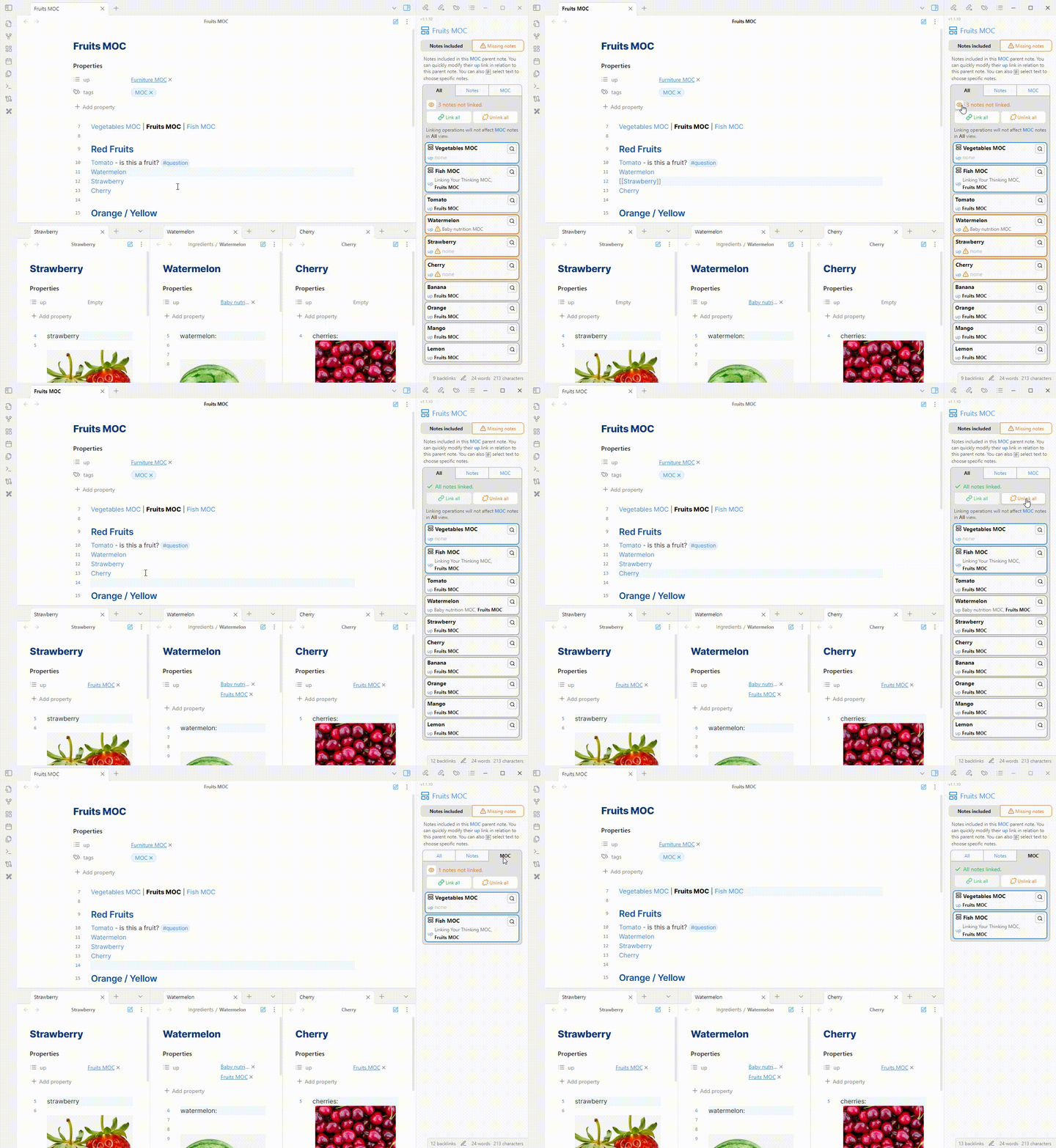
Main view

  • You can also select text in the MOC and it will filter the notes on the view to the selected ones only.
    • This can be useful for when you want to split your MOC from including all notes to mutliple smaller MOCs. So if I want to turn Red Fruits into an MOC, I firstly remove the link to the Fruits MOC from all the red ones.
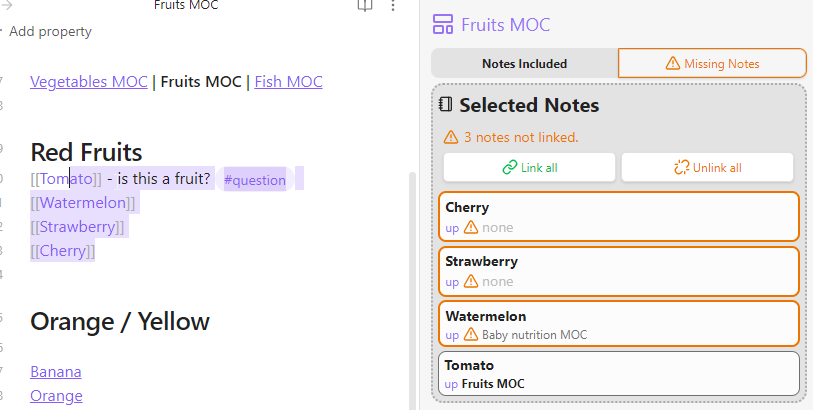
Selection

When selection is activated, the linking operations will be applied only to the selected files.

  • Will link even MOCs if they are selected

View - Missing Notes

This view will show any notes that have an up-link to this MOC, but are not included in the MOC.
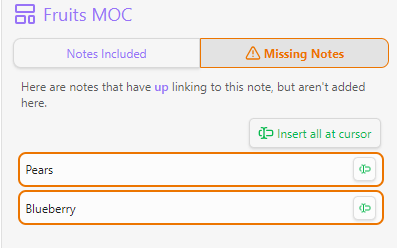
Missing notes

  • You can easily insert them as links at the position of your text cursor.

Child notes

There are also small functionalities on child notes. You can see the note's parents (which are included in its up links) and also a possible MOCs that it belongs to.
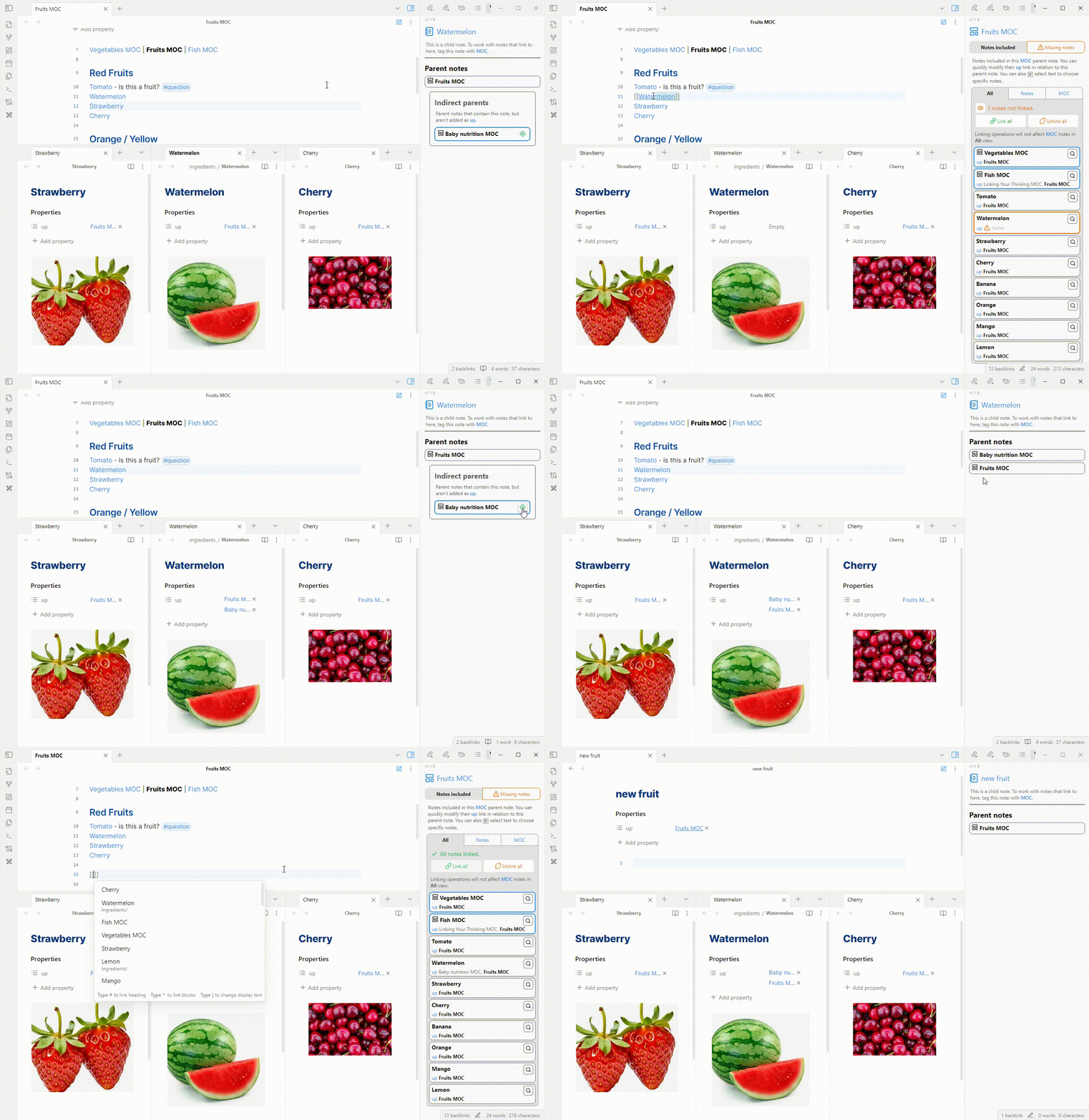
Child note

Issues

If you find any issues or bugs, or complains, please submit them at https://github.com/BogdanCodreanu/obsidian-moc-checker/issues.

Donate

If this project saves you time and you want to donate, please do so at

70%
HealthGood
ReviewCaution
About
Manage and sync links between a Map of Content (MOC) and its child notes. Open a dedicated view to add or remove 'up' frontmatter links in bulk, find notes that reference the MOC but aren’t included, and insert or filter included notes for splitting or syncing MOCs.
LinksPropertiesIntegrations
Details
Current version
1.1.12
Last updated
Last year
Created
2 years ago
Updates
13 releases
Downloads
1k
Compatible with
Obsidian 1.6.0+
Platforms
Desktop only
License
MIT
Report bugRequest featureReport plugin
Sponsor
Buy Me a Coffee
Author
bogdancodreanubogdancodreanu
GitHubbogdancodreanu
  1. Community
  2. Plugins
  3. Links
  4. MOC Link Helper

Related plugins

Local REST API & MCP Server

Unlock your automation needs by interacting with your notes over a secure REST API.

Advanced Canvas

Supercharge your canvas experience. Create presentations, flowcharts and more.

Smart Connections

AI link discovery copilot. See related notes as you write. Lookup using semantic (vector) search across your vault. Zero-setup local model for embeddings, no API keys, private.

Excalidraw

Visual PKM powerhouse. Create and edit Excalidraw drawings.

BRAT

Easily install a beta version of a plugin for testing.

Meta Bind

Make your notes interactive with inline input fields, metadata displays, and buttons.

Maps

Adds a map layout to bases so you can display notes as an interactive map view.

Self-hosted LiveSync

Sync vaults securely to self-hosted servers or WEBRTC.

Zotero Integration

Insert and import citations, bibliographies, notes, and PDF annotations from Zotero.

Readwise Official

Sync highlights from Readwise to your vault.