Search...Search plugins and themes...
⌘K
Sign in
  • Get started
  • Download
  • Pricing
  • Enterprise
  • Account
  • Obsidian
  • Overview
  • Sync
  • Publish
  • Canvas
  • Mobile
  • Web Clipper
  • CLI
  • Learn
  • Help
  • Developers
  • Changelog
  • About
  • Roadmap
  • Blog
  • Resources
  • System status
  • License overview
  • Terms of service
  • Privacy policy
  • Security
  • Community
  • Plugins
  • Themes
  • Discord
  • Forum / 中文论坛
  • Merch store
  • Brand guidelines
Follow us
DiscordTwitterBlueskyThreadsMastodonYouTubeGitHub
© 2026 Obsidian

Minio Uploader

seebinseebin3k downloads

Upload images, videos, audio, PDFs, and other files to Minio OSS.

Add to Obsidian
  • Overview
  • Scorecard
  • Updates3

English | 中文

Upload images, videos, audio, PDFs, and other files to Minio OSS instead of copying them locally. Reduce the size of local disk usage and improve the efficiency of synchronization between multiple devices.

Preview
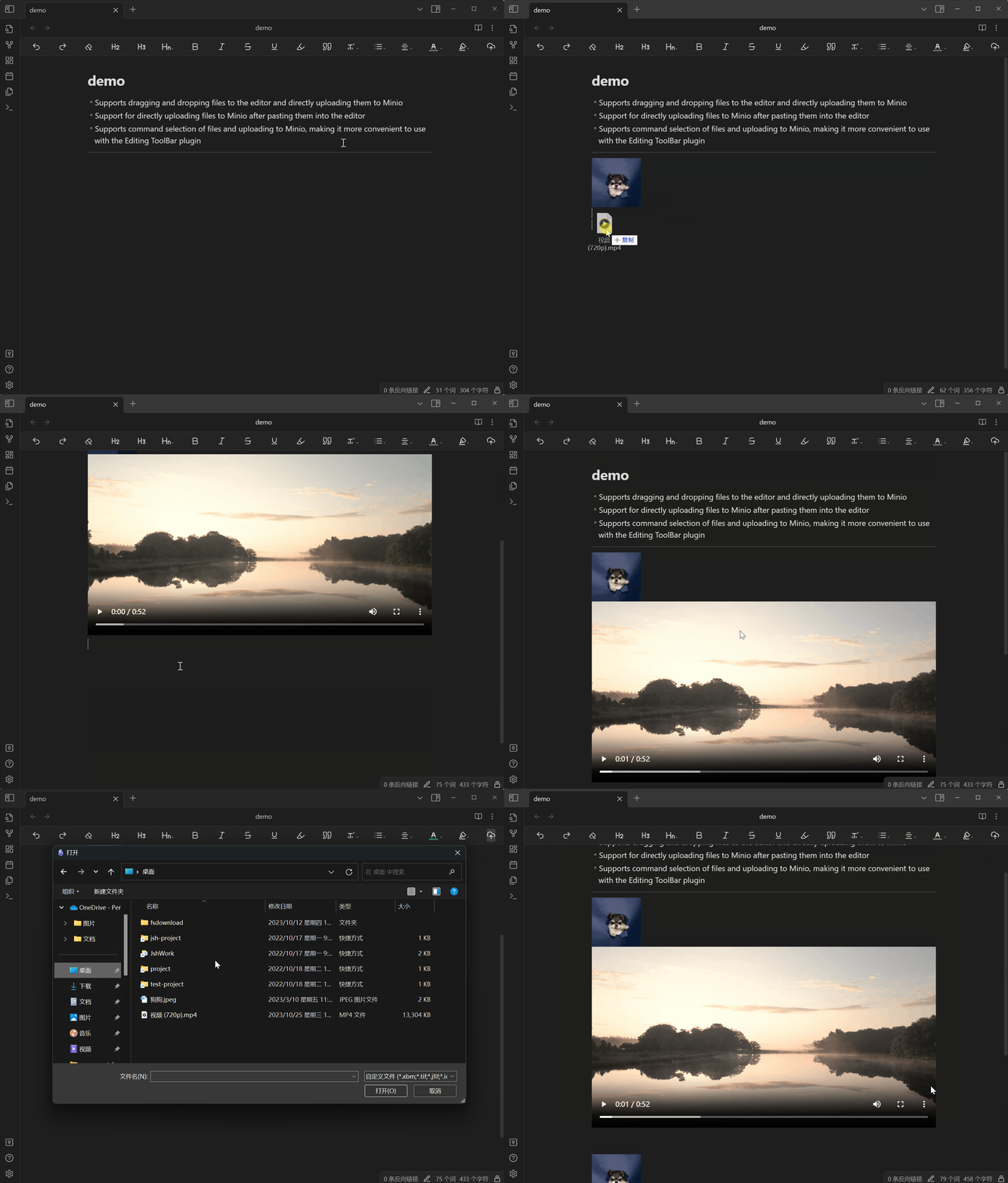
demo

Can be paired with Editing ToolBarTo use the plugin, add the mini command to the action bar. You can click to select a file, upload it, and add it to the Observer document

Features

  • Supports dragging and dropping files to the editor and directly uploading them to Minio
  • Support for directly uploading files to Minio after pasting them into the editor
  • Supports command selection of files and uploading to Minio, making it more convenient to use with the Editing ToolBar plugin

Setting

Firstly, all Minio related configurations must be correctly configured before they can be used normally:

Tip: API data access port number for Minio

  • accessKey
  • secretKey
  • bucket
  • endpoint
  • port
  • SSL

Secondly, it is necessary to enable anonymous access to files in the Bucket settings of the Minio console, which means that files can be directly accessed through URLs.
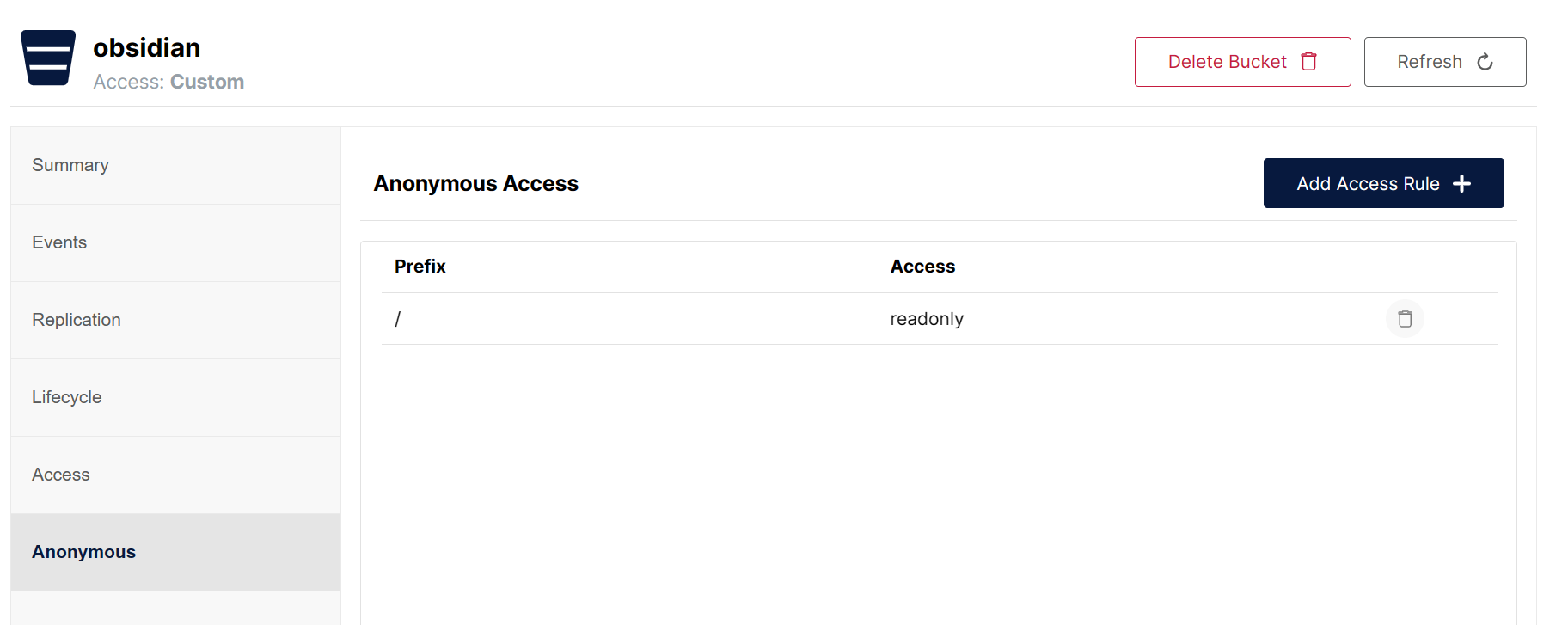
Settings

Thanks

This project draws inspiration from the S3 image uploader \ Editing ToolBar plugin

60%
HealthFair
ReviewCaution
About
Upload images, videos, audio, PDFs and other files to Minio object storage instead of saving them locally. Use drag-and-drop, paste-to-upload, or command selection with Editing ToolBar integration to insert previews and links, reduce local disk usage and speed up sync across devices.
AttachmentsIntegrationsEditing
Details
Current version
1.0.2
Last updated
2 years ago
Created
3 years ago
Updates
3 releases
Downloads
3k
Compatible with
Obsidian 0.15.0+
Platforms
Desktop, Mobile
License
MIT
Report bugRequest featureReport plugin
Author
seebinseebin
www.seebin.com
GitHubseebin
  1. Community
  2. Plugins
  3. Attachments
  4. Minio Uploader

Related plugins

LanguageTool Integration

advanced spell/grammar checks with the help of language-tool.

Image auto upload

Upload images from your clipboard by PicGo.

Advanced Tables

Improved table navigation, formatting, and manipulation.

Local REST API & MCP Server

Unlock your automation needs by interacting with your notes over a secure REST API.

BRAT

Easily install a beta version of a plugin for testing.

Meta Bind

Make your notes interactive with inline input fields, metadata displays, and buttons.

Outliner

Work with your lists like in Workflowy or Roam Research.

Maps

Adds a map layout to bases so you can display notes as an interactive map view.

Various Complements

Complete words similar to auto-completion in an IDE.

Self-hosted LiveSync

Sync vaults securely to self-hosted servers or WEBRTC.