Metadata Visuals
 Anthony Fitzpatrick2k downloads
A metadata-driven visual engine for Obsidian.
- Overview
- Scorecard
- Updates9

Metadata Visuals
Metadata Visuals turns Obsidian frontmatter into clear visual cues without adding colours or icons to your stored metadata. Create a rule for a field and value, then reuse it in Properties, the File Explorer, enabled folders, and supported native Bases views.
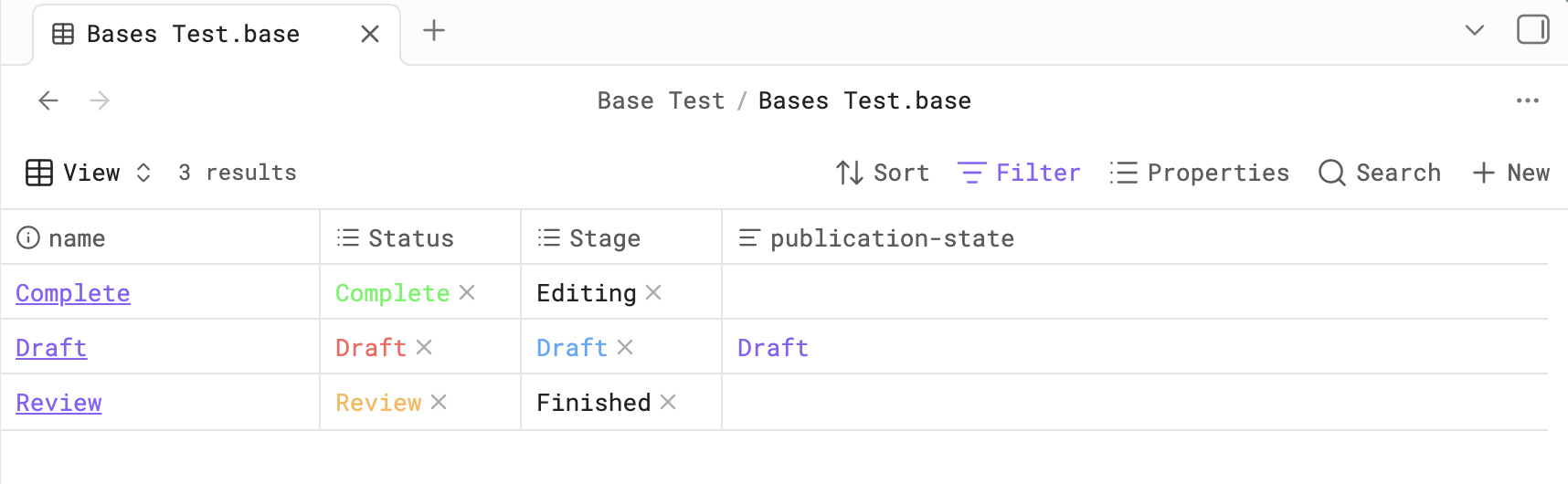
Metadata Visuals applies rules by property and value, not by visible text alone.
Read the Metadata Visuals User Guide for setup, configuration, compatibility, limitations, and troubleshooting.
Highlights
- Creates visual label rules for frontmatter fields and values.
- Colours matching values in normal note Properties.
- Adds optional icons and filename colours in the File Explorer.
- Colours enabled folders from the selected File Explorer field.
- Reuses the same rules in native Bases Table and Card views, including embedded Bases.
- Updates visible supported surfaces when metadata or rules change.
- Provides bulk metadata-update actions from the File Explorer context menu.
Rules are field-specific. For example, three properties can all contain Draft while using three different colours:
status: Draft
stage: Draft
publication-state: Draft
status / Draft             → red
stage / Draft              → blue
publication-state / Draft  → purple
Field names are matched case-insensitively, so Status, status, and STATUS identify the same property without changing its stored spelling. If duplicate rules match the same field/value pair, the first configured rule wins; reorder the rules to change that result.
Rule configuration
- Grouped rule editor with editable values, drag reordering, previews, and per-label deletion.
- Add rule for a new metadata field group and Add label for another value in an existing group.
- Configurable shape, colour, icon visibility, filename colouring, and note/folder target for every label.
- One selected File Explorer field, so note and folder rows do not receive competing visuals from several fields.
- Smart-folder enablement and bulk updates from the File Explorer context menu.
- Optional local import of Metadata Menu Select values; Metadata Menu is not required for normal use.
Bases support
Enable Colour properties in Bases to extend existing Metadata Visuals rules into compatible native Bases values. You do not create separate Bases rules.
| Base view or property | Support |
|---|---|
| Table view | Yes |
| Card view | Yes |
| Embedded Table/Card | Yes |
| Multiple visible Bases | Yes |
note.<field> properties |
Yes, when the value is safely isolated |
| List view | No — values are deliberately left native |
file.* properties |
No |
formula.* properties |
No |
| Ambiguous multi-value/list rendering | May remain native |
List view is intentionally unsupported because Obsidian does not expose reliable property identity for each rendered value. Metadata Visuals leaves it native rather than risk colouring the wrong value. See Bases in the User Guide.
Installation
Community plugins
Install Metadata Visuals from Obsidian Settings → Community plugins when it is available in the Community Plugins directory, then enable it.
Manual installation
Copy the release files into:
<vault>/.obsidian/plugins/metadata-visuals/
manifest.jsonmain.jsstyles.css
Then enable Metadata Visuals in Settings → Community plugins.
Quick start
- Open Settings → Metadata Visuals.
- Choose a frontmatter field in the Rules selector, such as
status. - Select Add rule to create the
statusgroup from known values. - Set the colour and other controls for each label.
- Use Add label beneath an expanded group whenever you need another value, such as
Draft. - Choose the field that should drive File Explorer visuals, and enable Bases colouring if wanted.
For a complete first setup, see Creating and maintaining rules.
Settings at a glance
| Setting | Purpose |
|---|---|
| Colour note metadata | Colours matching values in normal note Properties. |
| Colour properties in Bases | Colours compatible values in native Bases Table and Card views. |
| File Explorer field | Chooses the one rule group used for File Explorer note names and icons. |
| Colour enabled folders | Lets that selected field colour folders enabled from the File Explorer context menu. |
Compatibility
Metadata Visuals requires Obsidian 1.12.7 or later and is not marked desktop-only in its plugin manifest. Bases is a native Obsidian feature whose rendered presentation can evolve between Obsidian versions; Metadata Visuals supports the compatible native Table and Card structures described in the User Guide.
Documentation
The User Guide is the detailed reference for rule editing, Properties, the File Explorer, Bases, limitations, practical workflows, and troubleshooting.
Reporting bugs and requesting features
Support and author
Created by Anthony Fitzpatrick at Wolf 359 Press. If Metadata Visuals is useful to you, Buy me a coffee.
Development
npm install
npm test
npm run build
npm run lint
The automated regression suite covers rule matching, Bases rendering safeguards, File Explorer refresh behaviour, Smart Folder aggregation, and colour cleanup.
License
Metadata Visuals is released under the 0BSD License.