Mermaid Flow Enhancer
 Nikolay Ponomarev52 downloads
Make Mermaid flowcharts easier to read with compact layouts, aligned branches, and smooth path highlighting.
- Overview
- Scorecard
- Updates5
Watch the video · Diagram source · Capture report
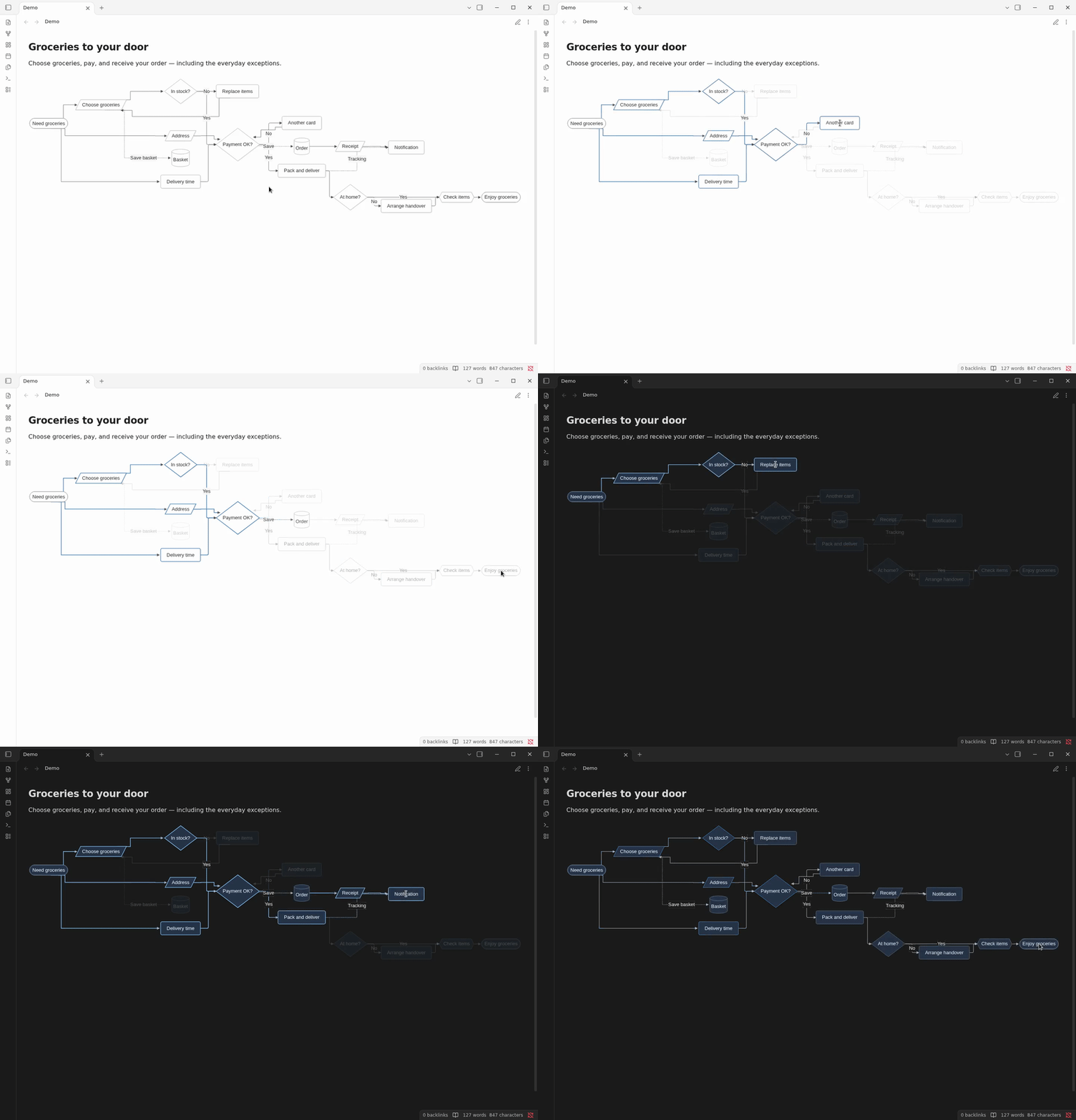
An Obsidian Mermaid plugin for readable Markdown flowcharts: compact diagram layouts, aligned decision branches, rounded orthogonal connectors, light and dark theme styling, and ancestor-path highlighting when you hover or focus any node or edge.

The button opens the official plugin installation page. Choose Add to Obsidian, then Install and Enable in the app.
Join the discussion on the Obsidian Forum — share your diagrams, suggest improvements, or report bugs.
Mermaid Flow Enhancer is the plugin name. “Obsidian” describes the platform it extends; this is an independent project and is not affiliated with or endorsed by Obsidian.
Mermaid flowcharts in Obsidian
Use Mermaid Flow Enhancer for Obsidian flowchart styling, compact Mermaid diagrams, aligned decision branches, rounded orthogonal arrows, and interactive path highlighting in Markdown notes. It helps you follow process diagrams and retry flows while keeping Mermaid source editable.
Features
- Compact flowchart spacing with readable labels.
- Aligns branches leaving decision nodes and routes connectors with rounded corners and centered side attachments.
- Highlights ancestors of the hovered or focused node by traversing forward layout edges. Return/back edges are excluded from ancestor traversal, though a hovered edge itself can still highlight. Moving across an edge updates the highlighted path.
- Works with light and dark Obsidian themes, with a uniform slate-blue palette in dark mode.
- Leaves non-flowchart Mermaid diagrams to Mermaid's normal renderer.
- Per-diagram opt-out with
%% mfe:off.
The plugin wraps Mermaid's render function and adjusts the generated SVG. It does not rewrite your notes.
Release security checks
New releases require a completed VirusTotal scan of the three plugin files before publication. Reports include SHA-256 hashes, engine verdicts, and public report links. Configuration and scan status are documented in the VirusTotal guide. Release 1.0.1 scan: no detections among engines completing analysis on 2026-10-09 (0/56 JavaScript, 0/46 manifest, 0/47 CSS). Failed, timed-out, and unsupported engines are recorded in the JSON report. Earlier releases are not claimed as scanned unless a report is linked.
Requirements
- Obsidian 1.14.2 or later (the conservative minimum declared in the plugin manifest).
- The plugin uses browser APIs and does not require desktop-only Node.js/Electron APIs. Mobile verification is pending; the manifest leaves
isDesktopOnlydisabled.
The plugin runs locally without telemetry or network requests. No additional service or account is required. Development and downloading releases require network access.
Install
From the community directory
Open the Mermaid Flow Enhancer listing and choose Add to Obsidian, then install and enable the plugin. If your app does not find the newly published listing yet, use the release installation below.
From a release
- Download
main.js,manifest.json, andstyles.cssfrom the same GitHub release. - Create
<your-vault>/.obsidian/plugins/mermaid-flow-enhancer/. - Copy all three files into that directory.
- In Obsidian, open Settings → Community plugins, enable community plugins if prompted, then enable Mermaid Flow Enhancer.
Isolated application tests and recordings
Use npm run docker:check or npm run docker:record to run real Linux Obsidian in Docker without opening the host app. See the Docker testing guide for exported videos, screenshots, and reports.
For development
git clone https://github.com/itsNikolay/obsidian-mermaid-flow-enhancer.git
cd obsidian-mermaid-flow-enhancer
npm ci
npx playwright install chromium
npm run typecheck
npm test
npm run test:integration
npm run build
Copy main.js, manifest.json, and styles.css to the plugin directory shown above, then reload Obsidian. For update and rollback steps, see the release checklist.
Use
Create a normal Mermaid flowchart code block in a note:
```mermaid
flowchart TD
  Start([Start]) --> Check{Ready?}
  Check -->|Yes| Finish([Finish])
  Check -->|No| Wait[Wait]
  Wait --> Check
```
Hover a node or connector to trace its incoming ancestor path. Keyboard focus on a node also shows its path. The highlight clears after the pointer leaves the diagram.
Add the opt-out comment inside a Mermaid diagram to retain Mermaid's rendering for that diagram:
```mermaid
%% mfe:off
flowchart LR
  A --> B
```
Settings
- Compact layout: enable or disable the plugin's flowchart layout adjustments.
- Path highlight: enable or disable ancestor-path highlighting.
- Animation duration: transition time in milliseconds; default
450. - Hover delay: delay before a highlight clears after leaving a target; default
180ms.
Per-diagram %% mfe:off takes precedence over the plugin settings.
Demo vault
Open the Markdown files under demo-vault/ in a disposable test vault with the plugin enabled. The generated big100.md and big300.md diagrams exercise larger graphs; they are artificial fixtures, not performance guarantees.
Compatibility and reporting issues
The plugin uses Obsidian's Mermaid loader and Mermaid's generated SVG structure. Obsidian or Mermaid updates can change that structure, so compatibility beyond the manifest minimum has not yet been established. Please include your Obsidian version, platform, theme, and a minimal diagram when opening an issue.
Development
The plugin and development scripts are written in TypeScript with strict type checking. npm run typecheck checks types; npm run check runs linting, type checking, all tests, and the build. The distributable remains a JavaScript main.js bundle for Obsidian.
See testing and development and the demo script.
Upgrade and rollback
Plugin releases do not migrate or rewrite note contents. Plugin preferences are stored separately by Obsidian and use the compactLayout, pathHighlight, animationDuration, and hoverDelay settings. New or missing values use defaults; numeric values are normalized to the supported range when loaded. Before replacing release files, disable the plugin and keep a copy of its existing plugin folder. To roll back, disable the plugin, restore the previous main.js, manifest.json, and styles.css together, and re-enable it. If you remove the plugin, Mermaid code blocks remain in notes and Obsidian renders them without this plugin.
License
MIT. Copyright (c) itsNikolay.
Development checks: see testing and code linting.