Search...Search plugins and themes...
⌘K
Sign in
  • Get started
  • Download
  • Pricing
  • Enterprise
  • Account
  • Obsidian
  • Overview
  • Sync
  • Publish
  • Canvas
  • Mobile
  • Web Clipper
  • CLI
  • Learn
  • Help
  • Developers
  • Changelog
  • About
  • Roadmap
  • Blog
  • Resources
  • System status
  • License overview
  • Terms of service
  • Privacy policy
  • Security
  • Community
  • Plugins
  • Themes
  • Discord
  • Forum / 中文论坛
  • Merch store
  • Brand guidelines
Follow us
DiscordTwitterBlueskyThreadsMastodonYouTubeGitHub
© 2026 Obsidian

Mermaid Copy

mblogsmblogs190 downloads

Adds a copy button to rendered Mermaid diagrams in Live Preview. Copy as PNG or SVG with one click.

Add to Obsidian
  • Overview
  • Scorecard
  • Updates1

An Obsidian plugin that adds a copy button to rendered Mermaid diagrams in Live Preview mode.
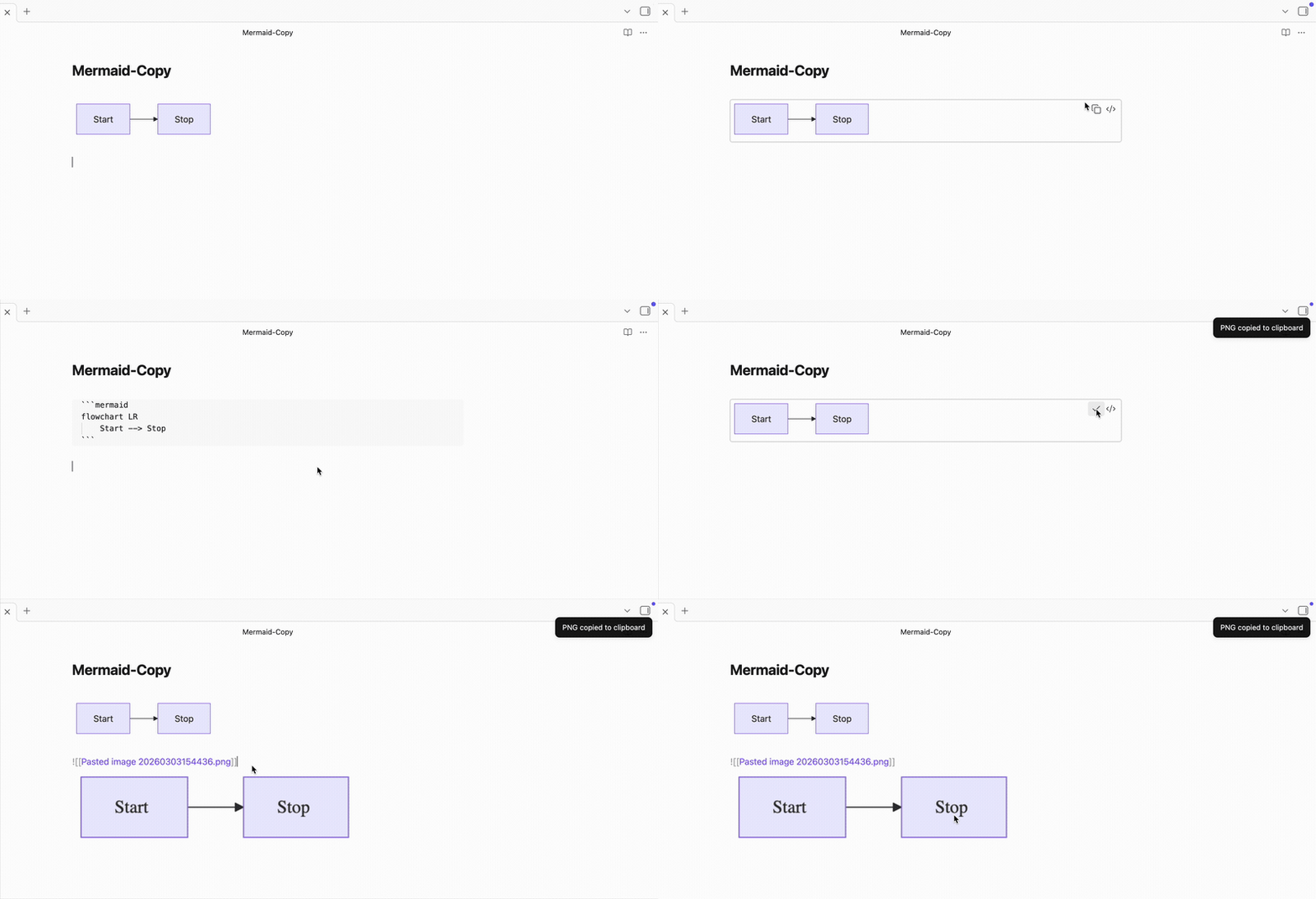
Demo of Mermaid Copy

Features

  • One-click copy of any Mermaid diagram
  • Copy as PNG (image) or SVG (markup) — configurable in settings
  • Button appears next to the existing edit button on each diagram
  • Transparent PNG background preserves theme colors

Usage

  1. Write a Mermaid code block in any note
  2. In Live Preview, hover over the rendered diagram
  3. Click the copy icon (next to the edit icon)
  4. Paste into any app — Slack, Docs, email, etc.

Settings

Copy format — Choose between PNG (default) and SVG output.

Installation

From Community Plugins

This plugin is currently under review for the Obsidian Community Plugin directory. Once approved, you will be able to install it directly from Settings > Community Plugins.

Manual

  1. Go to the latest release
  2. Download the three files: main.js, manifest.json, and styles.css
  3. In your vault folder, create .obsidian/plugins/mermaid-copy/
  4. Move the three downloaded files into that folder
  5. Open Obsidian, go to Settings > Community Plugins, and enable Mermaid Copy
82%
HealthExcellent
ReviewSatisfactory
About
Add a copy button to rendered Mermaid diagrams in Live Preview. Copy any diagram to the clipboard as PNG (transparent background preserves theme colors) or SVG with one click from the button next to the edit icon.
ExportImagesVisualization
Details
Current version
1.0.0
Last updated
3 months ago
Created
3 months ago
Updates
1 release
Downloads
190
Compatible with
Obsidian 1.4.0+
Platforms
Desktop, Mobile
License
MIT
Report bugRequest featureReport plugin
Author
mblogsmblogs
github.com/MBlogs
GitHubmblogs
  1. Community
  2. Plugins
  3. Export
  4. Mermaid Copy

Related plugins

Leaflet

Interactive maps inside your notes.

Mermaid View

Handle Mermaid files as first-class citizens, rendering them fullscreen when opened.

Export Image plugin

Easily convert your article to image.

Note Gallery

A masonry gallery that will visualize your notes, similar to Craft note view.

Advanced Canvas

Supercharge your canvas experience. Create presentations, flowcharts and more.

Excalidraw

Visual PKM powerhouse. Create and edit Excalidraw drawings.

Mermaid Tools

Improved Mermaid.js experience: visual toolbar with common elements and more.

Maps

Adds a map layout to bases so you can display notes as an interactive map view.

Image Converter

Convert, compress, resize, annotate, markup, draw, crop, rotate, flip, align, drag-resize, rename with variables, and batch process images: WEBP, JPG, PNG, HEIC, TIF

Image Context Menus

Image context menus (mostly on right click): Copy to clipboard, Open in default app, Show in system explorer, Reveal file in navigation, Open in new tab.